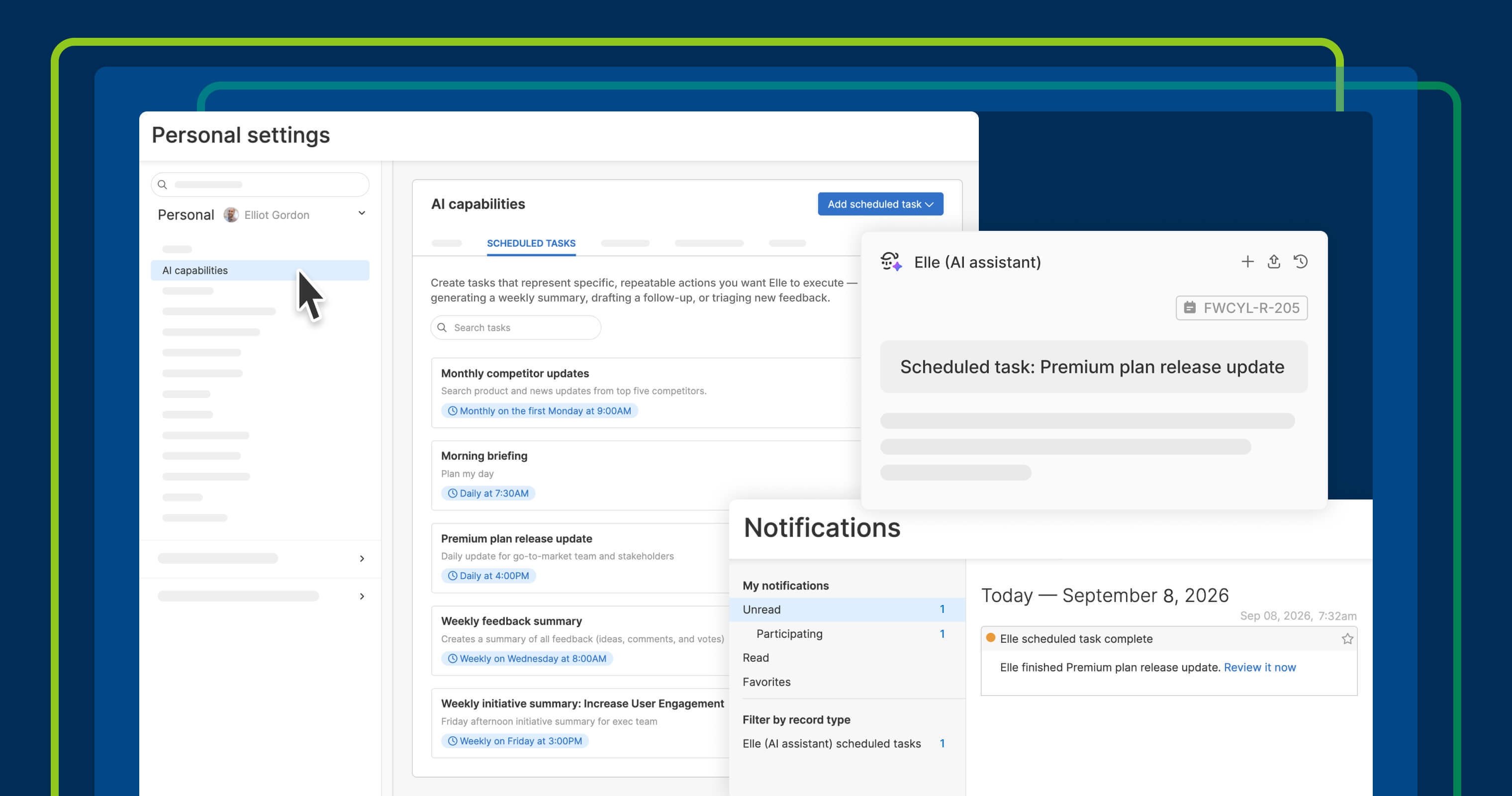
Product managers never have enough time. You plan to review customer feedback, but feature work needs your attention. You get behind on competitor research while you are deep in strategic planning. And there is always another release to prepare for. Elle, the AI assistant in Aha! software, already handles many of these routine tasks well. Now, you can put them on a schedule and have the results ready when you need them.
Give Elle recurring product tasks to complete on an hourly, daily, weekly, or monthly schedule — and get notified when the results are ready.
Put routine product work on a schedule #
Elle can handle a wide range of product work, including research, writing, prototyping, and planning. But until now, you started each task by opening a chat and prompting Elle to begin. With scheduled tasks, you can assign work in advance. Tell Elle what you need done and when. Review the results and continue the conversation from there.
Here is what you can do:
- Set recurring tasks: Give Elle instructions for the work you want completed and when you want it done.
- Add skills and context: Choose theskills Elle should use to ensure the output meets your team's standards every time.
- Determine the right cadence: Run tasks hourly, daily, weekly, or monthly — or on demand.
- Review the results: Get a notification when Elle finishes the work, then open the completed task and continue the conversation.
Put recurring product tasks on autopilot — so you can focus on more strategic work. If a task involves creating or updating a record, Elle s and waits for your approval before making any changes.
Scheduled tasks for Elle are available across the Aha! suite, including Aha! Roadmaps, Aha! Discovery, Aha! Ideas, Aha! Whiteboards, Aha! Develop, Aha! Teamwork, and Aha! Knowledge. Owners and contributors can schedule tasks.
How to get started #
- Go to AI capabilities****Scheduled tasks in yourPersonal settings .
- Select Add scheduled task and write instructions for the work you want done.
- Choose which skills the task can use, or leave it open to all available skills.
- Set a schedule and save. Elle will run the task at the cadence you choose.
- Click the Run now button to manually run the task at any time.
- When a run is complete, you will receive a notification with a link to the results.
📚 Read the full support article for detailed instructions. There are probably tasks you ask Elle to handle again and again. Those are good candidates for a schedule. Set up the work once, choose how often it should run, and see what Elle can take on without waiting for you to start the conversation.
Start a free trial
Scheduled tasks are available to Aha! customers. Our suite of tools includes Aha! Roadmaps, Aha! Discovery, Aha! Ideas, Aha! Whiteboards, Aha! Builder, Aha! Develop, Aha! Teamwork, and Aha! Knowledge. Use each product individually or combined to help teams deliver even greater value. Sign up for a free 30-day trial or join a live demo to see why more than 1 million product builders trust our software to build lovable products and be happy doing it.