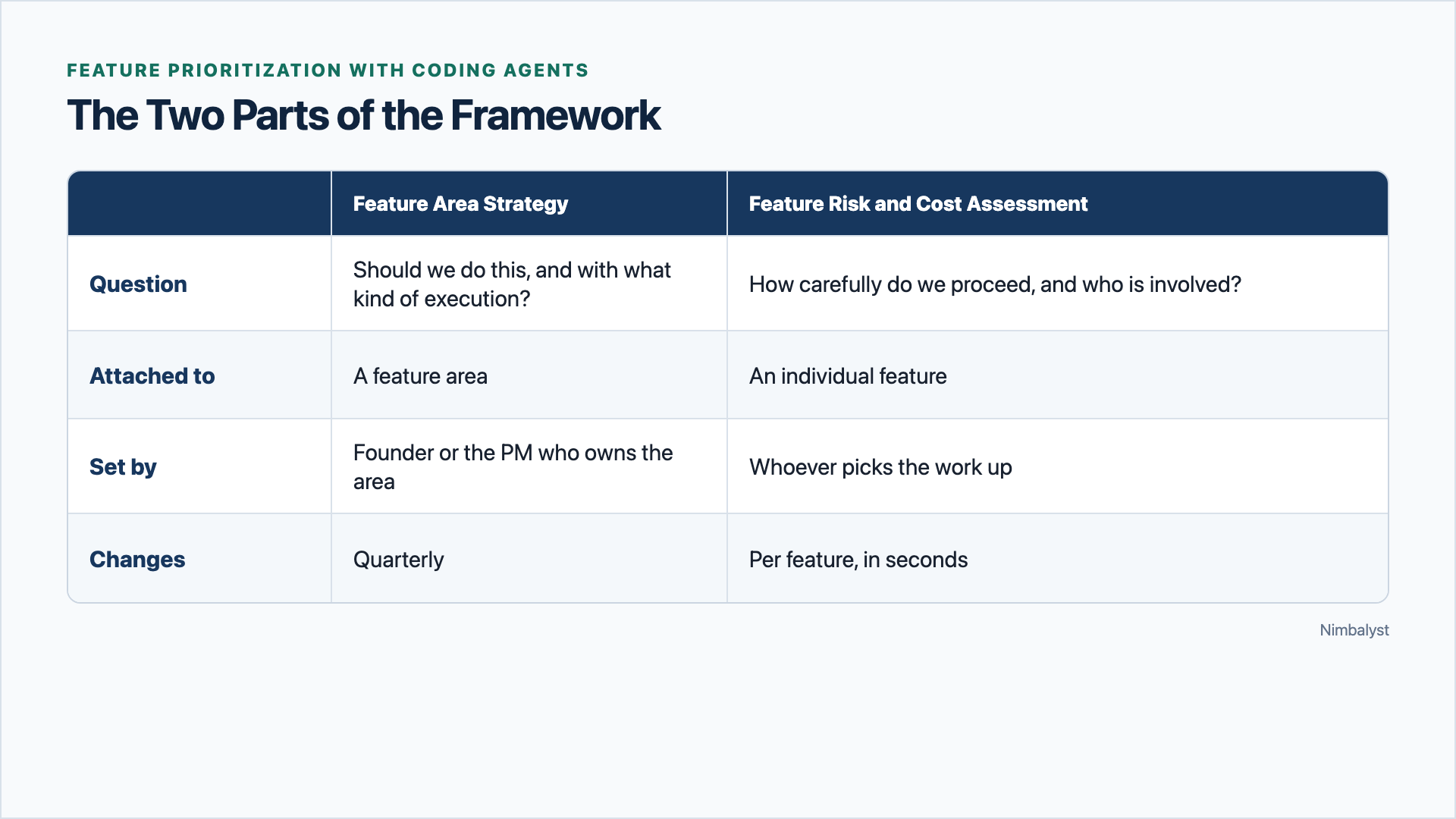
With coding agents, implementation effort stopped being the dominant constraint. We replaced per-feature scoring with a strategy for each feature area and a risk and cost assessment for each feature.
What should we build next? Historically, PMs have focused on the per-feature prioritization and estimation process. What works better with coding agent teams is strategy mapped at the level of a feature area, with clear paths based on technical, security, UI impact, and user attention risk to determine the process for the individual features.
What Changed with Coding Agents #
Throughout my career as a PM, CEO, and founder, prioritization was dominated by “what can we afford to build?” Engineering hours were scarce. In RICE, Effort was the denominator; in ICE, Ease played a similar role. Weighted Shortest Job First (WSJF) cared about time criticality, job size, cost of delay. Value vs. Effort cared about Effort .
You’d think that because each engineering bet was so costly, great effort was spent on determining what bets to take to maximally provide differentiated value for the customer. Unfortunately I found that was often not the case. The dominance of the cost of effort meant everybody threw themselves into working on the Effort, refining the PRD, answering questions about what do you want us to do about that, should this sub-feature be included, how can we cut the scope and still retain the value.
RICE
Value vs. Effort
Codex and Claude Code have changed this. Effort is no longer dominant. It has not gone to zero, and a large piece of architecture is still large, but for most of a backlog the estimate no longer separates the items. When a competent implementation takes an afternoon, the difference between a 2 and a 5 does not change the answer, and the week you spend producing that 2 or 5 costs more than building the thing.
This does not make engineering free. Product coherence, architecture, validation, rollout risk, review capacity, and user attention now constrain us more often than typing the code does.
So, what would be an ideal feature prioritization decision framework for working as a team with coding agents? Such a framework would:
- Put differentiated value for our customers at the forefront of the process and the conversation
- Help us be clear about what we are sure about and unsure about and how to take the next step to get to clarity
- Enable maximum speed, bandwidth, and individual autonomy
- Ensure appropriate analysis and mitigation for security and technical risks and UI and customer attention costs.
We tried to use or adapt existing frameworks for this without success, because they were not built for 2 and 3 at all and they didn’t tie strategy to action. Here is what we have iterated our way to so far. I would welcome help refining this.
Tie strategy to a feature area #
We specify our strategy: how are we going to add maximal differentiated value for our customers?
Example Strategy: Nimbalyst will provide individuals and teams building with coding agents the highest bandwidth, most enjoyable way to work through: a deeply integrated graph connecting all the work; visual interfaces for the human to see the connections, do their work, and work with the coding agents; real-time collaboration for teams and agents to work together; and extensibility that ties into the graph, is visual, integrated with coding agents, and collaborative.
A feature either strengthens that graph or it does not, and anyone on the team can apply that test without asking me.
For each feature area, we set a Feature Area Strategy: whether we think the area will differentiate us, is something we should just do, is something we are unsure about, or is something we should not do.
- I prefer this to MoSCoW because instead of talking in Must and Could which don’t contain the why within them, you are talking in terms of Differentiate or Not
- It has something in common with Kano, which sorts features by how users react to them rather than scoring them. The difference is that Kano tells you how people feel about a feature and says nothing about whether it is where you intend to win.
- I like being upfront about Unsure. Giving a score to a feature when we just don’t know implies more clarity than we have. Put it in the Unsure bucket until we are sure.
- Many prioritization frameworks don’t maintain a clear list of what will not be done… this is because they operate at the feature level not the feature area level. I have found having a clear list of feature areas we will not do with the reason why to be clarifying.
As an example, here is a small slice of the mapping for Nimbalyst related to the topic of agents:
A Differentiate strategy needs a second answer beyond why. If effort is cheap for us, it is cheap for a competitor, so anything we can build in an afternoon they can match in an afternoon. Before an area gets a Differentiate strategy, we say how we intend to stay ahead in it.
Tie each Feature Area Strategy to a clear execution plan #
Next we tie each Feature Area Strategy to its execution plan: the goal, who can start a feature in that area, who can approve, and what the approach will be.
Every feature area has a named PM who owns it. Owning an area means holding its strategy, approving the Do work inside it, and being the person a request goes to when nobody is sure where it belongs.
Some benefits of this approach include:
- A feature request lands in an area, the area’s strategy is already known, and the answer follows without a meeting.
- It increases initiative and independence. An engineer has an idea for a feature that is in a Do area, they just do it. They review it with the PM for that Area and they ship.
Example
The Feature Risk and Cost Assessment #
A feature area is mapped to a Feature Area Strategy (Differentiate, Do, Unsure, Not do) and therefore to an execution policy: who can start it, who approves, what approach will be taken. But within a feature area, individual features carry different risks and different costs, and those change the path of execution. So every feature gets a Feature Risk and Cost Assessment across four categories.
- Security risk and technical risk are well understood and every team already has a version of them.
- The scarce resource is often user attention. Stewart Butterfield made the point on Lenny’s podcast that minimizing clicks is the wrong target, because you can always win at it by putting every option on one screen and end up with a product nobody can use. What you are spending is the user’s thinking, and the better mantra is Steve Krug’s: don’t make me think.
- Like user attention, UI surface is a scarce, hard to change resource. A feature can be instantly understandable and still clutter, and it can take no new room at all while demanding that people rethink how they work. A keyboard shortcut is attention-heavy and surface-free. A new sidebar item for something obvious is the reverse.
Score every feature on all four: None, Some, or High.
- The scores tell you who has to be in the room, and how much care to apply, so all-None means no specialist has to be involved. Normal engineering ownership, testing, and release standards still apply. - Start at None, but record a one-line rationale for every dimension. Concrete triggers, not intuition, raise a score. - Multiple Some scores require each relevant reviewer; they do not automatically become High. Any single High score invokes the High gate for that dimension.
Putting the two pieces together #
Review your feature area strategy quarterly and whenever material evidence challenges it. What will differentiate, what are you unsure about or now sure of, what won’t you do? As features come up as ideas, groom the backlog, categorize by feature area, assess risk and cost, and then execute.
For example: A feature in a Do area with no risk above None needs no PM involvement at all. My own attention goes to the Differentiate areas and to anything carrying a High User Cost. Everything else routes itself, which is how you get near-zero per-feature process without the product falling apart.
What about Bugs #
If it’s a validated bug, severity determines when we respond; the cost/risk assessment determines how we respond. Usually a fix adds nothing more, so we just fix it. If it adds risk or cost, we add the appropriate review. So nice! No triage ritual, no defect backlog carried as a negotiating position between support and sales, no allocation percentage to defend and watch erode.
How to work on Unsure #
We mockup and then prototype internally. We try it, sit with it, think about if its an area we can differentiate in and want to differentiate in or something we shouldn’t do for this or that reason. If we can see the possibility of differentiation or the need to just do it as functionality, then we will have customers try it and give us feedback.
Give each Unsure area an owner, an evidence threshold, and a decision date so it does not become a parking lot.
Some refinements to make this process work well. #
Changing a Feature Area Strategy is a control point. Moving an area from Unsure to Differentiate is the biggest product decision I make. Moving one from Differentiate to Do is how we stop pouring creative effort into something that stopped mattering. Deciding what to Not Do is hard and vital.
Don’t make exceptions for Not Do, reopen the area. When a strong request lands in a Not-do area, the answer is never “let’s make an exception for this one.” It is evidence the area’s strategy might be wrong, so we re-decide the area.
Differentiate is capped. If half the product is marked Differentiate, the word means nothing and the focus it is supposed to concentrate gets spread evenly again.
What this bought us #
With this approach, we have been able to do the following:
- Put differentiated value for our customers at the forefront of the process and the conversation
- Be clear about what we are sure about and unsure about and how to take the next step to get to clarity
- Work at high speed, bandwidth, and individual autonomy
- Ensure appropriate analysis and mitigation for security and technical risks and UI and customer attention costs.
I think it’s helped us build a great product, quickly, getting the most out of the team and AI, in an enjoyable collaboration, with a minimum of boring meetings and process.
I would welcome help refining this. If you are running a team with coding agents and have found something better or have suggestions on how to improve this, tell me.
Related posts #
Best Enterprise AI Coding Platforms in 2026
Claude Code, OpenAI Codex, GitHub Copilot, Cursor, Devin, and Nimbalyst compared for enterprise engineering teams on control, collaboration, portability, and review.
Best Tools for Managing Parallel AI Coding Agents in 2026
Looking for an agent kanban board or a way to manage multiple coding agents? These 10 tools cover multi-agent coding across Claude Code, Codex, terminal multiplexers, and visual workspaces.
Best AI Coding Tools in 2026: 15 Agents, IDEs, and Workspaces Compared
Best AI coding tools of 2026 compared across agent harnesses, AI IDEs, visual workspaces, and cloud agents. Claude Code, OpenAI Codex, Cursor, Nimbalyst, Devin, and more.