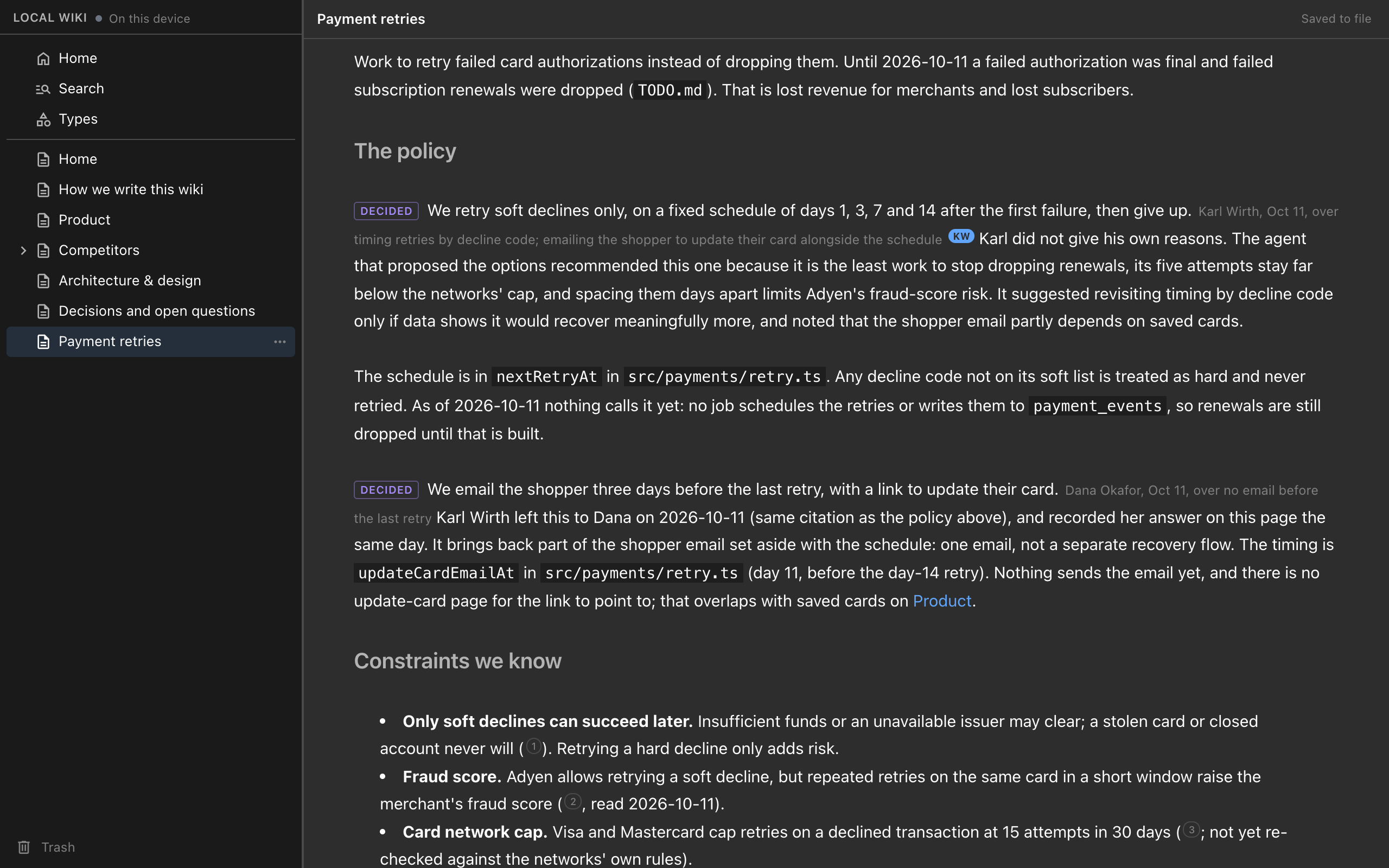
Add the free Nimbalyst Wiki to Cursor, VS Code with Copilot agent mode, Cowork or any MCP client through the nim mcp server. Your agent writes a markdown wiki of decisions and open questions that you read and edit in your browser.
Cursor, VS Code, Cowork and any other MCP client can keep the same project wiki as Claude Code and Codex, with the free Nimbalyst Wiki for coding agents. Install the nim command line, add its nim mcp server to your agent’s MCP config, and ask the agent to start a wiki for your repo. The agent writes markdown pages of decisions, open questions and tracked items in your project, and you read and edit them in your browser with no app and no account.
Why one wiki across agents #
You may use more than one coding agent: Cursor or VS Code for editing, Claude Code or Codex for longer tasks, Cowork for work outside the repo. Each one makes decisions and raises questions in its own sessions, and trying to keep track of all of it is how the overwhelm of working with several coding agents starts. Each agent’s instruction files and memory are written for that agent; we cover how agent memory differs from a wiki written for you separately.
The Nimbalyst Wiki gives every agent the same tools on the same files. A decision recorded from Cursor shows up on the page Claude Code reads next, and you see all of it in one place in your browser. You can switch agents without losing anything they wrote.
Step 1: Install the nim CLI #
You need Node.js 22 or later. Then:
npm install -g @nimbalyst/cli
nim includes the local MCP server and the browser view. It is MIT licensed and needs no account.
Step 2: Add the wiki server to your agent #
nim mcp is a standard MCP server on stdio. Each agent keeps its MCP config in a different file, and the install docs for Cursor, VS Code, Cowork and other agents cover each one.
Cursor
Add the server to .cursor/mcp.json in your project:
{
  "mcpServers": {
    "nimbalyst-wiki": {
      "command": "nim",
      "args": ["mcp", "--workspace", "${workspaceFolder}"]
    }
  }
}
Cursor’s MCP docs also support a global ~/.cursor/mcp.json, but a project file keeps the wiki tied to the repo it belongs to.
VS Code with Copilot agent mode
Add the server to .vscode/mcp.json in your project. VS Code uses a servers key instead of mcpServers:
{
  "servers": {
    "nimbalyst-wiki": {
      "command": "nim",
      "args": ["mcp", "--workspace", "${workspaceFolder}"]
    }
  }
}
Then use the wiki from GitHub Copilot in agent mode. VS Code’s MCP docs now also describe a workspace-root .mcp.json file behind an experimental setting, and list .vscode/mcp.json as kept for compatibility.
Cowork
Cowork runs in the Claude desktop app, so the wiki goes in the desktop app’s MCP config, pointed at the folder that holds your wiki:
{
  "mcpServers": {
    "nimbalyst-wiki": {
      "command": "nim",
      "args": ["mcp", "--workspace", "/path/to/your/project"]
    }
  }
}
Use the full path to your project. If the app cannot find nim, use the full path that which nim prints.
Any other MCP client
Point the client at nim mcp with --workspace set to your project folder. The tools are the same in every agent.
Step 3: Start the wiki #
Ask the agent:
Start a wiki for this repo.
The agent creates the wiki in nimbalyst-local/wiki, a folder git ignores so it stays private to you, or in a checked-in folder such as docs/wiki if you would rather share it through git. It writes a Home page and starter pages from your README and docs.
These agents get the wiki tools but not the setup, capture and recall skills that come with the Claude Code and Codex plugin, so ask for what you want in plain words. These requests work well:
- “Record what we decided in the wiki, with who decided, when, and what we passed over.”
- “Add the open questions from this session to the wiki, each with an owner.”
- “What does the wiki say about auth?”
- “Track our customers in the wiki: segment, plan and main request for each.”
- “Open the wiki in my browser.”
What a recorded decision looks like #
A decision is a marked sentence in the page it affects:
[We store and evaluate flags in Flagship.]{decided by="Dana Lee" [email protected] on=2026-09-30 over="our own Durable Object store"}
Open questions use the same form with an owner. An index page links to every decision and open question, so you can catch up on a week of work across all your agents in a few minutes. Our post on architecture decision records your agent keeps goes deeper, and the capture docs list what the agent records. The format is documented in the plugin’s FORMAT.md, and the pages stay plain markdown that any editor or GitHub can show.
Read and edit it in your browser #
Ask the agent to “open the wiki in my browser”, or run nim wiki serve from a shell. You get the page tree and an editor for text pages, drawings, mind maps, spreadsheets, data models and mockups. Edits save to the files and what your agents write shows up live. The view listens on your machine only and is protected by a token. See the browser view docs.
Keep nim up to date #
Once a day nim mcp checks npm for a newer nim, and the agent mentions it the next time it uses the wiki. Run nim update, then start a new session so the agent restarts the server. nim doctor shows which versions are installed and where they came from.
Share it with your team #
When teammates need the wiki, run nim login and nim wiki move-to-team from a shell, or ask your agent to run them. Your pages, typed pages and links move to Wiki Teams, where everyone edits the same pages in their browser. To keep working on the team wiki from your agent, add the team server to the same MCP config:
{
  "mcpServers": {
    "nimbalyst-team": {
      "type": "http",
      "url": "https://sync.nimbalyst.com/mcp"
    }
  }
}
Your agent asks you to sign in to Nimbalyst the first time it connects. Your local files are not deleted.
FAQ #
How do I add the wiki to Cursor? Run npm install -g @nimbalyst/cli, add nimbalyst-wiki to .cursor/mcp.json with nim mcp --workspace ${workspaceFolder}, and ask the agent to start a wiki.
How do I add it to VS Code? Same server, in .vscode/mcp.json under the servers key, used from Copilot in agent mode.
How do I add it to Cowork? Add the server to the Claude desktop app’s MCP config with the full path to your project as the workspace.
Do these agents get the plugin’s skills? No. They get the wiki tools, so ask in your own words.
Is it the same wiki Claude Code and Codex use? Yes. A wiki started in one agent is ready in the others.
All install routes are on the Nimbalyst Wiki page, and the plugin and nim CLI reference lists every command.
Related pages #
-
Nimbalyst WikiA local wiki your coding agents write for you, so you can think, organize and set direction.
-
How to Keep a Project Wiki with Claude CodeInstall, setup, capture and recall with the Claude Code plugin.
-
How to Keep a Project Wiki with CodexThe Codex CLI plugin, or one command for the Codex app and IDE extension.
-
Claude Code Memory vs a Wiki Your Agents WriteWhere CLAUDE.md, AGENTS.md, auto memory and a wiki for you each fit.
-
Docs: Read and Edit the Wiki in Your BrowserThe local browser view, from your agent or nim wiki serve.
Related posts #
-
Architecture Decision Records Written by Your Coding AgentHow to keep architecture decision records and a decision log when Claude Code and Codex make decisions faster than anyone writes them down: the agent records each decision in the page it affects, with who decided, when, what was rejected and a quote from the session.
-
How to Keep a Project Wiki with CodexAdd the free Nimbalyst Wiki to Codex with the Codex CLI plugin or one codex mcp add command for the Codex app and IDE extension. Codex writes a markdown wiki of decisions and open questions in your repo that you read and edit in your browser.
-
How to Keep a Project Wiki with Claude CodeInstall the free Nimbalyst Wiki plugin in Claude Code, run setup, and Claude writes a markdown wiki of your decisions, open questions and tracked items in your repo, which you read and edit in your browser.