At 1pm UTC on a Friday, a developer launched a new internal AI assistant.
It had careful system prompts, a clean UI, and access to the company’s entire knowledge base. The launch looked huge. On day one, the team asked it hundreds of questions. By dinner, it had solved dozens of theoretical problems.
On day three, engagement dropped to a trickle.
In week two, it was zero.
The most capable assistant in the company’s history was abandoned before the month ended.
I wanted to understand whether this shape was unusual or normal when teams build AI tools. The answer is uncomfortable: the flatline is normal.
The AI was smart, but it was paralyzed.
It could tell a user how to write an invoice, but it could not generate the PDF.
It could write the perfect script, but it could not run it.
It could explain the workflow, but it could not finish the workflow.
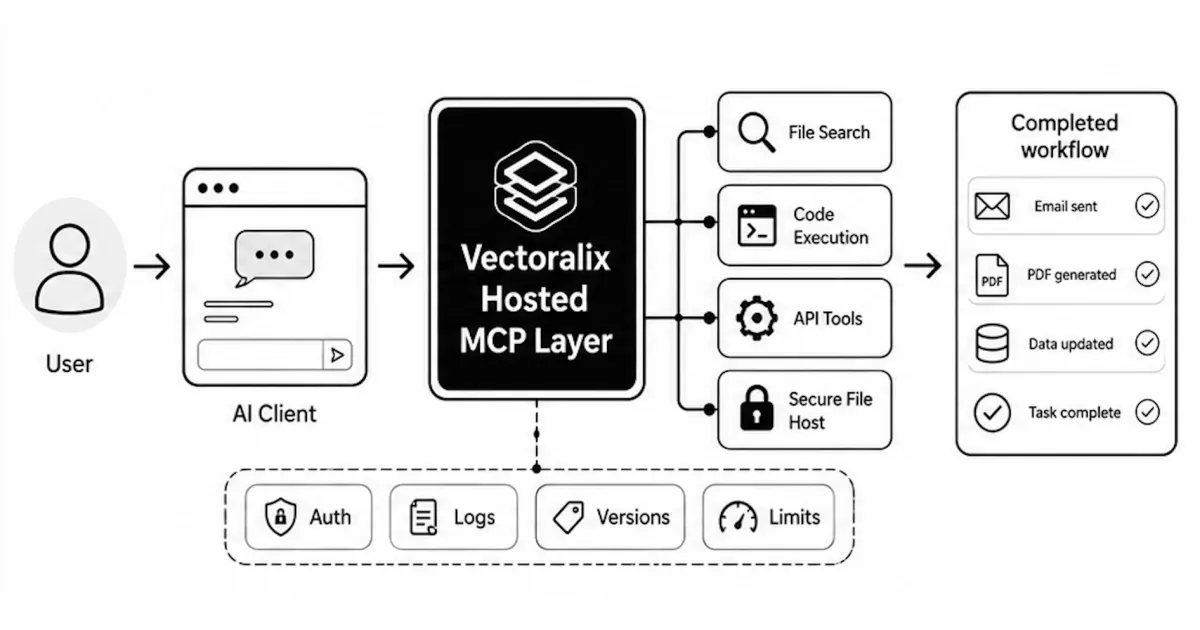
When we stop treating LLMs like advanced encyclopedias and start treating them like workers, the product changes completely. That is the promise of the Model Context Protocol, or MCP.
MCP gives models access to managed tools. In simple terms, it gives the model hands.
And that is where the real product begins.
The median AI agent just talks #
Most teams think the hard part is connecting to an LLM API.
It is not.
That is only the beginning.
The median AI wrapper today saves almost zero end-to-end labor. A user asks a question, gets beautifully formatted Markdown, and then manually copies that output into an email, a code editor, a spreadsheet, a CRM, or a document.
That is not automation. That is assisted copy-paste.
On launch day, everyone imagines seamless work. In reality, the average experience looks more like this:
The LLM integration feels like the milestone because it is visible. You can demo it. You can ask it questions. You can show screenshots.
But for the user, the real milestone is much simpler:
Did the work get done?
If the answer is no, the agent is still just a text box.
The first breakout: files and secure sharing #
Start with document generation.
LLMs are excellent at structuring information, but businesses do not run on chat logs. They run on artifacts: invoices, reports, proposals, contracts, summaries, spreadsheets, and PDFs.
When an MCP server exposes a generate_pdf
tool, the dynamic changes immediately.
The user does not receive instructions about how to make an invoice. The agent creates the invoice.
It can compile a weekly report.
It can generate a polished contract draft.
It can turn messy notes into a clean document.
But a file also needs to live somewhere. That leads to the next important tool: secure_file_host
.
The agent generates the PDF, uploads it to a temporary secure location, and gives the user a short-lived link protected by a security code.
No email attachments floating around.
No public files forgotten on a server.
No manual download-upload-send loop. The workflow closes itself.
The user asked for a file. The user got a file.
That sounds boring, but boring is where automation becomes useful.
The API bridge: email and reality #
The next layer is API access.
This is where the real leverage starts.
An agent that can read an inbox is interesting. An agent that can read an inbox, classify intent, draft a response, check your database, and call send_email
is no longer a chatbot.
It is part of the business process.
Look at the most common workflows in any company. Most of them involve moving data from one place to another:
- from inbox to CRM;
- from support ticket to internal task;
- from database to report;
- from customer request to invoice;
- from form submission to email reply.
These workflows are repetitive, but they are also full of small decisions. That is exactly where LLMs fit well.
By exposing email and business endpoints through MCP tools, the model can pull context from a thread, check the correct system, and dispatch a reply without forcing the user to open three different apps.
This is where volume appears.
If an agent can process one email correctly, it can process a thousand. The clock stops mattering.
Code tools: the agent as a developer #
“Vibe coding” and agentic development are changing how software gets built, but they still break down at a very basic point:
the agent often cannot test its own work.
If the AI writes code, you copy it into your editor, run it, paste the error back, and ask for a fix, then you are not managing an agent. You are acting as the compiler.
Code execution tools flip that relationship.
When backend functions are exposed through an MCP server, the agent can work against real feedback. It can write a script, run it in a sandbox, catch the exception, and patch its own mistake.
That sandbox might be a QuickJS runtime.
It might be a Docker container.
It might be a restricted project environment with access only to safe commands.
The exact runtime matters less than the loop:
- write;
- run;
- fail;
- inspect;
- fix;
- run again.
That is the difference between text generation and actual development assistance.
The model is no longer only predicting the next token. It is iterating against reality.
The missing layers: data and distribution #
Once you host an MCP server, you can expose tools for almost anything.
This is where MCP becomes more than a developer convenience. It becomes the connective tissue between the model and the systems around it.
Database queries
A secure execute_sql
tool can let the agent build its own context from a read-only replica.
Instead of relying only on brittle retrieval pipelines, the model can ask the database a precise question.
Not every agent should have direct SQL access, of course. Permissions, query limits, audit logs, and safe replicas matter. But when this is done carefully, the agent stops guessing and starts checking.
Web fetching
A fetch_and_parse_url
tool gives the agent access to the live web.
If a user asks about a competitor’s pricing page, the agent does not need to hallucinate from old context. It can fetch the current page, parse the content, and work from real data. Again, the tool boundary matters. You want rate limits, domain rules, content filters, and logs.
But the principle is simple:
the model should not pretend to know what it can safely look up.
Distribution and growth
This is the underrated category.
A useful agent is not limited to internal workflows. It can also help with the slow, compounding work of distribution.
Imagine tools that let an agent:
- analyze Reddit threads for relevant conversations;
- draft directory submissions;
- prepare founder updates;
- check SaaS directories for listing opportunities;
- summarize backlink gaps;
- track mentions and comments;
- generate outreach drafts.
None of this is glamorous. It is daily work. It is boring work.
That is exactly why it should be automated.
The agent does not need to replace strategy. It needs to remove the repetitive steps that stop strategy from happening consistently.
Chat is a moment. Action is a campaign. #
The chat interface is a great starting point.
It is not a product strategy by itself.
You cannot build a serious workflow company on a text box. A text box can answer. A tool can act.
The systems that survive will not be the ones with the longest prompts or the prettiest chat UI. They will be the ones that connect the model to real work:
- creating files;
- sending emails;
- querying databases;
- running code;
- fetching live data;
- updating systems;
- triggering repeatable workflows.
The launch of the LLM was only the beginning.
The tools are the actual product.
Comments #
No comments yet. Be the first to share your thoughts.