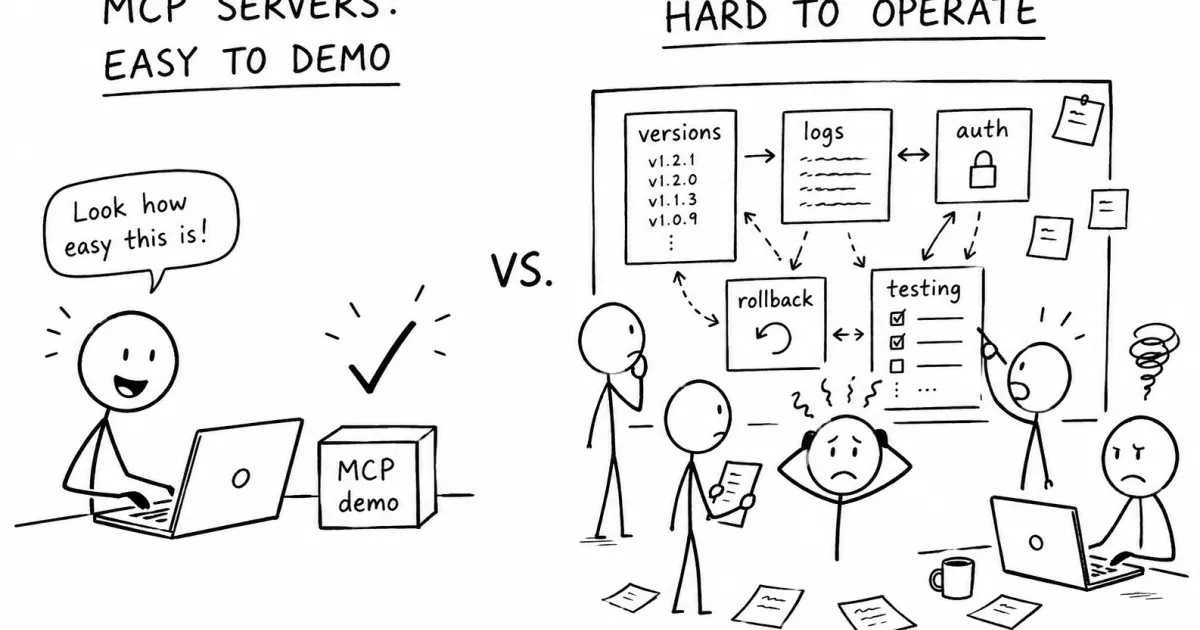
The MCP ecosystem is moving fast.
There are registries, connector catalogs, hosted tools, local servers, open-source examples, and wrappers around almost every popular API. This is useful. Discovery matters. Developers need a way to find tools, connect agents to external systems, and avoid writing everything from scratch.
But I think the MCP conversation is starting to focus too much on the easiest part.
Finding an MCP server is not the hard problem.
The hard problem starts after someone actually depends on one.
A demo MCP server can be impressive in five minutes. It exposes a few tools, connects to a local file, calls an API, or searches some documentation. The agent calls it, the response looks useful, and everyone understands the idea.
Then the real questions begin.
Who owns this server?
Which version is the agent using?
Can we test a tool before changing it?
What happens if the response format changes?
Can we roll back?
Who can call this tool?
Where are the logs?
Which credentials are exposed?
Why did the agent call this tool yesterday?
Can another team member use the same setup?
Can this run outside one developer’s laptop?
That is where the demo ends and operations begin.
Local MCP is great until it becomes team infrastructure #
Local MCP servers are a good starting point. They are simple, flexible, and developer-friendly. For personal workflows, that may be enough.
A developer can run a server locally, connect it to an editor or agent, expose a few tools, and move quickly. There is very little ceremony. That is one of the reasons MCP became interesting in the first place.
But local-first workflows have a natural ceiling.
They work well when the user, the machine, the credentials, and the context all belong to the same person. They become harder when the same MCP server is expected to support a team.
For example, imagine an MCP server that exposes internal project knowledge. At first, it reads a few Markdown files from a repository. Then it expands to API documentation. Then it includes database schema notes, deployment instructions, product decisions, and troubleshooting guides.
One developer can run that locally.
But when five people need it, the setup starts to become fragile. Everyone has slightly different files, slightly different environment variables, slightly different versions, and slightly different client configurations.
The agent may appear to have access to “the same knowledge,” but in practice each person is running a different copy of the system.
That is not infrastructure. That is a collection of personal setups.
Discovery is not lifecycle management #
A registry or directory answers one question:
Where can I find an MCP server?
That is an important question, but it is not the same as:
How do I safely operate this MCP server once workflows depend on it?
Those are completely different problems.
A directory helps with discovery.
A connector catalog helps with access to popular services.
A gateway may help centralize traffic and authentication.
A local server helps a developer move quickly.
But production use needs something else: lifecycle management.
That means treating MCP servers less like small scripts and more like controlled interfaces that agents depend on.
The moment an agent can take action through a tool, the MCP server becomes part of the application surface. It is no longer just “context.” It is a boundary where AI behavior meets real systems.
That boundary needs to be managed.
Tool definitions are contracts #
One of the easiest mistakes with MCP is treating tool definitions as casual prompts.
A tool name, description, input schema, and output format are not just documentation for the model. They are a contract between the agent and the system.
When that contract changes, behavior can change.
Renaming a tool can break selection.
Changing a description can change when the model decides to call it.
Adding optional fields can confuse the agent.
Changing the output shape can break downstream reasoning.
Returning too much data can pollute the context window.
Returning too little data can make the tool useless.
In normal software, we understand this. API changes are reviewed, versioned, tested, deployed, and sometimes rolled back.
MCP tools deserve the same treatment.
Not because every MCP server needs enterprise ceremony, but because agents are sensitive to small changes in their tool surface. A human developer can read a changelog and adjust. An agent may simply start making worse calls.
The missing checklist for real MCP usage #
A serious MCP setup eventually needs a boring checklist.
Not exciting. Not magical. Just necessary.
It needs versioned releases, so teams know which tool definitions and instructions are currently active.
It needs a playground or test environment, so changes can be tried before they affect real users or workflows.
It needs request logs, so people can understand which tools were called, with what input, and what came back.
It needs authentication, because not every user or agent should have access to every tool.
It needs scoped credentials, because a tool that reads documentation is not the same risk as a tool that sends email, updates a CRM, or triggers deployment actions.
It needs rollback, because bad tool changes will happen.
It needs quotas or rate limits, because agents can call tools more often than expected.
It needs clear ownership, because someone has to maintain the server when the underlying API changes.
It needs safe API execution, because exposing an HTTP request as a tool is powerful but also dangerous.
It needs documentation, because future users need to know what each tool is supposed to do.
This is not glamorous work. But it is the difference between an MCP demo and an MCP dependency.
“Just expose the API” is not enough #
A common pattern is to take an existing API and expose it directly as MCP tools.
That can work, but it often creates a poor tool surface.
APIs are designed for software clients. MCP tools are consumed by language models. Those are not the same thing.
An API may have dozens of endpoints, nested parameters, pagination rules, authentication details, and response formats optimized for deterministic programs.
A model needs a smaller and clearer surface.
Instead of exposing every endpoint, it is often better to expose opinionated actions:
- “Search project documentation”
- “Create a draft issue”
- “Find recent failed deployments”
- “Get customer subscription status”
- “Summarize this repository module”
- “Check whether this API call is safe”
These tools may call one or many APIs behind the scenes. The important part is that they match the task the agent is supposed to perform.
Good MCP design is not only about connecting APIs to agents.
It is about shaping tools so agents can choose them correctly.
More tools can make agents worse #
There is also a scaling problem.
Adding tools feels like progress. Ten tools become twenty. Twenty become fifty. Soon the agent has a large menu of similar actions with overlapping descriptions.
At that point, the model may not become more capable. It may become more confused.
This is one of the hidden costs of MCP.
A large tool catalog is not automatically better than a small, well-designed tool surface.
Agents need clear boundaries. They need tools with obvious names, narrow responsibilities, and predictable outputs. They need fewer ambiguous choices, not endless options.
This is another reason lifecycle matters.
As MCP usage grows, teams will need to review not just whether a tool works, but whether it still belongs in the active tool surface.
Some tools should be experimental.
Some should be deprecated.
Some should be private.
Some should be replaced by better abstractions.
Some should not be exposed to the agent at all.
Without a control layer, the tool surface becomes messy over time.
And messy tool surfaces produce messy agent behavior.
Logs are not optional #
When an agent gives a bad answer, the first question is usually:
Why did it do that?
Without logs, the answer is guesswork.
Maybe the model chose the wrong tool.
Maybe the tool description was ambiguous.
Maybe the tool returned stale data.
Maybe the tool failed silently.
Maybe the response was too large.
Maybe the user did not have access to the right context.
Maybe the server was running an old version.
This is why MCP calls need visibility.
You need to see what happened at the tool boundary. The prompt is only part of the story. The tool call is often where the important decision happened.
For production systems, MCP logs are not just debugging details. They are audit trails. They help answer:
- what the agent tried to do
- which tools were used
- what data came back
- whether the tool failed
- whether the response changed
- whether the wrong version was active
Without that, teams are operating blind.
MCP needs release management #
The simplest way to think about this is:
MCP servers need releases.
Not just code releases. Tool-surface releases.
A release should include the available tools, their descriptions, schemas, instructions, connected knowledge, and runtime behavior.
That release should be testable.
It should be possible to promote it from draft to active.
It should be possible to compare it with the previous version.
It should be possible to roll it back.
This may sound obvious to people who build normal software systems. But many MCP workflows today still feel closer to local scripts than managed interfaces.
That is fine for experimentation.
It is not enough for shared agent infrastructure.
The future is not just bigger directories #
I do not think MCP will be won only by the largest catalog of connectors.
Large catalogs are useful. They help people discover what is possible. But the deeper value is in making MCP safe and repeatable enough for real workflows.
The important layer is the one that lets teams publish, test, observe, secure, and roll back the tools and context their agents depend on.
That layer is less exciting than a demo video.
It is also more important.
Because once agents become part of daily work, MCP servers stop being toys. They become operational surfaces.
And operational surfaces need control.
That is the direction we are exploring with Vectoralix: hosted MCP servers, versioned tool releases, managed knowledge, API-backed tools, playground testing, request logs, and safer deployment boundaries.
The goal is not to replace every local MCP server or every connector catalog.
The goal is to solve the part that appears after the demo works:
How do you run this reliably as a team?
Comments #
No comments yet. Be the first to share your thoughts.