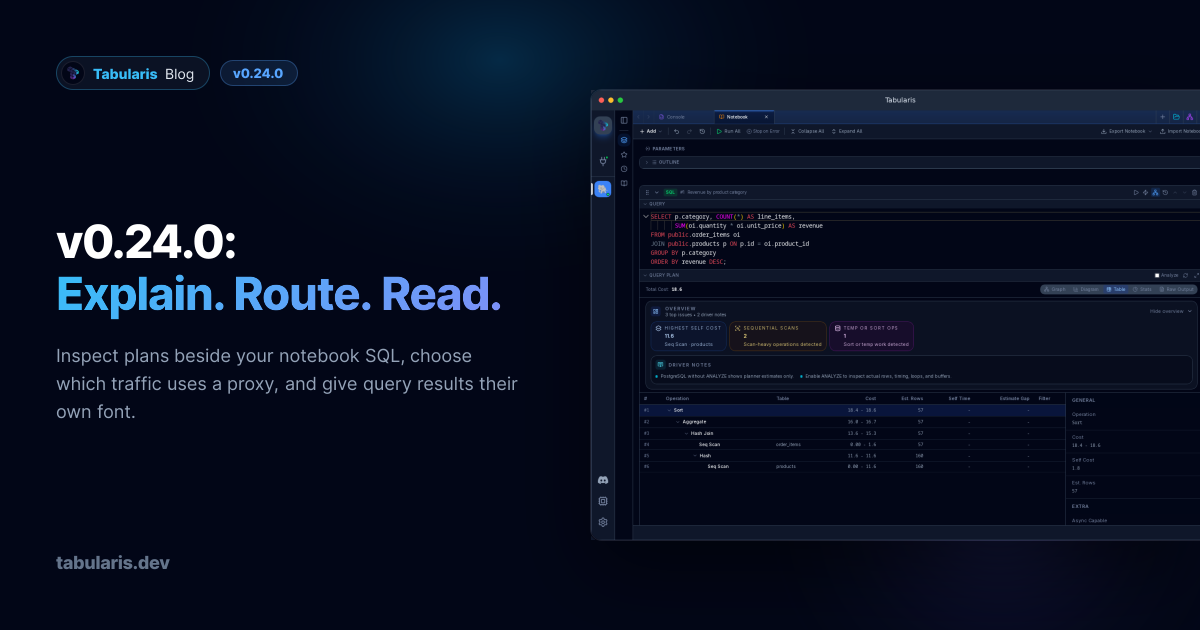
v0.24.0 follows v0.23.0 with changes to the work you do after connecting. A notebook cell can keep its execution plan beside its SQL and results, rather than sending you into a separate modal. Network settings let you route application requests, database connections, AI calls and SSH traffic independently through an HTTP or SOCKS5 proxy. Query results get their own font picker, and a running query identifies its tab even while you work elsewhere. Underneath, plugins can discover capabilities and data types per connection instead of describing every server with one static manifest. The community fixes cover autocomplete ranking, Linux appearance detection, Snap packaging and desktop deep links.
Query Plans Belong in the Notebook #
@harshavardhankonisa brings Visual EXPLAIN into the cell itself in PR #718. SQL cells on a connection that supports EXPLAIN gain a Query Plan toggle in their header. Turn it on and a resizable plan section appears alongside Query, Results and Chart, using the same Visual EXPLAIN views as the standalone viewer. Visibility is saved with the cell and survives notebook export and import.
Video unavailable
The first opening requests a plain EXPLAIN, not ANALYZE. The panel has an EXPLAIN ANALYZE checkbox, a Re-run button and a popout that opens the already-fetched plan in the full modal without another database request. Selecting ANALYZE does not execute anything until you press Re-run. That distinction matters: ANALYZE runs the statement, including writes for data-modifying queries.
The plan uses the query the notebook would actually execute. @param values are substituted and {{cell_N}} references expand to their result CTEs. If a referenced cell has not run successfully, the panel names the unresolved references and sends no request. If you change the SQL, connection or schema after fetching a plan, the old plan is replaced by an outdated notice until you explicitly refresh it. The ANALYZE choice is tied to that source too, so consent to analyze one statement does not carry over to a different one. Running the cell again does not silently run EXPLAIN again.
Several notebook fixes ship with it. CSV and JSON exports now report success or failure instead of swallowing write errors. Repeated checks for parameters and cell references no longer alternate between true and false because a shared global regular expression retained its cursor. Referencing the same cell twice emits one CTE instead of duplicate definitions. And reordering, inserting or deleting cells no longer remounts every cell below the change, preserving their editor and panel state.
A Proxy for the Traffic You Choose #
PR #737, by @coloraven, adds Settings → Network. Configure an HTTP CONNECT or SOCKS5 endpoint with an optional username and password, then choose which traffic should use it:
| Scope | What it covers |
|---|---|
| App network requests | Update checks, plugin downloads, registry requests and WebDAV backups. |
| Database connections | Direct database TCP connections. |
| AI / LLM endpoints | Requests to the configured AI providers. |
| SSH tunnels | The outbound connection to the SSH bastion. |
The global proxy is off by default, and each scope is opt-in. A database connection's Advanced section and each AI provider's settings can inherit the global choice, use a custom endpoint or disable proxying for that target. An explicit target override takes precedence over the global setting. Proxy passwords go into the OS keychain, not config.json or connections.json.
For SSH, the proxy applies to the bastion hop; the local leg produced by an SSH or Kubernetes tunnel is not sent through a second database proxy. Reusable SSH profiles do not gain a separate proxy picker in this release: use the global SSH scope or the database connection's override. Saving global proxy settings tears down existing SSH tunnels and cached forwards so later connections use the new configuration; reconnect after changing it. This is routing control, not a promise that every third-party plugin's own HTTP client obeys application settings. It is also not a replacement for TLS to the database or AI endpoint.
Result Cells Get Their Own Font #
Until now, the grid was hardwired to a monospace stack. Changing the interface font did not change result cells, which is what #726 asked for. PR #741 adds Settings → Appearance → Data Grid → Result font.
Choose Same as interface, a bundled font or a custom family. The default remains JetBrains Mono, so existing installations look the same. The choice covers result cells, inline edit inputs and multiline textareas; multiline width measurement uses the actual selected font, so proportional text is not measured as if it were monospace. SQL editors, logs, hex and JSON views keep their own typography. The setting is persisted as resultFontFamily; Same as interface is stored as inherit and follows later interface-font changes.
The Running Query Identifies Its Tab #
PR #767 replaces a tab's type icon with a spinner in the connection's accent colour while a query is executing. It carries an Executing query tooltip and an accessible status role, and remains visible when another tab is active. The thin pulsing line beneath the tab stays too.
Video unavailable
Notebook tabs participate: one running cell or Run All keeps the indicator active until all currently executing cells finish. Errors and cancelled execution guards clear it correctly, and state is not persisted into a restored session. A small change, but it answers “which query is still running?” without opening each tab.
One Plugin, Different Metadata for Each Connection #
A generic driver cannot describe PostgreSQL and MySQL accurately with the same type list and identifier quoting. PR #744, following discussion #728, gives plugins an opt-in connection metadata discovery contract.
A manifest can declare "connection_metadata": true. After a successful connection test, Tabularis calls get_connection_metadata before database objects. The reply can override capabilities, data types and type mappings for that connection. The registered manifest stays immutable: two connections using the same plugin do not overwrite each other's dialect or type selectors, and backend operations, including MCP, resolve the same connection-specific metadata.
Omitted fields keep their manifest defaults; explicit false values and empty collections replace them. A connection cannot lift a manifest-level read-only restriction. Discovery is cached per plugin process and invalidated by connection tests and disconnects. Only JSON-RPC -32601 falls back to the static manifest; authentication failures, transport errors and malformed responses remain visible errors.
Existing plugins do not opt in automatically and receive no new discovery requests. This ships the host contract, not a finished JDBC integration: a bridge still needs to implement the method and route requests to the correct database worker, and its registry must accept the opt-in field. The protocol reference documents those boundaries.
Smaller Things #
-
Autocomplete ranks the nearest table first (@adisusilayasa , PR#679 , fixes#507 ): in a join condition, columns from the table being joined rank above other in-scope columns; in SELECT, WHERE and SET contexts, the primary table takes priority. Aliases and nested scopes are respected, and other tables' columns remain available.
-
Follow System uses native appearance (@be-student , PR#723 , fixes#716 ): WebKit could report light while GNOME was dark. The app now follows native theme signals and Linux desktop-portal preferences, with browser media queries as the preview fallback, and avoids feeding a forced app theme back into OS detection.
-
Snap's editor loads correctly (@wangyingsm , PR#712 , fixes#710 ): the package gains the
network-statusplug needed by WebKit's portal requests and stops mixing a staged WebKit library with the GNOME platform's helper processes. Sandboxed launches skip redundant deep-link registration. Keychain errors in Snap now point tosudo snap connect tabularis:password-manager-service. -
Linux desktop links reach the app (@anandghegde , PR#754 , fixes#671 ): the desktop entry passes
%uto the executable, so atabularis://URL is not lost on a cold start. The launcher name becomesTabularis and its category becomesDevelopment , shared by deb, rpm and AppImage packaging. -
Plugin activation does not revert unrelated settings (@aesslinger , PR#736 ): PostgreSQL auto-activation writes only its driver setting instead of a stale full-config snapshot. The migration checklist also closes with Escape.
-
Saved query names are readable in light themes (PR#770 , fixes#743 ): the Save/Edit Query modal uses theme text colours instead of hardcoded white, from both the editor and sidebar.
-
Release notes render as Markdown (PR#738 ): the update notification renders headings, lists, code and links instead of a plain preformatted block. Links open through the OS opener.
-
A personal invitation in What's New (PR#772 ): a compact author introduction links to GitHub Sponsors and the repository.Never show this again hides only the invitation, not future release notes; the avatar is bundled locally.
-
Test certificates are generated, not committed (@igorzelaya-io , PR#742 , fixes#715 ): the PostgreSQL mTLS test creates its self-signed EC certificate at runtime instead of carrying a static private-key fixture.
-
CI dependency update :
pnpm/action-setupmoves to 6.1.0 in PR#768 .
Thanks #
Eight external contributors land in this release. @harshavardhankonisa built inline notebook plans and fixed the surrounding notebook state and export issues (#718). @coloraven added scoped proxy routing and target overrides (#737). @adisusilayasa made multi-table autocomplete prioritise the table you are working with (#679).
@be-student fixed native theme detection (#723), @wangyingsm repaired Snap integration (#712), and @anandghegde fixed Linux desktop entries (#754). @aesslinger closed the plugin-activation config race and added Escape to the migration checklist (#736). @igorzelaya-io replaced the committed TLS test fixture with runtime generation (#742).
If you investigate queries in notebooks, work behind a proxy, or keep losing track of the tab that is still running, this is the upgrade. v0.24.0 is available now. Download the builds from the release page.