Connect Slack to Munder Difflin 0.5.2: create the Slack app, add the bot scopes, pick one of three connection modes, and get answers in the thread.
To connect Slack to Munder Difflin 0.5.2, create a Slack app with four bot scopes (six to list channels), paste the bot token under Settings, Connections, Slack, press Test connection, pick the channel and press Turn on. Then mention the bot in that channel, and your orchestrator or the agent you chose answers in the thread.
Slack is on every plan, free included. If the app is not installed yet, start with how to install Munder Difflin. Every mode needs the app open and the laptop awake, because the connection runs on your machine. This guide was checked against the 0.5.2 source and its Settings screens on 14 Sep 2026. Our older Slack guides cover the ideas, and this page covers the current setup.
Which Slack mode should you pick? # #
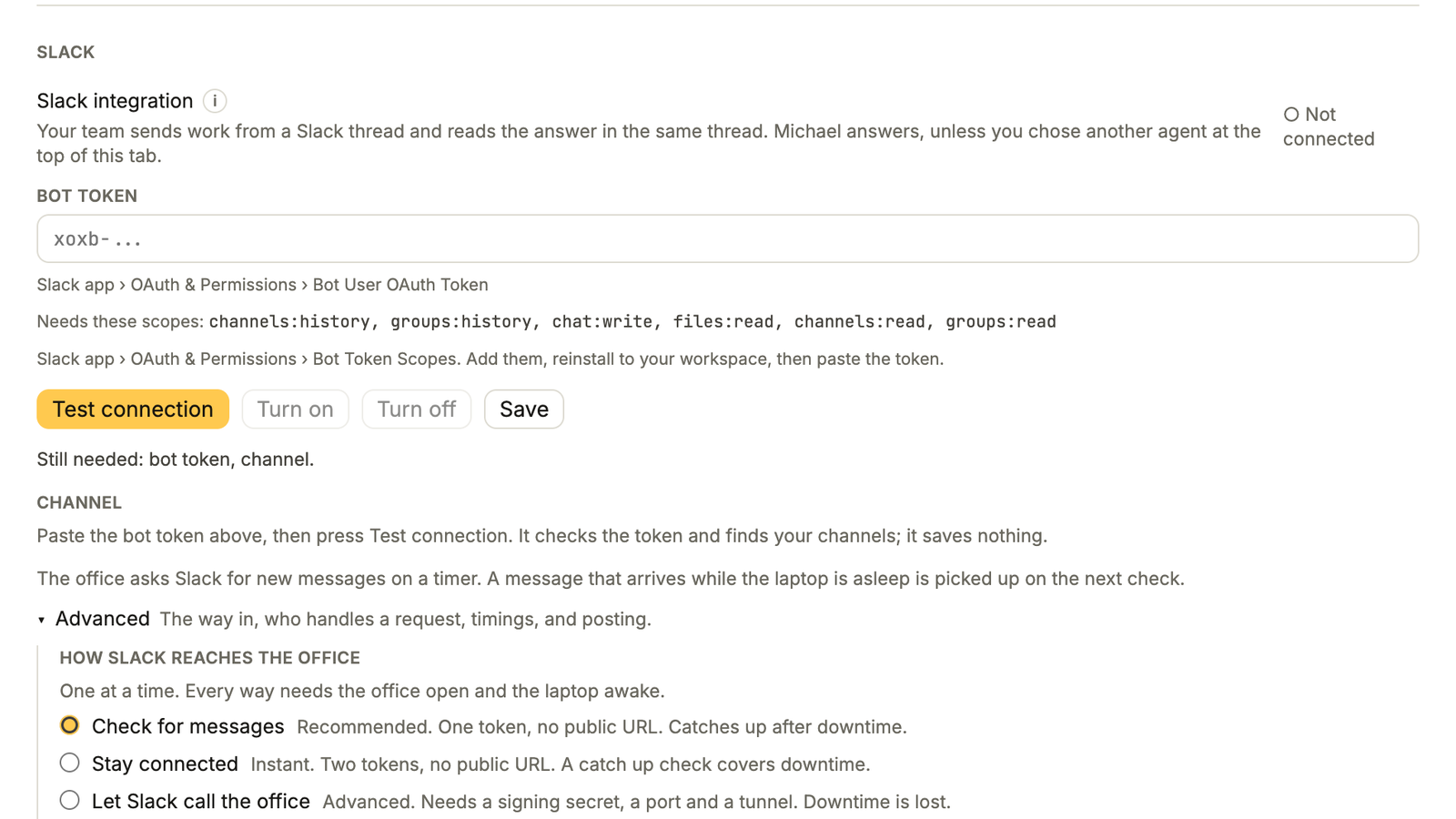
Pick Check for messages unless you need instant replies. Under How Slack reaches the office, 0.5.2 offers three modes, and only one runs at a time.
| Mode | What it needs | Speed | While the laptop sleeps |
|---|---|---|---|
| Check for messages | Bot token | Checks every 30 seconds to 5 minutes, 1 minute by default | Caught up on the next check |
| Stay connected (Socket Mode) | Bot token and app token | Instant | A catch up check (1 minute to 1 hour, 5 minutes by default, or off) picks it up, if you picked a channel |
| Let Slack call the office (Events API) | Bot token, signing secret, a port and a public tunnel | Instant | Lost |
The first two need no public URL. The app itself calls the third one Advanced, for a reason: its Request URL is a tunnel that changes every time you start it, so you paste it into Slack again after each restart.
How do you create the Slack app? # #
These steps are for Check for messages, the recommended mode. Slack’s own app settings quickstart covers the same screens.
- Go to api.slack.com/apps , chooseCreate New App and start from a blank app (older Slack screens sayFrom scratch ). Name it Munder Difflin and pick your workspace.
- Open OAuth & Permissions and add theseBot Token Scopes :
channels:history,groups:history,chat:writeandfiles:read. Also addchannels:readandgroups:read, so the app can list the channels the bot is in instead of asking you for an id. - Choose Install to Workspace . If your workspace needs admin approval, this is where you wait for it.
- Copy the Bot User OAuth Token . It starts with
xoxb-. - In the Slack channel you want the bot to watch, run
/invite @MunderDifflin.
The Slack card has a shorter version of these steps behind the i next to Slack integration.
For Stay connected, do two more things in the same Slack app:
- Turn on Socket Mode . UnderBasic Information ,App-Level Tokens , generate a token with the
connections:writescope. It starts withxapp-; Slack’stoken docs explain the difference between bot and app-level tokens. - Under Event Subscriptions , enable events and subscribe to the bot events
message.channelsandmessage.groups. No Request URL is needed. Reinstall if Slack asks.
Where do the tokens go in Munder Difflin? # #
Open Settings, then Connections.
- At the top, Who answers inbound messages decides who gets Slack requests. The default is your orchestrator, Michael unless you renamed him, and the app recommends keeping it. You can pick any agent instead. If that agent is not running, the orchestrator takes the request.
- In the Slack card, openAdvanced , then choose your mode underHow Slack reaches the office . Check for messages is selected to begin with.
- Paste the
xoxb-token intoBot token . For Stay connected, paste thexapp-token intoApp token . - Press Test connection . If the bot is in one channel, the app uses it. If it is in several, pick one. If you skipped the two read scopes, type the channel id intoChannel ID under Advanced instead; it starts with
C. Stay connected needs no channel, because it hears every channel the bot is in, but pick one if you want the catch up check. - Set Check every (orCatch up every for Stay connected), then pressTurn on .
When it works, the card shows a status line in the form “Checking
For Stay connected, the card adds the **App token** field beside the bot token, and **Check every** becomes **Catch up every**.

## What happens when someone mentions the bot? [#](#what-happens-when-someone-mentions-the-bot)
Mention the bot in the watched channel. From then on, every reply in that thread counts too, without another mention; Check for messages follows threads active in the last 24 hours. The app ignores bot posts and edited messages, so the bot never answers itself. A file upload counts if it mentions the bot or lands in a watched thread, and attachments up to 10 MB are downloaded for the agent.
The request lands as a Slack request with the agent set under Who answers inbound messages, your orchestrator by default. How the orchestrator routes work explains how he picks an agent from there. His instructions for these are strict: pick one agent quickly, hand over the exact reply command, ask no interactive questions, and only for high risk actions. The agent replies in the same thread through a helper that sends the reply to a local endpoint holding the bot token, so agents are never handed the token. It is still stored in the app’s config file, so keep agents that have full file access in mind. When the task card reaches done, the app posts one summary to the thread, unless the agent already replied itself.
Two switches matter here:
- Post in Slack on its own is off by default. While it is off, the office only answers inside a thread someone already started. Replies to work sent from Slack still go back to their own thread.
- If you want the orchestrator to bring in a temp for a Slack request, turn on Can start agents on its own in hisConfiguration tab. It is off after setup.
On Pro, the Inbox has a Slack view under Outside, showing what came in and what was posted.
What goes wrong most often? # #
Check these first: a missing scope, a missing invite, or a sleeping laptop.
- Nothing answers. The app is closed or the laptop is asleep. Check for messages catches up when it wakes; Let Slack call the office does not.
- “The bot is not in any channel yet.” Run
/invite @MunderDifflinin the channel and press Test connection again. - It asks you to type the channel id. The app lacks
channels:readandgroups:read. Add them, reinstall the Slack app, and the list fills in. - A private channel stays silent. The bot needs
groups:historyand has to be invited to that channel. - Let Slack call the office stopped after a restart. The Request URL changed. Paste the new one into Event Subscriptions.
Once Slack works, point it at real work. Your First Hour With Munder Difflin shows where a Slack agent fits beside scheduled automations, webhooks and the rest of a Pro office. Get Munder Difflin.
FAQ #
Do I need Pro to connect Slack?
No. Slack lives under Settings, Connections, which every plan has. Pro adds a Slack view to the Inbox, where you can see what came in and reply in the thread.
Can I turn on more than one Slack mode at once?
No. Munder Difflin 0.5.2 runs one mode at a time. Switching stops the current one, and you press Turn on (or start, for Let Slack call the office) for the new mode.
Do my agents get the Slack bot token?
Agents are never handed it. They reply through a small helper that sends the reply to a local endpoint inside the app, and the endpoint holds the token; the agent only passes the channel, the thread and the text. The token is still saved in the app's config file on your machine, which an agent with full file access could read.
Does the bot answer direct messages?
Not in 0.5.2. It listens in channels the bot was invited to, public or private: the one channel you pick, or with Stay connected and no channel picked, every channel the bot is in. It acts on messages that mention it or reply in a thread where it was mentioned.
What happens to messages sent while my laptop is asleep?
Check for messages picks them up on its next check. Stay connected picks them up with its catch up check if you picked a channel. Let Slack call the office loses them.