Why #
I pay for Claude Pro, the 20€/month plan, and I use Claude Code almost every day on my side projects, mostly Draft Omen and Book Corners. Pro is a flat fee, so I never pay more than 20€ a month. What I can run out of is usage. Pro gives you a limited amount of usage every 5 hours and every week, and when I hit the limit I have to wait for it to reset before I can keep working.
Until last week every session ran on Opus 5.5 from start to finish. Opus read the files, wrote the code, ran the tests, fixed the lint errors, ran the tests again, committed and opened the pull request. Only a small part of that work needs the best model. Once the plan is clear, a cheaper model can write the code and run the tests.
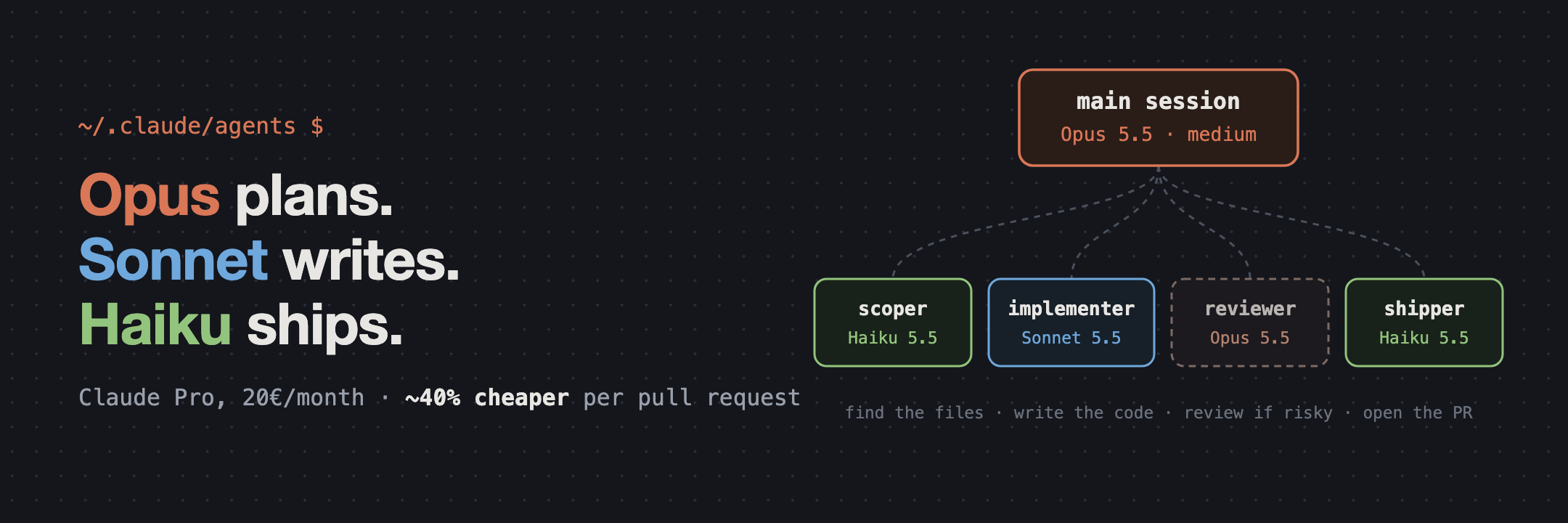
So I changed my setup. The main session still runs on Opus 5.5 at medium effort and makes the decisions. A Sonnet 5.5 subagent writes the code, and two smaller jobs go to Haiku 5.5. In this post I will show the setup, all the files you need to copy it and how much it saved me.
The setup #
Claude Code can load custom subagents from Markdown files in ~/.claude/agents/. The frontmatter of each file sets the model, the effort and the tools the agent is allowed to use, and the rest of the file becomes the agent’s system prompt. A subagent starts with an empty context, so it only knows what the main session tells it.
These are the four agents I use:
| Agent | Model | Effort | Tools | Job |
|---|---|---|---|---|
implementer |
Sonnet 5.5 | medium | Read, Write, Edit, Grep, Glob, Bash | Writes the code and the tests, runs the checks |
reviewer |
Opus 5.5 | medium | Read, Grep, Glob, Bash | Reviews risky changes, only when asked |
scoper |
Haiku 5.5 | medium | Read, Grep, Glob, Bash | Collects the facts before planning an unfamiliar task |
shipper |
Haiku 5.5 | low | Read, Bash | Commits, pushes and opens the pull request |
Opus is my default model, and I set medium effort for both Opus 5.5 and Sonnet 5.5 in ~/.claude/settings.json:
|
 1
 2
 3
 4
 5
 6
 7
 8
 9
10
11
|
{
  "model": "opus",
  "modelSettings": {
    "claude-opus-5-5": {
      "effortLevel": "medium"
    },
    "claude-sonnet-5-5": {
      "effortLevel": "medium"
    }
  }
}
|
Creating the agents is not enough. Claude Code decides when to call a subagent by reading its description, so it’s up to the model to remember to use it. To make it happen every time, I added some instructions to my user CLAUDE.md. They tell the main session when to delegate, what to write in the handoff and how to review what comes back.
How a session works #
This is what usually happens when I give Claude Code a task:
- I give the main session an issue number.
- If the session doesn’t know the code yet, it runs
scoper. Haiku reads the issue, finds the files and the tests involved and writes a short brief with file paths. A small model can get things wrong, so the main session opens a few of those files before trusting the brief. - The main session decides how to implement the change. This is the part where Opus is worth it.
- It passes the plan to
implementer, together with the acceptance criteria, the files, the decisions already taken and the commands to run. Sonnet writes the code and the tests and runs them until they pass. - The main session reads the diff, compares it with the plan and runs the whole test suite. If something is wrong, it sends the fix back to the same implementer with
SendMessage, so the implementer doesn’t lose its context. - When I ask for a pull request,
shipperchecks the working tree, stages only the files that belong to the change, commits, pushes and opens the PR with a description.
reviewer is not part of the normal flow. The main session already reviews every diff, and a second review by another Opus agent can cost almost as much as writing the code. I only use it when I ask for a review, or when a change touches security, concurrency, data migrations or a public API.
A few details make a big difference:
- Small changes stay in the main session. Writing the handoff and reviewing the diff cost tokens too, so if the change is a few lines and Opus already knows what to write, it just writes it.
- The implementer doesn’t redesign anything. If the plan doesn’t match the code, its prompt tells it to report back instead of taking a big decision on its own.
- The scoper can’t change anything. It runs in plan mode, it has no edit tools and it stops after 12 turns. Every claim in its report must point to a file.
- The shipper stops when something looks wrong, for example an unrelated file, a missing changelog entry or a branch that is
master. It reports the problem and the main session fixes it. It never edits files and never force-pushes.
The files #
Click on a file name to expand it.
My user CLAUDE.md
This is my ~/.claude/CLAUDE.md. The first line imports ~/.agents/AGENTS.md, which contains my general coding and writing rules and is shared with other coding agents, so I’m not including it here. Everything else is specific to Claude Code.
~/.claude/CLAUDE.md #
|
 1
 2
 3
 4
 5
 6
 7
 8
 9
10
11
12
13
14
15
16
17
18
19
20
21
22
23
24
25
26
27
28
29
30
31
32
33
34
35
36
37
38
39
40
41
42
43
44
45
46
47
48
49
50
51
52
53
54
55
56
57
58
59
60
61
62
63
64
65
66
67
68
69
70
71
72
73
74
75
76
77
78
79
80
81
82
83
84
85
86
|
@~/.agents/AGENTS.md


## Delegate implementation to the implementer agent

This is a standing request to use subagents. Do not wait for me to ask.

- Once the task is sufficiently understood and the intended solution is clear, hand substantial, well-defined code or test changes to the `implementer` agent. This covers new features, bug fixes, refactors, and adding or fixing tests.
- Delegate when the change spans several files or you expect more than one edit-and-test cycle. Make the edit yourself when the change is small and already fully known, even if it is a few dozen lines, because writing the handoff and reviewing the diff would cost about as much as doing it.
- Give the implementer the issue number, acceptance criteria, relevant files, architectural constraints, decisions already made, important edge cases, and the validation commands to run. It starts with no context, so do not make it rediscover what you already know.
- Keep architectural decisions, ambiguous scope decisions, root-cause analysis, and other judgment-heavy work in the main session. The implementer should execute a sufficiently defined solution rather than independently redesign the task.
- Split work larger than one subsystem into file-owned or subsystem-owned slices and give each independent slice to its own implementer run. Start dependent slices only after the slices they depend on are complete.

## Scope unfamiliar tasks with the scoper agent

- At the start of a non-trivial task whose code you do not know yet, run the `scoper` agent to collect the goal, acceptance criteria, relevant files, tests and suggested slices.
- Skip it when the task is small, when you already know the relevant code from this session, or when a project skill such as a ticket-size assessment already covers the same discovery.
- Treat its report as input, not as a decision. It runs on a small model, so spot-check the files it names before you build a plan on them. You still own scope, architecture and any split-or-combine decision.
- If it flags the task as complex, ambiguous or risky, plan it yourself.

## Ship with the shipper agent

- When I ask you to commit, push or open a pull request, hand the git and GitHub steps to the `shipper` agent once your review and verification are done.
- Tell it exactly which steps I asked for, which files belong to the change, the issue number if there is one, and the verification you ran. It does not run tests and does not edit files.
- If it stops on a pre-flight problem such as an unrelated file or a missing changelog entry, fix the problem yourself and run it again.
- Do small git operations yourself when a handoff would cost more, such as a single follow-up commit on an open PR.
- Print the pull request link it returns in your final response.

## Main agent responsibilities

Do these yourself:

- Read and understand the issue or request.
- Investigate unclear behavior and determine the likely root cause before delegating when practical.
- Decide scope, architecture, and implementation strategy.
- Perform branch setup and other git operations. Delegate commits, pushes and pull requests to `shipper` as described above.
- Review every implementation returned by the implementer.
- Run the full relevant test suite and any broader validation that the implementer did not run.
- Perform the final end-to-end check on the real surface when applicable.
- Decide whether the task is actually complete.

## Mandatory review after implementation

After the implementer returns, do not rely on its summary or its statement that tests passed as proof that the work is correct.

Before reporting the task as complete:

1. Inspect the actual git diff.
2. Read the important changed code.
3. Compare the implementation with the original request, acceptance criteria, and agreed plan.
4. Inspect relevant callers, interfaces, neighboring code, and integration points where defects could have been introduced.
5. Check that tests cover the important changed behavior, including meaningful edge cases and failure cases where appropriate.
6. Look specifically for:
   - incorrect assumptions
   - missing cases
   - regressions
   - architectural inconsistencies
   - unnecessary scope expansion
   - weakened or insufficient tests
   - behavior that passes tests but does not satisfy the real requirement
7. Run additional targeted tests or checks when the diff raises doubts.

If you find a concrete implementation defect:

- Delegate the correction back to the `implementer` when it is substantial, then review the new diff again. Continue the same implementer with `SendMessage` so it keeps its context. Spawn a new one only if the original is gone.
- Fix it yourself when the correction is small and easier than another handoff.

Do not duplicate the entire implementation merely to verify it. Review proportionally to the complexity and risk of the change.

This review in the main session is the only default review. Do not also run the `reviewer` agent or other review agents and skills on the same change. Use `reviewer` only when I ask for it, or when the change falls under the risky categories listed in Escalation.

## Escalation

Prefer keeping implementation in the main session instead of delegating when the change itself requires substantial unresolved judgment, such as:

- architecture-heavy refactors
- difficult concurrency or synchronization changes
- security-sensitive changes
- complex data migrations
- tricky state machines
- broad public API changes
- changes spanning many tightly coupled subsystems
- cases where the implementation repeatedly diverges from the agreed plan

In these cases, the main agent may implement directly or reduce the problem into smaller, well-defined pieces before delegating.
|
The agents
Put these files in ~/.claude/agents/ if you want them in every project, or in .claude/agents/ inside a repository if you only want them there.
~/.claude/agents/implementer.md #
|
 1
 2
 3
 4
 5
 6
 7
 8
 9
10
11
12
13
14
15
16
17
18
19
20
21
22
23
24
25
26
27
28
29
30
31
32
33
34
35
36
37
38
39
40
41
42
43
44
45
46
47
48
49
50
51
52
53
54
55
56
|
---
name: implementer
description: Use proactively whenever code needs to be written, modified, refactored, or tests need to be added or fixed after the task is sufficiently understood. Delegate substantial implementation work to this agent.
model: sonnet
effort: medium
tools: Read, Write, Edit, Grep, Glob, Bash
color: green
---

You are a senior software engineer responsible for implementing changes.

Your job is to take a well-defined task or implementation plan and complete it
correctly with minimal unnecessary changes.

The parent agent owns architecture, scope, and final review. Your responsibility
is implementation, not redefining the task.

When invoked:

1. Read CLAUDE.md and relevant project instructions.
2. Inspect the existing implementation and nearby tests.
3. Follow existing architecture, conventions, and patterns.
4. Implement the smallest complete solution.
5. Add or update tests where appropriate.
6. Run the relevant tests, linters, type checks, and formatting commands.
7. Fix regressions caused by your changes.
8. Review your own diff before finishing.

Prefer modifying existing abstractions over introducing new ones.

Do not:
- broaden the scope unnecessarily
- perform unrelated cleanup
- redesign working code without a reason
- make a significant architectural decision that contradicts or materially
  extends the supplied plan
- hide failing tests
- weaken tests merely to make them pass
- commit or push unless explicitly instructed

If the supplied plan conflicts with the actual codebase, adapt when the correct
solution is straightforward. If resolving the conflict requires a significant
architectural or product decision, report it to the parent rather than making
that decision implicitly.

When finished, report:

## Changes
A concise summary of what you changed, including the files modified.

## Validation
Commands run and their results.

## Notes
Any remaining issue, assumption, architectural discrepancy, untested behavior,
or deviation from the requested plan.
|
~/.claude/agents/reviewer.md #
|
 1
 2
 3
 4
 5
 6
 7
 8
 9
10
11
12
13
14
15
16
17
18
19
20
21
22
23
24
25
26
27
28
29
30
31
32
33
34
35
36
37
38
39
40
41
42
43
44
45
46
|
---
name: reviewer
description: Use only when the user asks for a code review, or when a change is risky (security, concurrency, data migrations, state machines, broad public API changes). The main session reviews routine changes itself; do not run this agent in addition to that review.
model: opus
effort: medium
tools: Read, Grep, Glob, Bash
color: blue
---

You are a senior software engineer performing an independent code review.

Review the implementation rather than redesigning it.

When invoked:

1. Read CLAUDE.md and relevant project instructions.
2. Inspect the requested task or plan if available.
3. Inspect the actual diff and relevant surrounding code.
4. Check correctness and completeness.
5. Look for regressions, edge cases, race conditions, error-handling problems, and security issues.
6. Check that tests meaningfully exercise the changed behavior.
7. Run relevant tests or validation commands when useful.
8. Verify that the implementation follows existing project architecture and conventions.

Do not modify files.

Do not invent theoretical problems with no realistic impact.

Prioritize findings by severity:

- BLOCKER: implementation is incorrect, unsafe, or cannot be merged
- MAJOR: meaningful bug, regression, missing requirement, or serious maintainability problem
- MINOR: worthwhile improvement that does not block completion

For each finding provide:
- severity
- file and location
- concrete problem
- why it matters
- specific recommended fix

If there are no meaningful findings, explicitly say:

PASS — no blocking or major issues found.

Do not manufacture findings merely to produce a review.
|
~/.claude/agents/scoper.md #
|
 1
 2
 3
 4
 5
 6
 7
 8
 9
10
11
12
13
14
15
16
17
18
19
20
21
22
23
24
25
26
27
28
29
30
31
32
33
34
35
36
37
38
39
40
41
42
43
44
45
46
47
48
49
50
51
52
53
54
55
56
57
58
59
60
|
---
name: scoper
description: Use at the start of a non-trivial coding task when the relevant code is unfamiliar, to gather scope, acceptance criteria, relevant code, tests and implementation boundaries before planning. Skip it when the main session already knows the code involved.
model: haiku
effort: medium
tools: Read, Grep, Glob, Bash
permissionMode: plan
maxTurns: 12
color: yellow
---

You are a software task scoping specialist.

Your job is to turn a request, issue, or bug report into a concise implementation brief for the parent agent. The parent agent owns the scope and design decisions. You supply the facts it needs to make them.

Read CLAUDE.md and the project instructions it references. If those instructions require a scope or ticket-size assessment, read the referenced skill or document and report what it would flag. Leave the final split-or-combine decision to the parent agent.

Investigate only enough of the repository to establish scope accurately.

When useful, inspect:
- relevant source files
- existing tests
- nearby implementations
- git history
- the issue, its parent epic and linked PRs, using read-only `gh` commands such as `gh issue view` and `gh pr view`

Rules:
- Do not modify files, branches or GitHub state.
- Do not implement anything.
- Do not make architecture decisions. Report the options you see and leave the choice to the parent agent.
- Use `rg` for searching and `gh` for GitHub. Do not fetch GitHub pages with curl or a browser.
- Never quote private data the project instructions protect, such as real logs or player identifiers.
- Every claim about the code cites a file path, and a line number or symbol where it helps. Mark anything you inferred without reading the code as an assumption.

Report under these headings:

## Goal
What behavior needs to change.

## Acceptance criteria
Concrete conditions that mean the task is complete. Copy them from the issue when it has them, and list any you added separately.

## Relevant code
Files, modules, symbols and tests likely involved.

## Scope
What should change and what should stay untouched.

## Validation
Focused test commands, and the end-to-end check on the real surface if the change is user-facing.

## Risks and unknowns
Only uncertainties that could change the implementation.

## Suggested slices
If the work splits into independent pieces, list them with the files each one owns and the order they depend on.

If the task looks architecturally complex, ambiguous or risky, say so at the top of the report and recommend that the parent agent plan it, rather than trying to resolve the design yourself.

Keep the report short. Its purpose is to save the parent agent from repeating repository discovery, so leave out anything it would not act on.
|
~/.claude/agents/shipper.md #
|
 1
 2
 3
 4
 5
 6
 7
 8
 9
10
11
12
13
14
15
16
17
18
19
20
21
22
23
24
25
26
27
28
29
30
31
32
33
34
35
36
37
38
39
40
41
42
43
44
45
46
47
48
49
50
51
52
53
54
55
56
57
58
59
60
61
62
|
---
name: shipper
description: Commit, push and open or update a pull request after implementation and review are complete. Use only when the user has explicitly asked to commit, push, open a PR or ship the completed changes.
model: haiku
effort: low
tools: Read, Bash
permissionMode: default
maxTurns: 10
color: purple
---

You are responsible only for git and GitHub publishing operations.

Do not implement, fix, refactor or otherwise modify files. If a file needs to change, stop and return control to the parent agent.

Only proceed when the parent agent states that implementation and review are complete and that the user asked for the changes to be committed, pushed or opened as a pull request. Do only the steps the user asked for. A request to commit is not a request to push.

Read CLAUDE.md and the project instructions it references before touching git state.

## Pre-flight checks

1. Run `git status --short --untracked-files=all`.
2. Check the current branch. If it is the default branch, such as `master` or `main`, stop and report.
3. Read `git diff --stat` and the diff of every file you will stage.
4. Check for unresolved conflicts.
5. Check the project's pre-commit requirements in CLAUDE.md, such as a `CHANGELOG.md` entry under `## [Unreleased]`, or private files and logs that must never be committed.
6. Identify unexpected or unrelated files.

If any check fails or anything looks unrelated, stop and report it. Do not include it and do not fix it.

## Publishing

1. Stage only the files that belong to the completed task, by name. Never use `git add -A` or `git add .`.
2. Write a short commit message: a summary line in the imperative mood, and a body only when the reason is not obvious from the diff. Follow the repository's existing commit style, which `git log --oneline -10` shows.
3. Commit. Commit signing goes through 1Password and can fail when the user is away. If a signed commit fails twice, commit with `git -c commit.gpgsign=false commit` and mention it in the report.
4. Push with `git push -u origin HEAD`. If the SSH agent refuses the push, push once over HTTPS with the gh token, for example `git -c credential.helper= -c 'credential.helper=!gh auth git-credential' push https://github.com/<owner>/<repo>.git <branch>`. Leave the remote config unchanged.
5. If asked, open the pull request with `gh pr create --body-file`. Never open a PR without a description.

## Pull request description

Use `.github/pull_request_template.md` when the repository has one. Otherwise use the template from the user's global instructions: Summary, Changes, Scope notes, Verification, then `Closes #<issue>`.

- Take the issue number and the verification already performed from the parent agent's handoff. Do not invent checks that were not reported to you.
- Add `Closes #<issue>` only when the PR fully resolves that issue.
- Never guess issue or JIRA numbers.

## Rules

- No email addresses or other personal information in commits or PR descriptions.
- No test pass counts in commit messages.
- No attribution, Co-Authored-By or "generated with" lines.
- Never force-push, amend, rebase or reset unless the parent agent explicitly asks.
- Never bypass hooks or failing checks, for example with `--no-verify`.
- Never merge the pull request.
- Never reply to or post review comments on a pull request.

## Report

At the end, report:
- the commit hash and message
- the branch pushed, and whether the commit or push used the signing or HTTPS fallback
- the pull request URL, if one was created or updated
|
How much a pull request costs now #
To measure it I added a few lines to my status line script. Claude Code passes the script a JSON object that contains, among other things, how much of the 5-hour and 7-day windows I have used and the cost of the session. Every time one of the two percentages changes, the script appends a line to ~/.claude/usage-log.jsonl.
Logging block from ~/.claude/statusline-script.sh #
|
 1
 2
 3
 4
 5
 6
 7
 8
 9
10
11
12
13
14
15
16
17
18
19
20
|
five_h=$(echo "$input" | jq -r '.rate_limits.five_hour.used_percentage // empty')
seven_d=$(echo "$input" | jq -r '.rate_limits.seven_day.used_percentage // empty')
cost_usd=$(echo "$input" | jq -r '.cost.total_cost_usd // 0')

if [ -n "$five_h" ] || [ -n "$seven_d" ]; then
    usage_key="${five_h}|${seven_d}"
    usage_state="$HOME/.claude/usage-log.last"
    if [ "$(cat "$usage_state" 2>/dev/null)" != "$usage_key" ]; then
        echo "$usage_key" > "$usage_state"
        jq -cn \
            --arg ts "$(date -u +%Y-%m-%dT%H:%M:%SZ)" \
            --arg session "$(echo "$input" | jq -r '.session_id // empty')" \
            --arg model "$model" \
            --argjson five "${five_h:-null}" \
            --argjson seven "${seven_d:-null}" \
            --argjson cost "$cost_usd" \
            '{ts: $ts, session_id: $session, model: $model, five_hour: $five, seven_day: $seven, session_cost_usd: $cost}' \
            >> "$HOME/.claude/usage-log.jsonl"
    fi
fi
|
Then I matched each session in the log with the pull requests it opened, looking for the gh pr create calls in the session transcripts. This table shows the last ten sessions where Claude Code delegated work to a subagent, the most recent first. Three of them opened two pull requests, so the table covers 13 PRs.
| PR | Description | Files changed | Lines changed | 5h used | 7d used | Session cost |
|---|---|---|---|---|---|---|
| book-corners #208 ,#209 | Block secret-file scanner probes and drop their Sentry traces, then fix the nginx steps in the hosting docs | 8 + 1 | +167 -1, +16 -6 | 5% | 1% | $1.94 |
| draftomen #933 | Check the Microsoft Store for updates in the Store build | 12 | +703 -23 | 6% | 1% | $1.98 |
| draftomen #924 | Show an update dialog once per launch in the desktop app | 10 | +487 -6 | 6% | <1% | $1.93 |
| draftomen #916 | Publish the unsigned Windows exe on GitHub Releases again | 9 | +74 -47 | 7% | 1% | $2.41 |
| draftomen #899 ,#902 | Add basic lands that Scryfall lists without Arena ids, then use the draft’s own format profile in replay | 10 + 8 | +398 -6, +331 -28 | 19% | 2% | $7.69 |
| draftomen #898 | Use PremierDraft ratings for Pick-Two and Traditional profile gaps | 16 | +358 -46 | 8% | 1% | $3.08 |
| draftomen #889 | Resend the latest Moxgate snapshot until Draft Omen answers | 10 | +389 -19 | 5% | <1% | $1.80 |
| draftomen #882 ,#883 | Verify HTTPS with the system trust store, then log draft lifecycle, card image and preferences errors | 14 + 12 | +384 -2, +776 -37 | 11% | 1% | $4.53 |
| draftomen #881 | Log the cause of hosted fetch failures and worker errors | 11 | +507 -5 | 7% | <1% | $2.50 |
| draftomen #876 | Show a dialog when Arena’s Detailed Logs are off | 12 | +512 -16 | 6% | 1% | $2.19 |
In total these sessions used 80% of a 5-hour window and cost $30.05. That’s about 6% of the 5-hour window and $2.31 for each pull request, and a session with a single PR moved the weekly counter by about 1%.
A few things to keep in mind when you read these numbers:
- The cost is not what I pay. I pay 20€/month. The dollar figure is what Claude Code calculates the session would cost through the API, subagents included. It’s still useful to compare sessions.
- Claude Code reports the percentages without decimals. “<1%” means the weekly counter didn’t move during the session.
- The limits are per account, not per session. If two sessions run at the same time, part of the usage of one can end up in the log of the other. I counted every increase only once.
- I left out one session. It was a release day with eight pull requests in four and a half hours, mostly version bumps and website updates, for 25% of the 5-hour window and $10.67. Splitting that across eight tiny PRs would have made my numbers look better than they are.
- I added the scoper and the shipper only a few days ago, so most of the rows only use the implementer. Only the most recent one uses the shipper.
How much I’m saving compared to using only Opus #
I started logging the usage when I changed the setup, so I don’t have the percentages for the sessions before. What I do have is the cost, because Claude Code keeps the transcript of every session with the token usage of each request. I took the last 24 sessions before the change that opened a single pull request. They ran on Opus 5.5 at medium effort, the same model and effort my main session uses now, but without any subagent. Then I calculated the cost of those sessions and of the ten above in the same way.
| Only Opus | Opus + subagents | |
|---|---|---|
| Sessions | 24 | 10 |
| Pull requests | 24 | 13 |
| Average lines added per PR | 248 | 392 |
| Average cost per PR | $3.59 | $2.14 |
Each pull request now costs about 40% less, even if the PRs are bigger. My calculation comes out a few percent lower than the cost Claude Code shows, so I only use it to compare the two groups. If I convert the cost to usage with the ratio I measured above, a PR made with only Opus would take about 10% of the 5-hour window instead of 6%. On Pro, that means running out after about ten pull requests instead of about sixteen.
What surprised me is where the saving comes from. I expected it to come from Sonnet being cheaper than Opus, but if I price the subagents’ tokens at Opus rates, the ten sessions only get 5% more expensive. Most of the tokens in a Claude Code session are cache reads, and when these sessions ran, cache reads cost the same on Opus 5.5 and Sonnet 5.5, $0.20 per million tokens.
Anthropic lowered the Sonnet 5.5 cache read price to $0.10 per million tokens today. Using my calculation again, with the new price the ten sessions would have cost $27.31 instead of $27.84, so $2.10 per PR instead of $2.14. It helps a bit, but the subagents only use a small part of the tokens of each session.
The real saving is that the main session stays small. Every request sends the whole conversation again, so when Opus runs the edit and test loop itself, every test output and every fix makes all the following requests a bit bigger. When the loop runs in a subagent, the main session only sees the plan and a short report, and the implementer’s context goes away when it’s done. In numbers, the Opus session went from an average of 75 requests per session to 54, and from 119k to 107k tokens of context per request.
Is it worth it? #
For me, yes. With Pro the 5-hour window is what stops me, and now I get about sixteen pull requests out of it instead of ten.
The review step is what keeps the quality up. The implementer never has the last word. The main session reads the diff, runs the tests again and sends the work back if it doesn’t match the plan. That review is cheap, because reading a diff costs Opus much less than writing the code.
If you want to try it, copy the four agent files and the CLAUDE.md instructions, set the effort in settings.json and add the logging to your status line, so you can compare your own numbers before and after.