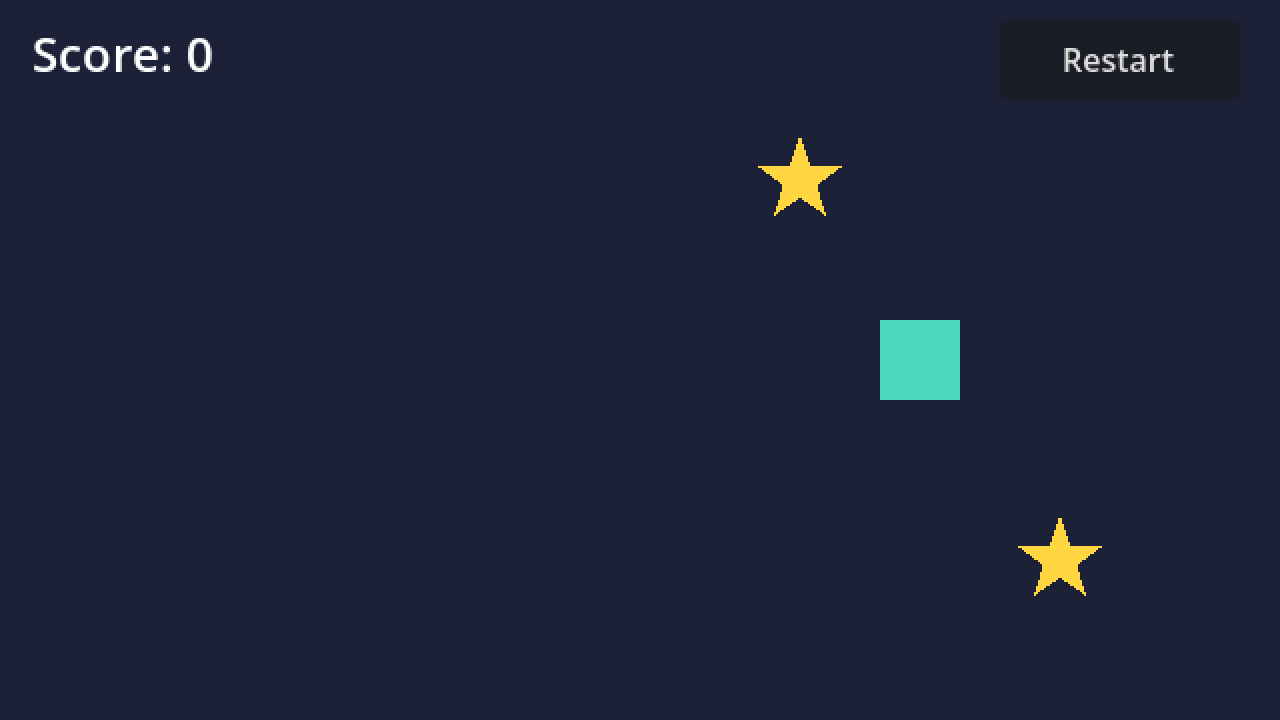
Several Godot MCP servers let Claude Code or Cursor run your game, send it input and screenshot the running game: Ziva, Godot MCP Pro, GDAI MCP, Godot AI (hi-godot/godot-ai) and Erodenn/godot-mcp-runtime, plus Summer Engine's MCP for Summer's own editor. In Ziva, one tool does all three: run_scene runs a scene in the open Godot editor, sends timed keyboard, mouse, input-action and UI-click input, and returns a screenshot of the running game with that run's console output and runtime errors. Ziva's get_godot_errors reads Godot's errors and output, and Ziva's get_screenshot captures the editor, not the game. To connect Claude Code, click Install for Claude Code in Ziva's settings, which runs claude mcp add --scope user ziva-godot -- ... for you. The Ziva plugin supports Godot 4.2 or later and its MCP tools need no paid plan, but Ziva's run_scene and get_screenshot need the Ziva dock signed in (the free Hobby plan works).
Ziva.sh makes Ziva and publishes this page. Facts about other servers are quoted from each vendor's own page or README as of 7 November 2026, except Godot AI's C# statement, from its README on 4 November 2026. Disclosure: GDAI MCP is made by Delano Lourenco, a Ziva cofounder.
Godot MCP servers compared: run, input, screenshot #
| Server | Cost/licence | Setup | Run game | Input to running game | Game screenshot | Errors/output | Godot version |
|---|---|---|---|---|---|---|---|
| Ziva (local MCP server inside the Ziva plugin) | Ziva: free Hobby plan works; sign-in needed for screenshots | Ziva: install the plugin, click Install for Claude Code orInstall for Cursor ; no Node.js or uv | Ziva: run_scene , in the open editor |
Ziva: run_scene actions, keys, left and right clicks, clicks on a Control by path or text, mouse motion |
Ziva: run_scene returns the final frame;get_screenshot is the editor only |
Ziva: run_scene output and runtime errors;get_godot_errors |
Ziva: plugin 4.2+; we ran run_scene on 4.7.2 |
| Coding-Solo/godot-mcp | Coding-Solo/godot-mcp: free, MIT | Coding-Solo/godot-mcp: claude mcp add godot -- npx @coding-solo/godot-mcp ; Node.js 18+ |
Coding-Solo/godot-mcp: "Execute Godot projects in debug mode" | Coding-Solo/godot-mcp: not stated | Coding-Solo/godot-mcp: not stated | Coding-Solo/godot-mcp: "Retrieve console output and error messages" | Coding-Solo/godot-mcp: not stated; UID tools need 4.4+ |
| GDAI MCP | GDAI MCP: "$19 one-time payment", binary only | GDAI MCP: addon in res://addons/ , plusuv |
GDAI MCP: play_scene |
GDAI MCP: simulate_input , "keyboard keys and input actions"; mouse not stated |
GDAI MCP: get_running_scene_screenshot |
GDAI MCP: get_godot_errors |
GDAI MCP: "Godot 4.2+" on its site; its GitHub README says 4.1+ |
| Godot MCP Pro | Godot MCP Pro: "$15 one-time purchase"; server proprietary | Godot MCP Pro: addon plus the Node.js server from the paid package; Node.js 18+ | Godot MCP Pro: play_scene |
Godot MCP Pro: simulate_key ,simulate_mouse_click ,simulate_mouse_move ,simulate_action ,simulate_sequence |
Godot MCP Pro: get_game_screenshot |
Godot MCP Pro: get_editor_errors ,get_output_log |
Godot MCP Pro: "Godot 4.4 or later" |
| Godot AI (hi-godot/godot-ai) | Godot AI: free, MIT | Godot AI: addon from AssetLib, uv , thenConfigure in the Godot AI dock |
Godot AI: project_run |
Godot AI: game_manage withinput_key ,input_mouse ,input_gamepad ,input_action |
Godot AI: editor_screenshot of the "running game framebuffer" |
Godot AI: logs_read |
Godot AI: "Godot 4.7+" |
| Erodenn/godot-mcp-runtime | godot-mcp-runtime: free, MIT | godot-mcp-runtime: npx -y godot-mcp-runtime withGODOT_PATH ; Node.js 20+; "No Godot addon" |
godot-mcp-runtime: run_project |
godot-mcp-runtime: simulate_input : keys, mouse clicks and motion, clicks on UI elements, actions, text |
godot-mcp-runtime: take_screenshot |
godot-mcp-runtime: get_debug_output |
godot-mcp-runtime: "Godot 4.x" |
| Summer Engine MCP | Summer Engine: "free, MIT-licensed"; "Cloud generation ... uses credits" | Summer Engine: npx -y summer-engine@latest setup claude-code --yes , plus the Summer Engine desktop app |
Summer Engine: summer_play |
Summer Engine: summer_game_input |
Summer Engine: summer_screenshot |
Summer Engine: summer_get_debugger_errors ,summer_get_console |
Summer Engine: its own desktop app, "compatible with Godot 4"; not stock Godot |
Notes on the table:
- Erodenn/godot-mcp-runtime's README calls it "a lightweight MCP server" whose "runtime bridge adds screenshots, input simulation, UI discovery, and live GDScript against the running scene tree". Erodenn/godot-mcp-runtime injects that bridge as an autoload when
run_projectis called and says it leaves "No leftover autoloads, no modified project files". - Summer Engine's FAQ answers "Does Summer MCP work with the stock Godot editor?" with "No. Its engine tools drive the Summer Engine desktop app, which is compatible with Godot 4 and opens compatible Godot 4 projects."
- Godot MCP Pro's site lists "187 Tools, 26 Categories". Godot AI's README lists "46 tools and 120+ operations".
- Coding-Solo/godot-mcp had 6,547 GitHub stars on 7 November 2026. Coding-Solo/godot-mcp's README lists running the project, capturing debug output and editing scenes, and lists no input or screenshot tool.
Set up Ziva's MCP server in Claude Code or Cursor #
Ziva's MCP server ships inside the Ziva plugin and runs only on your computer, with no hosted URL. Install Ziva in your Godot project, open the project in Godot, wait for Ziva to start and sign in to Ziva in its dock. In Ziva, open Settings → Models & Providers → Ziva as an MCP server and check that it shows Running.
Claude Code
- Make sure the
claudecommand works in your terminal. - Under AI application , chooseClaude Code and clickInstall for Claude Code . Ziva runs
claude mcp add --scope user ziva-godot -- ...with its generated command, soziva-godotis available in every project. - Start a new Claude Code session from your Godot project folder and ask: "Use ziva-godot's run_scene tool to run res://main.tscn for 2500 ms, holding ui_right from 300 ms for 1200 ms, and tell me which errors it printed."
Cursor
- Under AI application , chooseCursor and clickInstall for Cursor . Ziva adds
ziva-godotundermcpServersin your project's.cursor/mcp.json. - Open that same project folder in Cursor and restart Cursor.
- Ask Cursor to use ziva-godot's
run_sceneon a scene, as in the Claude Code example.
If Godot is closed, a command-line client such as Claude Code started from your project folder sees one Ziva tool, `start_godot`, which opens the editor; after that, the full Ziva tool list appears. Codex, VS Code, Windsurf, Zed, Gemini CLI and other apps have their own **Install for [app]** button, and the [Ziva MCP server guide](https://ziva.sh/docs/ziva-mcp-server) has the manual setup.

## [What Ziva's MCP tools return](#what-zivas-mcp-tools-return)
Ziva's run_scene takes a scene path, a run length in duration_ms and an optional list of timed inputs. Each input starts at at_ms and is held for hold_ms:
Ziva's input types are action (a named input action), key (a raw keyboard key, with Shift, Ctrl, Alt or Meta held as modifiers), mouse (a left or right click at a pixel position), target (a click on a Control found by node path or visible text) and motion (relative mouse movement, for a camera with a captured mouse). Ziva's run_scene returns:
- One screenshot: the final frame of the running game, as an image Claude Code or Cursor can look at.
- An input delivery report with the frame and millisecond each press and release landed on, so the client can tell an input the game never got from one it ignored.
- The Godot console output and runtime errors from that run, with file and line.
- With
speed: true, the frame rate, and when the run is slow, the slowest functions with file and line.
Ziva's other tools for this loop are get_godot_errors for script errors, runtime errors, stack traces and print() output, get_screenshot for the editor window or its 2D or 3D viewport, get_scene_tree to inspect the scene, and run_tests for a test suite. MCP calls skip Ziva's approval prompts, so use your client's permission settings. In our Godot playtesting guide, Ziva's run_scene held ui_right in a sample game and returned the null-instance error from res://main.gd:15 with a screenshot showing the score still at 0.
Tested: Claude Code running a Godot game through Ziva's MCP server #
On 7 November 2026 we connected Claude Code 2.1.318 to Ziva's MCP server with the same stdio command Ziva's Install for Claude Code button registers, opened the Star Catcher sample in Godot 4.7.2 with a development build of Ziva from 7 November 2026 and the Ziva dock signed in to a Hobby account, and ran one prompt:
Use the ziva-godot MCP tools. Run the main scene of this Godot project for about 4 seconds while holding the right arrow key (ui_right) for 2 seconds, then tell me what the screenshot shows and list any runtime errors exactly as reported. Do not edit any files.
Claude Code saw 42 ziva-godot tools, read the main scene path with Ziva's get_project_info, then called Ziva's run_scene once:
The call took 8.1 seconds. Ziva's input delivery report said the press landed at 0 ms and the release at 2009 ms, and Ziva's run_scene returned the sample's two real errors word for word:
From the screenshot and the errors, Claude Code concluded that a star was collected but the score label never updated, which is the bug. With Godot closed, the same Claude Code setup saw only Ziva's `start_godot` tool, called it, and had the editor open with all Ziva tools available 5.2 seconds later; the first `run_scene` after that hit a one-off upload error and worked on retry. With the Ziva dock signed out, Ziva's `run_scene` and `get_screenshot` returned "Not signed in", while Ziva's `get_godot_errors` and `get_project_info` still worked.

## [What Ziva's MCP server can't do](#what-zivas-mcp-server-cant-do)
- Ziva's
run_scenereturns one frame per call, not a video or a stream. To see a later moment, call it again with a longerduration_ms. - Ziva's
run_sceneneeds the Godot editor open, so Ziva has no headless or CI mode. - Ziva's
run_scenehas no gamepad or touch input. - Ziva's
run_scenerefuses to start while you are playing a game in the editor, because it would close your game. - Ziva's Full Game Playtest Agent, which plays toward a goal and returns pass, fail or blocked, is not available over MCP.
- Ziva's
run_sceneandget_screenshotneed the Ziva dock signed in, because Ziva uploads each screenshot to Ziva's servers before returning it. Signed out, they return "Not signed in". - Ziva's
run_sceneonly appears whenEnable playtest tool is on in Ziva'sSettings → Agent . Ziva'sgenerate_imagetool draws on your plan's included usage.
How to choose a Godot MCP server #
- Pick Ziva if you also want an AI agent inside the Godot editor, or you don't want to install Node.js or uv. Ziva's
run_scenegives Claude Code or Cursor input, a screenshot and errors in one call. - Pick Godot AI (hi-godot/godot-ai) if you are on Godot 4.7 or later and want a free, MIT-licensed server with gamepad input.
- Pick Erodenn/godot-mcp-runtime if you want a free, MIT server with no addon to install or commit, or the game launched without the editor open.
- Pick Coding-Solo/godot-mcp if you only need to run the project and read errors, with no editor addon.
- Pick Godot MCP Pro or GDAI MCP if you prefer a one-time purchase: Godot MCP Pro lists mouse input and needs Godot 4.4 or later, and GDAI MCP lists keys and input actions.
- **For CI** , use scripted GUT or GdUnit4 input tests rather than an MCP client; our[playtesting guide](https://ziva.sh/blogs/godot-automated-playtesting) has tested examples.

## [Related reading](#related-reading)

- [Ziva as an MCP server](https://ziva.sh/docs/ziva-mcp-server) : full setup for every supported app
- [How to automate playtesting in Godot](https://ziva.sh/blogs/godot-automated-playtesting) : GUT, GdUnit4, headless bots and AI agents
- [Ziva vs Godot MCP](https://ziva.sh/blogs/ziva-vs-godot-mcp) : Ziva compared with Coding-Solo and other open-source servers
- [Ziva vs GDAI MCP](https://ziva.sh/blogs/ziva-vs-gdai-mcp) : Ziva compared with GDAI MCP