To automate playtesting in Godot, something has to press the buttons for you and something has to decide whether what happened was right. You can script both yourself, with input tests in GUT or GdUnit4 or a bot autoload you run from the command line, including headless in CI. Or you can hand the pressing to an AI: an MCP server that lets Claude Code or Cursor run the game, or an agent inside the editor such as Ziva.
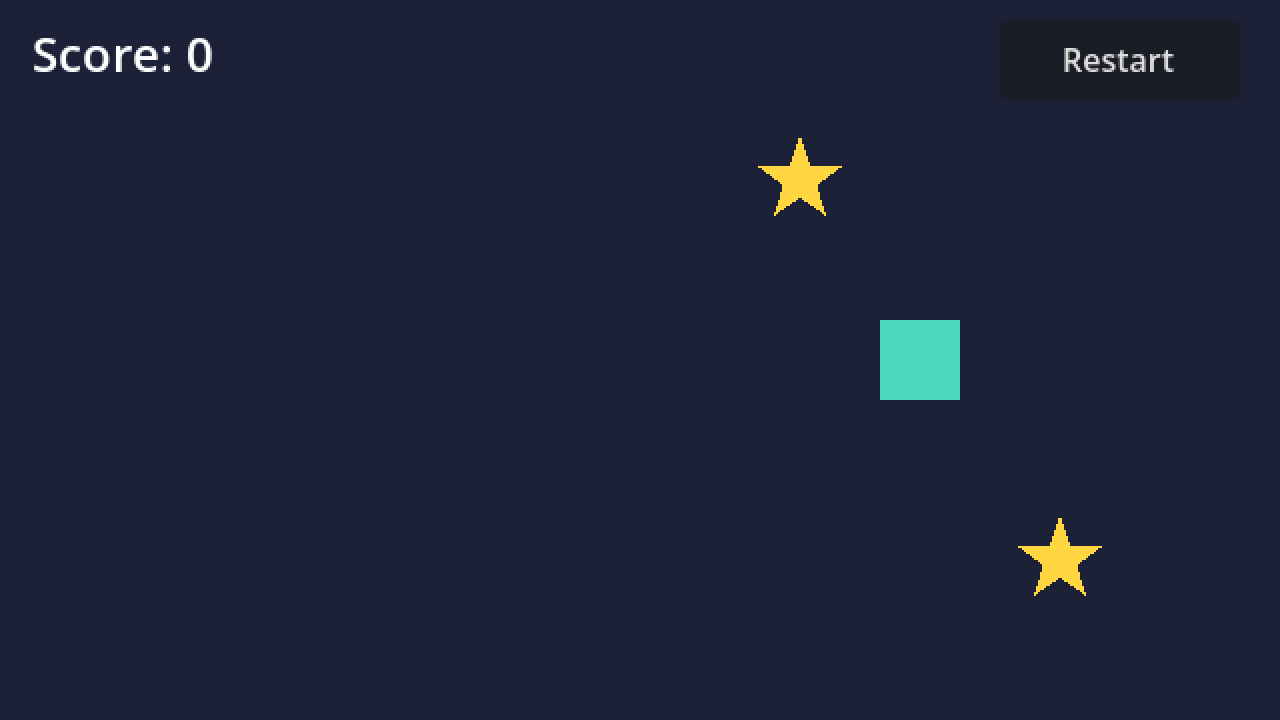
Ziva.sh publishes this page and makes Ziva. Facts about other tools come from their own pages, as of 5 November 2026. We ran every Godot command and test on this page on 5 November 2026 with Godot 4.7.2 on Linux, on the public Star Catcher sample, a small game with one deliberate bug: collecting a star should add a point, but the score label is never found.
The ways to automate playtesting in Godot #
| Way | Who decides what to press | Headless or CI | Price |
|---|---|---|---|
| GUT input tests | GUT: your test script, through GutInputSender | GUT: yes; exited 1 on a failing test in our run | GUT: free, MIT |
| GdUnit4 scene runner | GdUnit4: your test script, through the scene runner | GdUnit4: yes; exited 100 on a failing test in our run | GdUnit4: free, MIT |
| A bot autoload run from the command line | Bot: your script | Bot: yes with godot --headless ; screenshots and video need a display |
Godot: free, MIT |
| Godot MCP servers with Claude Code or Cursor | MCP servers: the AI client's model | MCP servers: drive a running editor or game; Beckett Full adds a headless CI runner | MCP servers: free to $19 one-time, plus the client |
| Ziva run_scene | Ziva run_scene: Ziva's agent, or Claude Code over Ziva's MCP | Ziva run_scene: no; the Godot editor must be open | Ziva run_scene: every plan, including the free Hobby plan |
| Ziva Full Game Playtest Agent | Ziva Full Game Playtest Agent: an AI playing toward your goal | Ziva Full Game Playtest Agent: no; the Godot editor must be open | Ziva Full Game Playtest Agent: Pro ($50/month) and Ultra |
| modl.ai ,nunu.ai | modl.ai, nunu.ai: their AI agents, from the screen | modl.ai: "upload your latest build"; nunu.ai: "PC and mobile (iOS and Android)" | modl.ai, nunu.ai: no price on their home pages |
Scripted tests and bots are free, repeatable and fast, but they only check what you thought to script. Agents find paths you did not script, but each run costs model time and an agent's choices vary between runs. Most games want both: scripted checks on every commit, an agent pass before a release.
Simulate keyboard and mouse input in Godot #
Godot itself has two ways to fake input from code. Both moved the Star Catcher player 360 px to the right in 1.2 seconds of game time in our run.
Godot's Input docs say parse_input_event "Feeds an InputEvent to the game" and "Also generates Node._input() calls", and that action_press "will not cause any Node._input() calls". Neither touches the operating system: sending an InputEventKey "won't toggle between active windows". To release a parsed key, send a copy with pressed = false. An InputEventAction sent through parse_input_event works the same way for actions.
GUT: GutInputSender
GUT's GutInputSender "can be used to send InputEvent* events to various objects. It also allows you to script out a series of inputs and play them back in real time." With Input as the receiver, GUT's Mocking Input page says Godot treats the events "exactly the same as if the events were triggered from hardware". This test passed on the fixed game and failed on the sample's main branch:
After importing the project once with godot --headless --path . --import, GUT 9.6.1 ran it headless with godot --headless --path . -s addons/gut/gut_cmdln.gd -gdir=res://test -gexit. On the buggy branch GUT reported ["Score: 0"] expected to equal ["Score: 1"], listed the Invalid assignment of property or key 'text' ... on a base object of type 'null instance' error under "Unexpected Errors", and exited with code 1. GutInputSender also has key_down, key_up, mouse_left_click_at and other mouse methods.
GdUnit4: the scene runner
GdUnit4's scene runner has functions that "mimic user key inputs as actions for testing purposes", plus key and mouse functions such as simulate_key_pressed(KEY_ENTER) and simulate_mouse_button_pressed(MOUSE_BUTTON_LEFT). The same check in GdUnit4 7.0.0:
GdUnit4 ran it with ./addons/gdUnit4/runtest.sh --godot_binary /usr/bin/godot --headless -a res://test, printed "Running in headless mode, Godot does not render anything.", reported a Godot runtime error and "Expecting: 'Score: 1' but was 'Score: 0'" on the buggy branch, and exited with code 100. On the fixed game it exited 0.
## [Make the game play itself: a bot and the command line](#make-the-game-play-itself-a-bot-and-the-command-line)

For a run through the real game rather than a test scene, add an autoload that plays only when you ask it to. This one walks right into the first star and checks the score:
Run it from the project folder:
On the sample's buggy main branch, Godot 4.7.2 printed:
The exit code was 1. After changing %ScoreLabel to $HUD/ScoreLabel in main.gd, the same command printed BOT: score label says 'Score: 1' and exited 0. What the flags did:
--headlessruns with no window and no audio, so it works on a CI machine. Nothing is rendered, so there are no screenshots.--fixed-fps 60gives every frame exactly 1/60 s of game time;godot --helpsays it "disables real-time synchronization". The whole run, startup included, took 0.78 s of wall time for 2 seconds of game time, and the player moved the same 360 px in every run we measured.--quit-after 600stops the game after 600 iterations (frames) if the bot never quits, so a stuck run cannot hang CI.- Arguments after
--reach the game throughOS.get_cmdline_user_args(), so normal launches ignore the bot.
The bot must decide pass or fail itself. Without the bot, godot --headless --path . --fixed-fps 60 --quit-after 600 printed the same Node not found error and still exited 0.
To watch what the bot did, record it with --write-movie run.avi. That needs rendering: with --headless, Godot 4.7.2 crashed (signal 11) in our test. On a virtual X display (Xvfb, no GPU), the same run without --headless wrote a 122-frame AVI at 60 FPS and printed Done recording movie at path. For longer games, chain several inputs, check signals or node state at each step, and give each level its own bot path.
Let Claude Code or Cursor run the game: Godot MCP servers #
An MCP server gives an AI client such as Claude Code or Cursor tools to control Godot. The client's model decides what to press. These servers list tools for running the game, sending input and seeing the result:
| MCP server | Run the game | Send input | See the running game | Licence and price |
|---|---|---|---|---|
| Ziva's MCP server | Ziva: run_scene runs a scene from the open editor |
Ziva: actions, keys, mouse clicks, clicks on a Control by path or text, mouse motion | Ziva: final screenshot plus console output and runtime errors; get_screenshot (editor) |
Ziva: run_scene on every plan, including the free Hobby plan |
| Godot MCP Pro | Godot MCP Pro: "Launch the game" | Godot MCP Pro: simulate_key ,simulate_mouse_click ,simulate_action ,simulate_sequence |
Godot MCP Pro: get_game_screenshot |
Godot MCP Pro: "$15 one-time purchase" |
| GDAI MCP | GDAI MCP: runs the game and checks it with screenshots | GDAI MCP: "press keyboard keys and input actions" | GDAI MCP: screenshots of "the editor and running game" | GDAI MCP: "$19 one-time payment", binary-only licence |
| Beckett | Beckett Lite and Full: "run your game" | Beckett Full: "simulate input, click 2D and 3D UI, scroll, drag, record and replay" | Beckett Lite and Full: "screenshot the running game" | Beckett: Lite free (MIT), Full "$15, one-time" |
| satelliteoflove/godot-mcp | satelliteoflove/godot-mcp: run, stop, restart; freeze and step | satelliteoflove/godot-mcp: "actions, joypad, raw keys, mouse-look, text" | satelliteoflove/godot-mcp: game screenshots and live state as JSON | satelliteoflove/godot-mcp: free, MIT; Godot 4.5+ |
| Godot AI (hi-godot/godot-ai) | Godot AI: project_run |
Godot AI: input_key ,input_mouse ,input_gamepad ,input_action ,input_sequence |
Godot AI: editor_screenshot with the running game's framebuffer |
Godot AI: free, MIT; Godot 4.7+ |
| Open Godot MCP | Open Godot MCP: godot_game play, stop, freeze |
Open Godot MCP: godot_input for keyboard, mouse, gamepad and text |
Open Godot MCP: godot_screenshot |
Open Godot MCP: free, MIT; Godot 4.5+ |
| Coding-Solo/godot-mcp | Coding-Solo/godot-mcp: "run projects, capture debug output" | Coding-Solo/godot-mcp: no input tool listed | Coding-Solo/godot-mcp: no game screenshot listed | Coding-Solo/godot-mcp: free, MIT |
| Summer Engine MCP | Summer Engine: "play" | Summer Engine: "input" | Summer Engine: "screenshots" | Summer Engine: MIT CLI and MCP tools that "drive Summer's desktop editor, not stock Godot" |
Two vendors also describe verification beyond pressing keys. Godot MCP Pro's page says it can "assert game state, and run stress tests with random input". Beckett's author wrote on 10 July 2026 about Beckett Full: "A headless runner plays every saved suite in your own CI and exits non-zero on failure."
Let Ziva run the game and read the errors #
Ziva is an AI agent that works inside the Godot editor. Since version 3.0.0 (June 2026), Ziva's run_scene tool runs a scene live from the open editor, in the editor's embedded game view, and returns a screenshot of the running game plus the console output and runtime errors from that run. Ziva's run_scene is on every plan, including the free Hobby plan. Ziva's agent calls it on its own when you ask for a concrete check, for example: "Run my level, jump onto the first platform, and check that the player lands."
Ziva's run_scene takes a timed list of inputs, each with a start time and a hold time:
action: a named input action, pressed withInput.action_press, so it works without a key mapping.key: a rawInputEventKey, which_inputsees.mouse: a left or right click at a pixel position.target: a click on a Control found by node path or visible text.motion: relative mouse movement, for a first-person camera with a captured mouse.
Ziva sends raw keys and mouse clicks as InputEvents through Input.parse_input_event, the channel a keyboard's events take inside Godot, and presses named actions with Input.action_press. Ziva presses no physical key, and Ziva's run_scene has no gamepad or touch input. Each Ziva run_scene result includes a delivery report with the frame and millisecond every press and release landed on, and speed: true adds average FPS, 1% low and worst frame time.
What Ziva's run_scene returned on Star Catcher
We called Ziva's run_scene directly through Ziva's local MCP endpoint, without a model, on the Star Catcher sample in Godot 4.7.2:
- A plain 2.5-second run returned
Node not found: "%ScoreLabel" (relative to "/root/Main")with sourceres://main.gd:5. - Holding
ui_rightfrom 300 ms for 1,200 ms moved the player 360 px and collected the first star. Ziva's result addedInvalid assignment of property or key 'text' with value of type 'String' on a base object of type 'null instance'atres://main.gd:15, and the screenshot showed the score still at 0. - For a UI check, we added a Restart button inside a CanvasLayer to our test copy (it is not in the public sample). Ziva's
run_sceneclicked it by its visible text "Restart", by its node pathRestartLayer/RestartButtonand by a mouse click at its pixel position, and the button'spressedhandler printed each time. - A target that matched nothing, "Play Again", came back in Ziva's delivery report as
delivered: falsewith "no Control matched target 'Play Again'". The run itself still reported success, so read the delivery report.
In a separate unedited recording on the same sample, one prompt asked Ziva to add stars, play the game and check that the score goes up. Ziva ran the game while holding ui_right, read the two errors, changed the lookup in main.gd to $HUD/ScoreLabel, ran the game again and saw Score: 1. The sample's README has the exact prompt and every change.
Use Ziva's run_scene from Claude Code or Cursor
Ziva runs a local MCP server, so Claude Code, Codex, Cursor and other MCP apps can call Ziva's run_scene and get_screenshot tools. Ziva's MCP server is local only, with no hosted URL. To connect Claude Code (full steps):
- Open your project in Godot with Ziva installed and signed in.
- In Ziva, open Settings → Models & Providers → Ziva as an MCP server and check that it showsRunning .
- Under AI application , chooseClaude Code and clickInstall for Claude Code .
- Start a new Claude Code session from your Godot project folder and ask, for example: "Use ziva-godot's run_scene tool to run res://main.tscn for 2500 ms, holding ui_right from 300 ms for 1200 ms, and tell me which errors it printed."
Claude Code then gets the same screenshot, console output and errors as Ziva's own agent. Ziva's run_scene only appears when playtesting is enabled in Ziva's settings, and Ziva's Full Game Playtest Agent is not available over MCP.
Ziva Full Game Playtest Agent
Ziva's Full Game Playtest Agent, added in 3.1.4 (August 2026), plays a whole game toward a goal you set, such as "chop down a tree and build a crafting bench". Ziva's Full Game Playtest Agent is on Ziva's Pro ($50/month) and Ultra plans. Ask Ziva to "use the Full Game Playtest Agent". Ziva's Full Game Playtest Agent starts the game, keeps it d while the model thinks, sends keyboard and mouse input one action at a time, checks the result with screenshots and values it reads from the running scene, and returns pass, fail or blocked with evidence. With Record playtests on in Settings → Agent, Ziva saves a video of the run with its goal and inputs drawn in. Ziva's Full Game Playtest Agent cannot edit your project: it reports, and you or Ziva's normal chat fix the bug. See Is there an AI agent that can playtest a Godot game? and the Full Game Tester page.
Checklist: find bugs in your Godot game before release #
- Make errors fail the run. Godot exited 0 after a
SCRIPT ERRORin our test, so have the bot callget_tree().quit(1), or fail the CI step when the log containsSCRIPT ERROR. - Script the main path: start, first level, win, lose, restart. Run it as a bot or as GUT or GdUnit4 tests headless on every commit.
- Use
--fixed-fps 60so timers and physics advance the same way every run. - Click through the UI, not only the gameplay: menus, , restart and buttons inside CanvasLayers.
- Record a bot run with
--write-movieon a display when a failure is hard to picture. - Before a release, let an agent play the paths you did not script, such as Ziva's Full Game Playtest Agent or Claude Code with an MCP server.
- Check frame rate at your target FPS. Ziva's
run_scenewithspeed: truereports average FPS, 1% low and worst frame time. - Test the exported build on each platform yourself. Ziva's playtesting runs in the editor, not on an export.
What Ziva doesn't do #
- Ziva plays games only inside an open Godot editor, so Ziva has no headless or CI mode; use GUT, GdUnit4 or a bot for CI.
- Ziva plays one game at a time, with no multiplayer or multi-window runs.
- Ziva sends keyboard and mouse input only, with no gamepad or touch input, and no exported builds, mobile or web.
- Ziva's Full Game Playtest Agent is Godot only, on Pro and Ultra, uses a hosted model, and cannot edit your project.
- Ziva's playtesting needs you signed in to Ziva, even when Claude Code calls
run_sceneover MCP; the free Hobby plan is enough forrun_scene. - Ziva doesn't tell you whether your game is fun.
## [Related reading](#related-reading)

- [Is there an AI agent that can playtest a Godot game?](https://ziva.sh/blogs/ai-agent-playtest-godot-game)
- [Ziva as an MCP server](https://ziva.sh/docs/ziva-mcp-server)
- [Ziva vs Godot MCP](https://ziva.sh/blogs/ziva-vs-godot-mcp)
- [Ziva vs GDAI MCP](https://ziva.sh/blogs/ziva-vs-gdai-mcp)