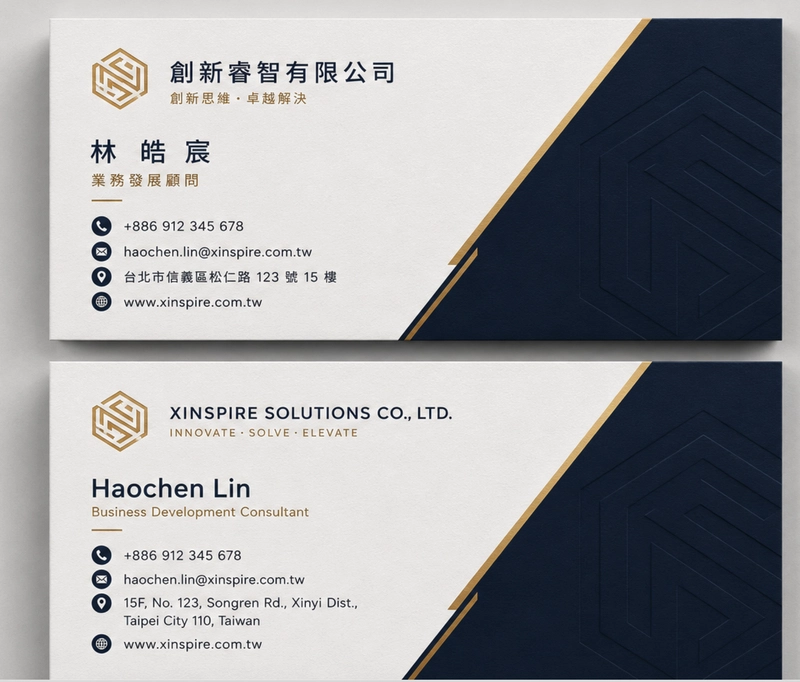
Instead of writing a thousand fragile regex rules to guess if two names are the same, I just let the user tell me. I implemented a "waiting room" state. When the first side hits, the bot asks, "Is there a back side?" If the user says yes, the bot holds onto that image in a user_states
dictionary with a 5-minute timeout (because users have the attention span of a goldfish).
The real magic happens when both images are fed into Gemini simultaneously. Trying to merge "Wang Daming" and "David Wang" via code is a recipe for a headache. Sending both images in one prompt and letting the LLM handle the semantic merge is the only sane way to do this.
Here is the prompt logic I used to force Gemini to combine the data into a single clean JSON object:
You are an expert OCR and data extraction agent. I am providing you with two images: the front and back of a single business card.

Your task:
1. Extract all professional information from both images.
2. Merge the data into a single unified record.
3. If a field (like Name or Company) appears in both languages, combine them into a single string (e.g., "Chinese Name / English Name").
4. Ensure the output strictly follows the provided JSON schema.
5. Ignore any background noise or irrelevant text.

Return only the final merged JSON.
For the implementation, I used gemini-1.5-flash
because it's fast enough that the user doesn't forget why they're waiting. I just wrap both image parts into the generate_content
call.
def generate_json_from_two_images(
 front_img: PIL.Image.Image,
 back_img: PIL.Image.Image,
 prompt: str) -> object:
 model = GenerativeModel(
 "gemini-1.5-flash",
 generation_config={
 "response_mime_type": "application/json",
 "response_schema": NAMECARD_SCHEMA
 },
 )
 front_part = Part.from_data(
 data=pil_to_bytes(front_img), mime_type="image/jpeg")
 back_part = Part.from_data(
 data=pil_to_bytes(back_img), mime_type="image/jpeg")
 response = model.generate_content(
 [prompt, front_part, back_part],
 stream=False,
 labels={"client_id": "namecard"}
 )
 return response
This approach turns a messy data-cleaning chore into a simple prompt engineering task. No more duplicate entries, no more manual deleting—just a clean, consolidated record.
Next Understanding LLM Context and Hallucinations →