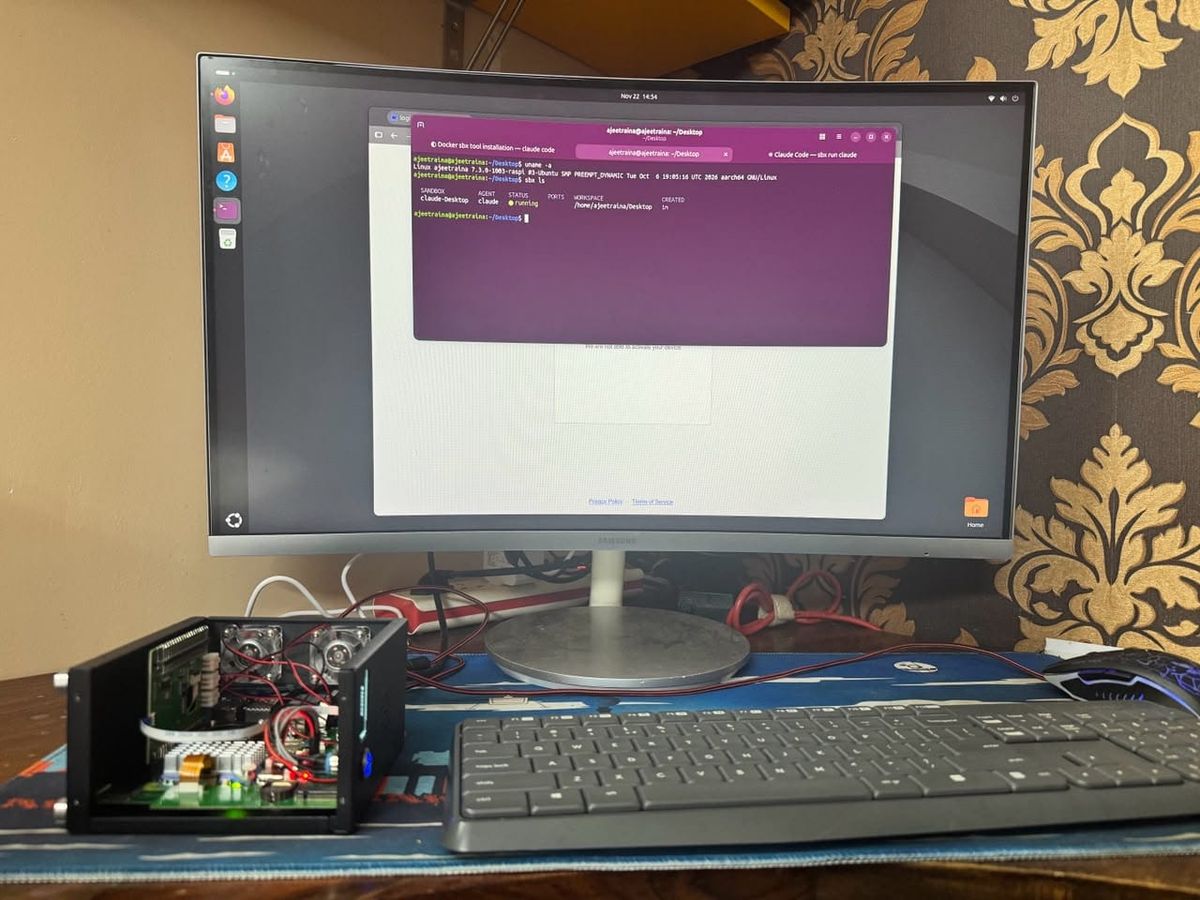
Yes. A Raspberry Pi 5 with 8 GB RAM can run real Docker Sandbox microVMs, complete with an independent kernel, Docker Engine, and enforceable network policies.
Docker Sandboxes (sbx v0.54.0) runs on an 8 GB Raspberry Pi 5: local microVMs start, run Docker inside themselves and enforce a network policy. After the first pull, creating a sandbox took about 8 seconds.
Test setup #
Every result below comes from one board, with a second sandbox running Claude Code alongside the tests.
| Item | Value |
|---|---|
| Board | Raspberry Pi 5 Model B Rev 1.1, 4 Cortex-A76 cores, 2.4 GHz max |
| Memory | 7.7 GiB usable |
| OS | Ubuntu 26.10 desktop, arm64 |
| Kernel | 7.3.0-1003-raspi, 4 KB pages |
| Storage | 58 GB root volume on mmcblk0 |
| Docker Engine on host | Not installed, and not needed |
Docker's install page asks for Ubuntu 24.04 or later, a 64-bit Arm processor and KVM. It does not mention Raspberry Pi, so treat this as a report from one board and not a support statement. Raspberry Pi OS was not tested.
Install #
First confirm that KVM is available and that your user can open it:
ls -l /dev/kvm
sudo usermod -aG kvm $USER   # then sign out and back in
Docker documents two commands for installing sbx without Docker Engine:
curl -fsSL https://get.docker.com | sudo REPO_ONLY=1 sh
sudo apt install docker-sbx
That route was not available on Ubuntu 26.10: on 22 November 2026 Docker's apt repository had no arm64 docker-sbx package for stonking. The 26.04 package from the releases page installed cleanly instead:
curl -fsSLO https://github.com/docker/sbx-releases/releases/download/v0.54.0/DockerSandboxes-linux-arm64-ubuntu2604.deb
echo "21c12141a3732502cf75c0141245b2090f28803a759961c2a16dbed06bcb51d0  DockerSandboxes-linux-arm64-ubuntu2604.deb" | sha256sum -c
sudo apt install ./DockerSandboxes-linux-arm64-ubuntu2604.deb
The release also has a tarball that installs without root. Ubuntu restricts unprivileged user namespaces, and the AppArmor profile in that tarball covers only /usr/libexec, so the .deb is the safer choice. The tarball route was not tried.
Sign in, then check the result:
sbx login
sbx diagnose
After sign-in, sbx diagnose reported 16 checks passed, 4 skipped and none failed.
A first sandbox #
This creates a plain shell sandbox with no host folder attached:
sbx create --name demo --cpus 1 -m 1g shell
sbx exec demo uname -a
sbx exec demo docker run --rm hello-world
sbx stop demo
sbx rm --force demo
Inside, the test sandbox had:
- Its own kernel: Linux 7.0.14 on aarch64, while the host ran 7.3.0
- Its own userland: Docker Hardened Images, Debian 13 (trixie)
- Its own Docker Engine: 29.10.0, and hello-world ran
- A non-root user: agent, with -u root available on sbx exec
- No host home directory: it was not visible
The 1 CPU and 1 GB limits held: nproc returned 1 and free -m showed 986 MB. For a coding agent, run sbx run claude from your project folder.
What works #
Network policy
The policy here denied anything without a matching rule. https://pypi.org returned 200 from inside the sandbox and https://example.com returned 403. A rule scoped to one sandbox changed that at once, and left the global policy alone:
sbx policy check network example.com
sbx policy allow network --sandbox demo example.com
sbx policy deny network --sandbox demo pypi.org
sbx policy log demo
sbx policy rm network --force --sandbox demo --resource example.com
After those rules example.com returned 200 and pypi.org returned 403. The log named the rule behind each block.
Ports and files
sbx port publish demo 18080:8000
sbx port ls demo
sbx port unpublish demo 18080:8000
sbx cp a.txt demo:/tmp/a.txt
sbx cp demo:/tmp/b.txt b.txt
A Python web server inside the sandbox answered on 127.0.0.1:18080, and stopped answering after the unpublish. Copies worked in both directions.
Workspaces
A folder passed to sbx create is mounted at the same path inside the sandbox, and files written there appear on the host. Adding :ro worked too: a write failed with Read-only file system.
Templates
Stop the sandbox, save it, and start another from the snapshot:
sbx stop demo
sbx template save demo demo:v1
sbx create --name demo2 --pull never -t demo:v1 shell ./ws
A file written in the first sandbox was present in the second.
Environment files
The experimental sbx env commands read an sbxenv.yaml file:
schemaVersion: "1"
name: demo-env
agent: shell
workspace: ${{ env.projectDir }}
env:
  HELLO: pi5
sbx env plan
sbx env create --force
sbx env exec sh -c 'echo $HELLO'
sbx env rm --force
Timings #
Only the first create is slow. These are single runs or small samples, with 1 CPU per sandbox and another sandbox running, so read them as a guide and not a benchmark.
| Action | Time |
|---|---|
First sbx create shell , including the download |
2 min 15 s |
Later sbx create shell |
8.4 s |
sbx create from a saved template |
8.0 s |
sbx exec on a stopped sandbox, including start (4 runs) |
2.3 to 4.1 s |
sbx exec on a running sandbox, simple commands |
0.7 to 1.7 s |
sbx stop |
0.7 to 3.4 s |
docker run --rm hello-world inside, including the pull |
6.2 s |
Memory is the limit to watch on an 8 GB board. The help text says a sandbox defaults to 50% of host memory, so set -m if you plan to run more than one. With two sandboxes up, the host had about 2.1 GiB available. The kernel log showed no out-of-memory kills. One temperature reading, not taken under sustained load, was 55.7 °C.
Things to watch #
- Sandboxes stop themselves. The daemon log showed an automatic stop 30 seconds after the last session disconnected. The next sbx exec starts the sandbox again, and its files are kept.
- sbx run with no path mounts the current folder. Use sbx create with no path when you want no host files attached.
- sbx template save prompted while the sandbox was running. Stopping it first avoided the prompt.
- Scripts need --force. Without a terminal, sbx policy rm network refuses to run unless you pass it.
- Old and new kits do not mix. The shell agent now ships as av3 kit , so adding av2 mixin failed with cannot mix v3 kits with v1/v2 kits in one sandbox.
- A scoped custom secret did not set the variable. Aftersbx secret set-custom on a running sandbox, thevariable was empty , and the output said it may need updating by hand.
- Removing a template can leave its image. After sbx template rm, sbx template ls still showed a sandbox-kit-assembled image, which needed its own rm.
- --clone needs Git on the host. This board had none, so clone mode was not tested.
- Some commands are cloud-only. sbx volume ls, sbx schedule ls and sbx template inspect ask for --cloud.
Command coverage #
All 129 entries found by walking the help output, groups included, answered --help. Of these, 54 were also run successfully, and the main gaps are listed after the table.
| Area | Run successfully |
|---|---|
| Lifecycle | create ,run --detach ,exec ,inspect ,ls ,cp ,stop ,rm ,prune --dry-run |
| Ports | port publish ,port ls ,port unpublish |
| Policy | ls ,inspect ,log ,refresh ,check network ,check http ,allow network ,deny network ,rm network ,profile ls ,approval ls |
| Daemon and host | version ,diagnose ,df ,daemon status ,daemon log-level ,completion for bash, zsh, fish and PowerShell |
| Settings and secrets | settings ls ,settings get ,settings unset ,secret ls ,secret set-custom |
| Templates | template save ,template ls ,template rm |
| MCP and skills | mcp add ,mcp ls ,mcp inspect ,mcp rm ,mcp auth status ,skills ls |
| Kits | kit validate ,kit inspect ,kit pack ,kit builder status |
| Environments | env plan ,env create ,env exec ,env rm |
Ran but returned an error: settings set (the value tried was not valid), kit add (v2 and v3 kits), kit provenance (none attached), policy approval inspect (nothing pending), and the three cloud-only commands under Things to watch.
Not run:
- Cloud features, such as attach, move, ttl, and the schedule and volume writes
- Interactive ones, such as tui and setup
- Anything disruptive: reset, logout, daemon stop, daemon restart and policy reset
- Others, including skills add, kit push, kit pull, kit sign and template load
mcp add was checked with a placeholder command, so registration is confirmed but not a working server.