20 min read
TL;DR #
- An AI website design workflow covers four jobs: define the site’s purpose, write design rules, review the output and test it in a browser.
- DESIGN.md holds the rules, Taste Skill and Impeccable guide and review the design, Playwright CLI tests the visitor journey, and img2threejs adds optional 3D.
- Start with documented direction, design review and browser verification.
- In a small authored demonstration, two test pages both showed a confirmation after a valid form submission, and only one of them sent the enquiry.
- The resources are published openly, but running them still costs money, starting with the AI coding agent.
Ask an AI coding agent for a bathroom renovation homepage and a polished page turns up in minutes. Then you open it on your phone, fill in the enquiry form, press send, and nothing arrives anywhere. An AI website design workflow is the set of steps that closes the distance between a page that looks finished and a site that works.
The five resources at a glance #
AI coding agents such as Claude Code (Anthropic’s coding agent) and Codex (OpenAI’s equivalent) can generate a complete website from a short prompt, and the resources below help direct and check that work. Choose the ones your project needs.
| Resource | What it is | Job in the workflow | Capability it supplies |
|---|---|---|---|
| DESIGN.md | A file format from Google Labs that combines structured design values with written rationale | Write down the design rules | Documented direction |
| Taste Skill | A portable agent skill with reference images and browser checks that pushes interfaces away from generic output | Guide how the agent designs | Design guidance and review |
| Impeccable | A skill with more than twenty commands for designing, reviewing and refining interfaces | Review and polish | Design guidance and review |
| Playwright CLI | A command line browser automation tool built for coding agents | Test the visitor journey | Browser verification |
| img2threejs | A skill that rebuilds an object from a reference image as Three.js code | Optional 3D | Optional visual feature |
1. Write a design brief the agent can follow #
An agent given a vague brief fills the gaps itself, and it tends to reach for the most common choices. The facts that make a site specific live in the business, so they need to be written down before any tool comes into play.
Answer these five questions in a sentence or two.
| Decision | The question to answer | Example |
|---|---|---|
| Audience | Who arrives, on what device, and what are they comparing you against? | Homeowners in the Gdańsk area planning a bathroom renovation, mostly on a phone, comparing three firms |
| Primary action | What single thing should a visitor do? | Send an enquiry that includes room size and a rough budget |
| Content priorities | What do they need to see, in what order? | Finished project photos first, price ranges second, the working process third, the team last |
| Brand direction | How should the site feel, and what should it never feel like? | Calm, practical and trustworthy, never luxury or showroom |
| Constraints | What is fixed regardless of design taste? | Polish first with English second, real project photos only, fast on mobile data, a privacy notice beside the form |
A goal as loose as “get in touch” gives the agent no way to decide what deserves emphasis, and constraints get filed under detail even though they rule out options before taste enters.
Fill in this template and keep it with the project.
Audience [who arrives, on what device, and what they compare you against]
Primary action [the one thing a visitor should do]
Content priorities [1, 2, 3, 4 in order of importance]
Brand direction [three words it should feel like, one it must never feel like]
Constraints [languages, content rules, performance limits, legal notices]
2. Turn the brief into design rules with DESIGN.md #
The brief tells an agent what the site is for, and a design rules file picks up from there to say what a button looks like. The format worth knowing is DESIGN.md, published by Google Labs, Google’s experimental unit. A file has two layers. A block of structured values at the top holds colours, type settings, spacing and corner radii that software can read directly, while the prose below explains why those values were chosen and how to use them. The specification describes the format as alpha, so expect it to change.
The prose layer is the part most people skip, and it carries the intent. A hex code tells an agent which green to use, and a sentence tells it where green is allowed to appear. A starting file for the renovation company follows, with illustrative values, so check field names against the specification.
---
name: Renovation Studio
colors:
  primary: "#1F2A2E"
  neutral: "#F7F5F0"
  tertiary: "#2F6F5E"
typography:
  body:
    fontFamily: Source Sans 3
    fontSize: 18px
    fontWeight: 400
    lineHeight: 1.6
  heading:
    fontFamily: Source Sans 3
    fontSize: 36px
    fontWeight: 700
rounded:
  sm: 4px
spacing:
  md: 16px
  section: 80px
components:
  button-primary:
    backgroundColor: "{colors.tertiary}"
    textColor: "{colors.neutral}"
    rounded: "{rounded.sm}"
    padding: 12px
---
Add the rationale below the values:
The tertiary colour is reserved for the enquiry button so the primary action is the one coloured object on the page. Body text starts at 18px, a size to review on real devices. Photographs get the generous section spacing because finished projects are the first content priority.
Every rule traces back to a decision in the brief, and a rule without that link can go.
DESIGN.md is a format, and a separate community library called DESIGNmd distributes design files written in it. Treat its examples as community interpretations of well known company styles, useful for seeing how others structure a file. For a published example of design rules steering AI landing pages, read our piece Seconds to a landing page, and the design rules that kept it honest.
3. Add design guidance with Taste Skill, and decide who wins #
Taste Skill is a portable agent skill, a set of written instructions an agent loads before it builds an interface. It targets generic looking output by pushing toward clearer hierarchy, deliberate typography and more intentional spacing. The project also supplies reference images and browser checks, and its documentation says it cannot guarantee good design and that results depend on the model and on your direction.
A skill carries its own taste, and that taste may clash with your brand. A skill that favours confident colour and distinctive type works against a company whose brief says calm, practical and plain, so we recommend an order of authority. The brief wins, then the DESIGN.md file, then the skill. Treat the skill’s suggestions as proposals and accept only those that serve a decision you have made.
4. Review before polishing with Impeccable #
A first draft deserves a critique before it gets a refinement. Impeccable is a skill for Claude Code and Codex, created by Paul Bakaus, that covers designing, reviewing and refining interfaces, including typography and layout. Its documentation describes more than twenty commands, including critique, audit and polish.
The two guidance tools overlap, since Taste Skill includes browser checks and Impeccable also guides design, so describing one as the generator and the other as the reviewer is our simplification.
A polish pass refines what exists and keeps the current design direction, so polishing a page with the wrong hierarchy produces a more refined wrong page. Review first, and take the questions from the brief.
- Is the enquiry button the most obvious element on a phone screen?
- Does the order of sections follow the content priorities, which are photos, prices, process and team?
- Do repeated components, such as project cards, look and behave the same each time?
- Does any copy claim something the business cannot back up, such as named testimonials, delivery times or prices, and are any placeholders left?
“Make the homepage better” gives the agent nothing to optimise, while “Critique the homepage against the brief, list where the primary action competes with other elements, and change nothing yet” gives it a standard and a boundary. Once you accept the findings, ask for a focused refinement, such as /impeccable polish on the enquiry form layout.
5. Verify the visitor journey with Playwright CLI #
A screenshot shows what rendered. It cannot show that a menu opens, that a form rejects bad input or that a confirmation appears. Playwright CLI is a command line tool built for coding agents, and it opens pages, clicks, fills in forms, takes snapshots that list page elements, captures screenshots and reads network requests and console messages. It needs Node.js 20 or newer (the JavaScript runtime) and runs headless by default, which means the browser works without a visible window.
Start with these three checks:
- Narrow layout. The documentation lists a resize command that takes a width and a height. Set a narrow width, open the menu, follow a link and confirm the page changes and the menu closes. Resizing covers layout at that width and nothing more, since touch input, a phone’s browser interface and real device performance sit outside it, so treat it as a layout check and leave the phone test for a real phone.
- Form validation. Submit the enquiry form empty, then with an invalid email, and check that each field shows its own error.
- Delivery. Submit valid test data, then confirm four things. The confirmation message should appear, the network request should succeed, the console should show no errors, and the enquiry should arrive in the test destination, such as a test inbox or a database record, with the fields intact. Even a confirmation message and a successful response leave open whether the enquiry was saved or delivered, so the test destination is the proof. A mocked request leaves delivery untested, and the write up should say so.
A passing run shows these journeys work in one browser at one width, which says little about whether the site is good.
The authored demonstration and what it caught #
To show what these checks catch, we built two single file homepages for the invented renovation company and ran the same scripted checks on both. This is an authored demonstration. Claude wrote both pages directly, and the two were built differently rather than as a controlled experiment. Page A came from a short instruction asking for a bathroom renovation homepage for Poland with a contact form. Page B came from the brief and design rules in sections 1 and 2, plus an instruction to post enquiries to a named address. The instructions, recorded afterwards, are in the companion files, and a small local server records every enquiry it receives.
| Check | Page A | Page B |
|---|---|---|
| Horizontal overflow at 390 and 320 pixels wide | None | None |
| Menu opens, and closes after a link is followed | Passed | Passed |
| Main action fully visible in the first screen at 390 by 844 | Yes | Yes |
| Empty form submitted | Submission blocked by native browser validation | Four inline messages, one beside each field |
| Invalid email submitted | Submission blocked by native browser validation | A specific message beside the field |
| Confirmation shown after valid submission | Yes | Yes |
| Enquiry request sent | No request | POST, status 200 |
| Enquiry received by the test destination | Nothing arrived | Arrived with all four fields intact |
| Console errors or warnings | None | None |
| Tab stops with no focus outline or shadow (border colour changes not scored) | 3 of 8 (the three form fields) | 0 of 11 |
| Contrast of the main button’s text | 2.21 to 1 | 5.42 to 1 |
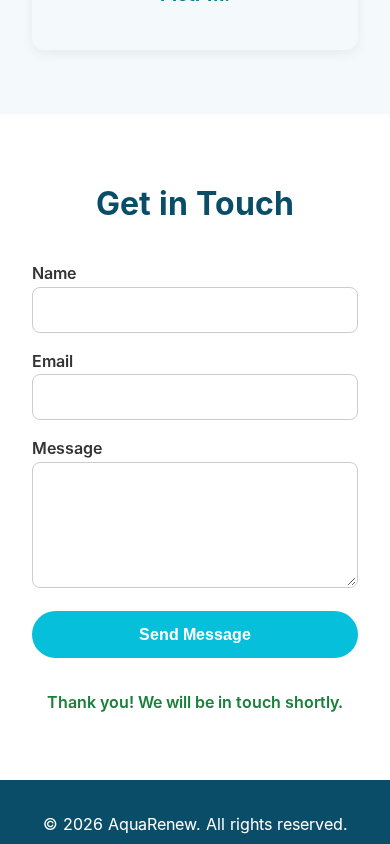
Page A displayed a friendly confirmation after a valid submission and sent no request at all, and the instructions it was written from had named no destination for enquiries. A screenshot of that state looks like success and the console was clean, but the request list showed no call to the enquiry address and nothing reached the test destination.
Three smaller observations came out of the same run. Page A’s form fields remove the default focus outline and add no outline or shadow in its place, although they do change the border colour on focus, which we left unscored. Its main button text measures 2.21 to 1 against the 4.5 to 1 that level AA asks for at normal text size, and its hero text measures 4.48 to 1 against the lighter end of its gradient. It also included two named testimonials and an on time and on budget promise that a real business could not publish without evidence.
Treat these results as two pages and what each check can detect. They say little about how prompts or tools perform in general.
Accessibility checks worth running either way #
Whatever the legal position, these checks help every visitor, whether you design sites or sign them off. Browser automation can help with keyboard order and form errors, while contrast and overall usability still need a person looking at the page. The contrast target comes from WCAG 2.2, the Web Content Accessibility Guidelines published by the W3C, the body that sets web standards.
- Visible keyboard focus. Tab through the page and confirm every interactive element is reachable in a sensible order and shows where focus is.
- Labelled fields. Every form field has a visible label that stays visible while someone types.
- Understandable errors. Each error sits next to its field and says what is wrong and how to fix it.
- Readable contrast. Text stands out from its background, and WCAG 2.2 level AA asks for at least 4.5 to 1 for normal text.
- Zoom behaviour. At 200 percent zoom, everything stays in view and every function still works.
- Consent banner. On a first visit, a consent banner leaves the enquiry form uncovered on a small screen.
Does the European Accessibility Act apply to your site? The Act is an EU directive on accessibility for products and services, and it has applied since 28 June 2025. It covers ecommerce services, meaning remote services provided at a consumer’s request with a view to concluding a consumer contract. Microenterprises providing services are exempt, which means fewer than 10 staff and turnover or a balance sheet of no more than EUR 2 million. The European Commission’s SME definition adds that a firm in a larger group may need to count the group’s figures. Headcount alone cannot settle exemption, and an enquiry form cannot settle scope, so we draw no conclusion for the invented firm. National laws differ.
6. Decide whether 3D is worth adding with img2threejs #
img2threejs is a skill for coding agents that turns a reference image of an object into a procedural model written in Three.js, a JavaScript library for 3D graphics. It writes the model from scratch in code, which makes it a different job from mesh extraction or photogrammetry. The agent builds the model in stages, renders it after each pass and compares the render with the reference. The project is open about its limits, since a single image cannot show hidden sides, so the output may be approximate, stylised or low polygon.
Does rotating this object help a visitor understand the product, or would a good photograph do the job? For the renovation company the answer is almost certainly a photograph, since finished bathrooms are judged by how they look in a room and a 3D model adds weight on a phone. A business selling a configurable object whose shape matters to the purchase has a stronger case. Even then, an approximate model can mislead, so label it as an illustration or check it against the real item.
Start with three things, and know the limits #
Start with three capabilities: documented direction (the brief and DESIGN.md rules), design review from one guidance tool, and browser verification of the visitor journey. For the guidance tool, choose Taste Skill if you want to shape what the agent generates, or Impeccable if you have a draft to critique. Add img2threejs only when a project gives 3D a clear job.
The workflow improves control and catches failures, and it leaves open whether your offer is competitive, whether your copy persuades and whether visitors will convert. A site can pass every check here and still bring in zero enquiries. Production security needs its own review. The resources are also young, so commands and formats will change. Our GitHub repositories for business teams hub follows more tools like these, with setup steps, running costs and dated source checks.
Frequently asked questions #
What is an AI website design workflow? #
It is the set of steps that closes the distance between a page that looks finished and a site that works. This guide covers four jobs, which are defining what the site is for, writing down the design rules, reviewing the output and testing it in a browser.
Do I need all five resources? #
Three capabilities are enough to start, and they are documented direction, design review and browser verification. The five resources cover different jobs, so add the rest only when a project needs them.
What is DESIGN.md, and does it replace a brief? #
DESIGN.md is a file format from Google Labs that pairs structured design values with written rationale. It records the rules, while the brief records what the site is for, so write the brief first and derive the file from it. The specification is in alpha, so expect it to change.
Should I use Taste Skill or Impeccable? #
Choose Taste Skill if you want to shape what the agent generates, and Impeccable if you have a draft to critique. The two overlap, so one is enough to start. When their suggestions clash with your brand, the brief wins, then the DESIGN.md file, then the skill.
Does a screenshot prove my contact form works? #
A screenshot only shows what rendered. In our demonstration, a page displayed a convincing confirmation message and sent no request, and a screenshot of that state looks like success, so check the request and the test destination.
Can Playwright CLI test my site on a real phone? #
Playwright CLI can resize the browser to a phone width, and that checks layout at that width. Touch input, a phone’s browser interface and real device performance sit outside it, so keep a test on a real phone as a final step.
Does the European Accessibility Act apply to my site? #
It can, and the answer depends on what you sell and how large the business is. The Act has applied since 28 June 2025 and covers ecommerce services. Microenterprises providing services are exempt, which means fewer than 10 staff and turnover or a balance sheet of no more than EUR 2 million, and a firm in a larger group may need to count the group’s figures. National laws differ, so check your own position before relying on this answer.
When is img2threejs worth adding? #
Add it when 3D has a clear job, such as showing a configurable object whose shape matters to the purchase. A good photograph does the job for most service businesses, and an approximate model can mislead, so label it as an illustration or check it against the real item.
Are they free to use? #
Public access does not establish the cost of using a resource. Each project’s licence governs how you may use it, so read it. The AI coding agent’s cost depends on your plan, and hosting your site or using any optional image or other services adds to the total.
Do they work with my AI coding agent? #
Each project names its own supported agents and they differ, so check the repository of the one you plan to use. DESIGN.md is a file format, so any agent that reads text files can use it.
How we tested #
On 28 October 2026 we ran Playwright CLI 0.1.22 with headless Chromium against two single file homepages for the invented company, written directly by Claude. A local server recorded every enquiry, and one script ran the same checks on both pages. We measured overflow at 390 and 320 pixels wide, menu behaviour, whether the first button fits the first screen, validation, the confirmation message, the enquiry request and whether it reached the server, console messages, focus outlines and shadows, and text contrast from the pages’ own colours. The run left out real devices, other browsers, screen readers, speed and any test of whether either design persuades anyone. Playwright CLI is the only resource we ran. We reviewed DESIGN.md, Taste Skill, Impeccable and img2threejs through their public documentation and repositories, and none of those four was run for this guide.
Sources #
- DESIGN.md specification from Google Labs
- DESIGNmd library of community design files
- Taste Skill repository
- Impeccable repository
- Playwright CLI repository
- Playwright documentation for page.setViewportSize
- img2threejs repository
- European Accessibility Act, Directive 2019/882
- European Commission SME definition
- WCAG 2.2
- Understanding WCAG 2.2 Contrast (Minimum)
Appendix, run the checks yourself #
The CLI’s own skill file lists these commands.
playwright-cli open http://localhost:3000
playwright-cli resize 390 844
playwright-cli screenshot
playwright-cli snapshot
playwright-cli fill <ref> "Anna Test"
playwright-cli click <ref>
playwright-cli requests
playwright-cli console
Serve your page over HTTP, because the CLI refuses to open pages straight from disk. Use the element references printed by snapshot in place of <ref>. The requests command lists each call the page made with its status, and console summarises errors and warnings. The resize command runs the Playwright call page.setViewportSize, which changes the viewport and nothing else. The run-code command accepts a script that uses the full Playwright page API, which is how we ran the checks above.
The downloadable evidence pack includes the instructions each page was written from (recorded afterwards), both pages, the local server, the check script, the raw results, server records, screenshots, checksums and reproduction steps.
Find more tools in our GitHub repository guides, with comparison tools in the IC Lab. Spotted a mistake? Write to us through the contact page. Our editorial guidelines explain how we handle corrections.