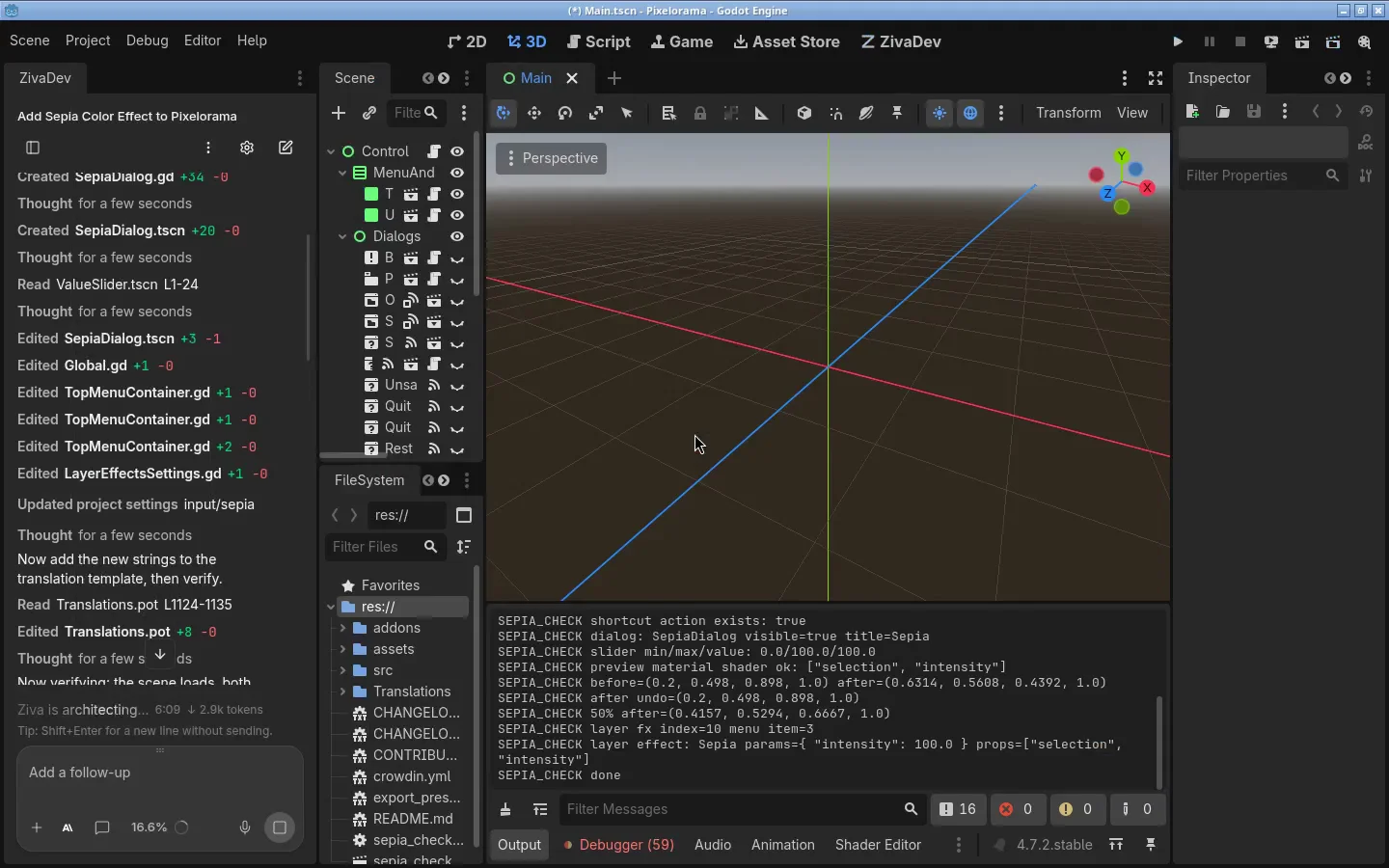
Can an AI assistant work in a large Godot project without losing track? We gave Ziva and Claude Code the same feature to build in Pixelorama, an open-source pixel art editor written in Godot 4 with 249 GDScript files (about 60,000 lines) and 120 scenes. Both used Claude Opus 5.5. The feature touched 8 files: a shader, a new dialog scene and script, the menu code, the shortcut list, the layer effects list, project settings and the translation template.
All four runs, two per tool, passed the same independent check in the running app. Ziva finished in 6 and 13 minutes; Claude Code took about 16 minutes both times. Claude Code tested its own work more thoroughly. Ziva's game runner could not screenshot Pixelorama while it sat idle, and Ziva left stray files in the project root. Details below.
Ziva.sh makes Ziva and wrote this test. We ran it on 7 November 2026 with Godot 4.7.2 on Linux, on Pixelorama commit 5b2ebf5 (MIT license), using a development build of Ziva from that day and Claude Code 2.1.318. Each tool used its default reasoning setting. The first runs of the two tools overlapped in time and the second runs started together on the same machine, so they shared its CPU. Claude Opus 5.5 in Ziva needs the Pro plan ($50/month).
The task #
Both tools got this prompt, word for word, in a fresh copy of the project:
This is the kind of change where an assistant "loses track" in a big project. Nothing in the prompt says where effects are registered. Pixelorama wires each effect in five places, and missing one gives a menu item that does nothing, a shortcut that never appears, or no layer effect at all.
Ziva ran in the Godot editor with auto-approve on. Claude Code ran in a terminal with no plugins, MCP servers or project instructions, permissions auto-approved, and Godot and a virtual display available on the command line.
Results #
| Ziva run 1 | Ziva run 2 | Claude Code run 1 | Claude Code run 2 | |
|---|---|---|---|---|
| Our check in the running app | Pass | Pass | Pass | Pass |
| Time | 6 min 15 s | 12 min 50 s | 16 min 0 s | 15 min 50 s |
| Cost | $1.94 of Ziva plan usage | $2.93 | $2.70 (Claude Code's API-price estimate) | $3.58 |
| Peak context | 137,000 tokens | 157,000 tokens | 135,000 tokens | 164,000 tokens |
| Files left in the project root | its test scene and script (Ziva said so) | an untitled.png it could not explain (Ziva said so) | none | none |
| Its own testing | Selected cels target only | Selected cels and selection-only | All four targets, save and load, 82 checks | 85 checks |
Our check was the same script for every run. It opened Effects > Color > Sepia in the running app, applied it to a blue canvas, undid it, applied 50% to a selection only, confirmed the shortcut entry, and added Sepia as a layer effect. All four produced identical pixel values, and none added new errors to the startup log.
On a Claude subscription you pay a flat fee rather than Claude Code's estimate, and Ziva's cost depends on your plan's included usage. Neither run came close to the model's context limit, so this test does not show how either tool handles a chat long enough to need summarizing.
How Ziva found its way around 1,383 files #
Ziva does not index or embed your code, and it does not load the project into the model. In both runs its first step was one search for "desaturat" across scripts, scenes, shaders, project settings and translation files. That found every place the existing Desaturation effect is wired. It then read 17 files in run 1 and 22 in run 2 and copied the pattern.
A few things helped on the way, and they come from Ziva running inside the Godot editor:
- GDScript checked after every script edit. Each time Ziva created or edited a
.gdfile, Godot's language server checked it and the files that depend on it. Every one came back with "No problems in this file or its callers." - Project settings through Godot. Ziva added the shortcut's input action with Godot's project settings API instead of editing
project.godotby hand, and in run 1 it read the live input map first. - The real app, not a stub. Ziva ran Pixelorama's main scene from the editor and read its output and errors.
- A memory for next time. In run 2 Ziva saved a project memory describing how to test Pixelorama code, so the next chat starts with a pointer to it. Seememories .
Claude Code got there with shell tools instead: grep, sed, and Godot from the command line on a virtual display. Its output landed in the same files.
Where Ziva struggled #
- Ziva's game runner timed out on an idle Pixelorama. Pixelorama turns on Godot's low-processor mode, so it only redraws when something changes. Ziva's
run_scenewaits for a drawn frame to screenshot, and running the main scene timed out after about 35 seconds, twice in each run. We confirmed the cause: with low-processor mode off, the same call returned a screenshot. Ziva worked around it with a temporary test scene that drove the app and printed its results. In run 2 that scene kept the app drawing, sorun_scenereturned screenshots too. - Ziva's script runner could not load Pixelorama's autoloads. Its one-off GDScript runner reported "Identifier not found: Global", so Ziva switched to the test scene above.
- Stray files. Run 1 left its test scene and script in the project root and asked whether to delete them. Run 2 deleted its test files, but an
untitled.pngappeared in the root during testing, and Ziva flagged it. - Less testing than Claude Code. Ziva tested only the Selected cels target and said so. Claude Code tested all four targets plus saving and . In run 1 it also reported a likely bug in Pixelorama's shared effect code, where applying an effect to all projects crops other projects with the current project's size. We read the line and it matches the report, but we did not reproduce it.
- The Full Game Playtest Agent did not run. Ziva tried it in both runs, but a credential problem in our local test setup stopped it before it started. This test says nothing about it either way.
What this test does not show #
It is one project, one feature, two runs per tool, and one model. The task added a feature across many files. It was not a rename or a move of files across many scenes, which we have not tested yet. Neither tool needed to summarize its chat. Results with other models, a bigger project or a vaguer prompt may differ.
If your AI loses track as your project grows #
These habits helped in this test and work with any assistant:
- Point it at an existing example. "Make it work like Desaturation" told both tools where to look. Name a similar scene, script or system in your project.
- Write your project's rules down. Ziva reads an
AGENTS.mdfile in your project, and Claude Code readsCLAUDE.md. Put your folder layout, autoloads and conventions there so the assistant does not rediscover them every chat. - Ask it to run the project. Both tools ran Pixelorama and read its errors before reporting back. An assistant that only edits text cannot see a scene that fails to load.
- Start a new chat for a new task. A long chat full of old file contents leaves less room for the current change.
For a broader comparison of the two tools, see Ziva vs Claude Code for Godot. If you use Claude Code and want Ziva's Godot tools inside it, Ziva can run as a local MCP server.