If your Area2D's `body_entered` never fires, or your player falls straight through the floor, check the seven settings below. We tested the Area2D ones in Godot 4.7.2 and reproduced the floor one in an example project. If you would rather have an AI find it: [Ziva](https://ziva.sh/), an AI agent inside the Godot editor, found and fixed all four bugs in a deliberately broken scene in 1 minute 34 seconds, using its `validate_physics_setup` tool and by reading the scene. That test is further down, along with the broken project to download.

## [The checklist](#the-checklist)
Work down the list. Each item has its fix in one line.
| # | Cause | Fix |
|---|---|---|
| 1 | The Area2D's Mask does not include the body's layer | Tick the body's layer under Collision > Mask on the Area2D |
| 2 | The CollisionShape2D has no Shape , or it is Disabled | Set Shape to a new RectangleShape2D (or similar) and untick Disabled |
| 3 | Monitoring is off on the Area2D | Tick Monitoring in the Area2D's inspector |
| 4 | The signal is not connected, or connected to the wrong node | Connect body_entered to the node whose script has the method |
| 5 | You listen to area_entered for a body |
Use body_entered for bodies,area_entered for other Area2Ds |
| 6 | A CharacterBody2D falls through the floor | Tick the floor's layer under Collision > Mask on the character |
| 7 | The floor is a TileMapLayer with no physics layer | Add a physics layer to its TileSet and draw collision polygons on the solid tiles |
How we tested items 1 to 5: a headless Godot 4.7.2 script dropped a CharacterBody2D on collision layer 2 through an Area2D with a 60 x 60 rectangle shape, moving it 4 pixels per physics frame with move_and_slide(), and recorded whether the signal fired. A working setup fired; every broken variant in items 1 to 5 did not.
1. Collision layers and masks: the Area2D's mask is what matters
Godot's physics introduction defines the two properties. The layer "describes the layers that the object appears in". The mask "describes what layers the body will scan for collisions. If an object isn't in one of the mask layers, the body will ignore it." Both default to layer 1.
For an Area2D to report a body, the body's layer must be in the Area2D's mask. In our test, an Area2D with mask 1 never saw a body on layer 2. The reverse direction did not matter: with the Area2D's layer set to 0 and the body's mask set to 0, body_entered still fired. So when a coin or trigger ignores the player, look at the trigger's Mask first.
In the inspector you tick layer numbers. In .tscn files and code the same values are bitmasks: layer 1 is 1, layer 2 is 2, layer 3 is 4, layer 4 is 8. A scene that says collision_mask = 4 scans layer 3, not layer 4. In code you can skip the arithmetic with set_collision_mask_value():
2. Missing or disabled shape
An Area2D with a CollisionShape2D child whose Shape is empty detected nothing in our test, and neither did one with the shape set but Disabled ticked. Select the CollisionShape2D, click the empty Shape field, pick a shape and size it over your sprite.
3. Monitoring is off
With Monitoring off, our Area2D detected nothing. The Area2D reference says body_entered "Requires monitoring to be set to true." It defaults to on; check the inspector and any script that sets it to false.
4. The signal is not connected, or goes to the wrong node
A _on_body_entered function does nothing unless the signal is connected to it. With no connection, nothing fired in our test. Connect it in the Signals dock (the Signals tab next to the Inspector), or in code as in the snippet above.
The connection also has to target the node whose script holds the method. In our example scene, a connection from the coin to the level root (which has no script) never ran _on_body_entered, and Godot printed no error. If the dock shows a connection but nothing happens, check its target.
5. body_entered vs area_entered
body_entered fires for physics bodies (CharacterBody2D, RigidBody2D, StaticBody2D) and for tile maps whose TileSet has collision shapes. area_entered fires only for other Area2Ds. In our test, listening to area_entered for a CharacterBody2D never fired.
6. CharacterBody2D falls through the floor
This is item 1 in the other direction: a character collides with a floor only if the floor's layer is in the character's mask. In our example project the player was on layer 2 with collision_mask = 4 (layer 3) and the floor was on layer 1. After 3 seconds the player was at y 4327, far below the floor at y 560. Setting the player's mask to 1 left it resting on the floor at y 520.
7. TileMapLayer floor with no physics layer
A TileMapLayer has no collision until its TileSet has a physics layer and the solid tiles have collision polygons. The steps are in our TileMapLayer guide. The character's mask still has to include that physics layer's collision layer.
Not the cause
Two suspects did not stop detection in our tests:
- Moving the body by setting
positioninstead ofmove_and_slide():body_enteredstill fired. Our body moved 4 pixels per frame; we did not test large jumps that could skip over a thin area. - The body starting inside the area :
body_enteredstill fired.
Tested: an AI that finds why the collision is not working #
A chat window sees only the code you paste into it, but layers, masks, shapes and signal connections live in the scene file. One Godot forum user, stuck on a jump that left their character floating, wrote that "chat gpt just scrambled my code to trash" (Godot Forum). We wanted to see whether an agent that can read the scene and run it does better on collision bugs.
Ziva.sh makes Ziva and wrote this test. We ran it on 10 November 2026 with Godot 4.7.2 on Linux, a development build of Ziva and Ziva Smart, the default model, with auto-approve on. It is one project and one run, so treat it as an example, not a benchmark.
We built a small scene with four planted bugs: the player's mask missed the floor's layer, the coin's mask missed the player's layer, the coin's CollisionShape2D had no shape, and the coin's _on_body_entered was never connected. Download the broken project (ZIP, 2 KB) to try it yourself. It imports and loads in Godot 4.7.2; press F5 and the player falls through the floor.
The prompt, word for word:
What Ziva did:
- Read the scene tree,
level.tscn, and both scripts. - Called
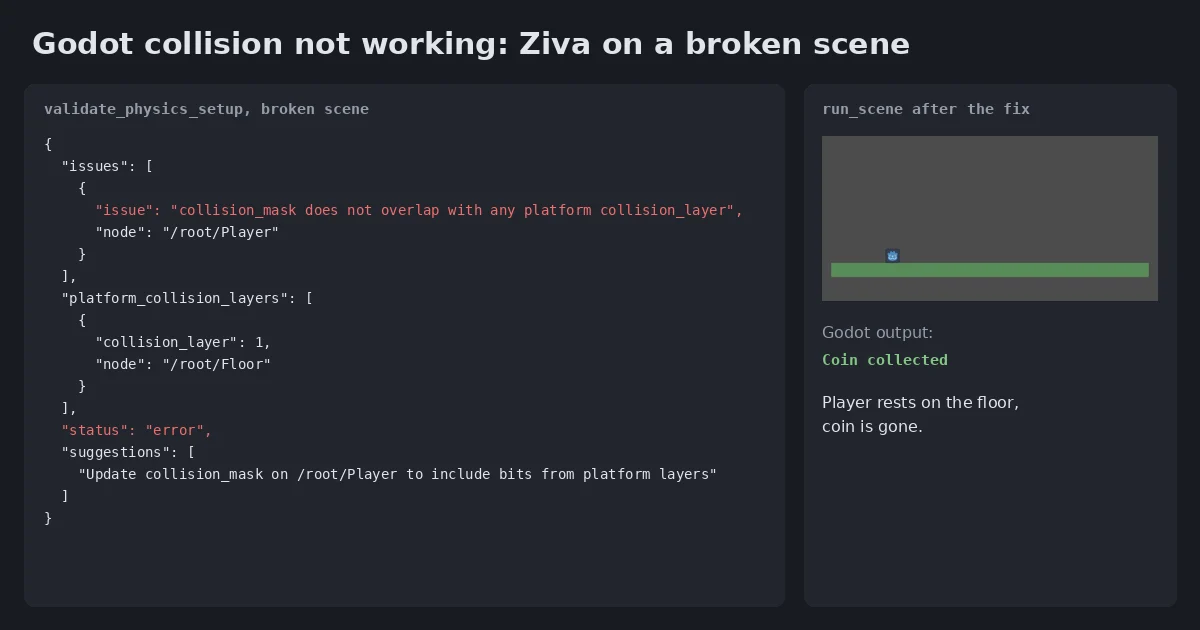
validate_physics_setupon the Player and the Floor. It returned one issue:"collision_mask does not overlap with any platform collision_layer"on/root/Player, and the suggestion"Update collision_mask on /root/Player to include bits from platform layers". - Listed all four bugs. The tool had flagged only the first; Ziva found the coin's mask, the missing shape and the missing connection in the scene file it had read.
- Fixed them by editing
level.tscn: player mask4to1, coin mask1to2, a 24 x 24 RectangleShape2D for the coin, and abody_enteredconnection. - Caught its own mistake: it first connected the signal to the level root, then noticed that
_on_body_enteredlives in the coin's script and changed the target to the Coin node before running anything. - Ran
validate_physics_setupagain (no issues), then ran the scene. Godot printedCoin collected, and Ziva's screenshot showed the player on the floor with the coin gone.
It took 1 minute 34 seconds, 16 tool calls and $0.0175 of Ziva usage on Ziva Smart, the default model. Our own check, a separate script run on the fixed project, agreed: the player rested on the floor at y 520, Coin collected was printed and the coin was removed.
What validate_physics_setup checks, and what it does not
validate_physics_setup takes a scene, the character nodes and the platform nodes. For each character it checks that the collision mask is not 0, that the mask overlaps at least one platform's collision layer, and that it has a CollisionShape2D child with a shape. For TileMapLayer platforms it checks that a TileSet is assigned and has a physics layer. It returns a list of issues and suggestions.
It does not look at Area2Ds, monitoring or signal connections. In this run it caught the floor bug only. The three coin bugs were found by the model reading the scene, so on a bigger scene that part depends on Ziva reading the right files.
Where Ziva slipped
- A wrong signal target, caught in time. Its first connection pointed at the level root, which would have failed without an error, as item 4 above shows. Ziva fixed it before running the scene.
- One small scene. The scene had three nodes that mattered and the bugs were all visible in one file. We have not tested Ziva on a collision bug spread across many scenes or caused by code that changes layers at runtime.
To try it on your own project, install Ziva and describe the symptom the way you would to a person, for example "my player falls through the floor, find out why and fix it, then run the scene."