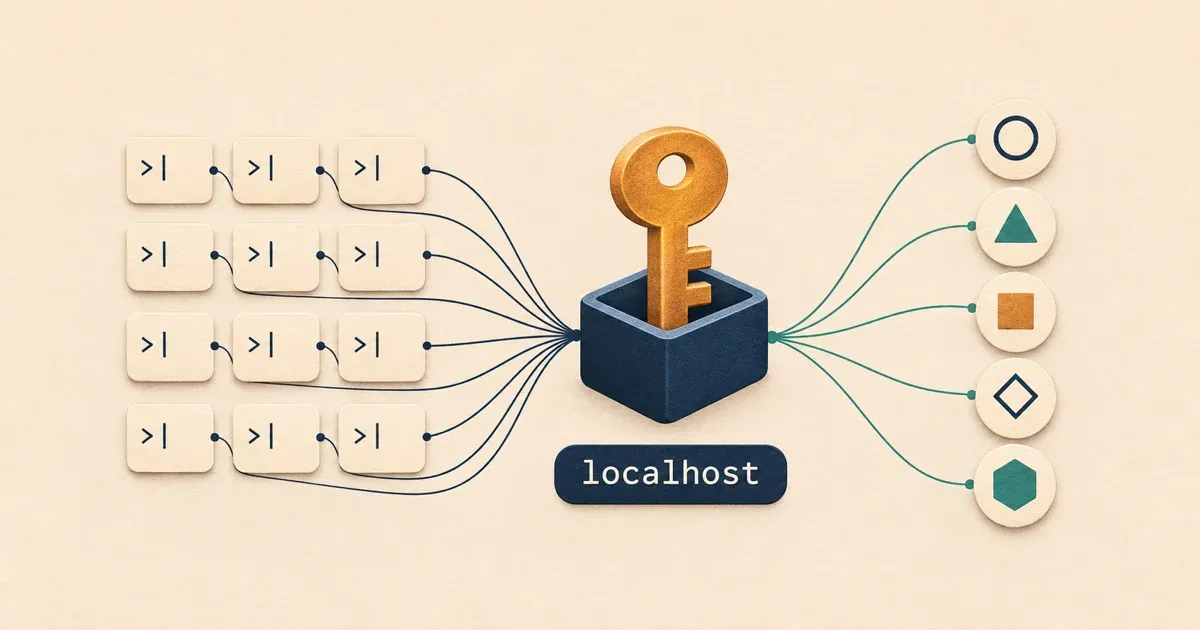
I usually have 40-60 Claude Code sessions open at once, each working on its own branch. Most of them use the same remote MCP servers: Shortcut for our stories, Notion for docs, Intercom for support conversations, Sentry for errors, and Slack. Every one of those servers signs you in with OAuth.
Many of my sessions would lose their sign-in to at least one server, and this would happen many times per day. Claude Code showed "needs authentication" next to Shortcut or Notion, I'd sign in again in one session, and the others would stay broken until I reconnected each one by hand. A few hours later it would happen again.
It turned out to be a race between the sessions, and adding more sessions made it worse. The fix was to stop letting each session hold its own copy of the tokens. Now one local process, MCPProxy, signs in to each server once and refreshes the tokens for everyone, and every Claude Code session connects to it instead. I haven't had to sign in again since. I've seen plenty of people talking about this on X, so I thought I would write a blog post to cover what causes it, what we changed in MCPProxy, and how my sessions use it.
Why the sessions sign each other out #
When you sign in to a remote MCP server, Claude Code gets two tokens. The access token is what it sends with each request, and it expires after a while: hours for some servers, much less for others. The refresh token is what Claude Code uses to get a new access token without opening the browser again.
The MCP specification requires refresh token rotation for clients like Claude Code. Its authorization spec says "For public clients, authorization servers MUST rotate refresh tokens". Rotation means every refresh hands back a new refresh token and invalidates the old one, so each refresh token works once. Slack's token rotation docs put it plainly: "Refresh tokens are designed to be used once."
Rotation also lets a server spot a stolen token. If an old refresh token turns up again, someone else has a copy. RFC 9700, the OAuth security best practices, says the server can't tell which party is the attacker, so "it will revoke the active refresh token." Some servers revoke the whole sign-in when that happens.
Now put 47 Claude Code processes on one Mac. They all read the same stored sign-in for Shortcut, and when its access token expires, many of them notice within the same few seconds:
- The first session to refresh gets a new pair of tokens and saves them. The old refresh token is now spent.
- Other sessions refresh with the spent token. The server answers
invalid_grant, and it may treat the reuse as theft and revoke the new tokens too. - A session that gets
invalid_grantdecides the sign-in is gone and clears the stored tokens, which can wipe out the good tokens the first session just saved. - Each session remembers that the server needs authentication. Signing in again in one session doesn't fix the others until they reconnect.
Claude Code does try to prevent this. It takes a lock file before refreshing, waits if another process holds it, and checks whether another process has already saved fresh tokens. That didn't hold up with dozens of sessions. Claude Code writes a log for each MCP server, and on 8 November the one for Shortcut showed how often the lock lost:
- "Refresh lock held by another process": 169 times
- "Token refresh failed, returning current tokens": 143 times
- "Skipping connection (cached needs-auth)": 138 times
- "Token refresh failed with invalid_grant", followed by "Invalidated credentials", with dozens of sessions refreshing within the same few seconds
A session that waits five times for the lock gives up and keeps its expired token, and a session that loses the race clears the sign-in. Shortcut failed most often because its access tokens expire quickly, so the race came up many times a day. Notion's last longer, so it broke less often.
Other people have reported the same race. Issue #84440 reproduces it with five claude mcp get commands run at once against a server that rotates refresh tokens, and shows the winning session's new token being stored and then wiped. It was closed as not planned in September, as was #43000, "MCP OAuth with multiple terminals open causes re-auth". Claude Code 2.1.325 logs messages about keeping tokens that another process rotated, so it may handle this better now. In those issues, the only workaround anyone reported was running fewer sessions.
One process holds the tokens #
If only one process ever refreshes a token, there's nothing to race. That process has to be something that runs all the time, holds the sign-in for every server, and lets every Claude Code session use those servers through it.
MCPProxy does this. It's an open-source (MIT) MCP proxy written in Go: one binary that runs in the background on your machine, with a web UI and an optional macOS menu-bar app. You add your MCP servers to it once and sign in to each one through MCPProxy, which keeps the tokens in its own data directory. Its docs say refreshes are "serialized per server": however many requests notice an expiring token at once, MCPProxy sends one refresh to the server, and every waiting request gets the result.
Claude Code then talks to MCPProxy at http://127.0.0.1:8080 instead of talking to Shortcut or Notion. Each session authenticates to MCPProxy with a static key, which never expires and never needs refreshing, so 47 sessions can share it safely. The OAuth tokens never leave MCPProxy.
What we changed in our fork #
Out of the box, MCPProxy puts all your servers behind one endpoint and exposes them as a small set of its own tools. An agent calls retrieve_tools to search across every server, then calls the tool it found through call_tool_read, call_tool_write or call_tool_destructive. There's also a mode that lists every tool directly, renamed to server__tool.
Both would have changed the name of every tool my sessions use. Claude Code names MCP tools after the server they come from, such as mcp__shortcut__get_story, and those names are all over our setup: permission rules that allow mcp__shortcut__*, skills that say which tool to call, and the notes in our AGENTS.md files. I wanted the sessions to see exactly what they saw before, with only the sign-in moved into MCPProxy.
So we forked MCPProxy and made a few changes.
One URL per server
/mcp/s/<server> serves a single upstream server under its own tool names and with its own instructions, as if Claude Code had connected to it directly. http://127.0.0.1:8080/mcp/s/shortcut lists get_story, not shortcut__get_story. You register it in Claude Code as shortcut, and the tools stay mcp__shortcut__get_story. Each server is still a separate entry that you can turn off or reconnect on its own in /mcp. The endpoint uses MCPProxy's existing authentication, tool filters and quarantine, so a key that isn't allowed a server gets a 404 for it.
Usage stats without fetching every tool list
The menu-bar app asks MCPProxy for usage stats about every 35 seconds. To show how many tokens it saves, MCPProxy fetched the tool list from every server for each of those requests, then counted the tokens in every tool definition. With twelve servers that was about 1,000 calls an hour to the servers and 3 to 7 seconds per poll, and minutes when my Mac was busy. Now it uses the tool lists it already keeps and only recounts when a server's tools change. The poll takes about 2 milliseconds.
Health checks that tolerate a busy machine
MCPProxy pings each server every 30 seconds and used to give up on a server after three pings that took longer than 5 seconds. When I restart all my sessions at once, my Mac used to be overloaded for a few minutes, every ping was slow, and MCPProxy would disconnect and reconnect every server while sessions were in the middle of requests. A ping now gets 15 seconds, and a server needs five slow pings in a row before it's marked as failing. A refused connection or a DNS failure still counts straight away. (I also fixed this in my Herdr config by pausing for a second after resuming each Claude Code session, so that they don't resume all at once.)
Setting it up for Claude Code #
This is my setup on macOS. The upstream MCPProxy is on Homebrew, but the per-server URLs need our fork, so I build it from source:
git clone -b docspring/per-server-endpoints https://github.com/DocSpring/mcpproxy-go.git
cd mcpproxy-go
make build
cp mcpproxy ~/.local/bin/mcpproxy-fork
The build embeds the web UI, so it needs Node.js 22.18 or later as well as Go.
Lock it down
By default, MCPProxy's MCP endpoint doesn't ask for a key, so any process running as you could call your servers with your sign-ins. I turned on require_mcp_auth and kept it on the loopback address in ~/.mcpproxy/mcp_config.json:
{
  "listen": "127.0.0.1:8080",
  "require_mcp_auth": true
}
Requests without a valid key now get a 401.
To keep it running, I added a launchd agent at ~/Library/LaunchAgents/app.mcpproxy.core.plist that starts it at login and restarts it if it exits:
<?xml version="1.0" encoding="UTF-8"?>
<!DOCTYPE plist PUBLIC "-//Apple//DTD PLIST 1.0//EN" "http://www.apple.com/DTDs/PropertyList-1.0.dtd">
<plist version="1.0">
<dict>
  <key>Label</key>
  <string>app.mcpproxy.core</string>
  <key>ProgramArguments</key>
  <array>
    <string>/Users/you/.local/bin/mcpproxy-fork</string>
    <string>serve</string>
  </array>
  <key>RunAtLoad</key>
  <true/>
  <key>KeepAlive</key>
  <true/>
</dict>
</plist>
launchctl bootstrap gui/$(id -u) ~/Library/LaunchAgents/app.mcpproxy.core.plist
Add each server and sign in once
mcpproxy-fork upstream add shortcut https://mcp.shortcut.com/mcp --transport http --trust-mode auto
mcpproxy-fork auth login --server=shortcut
MCPProxy quarantines a new server until you approve it in the web UI, and with the default trust mode it holds back new or changed tools until a scan says they're safe. I set --trust-mode auto for vendors' own hosted servers, which I'd be trusting just as much if Claude Code connected to them directly. Keep the defaults for anything you're less sure of.
auth login opens the server's sign-in page in your browser. That's the only time you sign in. When a sign-in does need renewing, run auth login again or use the web UI at http://127.0.0.1:8080/ui/, and every session is fixed at once.
Give Claude Code a key
Create an agent token that can use every server and never expires, and store it in the macOS Keychain:
mcpproxy-fork token create --name claude-code --servers "*" \
  --permissions read,write,destructive --expires never
security add-generic-password -U -a mcpproxy -s mcpproxy-claude-code -w 'mcp_agt_...'
Claude Code's headersHelper setting runs a command each time it connects to a server and sends the headers the command prints. Mine reads the key from the Keychain, so the key isn't written into any Claude Code config file:
#!/bin/sh
set -eu
token=$(security find-generic-password -a mcpproxy -s mcpproxy-claude-code -w)
printf '{"Authorization":"Bearer %s"}\n' "$token"
Then register each server at user scope under its usual name:
claude mcp add-json --scope user shortcut \
  '{"type":"http","url":"http://127.0.0.1:8080/mcp/s/shortcut","headersHelper":"/Users/you/.local/bin/mcpproxy-claude-headers"}'
When the helper prints an Authorization header, Claude Code uses it and doesn't try OAuth for that server. Remove any older registration of the same server in a project's .mcp.json too. Otherwise Claude Code warns about conflicting scopes, and some sessions keep talking to the server directly.
Servers that don't let MCPProxy register itself
Most servers let a new client register itself during sign-in, using Dynamic Client Registration. Slack doesn't: its MCP server docs say "We do not support SSE-based connections or Dynamic Client Registration at this time", and only internal apps or apps in the Slack Marketplace can use it. Slack also allows only two active tokens at a time, so the official Slack plugin, which signs in separately in every session, kept getting signed out too.
For Slack, I created an internal Slack app, turned on "Slack MCP server access" in its settings, added a fixed redirect URL, and gave MCPProxy the app's client ID and secret. MCPProxy already supports this, and it can read the secret from the Keychain:
{
  "name": "slack",
  "url": "https://mcp.slack.com/mcp",
  "protocol": "http",
  "oauth": {
    "client_id": "1234567890.1234567890123",
    "client_secret": "${keyring:slack-oauth-client-secret}",
    "redirect_uri": "http://localhost:3119/callback",
    "scopes": ["channels:history", "channels:read", "chat:write", "search:read.public", "users:read"]
  }
}
Things to watch out for #
Restarting MCPProxy reconnects every session
When MCPProxy restarts, every session loses its connections and reconnects at the same moment, and on a busy machine many of those connections time out. To pick up a config change for one server, restart only that server with mcpproxy-fork upstream restart <name>.
A busy Keychain can make a server look signed out
MCPProxy checks that the Keychain is available when it starts and gives up after 2 seconds. During one of those reconnect rushes, the check failed, a server's ${keyring:...} header wasn't filled in, and that server showed "Sign-in required" even though nothing was wrong with its key. Restarting that one server fixed it.
The menu-bar app can start its own copy
If the menu-bar app starts at login before your own MCPProxy, it launches the core bundled inside the app on port 8080. Our fork then couldn't get the port, and for three days my sessions were back on the upstream version without any warning, with retrieve_tools in place of their own tools. I removed the app from my login items. If you use it, open it after MCPProxy is running and it connects to that one instead, or start it with MCPPROXY_TRAY_SKIP_CORE=1.
Some errors from a server get hidden
When Slack rejected the connection with a 400 ("App is not enabled for Slack MCP server access"), MCPProxy reported it as "likely a legacy SSE server", because its MCP library describes every 4xx response to the first request that way. Calling the server directly with curl showed the real error.
Do you need this? #
If you only run a few Claude Code sessions at a time, Claude Code's own lock is probably enough. I only needed this because I run many sessions in parallel. Since 9 November I've signed in to each server once, my sessions use the same tool names as before, and I can open as many sessions as my Mac can handle without them signing each other out.