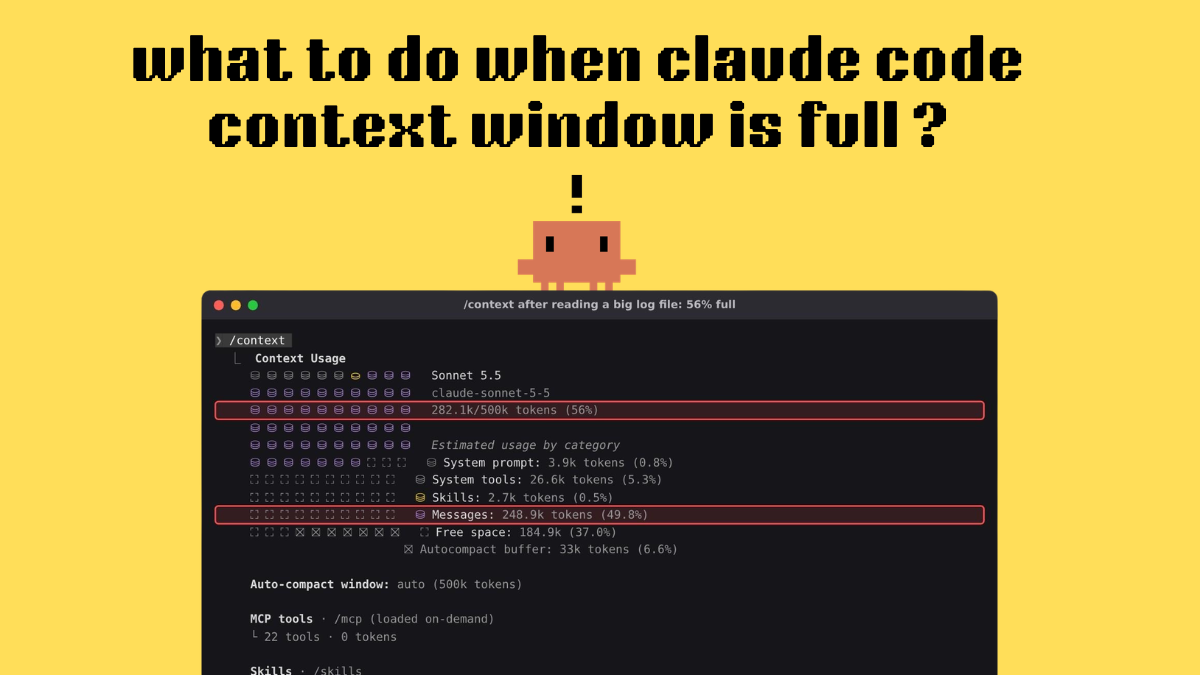
Quick answer: When the Claude Code context window is full, run /context to see what is filling it. If you’re staying on the same task, run /compact followed by what to keep, for example /compact keep the bug diagnosis and the planned fix. If you’re starting something unrelated, run /clear for a free, empty context.
Fix a full context window in 5 steps: #
- Run /context to see how full the window is and what is filling it.
- Still on the same task? Run /compact <what to keep>.
- Starting a new task? Run /rename <name> and then /clear.
- Add a # Compact instructions section to CLAUDE.md so every compaction keeps the right things.
- Hand big reads (logs, whole folders, test output) to a subagent so they never reach your main context.
To stop it happening again, keep lasting rules in CLAUDE.md and show context % in your status line (covered below).
How big is the window? Current models (Fable, Sonnet 5 and later, Haiku 5.5, Opus 4.7 and later) have 1M tokens. Opus 4.6 and Sonnet 4.6 have 200K unless you pick their [1m] variant. Claude Code auto-compacts before the window is full. On Sonnet 5.5, the auto setting compacts at 500k in our test.
In our test, one /compact cut the conversation from 282.1k tokens to 44.9k tokens, and Claude carried on with the same bug. The screenshots below show each step.
Context window full vs usage limit: which one did you hit? #
Before you start, make sure this is really a context problem. People often mix up two different limits in Claude Code:
| What you see | What it means | What fixes it |
|---|---|---|
| X% until auto-compact or Context low (X% remaining) · Run /compact to compact & continue | This one conversation is close to its context window | /compact, /clear, the steps in this guide |
| Context limit reached · /compact or /clear to continue or Prompt is too long | The conversation no longer fits in the window | /compact, or /clear (see the fixes below) |
| You’ve hit your session limit or You’ve hit your weekly limit | Your Pro or Max plan usage has run out | Wait for the reset or use usage credits. /compact won’t help |
Anthropic’s docs make the same point: a context or auto-compact warning is “not a usage limit”. If you are seeing the plan message, read our guide on how to see your Claude Code usage and compare the plans in Claude pricing plans.
What is the Claude Code context window? #
The context window is everything Claude can “see” at once during a session. That includes your messages and its replies, every file it read, every command output, your CLAUDE.md, auto memory, skill descriptions, tool definitions and the system prompt. It all goes back to the model with every request. Prompt caching makes the repeated history cheaper, but not free, so a long session costs more on every turn, not just at the end.
A lot of it is there before you type anything. On a fresh session in our test, /context showed 32.6k tokens already used and only 10 tokens of messages. The rest was the system prompt, tools and skills.
Claude Code /context command on a fresh session showing 32.6k of 500k tokens used, Messages 10 tokens, System tools 25.9k tokens, and a 33k autocompact buffer
A fresh session: 32.6k tokens are used before the first prompt. Your numbers will differ with your MCP servers, skills and CLAUDE.md.
Claude Code context window size by model
| Model | Context window in Claude Code |
|---|---|
| Fable models, Sonnet 5 and later, Haiku 5.5, Opus 4.7 and later | 1M tokens by default, no setup needed |
| Opus 4.6 and Sonnet 4.6 | 200K by default; 1M only through the [1m] variant (for example /model opus[1m]) |
| Any model with CLAUDE_CODE_DISABLE_1M_CONTEXT=1 set | Treated as 200K |
Access to the [1m] variants of the 4.6 models depends on your plan. On Max, Team and Enterprise, Opus 4.6 with 1M is included and Sonnet 4.6 with 1M needs usage credits. On Pro, both need usage credits. On the API, both are fully available. On the Anthropic API, the 1M window is billed at standard model pricing with no extra charge for tokens beyond 200K, except Haiku 5.5, which costs more on prompts over 100K. See our Claude model pricing page for per-token rates.
The window and the auto-compact point are not the same number. Claude Code compacts before the window is completely full. In our test, /context showed Auto-compact window: auto (500k tokens) for Sonnet 5.5 and kept a 33k-token autocompact buffer. The total in /context is this auto-compact window (500k on auto for Sonnet 5.5), not the model’s full 1M window. Always check /context for the real figure on your own setup.
Step 1: Check what is filling the context with /context #
Type /context and press Enter. You get a coloured grid, a used/total tokens (%) line, and a breakdown by category: System prompt, System tools, Memory files, Skills, Messages, Free space and Autocompact buffer. Below that, Claude Code lists Suggestions for anything taking a lot of space. In our test we asked Claude to read a 6,000-line server.log in full. Afterwards, /context showed 56% of the auto-compact window (282.1k of 500k), with Messages at 248.9k tokens. Its suggestion line said file reads alone used 115.6k tokens and that reading only the parts you need would save about 34.7k.
Claude Code /context output at 56% full: 282.1k of 500k tokens, Messages 248.9k tokens, and a suggestion that read results use 115.6k tokens
After one big file read, the conversation (Messages) takes up almost half the auto-compact window.
How to read it:
- Messages is the largest row: your conversation and tool output are the problem. Go to Step 2 or Step 3.
- System tools, Memory files or Skills are large: what loads at startup is the problem. SeeCut what loads at startup below.
- Want the detail? Run /context all to see every item.
Know the warnings: “% until auto-compact” and “Context low” #
When you get close to the auto-compact point, a small grey note appears on the right above the prompt, such as 12% until auto-compact. When space gets very low, Claude Code shows a red line: Context low (X% remaining) · Run /compact to compact & continue. People search for “context left until auto-compact” because that is how older versions worded it. On v2.1.304, the text is the one shown here.
To capture it, we lowered the auto-compact window to 300k with /autocompact 300k. Our 282k-token conversation was already past that point, so the warning showed 0% until auto-compact.
Claude Code /autocompact 300k command output: Auto-compact window for Sonnet 5.5 set to 300k tokens, with the warning 0% until auto-compact
0% means the next message will trigger automatic compaction.
If you do nothing, Claude Code compacts on its own, so a full window does not end your session. The automatic pass, though, decides for itself what is important. Compacting yourself (Step 2) lets you choose what Claude keeps.
Step 2: Run /compact with instructions (to keep working on the same task) #
/compact replaces the conversation so far with a structured summary and keeps the session going. Add a short note after the command to say what matters:
/compact keep the POST /invoices 500 diagnosis and the proposed fix for src/server.js, drop the raw log contents
In our test it finished in under a minute. Claude Code then printed Compacted, re-read the source files it had worked on, and listed server.log as a Referenced file. That label is how Claude Code handles a file over 5,000 tokens: it comes back as a path only, so the big log did not refill the window.
Claude Code /compact command with focus instructions, showing Compacted, Referenced file server.log, and Read src/server.js
Manual compaction with a focus: the large log comes back as a reference, and the code files come back in full.
Running /context again showed the result: 44.9k of 300k tokens (15%), with Messages down from 248.9k to 12.4k tokens.
Claude Code /context after compaction showing 44.9k of 300k tokens (15%) and Messages 12.4k tokens
Same session, same task: 282.1k tokens before /compact, 44.9k after.
What survives a compaction, according to Anthropic’s docs:
| Kept or reloaded | Summarized away or limited |
|---|---|
| System prompt and output style | Detailed instructions you typed early in the chat |
| Project-root CLAUDE.md and unscoped rules (re-read from disk) | Path-scoped rules and nested CLAUDE.md files (they reload only when Claude touches those files again) |
| Auto memory, and the plan from plan mode | Context that hooks added earlier |
| Up to 5 recently modified files Claude read or edited (files over 5,000 tokens come back as a path only) | Skill bodies over 5,000 tokens (each is cut to fit; 25,000 tokens total, oldest dropped first) |
| Background commands and subagents (they keep running) | Skill descriptions (not reloaded) |
Tips for /compact: #
- Compact at a natural break, before you start the next big step, rather than waiting for the warning.
- Compacting has a cost. /compact reads the whole conversation it summarizes, so on a huge context it is a large request in its own right.
- To summarize only part of the chat, run /rewind, pick a message, and chooseSummarize from here orSummarize up to here .
- If you see “Not enough messages to compact”, the conversation has too few turns to summarize. This can happen when one huge paste filled the window. Use /clear instead.
Step 3: Use /clear when you switch tasks (and /resume to go back) #
If the next task has nothing to do with the last one, don’t compact. Clear. /clear starts a new conversation with an empty context and keeps your project memory (CLAUDE.md). Anthropic’s docs point out that /clear “costs nothing”, whereas /compact spends tokens on the summary. Old, unrelated conversation also uses up tokens on every message you send after it. Name the session first so you can find it again:
/rename invoice-500-bug /clear
Later, run /resume, or start Claude Code with claude –resume, and pick the session from the list.
Claude Code /resume session picker showing the renamed session invoice-500-bug after running /clear
After /clear, the old session is one /resume away. That’s why /rename comes first.
Two related commands:
- /btw <question> asks a quick side question without adding it to the conversation history.
- /branch creates a copy of the conversation so you can try a different direction without touching the original.
Step 4: Add compact instructions to CLAUDE.md #
Your project-root CLAUDE.md is re-read from disk after every compaction. Detailed instructions you typed in chat may be lost. So lasting rules belong in CLAUDE.md, and that includes rules about what to keep when compacting. Add a # Compact instructions section:
When you compact, keep: the current bug, files changed, test results,
and the next step. Drop raw log output and full file dumps.
CLAUDE.md file with a project rule to never read server.log in full and a Compact instructions section
The CLAUDE.md we used in the test. It has a context-saving rule and a Compact instructions section.
Our file also had one rule: “Never read server.log in full.” In a new session we asked Claude to read the first 3,000 lines and list the most common messages. Instead of those lines, it piped them through a shell command and counted them. It said so in its answer, and the context stayed at 4%.
Claude Code answer saying it didn’t read the file in full as CLAUDE.md requires, with a status line showing Sonnet 5.5 and 4% context
Claude following the CLAUDE.md rule. The bottom line is a custom status line showing context usage.
Keep CLAUDE.md short. Anthropic suggests keeping it under about 200 lines, because the whole file loads into every session. Move long, task-specific instructions (PR reviews, migrations) into skills, which load only when they’re used. Our Claude Code templates page has ready-made examples.
Step 5: Send big reads to subagents #
Log files, test runs, documentation and whole-folder searches are what fill a context window fastest. A subagent works in its own separate context window and sends back only a summary. Just ask:
Use a subagent to read all of server.log and report back only the count of each ERROR and WARN message In our test, the subagent went through all 6,000 lines of the log. Afterwards, /context in the main session showed 41.4k of 500k tokens (8%), with Messages at just 8.1k. That compares with the 248.9k tokens of messages when the main session read the same file itself in Step 1.
Claude Code /context after a subagent read the whole log: 41.4k of 500k tokens (8%), Messages 8.1k tokens
A subagent read the whole file, and only its summary reached the main context.
The subagent’s own requests still count toward your plan usage. To keep that low, give subagents a smaller model, such as model: haiku in the subagent configuration.
Prevent it: cut what loads at startup #
If /context shows that System tools, Memory files or Skills are large, trim what loads before you type:
- MCP servers: MCP tool definitions are loaded only when needed, by default; our 56% screenshot shows 22 tools · 0 tokens. Each server still adds its tool names and instructions. Run /mcp and disable servers you don’t use. CLI tools like gh or aws are lighter than MCP servers.
- CLAUDE.md: move workflow-specific instructions into skills (see Step 4).
- Skills you call by hand: set disable-model-invocation: true so their descriptions stay out of context until you invoke them.
- Prompts: be specific. “Add input validation to the login function in auth.ts” makes Claude read far fewer files than “improve this codebase”.
Prevent it: show context % in your status line #
You don’t have to keep running /context. Claude Code’s status line can show context usage all the time. The quickest way is to ask for one:
/statusline show model name and context percentage with a progress bar
Or write the script yourself. This is the script we used, saved and set as statusLine in settings.json. It needs jq (brew install jq on macOS, sudo apt install jq on Debian/Ubuntu):
#!/bin/bash
input=$(cat)

MODEL=$(echo “$input” **|** jq -r ‘.model.display_name’)

PCT=$(echo “$input” **|** jq -r ‘.context_window.used_percentage // 0’ **|** cut -d. -f1)

FILLED=$((PCT / 10))**;** BAR=””**for** i **in** $(seq 1 10)**;** **do** **if** [ $i -le $FILLED ]**;** **then** BAR=”${BAR}▓”**;** **else** BAR=”${BAR}░”**;** **fi;** **done**

echo “[$MODEL] $BAR $PCT% context”

{

  “statusLine”: { “type”: “command”, “command”: “~/.claude/statusline.sh” }

}
context_window.used_percentage counts input tokens only, not output. Early in a session it can be empty. The status line updates after each response, so it can show a slightly different number from a /context run at the same moment.
Optional: change when auto-compact happens #
Claude Code v2.1.221 and later has /autocompact, which sets how full the window gets before automatic compaction:
Claude Code /autocompact dialog showing current setting for Sonnet 5.5: 300k tokens, with an explanation that auto is recommended
Run /autocompact with no argument to open this dialog. Claude Code itself recommends “auto”.
| What you want | How |
|---|---|
| Compact earlier on the current model | /autocompact 300k (accepts 100K to 1M) |
| Go back to the recommended setting | /autocompact auto |
| Set it for every model | “autoCompactWindow”: 200000 in ~/.claude/settings.json |
| Set it for one launch | claude –autocompact 300k |
| Set it in scripts or CI | CLAUDE_CODE_AUTO_COMPACT_WINDOW=300000 (k/M suffixes need v2.1.304+; a bare number is read as tokens, so 200 means 200 tokens, not 200K, and Claude Code warns about values outside 100K to 1M) |
| Turn compaction off completely | DISABLE_COMPACT=1 (not recommended) |
Whatever you set, Claude Code caps it at the model’s actual window. The auto setting picks a window tuned for your model, and the dialog calls it “strongly recommended”. Only lower it if you would rather compact more often than run long, expensive turns.
Fixes for “Context limit reached”, “Prompt is too long” and auto-compact errors #
“Context limit reached · /compact or /clear to continue” or “Prompt is too long” The conversation no longer fits in the window. Run /compact with a focus. If the earlier conversation doesn’t matter any more, run /clear.
“Autocompact is thrashing: the context refilled to the limit…” Compaction worked, but one file or tool output filled the window straight back up, several times in a row, so Claude Code stopped retrying. Anthropic’s recovery steps:
- Ask Claude to read the large file in smaller pieces, such as a line range or a single function.
- Run /compact with a focus that drops the big output, for example /compact keep only the plan and the diff.
- Move the large-file work into a subagent.
- Run /clear if you no longer need the earlier conversation.
If it comes back after /clear, run /context. If Messages is the largest row, a file in the new chat is the cause. If the startup rows add up to more, trim what loads at startup (see Cut what loads at startup). Usage climbing much faster than expected in a long session Claude Code sends the full conversation with every request. A one-line question in a session that has been open all day still uses tokens for the whole history. Clearing between tasks is the single biggest saving.
/compact vs /clear vs a bigger window #
| Option | Keeps the task going? | Token cost | Use it when |
|---|---|---|---|
| /compact <focus> | Yes, as a summary | One large summary request | You’re mid-task and the window is filling up |
| /clear | No (but /resume can bring it back) | Free | You’re switching to unrelated work |
| /rewind → Summarize from here | Yes, partly | Smaller summary | Only one stretch of the chat is noisy |
| Subagent | Yes | The subagent’s own usage | The work is a big read, search or test run |
| 1M model or [1m] variant | Yes | Can be higher per turn, and sometimes needs usage credits | You need a lot of code in view at once |
A bigger window doesn’t fix a messy session. Every turn still sends the whole conversation, so a 900k-token chat costs more per message than a 50k one. Use the large window for work that truly needs it, and clear or compact the rest.
FAQ #
What happens when the Claude Code context window is full? Claude Code compacts automatically. It clears older tool outputs first, then summarizes the conversation, so your session keeps going. Detailed instructions from early in the chat may be lost, which is why lasting rules belong in CLAUDE.md.
How do I check context usage in Claude Code? Run /context for a full breakdown, or add context % to your status line with /statusline. /usage shows token totals and cost for the session (and plan limits on Pro and Max). It doesn’t show how full the window is.
What is auto-compact in Claude Code? It’s the automatic version of /compact. When the conversation reaches the auto-compact window, Claude Code summarizes the history and carries on. You can see the window in /context and change it with /autocompact.
What does “compacting conversation” mean in Claude Code? Claude Code is summarizing the conversation so far to free space. In our test it finished in under a minute. Afterwards, CLAUDE.md, memory and up to five recently modified files are loaded again.
Does /compact lose my code? No. Your files on disk don’t change. Only the conversation history is summarized. Claude re-reads recently modified files after compacting, and anything else can be read again when needed.
Is /clear the same as starting a new session? Yes. /clear (also /reset or /new) starts a new conversation with an empty context and keeps project memory. The old one stays available through /resume.
How big is the Claude Code context window? 1M tokens on Fable models, Sonnet 5 and later, Haiku 5.5 and Opus 4.7 and later. 200K on Opus 4.6 and Sonnet 4.6 unless you pick their [1m] variant. Run /context to see your exact window and auto-compact point.
Related guides #
- [How to see your Claude Code usage](https://vibecoderjournal.com/how-to-see-claude-code-usage/) , for when it’s your plan limit rather than your context window
- [How to install Claude Code](https://vibecoderjournal.com/install-claude-code/)
- [https://vibecoderjournal.com/best-claude-model-for-coding/](about:blank)
- [Claude model pricing (API price per model)](https://vibecoderjournal.com/claude-model-pricing/)
- [Taste Skill for Claude Code](https://vibecoderjournal.com/taste-skill-for-claude-code/) , an example of a skill that loads only when used
- [Models with a 10M token context window](https://vibecoderjournal.com/10m-token-context-window/)
- [LLM token calculator](https://vibecoderjournal.com/tools/llm-token-calculator/) , to estimate what a long context costs
Sources: Anthropic’s Claude Code docs: Explore the context window, How Claude Code works, Commands, Model configuration, Manage costs effectively, Customize your status line, Troubleshooting, Error reference.