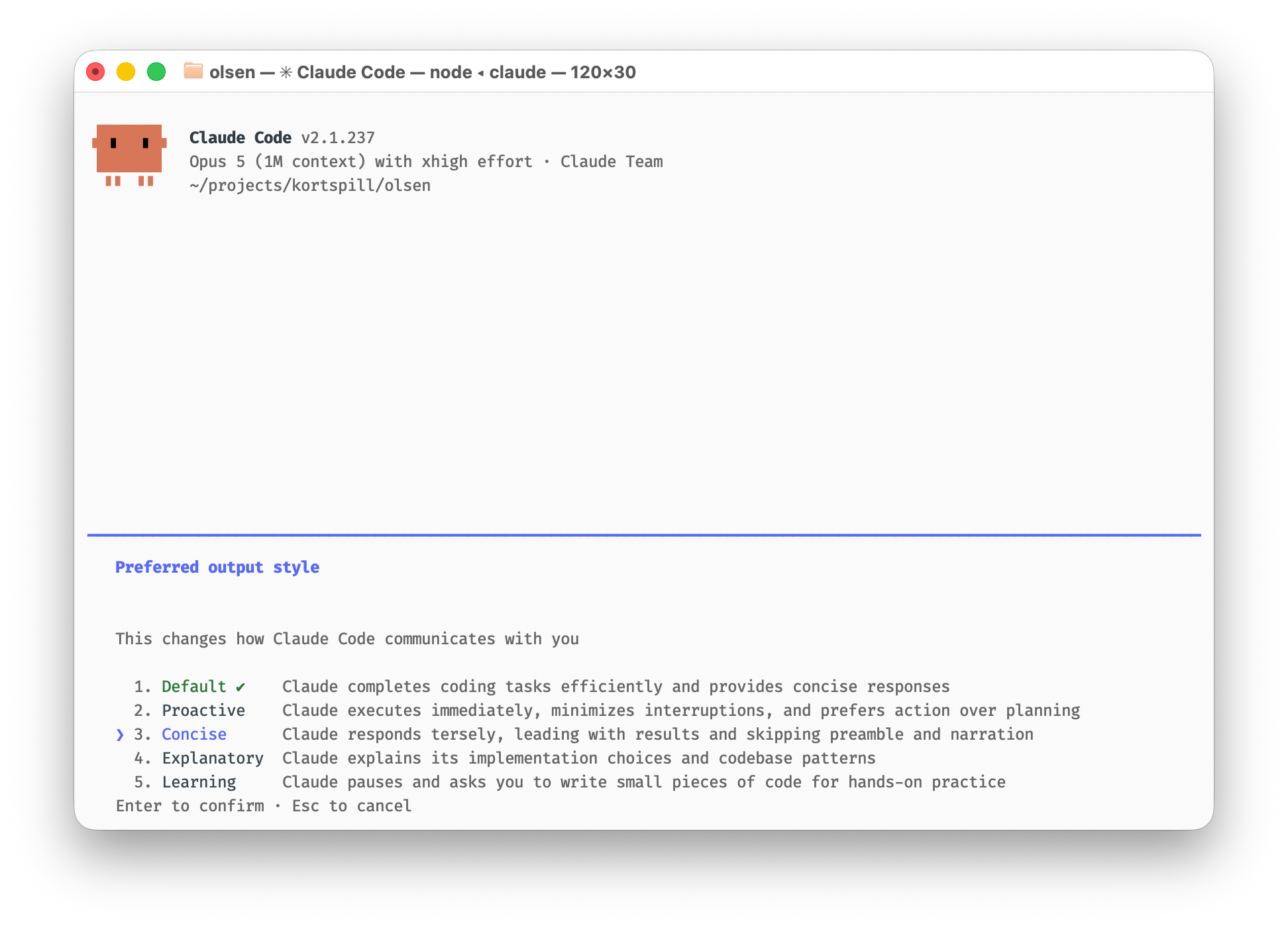
Opus 5 is a strong coding model, but it answers every question with a word salad. My fix used to be a custom output style built on ASD-STE100, the simplified English of aircraft maintenance manuals. Now Claude Code ships a built-in style called Concise that does the same job better after changing one configuration.
Load-bearing paragraphs #
Opus 5 at xhigh effort does excellent work. Then it tells you about it. And goes on an on. Ask for a variable rename and the answer explains which architectural “seam” the variable sits on, why that seam is “load-bearing”, and what is “worth knowing before you touch anything”. Every module is “the interesting part”. Somewhere in paragraph four, the rename is confirmed.
The words are fine words on their own, there are just so many of them and they often make little sense together.
Aircraft English #
ASD-STE100 is Simplified Technical English, the writing standard for aerospace maintenance manuals: a controlled dictionary of about 900 approved words, and rules that cap a sentence at 20 words with one instruction in it. It exists so a tired mechanic cannot misread a step. Exactly the reading level I want at the end of a long day.
Claude Code supports custom output styles, and it will happily write one for itself. One prompt is enough:
Change the output mode to use ASD-STE100
Claude wrote the style file to ~/.claude/output-styles/ASD-STE100.md
, pointed the configuration at it, and added two carve-outs on its own: code and quoted text stay verbatim, and anything written for my projects follows my language guide instead of aerospace English.
The new Concise style #
With version 2.1.237, Claude Code made the workaround unnecessary. /output-style
now lists five styles, and the new one is Concise: “Claude responds tersely, leading with results and skipping preamble and narration.”
An output style swaps the part of the system prompt that governs how Claude talks to you. Answers lead with the result and a simple question gets a sentence or three instead of a report. Narration and recaps are cut. Error output and failing tests keep their full content, and asking for detail still gets you detail. Only the default changes.
Same question, three styles #
I tested all three in the repo of Olsen, my crazy eights card game, asking each style to describe the project’s tech stack. Only the output style changed between runs. Default was the longest:
"Here's what's actually in the project, checked against the Xcode project and the source rather than the docs." (663 words) #
Here's what's actually in the project, checked against the Xcode project and the source rather than the docs.

## Shape of it

One Xcode project, three native targets, ~18k lines of Swift:

- `olsen` — the iPhone/iPad app, Mac Catalyst enabled (`TARGETED_DEVICE_FAMILY = "1,2"` + `SUPPORTS_MACCATALYST = YES`), `com.hjerpbakk.olsen`, version 2026.6
- `olsen watchOS Watch App` — `com.hjerpbakk.olsen.watchkitapp`, version 1.0 (6)
- `olsenTests` — unit tests

Deployment targets are iOS 26.2 and watchOS 26.2. `SWIFT_VERSION = 5.0`, so Swift 5 language mode, but with `SWIFT_DEFAULT_ACTOR_ISOLATION = MainActor` and `SWIFT_APPROACHABLE_CONCURRENCY = YES`: everything is main-actor by default and concurrency only shows up where it's asked for. `MultiplayerSession.swift:11` spells out the consequence, that GameKit callbacks and sends all stay on the main thread so no hops are needed.

## UI layer, two of them

Phone/iPad/Mac is a thin UIKit shell around SpriteKit. `AppDelegate` → `SceneDelegate` → Main storyboard → `GameViewController`, then everything visible is an `SKScene`: `MainMenuScene`, `LobbyScene`, `OlsenGameScene` (1410 lines, the biggest file), `SettingsScene`, `HowToPlayScene`, `WelcomeScene`, `TutorialCompletionScene`. Below those, hand-rolled `SKNode` subclasses in `olsen/iOS/Nodes/`: `CardNode`, `HandNode`, `DeckNode`, `SuitSelectorNode`, `ModernButtonNode`, `SFSymbolSprite`, and `CardGlowNode`, which is the only place using `SKShader`. Card art comes out of `Cards.spriteatlas` through `CardAtlas.swift`, which caches the extracted textures.

Mac Catalyst gets its own extras: a menu bar and a separate About window scene (`AboutSceneDelegate`, routed by activity type in `AppDelegate`).

The watch app is plain SwiftUI + WatchKit, no SpriteKit, with its own view models and models (`WatchGameViewModel`, `WatchModels`). It is a separate implementation of the game's surface, not a port of the scenes.

## Game engine

`olsen/Shared/` is the platform-agnostic half: GameplayKit ECS with entities (Player, Card, Deck, DiscardPile), components (Hand, Turn, AI, Animation, Card, Sprite) and systems (CardPlay, Turn, Draw, AI). `GameManager` (878 lines) is the singleton that owns the rules and pushes changes out through a delegate. AI is protocol-based, `AIStrategy` with Easy/Normal/Hard.

## Two protocol seams

This is the interesting part of the architecture, and both seams are documented in their own files:

- `GameSession` (`olsen/Shared/Session/GameSession.swift`) sits between the scene and the game. The scene talks to it instead of `GameManager.shared`, so the same scene renders either `LocalGameSession` (a wrapper over the engine) or `RemoteGameSession` (a guest applying host snapshots).
- `GameTransport` (`olsen/Shared/Multiplayer/GameTransport.swift`) sits between the game and the network. `MultiplayerSession` implements it over `GKMatch`; the tests implement it with a fake. That's what keeps GameKit out of the engine and makes the snapshot fan-out unit-testable.

Multiplayer is host-authoritative: `SnapshotBroadcaster` sends every remote seat its own redacted snapshot with a monotonic `seq` plus a baseline flag for reconnect resync, guests send intents (`GameIntent`), seats are mapped in `SeatMap`, and invites come in via `GKLocalPlayerListener` and `GameInviteRouter`.

## Apple services

Game Center is entitled on both the app and the watch: authentication, achievements, leaderboards, `GKAccessPoint`. The watch can't submit on its own, so `WatchGameCenterManager` relays through `WCSession.sendUserInfo` and `GameCenterManager` picks it up as a `WCSessionDelegate` (`GameCenterManager.swift:399`). StoreKit shows up in `ReviewPrompter`, `SettingsScene` and `AboutViewController`. Localization is String Catalogs (` Localizable.xcstrings`, `InfoPlist.xcstrings`), en + nb. The app icon is the new Icon Composer format (` AppIcon.icon`).

## Third-party, all SPM

Three pins, no other package manager:

- Google Mobile Ads 13.6.0 — interstitials only, through `InterstitialAdManager`, compiled out on Mac Catalyst
- Google User Messaging Platform 3.1.0 — consent
- umami-swift 1.6.0 — self-hosted analytics against `hjerpbakk-analytics.fly.dev`, imported in 25 files across both platforms, and skipped for test and `-screenshotMode` runs

## Tests

`olsenTests`, Swift Testing (` import Testing`), 8 files and almost all of it multiplayer: engine, snapshots, intents, seat map, broadcaster, remote session. The single-player engine has no direct coverage.

Three things in `AGENTS.md` no longer match the project: there is no `olsenUITests` target (only the three above), the Swift version is 5.0 rather than 6, and the preferred simulator listed there (iPhone 16 Pro) isn't installed on this machine any more, iPhone 17 Pro on 26.2 is. Also worth knowing: `Info.plist` sets `NSAllowsArbitraryLoads` true across the board, which is the ads-SDK boilerplate and wider than the app needs.
ASD-STE100 trimmed it and used a simpler structure:
"# The stack in Olsen. Here's what the project actually is, from the sources rather than the docs." (525 words) #
Here's what the project actually is, from the sources rather than the docs.

## Shell and build

One Xcode project (`olsen.xcodeproj`), no `Package.swift`. Three targets: `olsen` (iPhone/iPad/Mac Catalyst), `olsen watchOS Watch App`, `olsenTests`. Two shared schemes. Around 18k lines of Swift.

Language settings are worth knowing before you touch anything: `SWIFT_VERSION = 5.0` but with `SWIFT_DEFAULT_ACTOR_ISOLATION = MainActor` and `SWIFT_APPROACHABLE_CONCURRENCY = YES`, so everything is main-actor by default and GameKit callbacks need no hops. Deployment targets are iOS 26.2 and watchOS 26.2, Catalyst on.

## The phone/iPad/Mac app

A thin UIKit shell: `AppDelegate` → `SceneDelegate` → Main storyboard → `GameViewController`, which owns an `SKView` and picks the first scene based on `tutorialCompleted` and `FirstLaunch.shouldShowWelcome`. From there it is all SpriteKit: 7 scenes (` WelcomeScene`, `MainMenuScene`, `OlsenGameScene`, `LobbyScene`, `SettingsScene`, `HowToPlayScene`, `TutorialCompletionScene`) and 11 nodes (` CardNode`, `HandNode`, `DeckNode`, `SuitSelectorNode`, `CardGlowNode`, and so on).

## The game engine

GameplayKit ECS under `olsen/Shared/ECS/`:

- Entities: `PlayerEntity`, `CardEntity`, `DeckEntity`, `DiscardPileEntity`, all real `GKEntity` subclasses
- Components: `Hand`, `Turn`, `AI`, `Animation`, `Card`, `Sprite`, all `GKComponent`
- Systems: `CardPlaySystem`, `TurnSystem`, `DrawSystem`, `AISystem`, plain classes that `GameManager` owns and calls, not `GKComponentSystem` update loops

`GameManager.shared` is the rules engine and pushes changes out through `GameManagerDelegate`. `Deck` shuffles through a `GKRandomSource`, so shuffles can be seeded.

One correction to the docs: `CLAUDE.md` says game flow runs on a `GKStateMachine`. There is no state machine in the code. `GamePhase` is a plain enum and `GameManager.currentPhase` is derived from engine state on demand, with no stored field. Worth fixing in the doc at some point.

AI is protocol-based: `AIStrategy` with `EasyAI`, `NormalAI`, `HardAI`.

## The two seams

Both are documented in their own files, and they are the load-bearing part of the design:

- `GameSession` sits between the scene and the game. The scene never touches `GameManager.shared`. `LocalGameSession` wraps the engine, `RemoteGameSession` applies host snapshots. `SeatDescriptor` lets the same avatar node render an AI or a human friend.
- `GameTransport` sits between the game and the network. `MultiplayerSession` implements it over `GKMatch`, tests implement it with a fake. GameKit never reaches the engine.

Multiplayer is host-authoritative: `SnapshotBroadcaster` sends each remote seat its own redacted snapshot (only that seat's hand is populated) with a monotonic `seq` plus a baseline flag for reconnect resync, guests send `GameIntent` s back, seats live in `SeatMap`, invites arrive through `GameInviteRouter`.

## watchOS

Completely separate UI: SwiftUI + WatchKit, its own views and `WatchGameViewModel`, no SpriteKit. The watch cannot submit to Game Center on its own, so `WatchGameCenterManager` relays over `WCSession.sendUserInfo` to `GameCenterManager` on the phone.

## Dependencies

Three SPM packages, all up-to-next-major:

- `googleads/swift-package-manager-google-mobile-ads` 13.6.0 (olsen target only)
- `googleads/swift-package-manager-google-user-messaging-platform` 3.1.0 (olsen target only)
- `hjerpbakk/umami-swift` 1.6.0 (both app targets)

Ads are interstitials only, behind `InterstitialAdManager`, compiled out on Catalyst. Umami is imported in 25 files, including the engine itself.

Apple frameworks in play: SpriteKit, GameplayKit, GameKit, UIKit, SwiftUI, StoreKit (the rating prompt via `ReviewPrompter`), AVFoundation and AudioToolbox (` AudioManager` synthesizes its tones in code), WatchConnectivity, and Combine in exactly one file.

## Tests

`olsenTests`, Swift Testing (` import Testing`), 8 files and almost all of it multiplayer: engine, snapshots, intents, seat map, broadcaster, remote session. No UI test target.
And Concise landed at half the default:
"Native Apple stack, no cross-platform layer." (330 words) #
Native Apple stack, no cross-platform layer. Three shipping surfaces from one repo:

**Platforms & build**
- Xcode project `olsen.xcodeproj`, two app targets: `olsen` (iOS 26.2, iPad, Mac via Catalyst) and `olsen watchOS Watch App` (watchOS 26.2). Tests in `olsenTests` (+ `olsenUITests`) using Swift Testing (` import Testing`), not XCTest.
- Swift with `SWIFT_DEFAULT_ACTOR_ISOLATION = MainActor` and approachable concurrency.

**Rendering**
- iOS/iPad/Mac: SpriteKit. `GameViewController` → `SKScene` subclasses in `olsen/iOS/Scenes/` (MainMenu, Lobby, Game, HowToPlay, Settings, Welcome, TutorialCompletion) and hand-rolled `SKNode` subclasses in `olsen/iOS/Nodes/`. Cards come from a sprite atlas (` Cards.spriteatlas`) via `CardAtlas` with texture caching. `CardGlowNode` uses an inline-GLSL `SKShader` with cached uniforms for the glow on special/playable cards.
- watchOS: SwiftUI, a separate lightweight implementation (`WatchGameViewModel`, `WatchModels`, `WatchCardView`) rather than shared engine code.

**Game logic**
- GameplayKit ECS in `olsen/Shared/ECS/`: entities (Card, Deck, DiscardPile, Player), components (Hand, Turn, AI, Animation, Card, Sprite), systems (CardPlay, Turn, Draw, AI). `GameManager` (878 lines) is the singleton coordinator that drives them and calls back through a delegate.
- AI is protocol-based (`AIStrategy`) with Easy/Normal/Hard.
- Note: CLAUDE.md says `GKStateMachine` handles game flow, but there is no `GKStateMachine` anywhere in the code. Flow lives in `GameManager` and the scenes.

**Multiplayer (two seams)**
- `GameSession` protocol is the seam between scene and game: `LocalGameSession` wraps the engine, `RemoteGameSession` renders host snapshots. The scene never touches `GameManager.shared` directly.
- `GameTransport` is the seam between game and network: `MultiplayerSession` implements it over `GKMatch`, tests use a fake. Host authority with per-seat redacted `GameSnapshot` s fanned out by `SnapshotBroadcaster` with monotonic seq numbers, plus `GameIntent`/` GameEvent`, `SeatMap`, and `GameInviteRouter`. The engine never imports GameKit.
- Watch talks to the phone over WatchConnectivity (`WCSession` in `GameCenterManager` ↔ `WatchGameCenterManager`) to relay Game Center.

**Dependencies (SPM, iOS target only)**
- Google Mobile Ads 13.6.0 + User Messaging Platform 3.1.0 (`InterstitialAdManager`)
- `umami-swift` 1.6.0 — self-hosted analytics, imported in 25 files
- Apple frameworks: GameKit (Game Center, 20 achievements + leaderboard), StoreKit (`ReviewPrompter`), AVFoundation/AudioToolbox (` AudioManager`), UIKit haptics.

**Localization**: String Catalogs (`Localizable.xcstrings`, `InfoPlist.xcstrings`) for English + Norwegian bokmål.
All three name the same architecture and the same drift between my docs and the code. Nothing I needed is missing from the short one. Still Opus 5 is true to itself: even in Simplified Technical English or Concise mode, there will be seams.