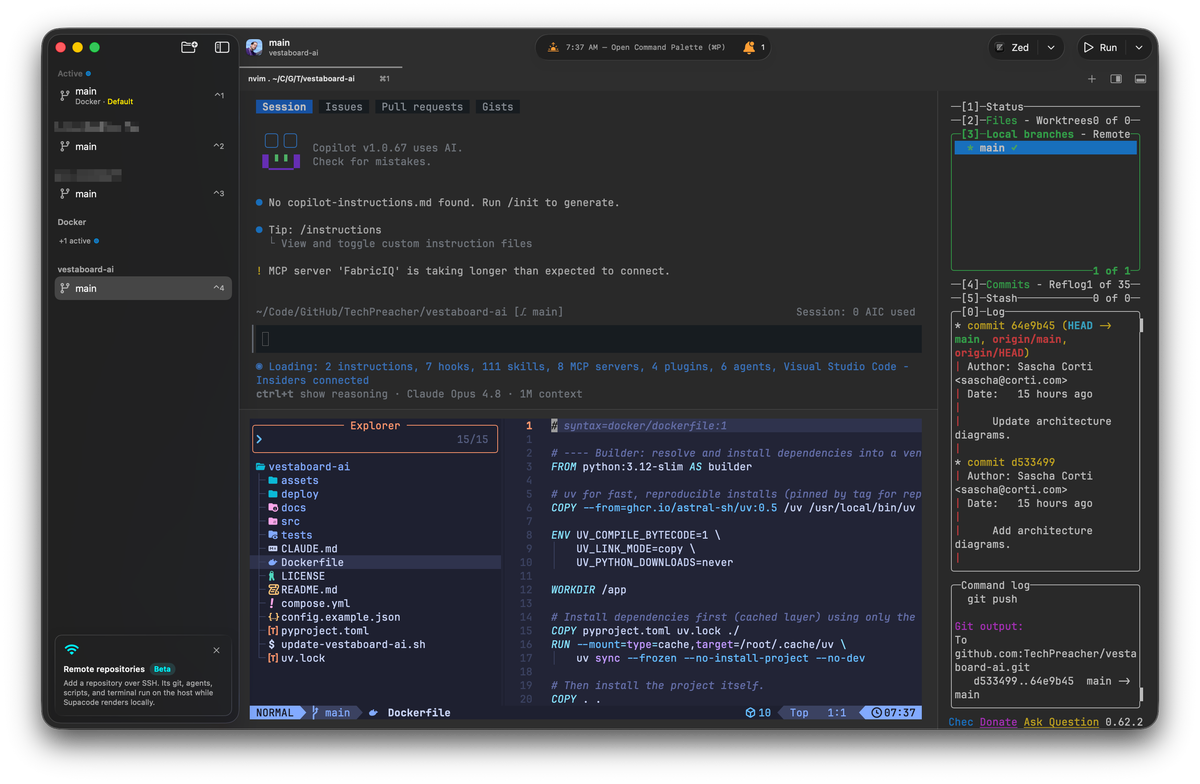
I've spent the last while collapsing my development environment into a single window. Not VS Code, not a raw Ghostty grid held together with a tmux config but Supacode. What started as "a nicer harness for running Claude Code, OpenCode or Copilot CLI in parallel" has quietly become the only thing I open when I sit down to work. This is the layout I've settled on and why each pane earns its place.
What Supacode actually is #
Supacode is a native macOS app from supabitapp that bills itself as a "worktree coding agents command center." A few technical properties matter for what follows:
- It's built in Swift on The Composable Architecture, with libghostty (GhosttyKit) as the terminal engine— the same GPU-accelerated core as Ghostty, not an Electron shell. Terminal surfaces are real native terminals, so there's no PTY-wrapper translation layer between me and the agent. - It reads the same Ghostty config I already maintain, so my fonts, theme, and keybindings carry over for free. Nothing to re-theme. - It's bring-your-own-agent. Any CLI coding agent runs in a surface as-is: Claude Code, Codex, OpenCode, and — since a recent release —** GitHub Copilot CLI**. - Each project's work happens in a git worktree, and the sidebar nests those worktrees under their repo with an agent badge on each active row. - Terminal state is split/tab-managed per worktree (one Ghostty surface per pane), and sessions survive quit/relaunch via a bundled zmx multiplexer.
Requirement worth stating up front: it targets macOS 26. It's still beta, free, and open source (brew install supacode
).
Everything below is built on top of those primitives. The parts that are mine — neovim, a file tree, lazygit — are just TUIs running inside panes. Supacode gives me the surfaces; I decide what runs in them.
The sidebar: projects and live agent sessions #
The left rail holds several repos open at once, each expanded to show its worktrees. Every worktree that has an agent attached carries a badge, so a glance down the sidebar tells me who's working where: which projects have a Claude Code or Copilot CLI session mid-stream, which are idle, which are pinned. Active and pinned worktrees float to the top, so the thing I'm currently driving is never buried.
This is the piece that replaced my old "1,000 tabs" problem. Instead of a flat wall of terminal tabs I have to remember the meaning of, the sidebar is the project switcher, and switching worktrees swaps the entire pane layout with it. Because each worktree is genuinely isolated at the git level, an agent churning in one repo can't step on the tree I'm hand-editing in another.
The main pane: agent on top, editor below #
Inside a single worktree I split the main area into two stacked panes:
Top pane — the coding agent. This is where Claude Code or Copilot CLI runs. It's the generator: I give it the task, it reads the tree, proposes and applies changes. Because it's a native terminal surface, the agent behaves exactly as it would in a bare terminal — same auth, same output, same tool calls, no wrapper quirks.
Bottom pane — neovim as the manual editor. neovim runs on the LazyVim configuration, so it isn't a bare editor — LazyVim ships a preconfigured LSP and Treesitter setup out of the box, which gives me automatic linting and diagnostics, proper code highlighting, and code hints/completions without me wiring any of that up per project. That's what makes the bottom pane a genuine review surface: I read what the agent did with full syntax highlighting and inline diagnostics, and take the wheel when a change needs a human hand — a tricky refactor, a config the agent keeps getting subtly wrong, a diff I want to reshape before it goes anywhere near a commit.
When I need actual file management rather than just editing — moving, renaming, bulk operations, navigating a tree — I reach for yazi, a fast terminal file manager, in a pane. neovim stays focused on editing; yazi handles the filesystem work.
The key point is that both panes point at the same worktree directory. The agent's edits land on disk; neovim (and yazi) are looking at that same disk. There's no sync step, no "reload from the assistant" — I :e
and I'm looking at exactly what the agent produced. The top pane writes, the bottom pane reviews and corrects, and neither is a copy of the other.
The right column: lazygit, full height #
Down the right side I keep one narrow, full-height pane running lazygit. This is the git surface for the worktree: staged/unstaged status, hunk-level staging, commit, push — all without leaving the window or dropping into raw git
incantations.
Supacode is itself GitHub-aware (it can surface PR check status natively), but for the actual mechanics of staging and shaping commits I want lazygit's granularity. So the division of labour is: Supacode owns which worktree/branch I'm on and the PR-level view; lazygit owns what goes into the next commit. Keeping it full-height on the right means the diff and the stage list are always visible while I work the other two panes — I can watch the change set grow as the agent and I edit, then stage and push the moment it's clean.
The loop this creates #
Put together, the three regions form a tight left-to-right, top-to-bottom loop: Sidebar— pick the worktree / spin up the agent session for the task.** Top pane**— the agent generates or modifies code.** Bottom pane**— neovim, over the same tree, is where I review and hand-edit.** Right pane**— lazygit stages the reviewed change, commits, pushes.
Nothing here leaves the terminal, and nothing crosses a translation layer. The agent, my editor, and my git tool are all looking at one worktree on disk, in one native window, with my existing Ghostty theme and keybindings intact. And because sessions persist across restarts, closing the lid doesn't tear the layout down — the fleet is still there, mid-stream, when I reopen it.
How this compares to VS Code #
VS Code is the obvious point of reference — it's the editor most agent tooling assumes, and it can approximate this layout: sidebar, editor in the center, an integrated terminal for the agent, a Git panel or GitLens on the side. So why not just use it?
A few differences that matter to me:
The agent runs in a real terminal, not a wrapped one. In VS Code the agent is either an extension talking to the editor through its API, or a CLI stuffed into the integrated terminal panel — a cramped strip along the bottom rather than a first-class pane. In Supacode the agent gets a full native libghostty surface: same auth, same output, same tool calls it would have in a bare terminal, no extension layer in between and no fighting the panel for vertical space.Worktree isolation is the unit of work, not folders/tabs. VS Code thinks in open folders and editor tabs. To run several agents in parallel without them colliding, you're layering multi-root workspaces or juggling windows, and they still share one checkout unless you set up worktrees yourself. Supacode makes the git worktree the primitive — the sidebaristhe parallel-agent view, and each agent physically can't step on another's tree.It's my terminal tooling, not the editor's reimplementation of it. neovim on LazyVim gives me the LSP/Treesitter stack — highlighting, diagnostics, hints — that VS Code would otherwise own, but asmyconfig that's identical everywhere I SSH. lazygit and yazi are the real tools, not a Source Control view or a file explorer that approximates them. And because Supacode reads my existing Ghostty config, the theme and keybindings are the same ones I already live in.Vim motions everywhere, not just in the editor. My primary way of navigating and editing is Vim motions, and the whole stack speaks them natively. neovim is Vim by definition; lazygit and yazi both shiphjkl
/Vim-style navigation; and because these are real terminal TUIs rather than a GUI with a bolted-on emulation extension, the motions behave the same in every pane. I don't drop out of modal editing to stage a hunk or move a file — the muscle memory carries straight across the agent-review-git loop. In VS Code, Vim is an extension emulating those motions on top of a fundamentally non-modal editor, and it stops at the editor's edge; the Source Control panel and file explorer don't play along.One coherent window with no context tax. VS Code can host all these pieces, but the agent, the editor, and Git each live in a different mental model (extension, buffer, panel). Here they're three terminal panes over one worktree on disk. The agent writes, neovim reviews, lazygit ships — nothing crosses a translation layer, and because sessions persist across restarts, the layout is still there mid-stream when I reopen the lid.
None of this makes VS Code wrong — for a lot of people the integrated, batteries-included model is exactly right. But my workflow was already terminal-native (neovim, lazygit, yazi, Ghostty), and Supacode lets me keep every one of those tools as the real thing while adding the agent orchestration and worktree sidebar on top. It's less "a better IDE" than "my terminal setup, finally assembled into one window I never have to rebuild."