My little iOS app PictureFramer does one thing: you photograph a framed painting in a museum, and it straightens the photo — finds the frame, fixes the perspective, keeps a clean strip of wall around it. Pure on-device geometry, no network, done.
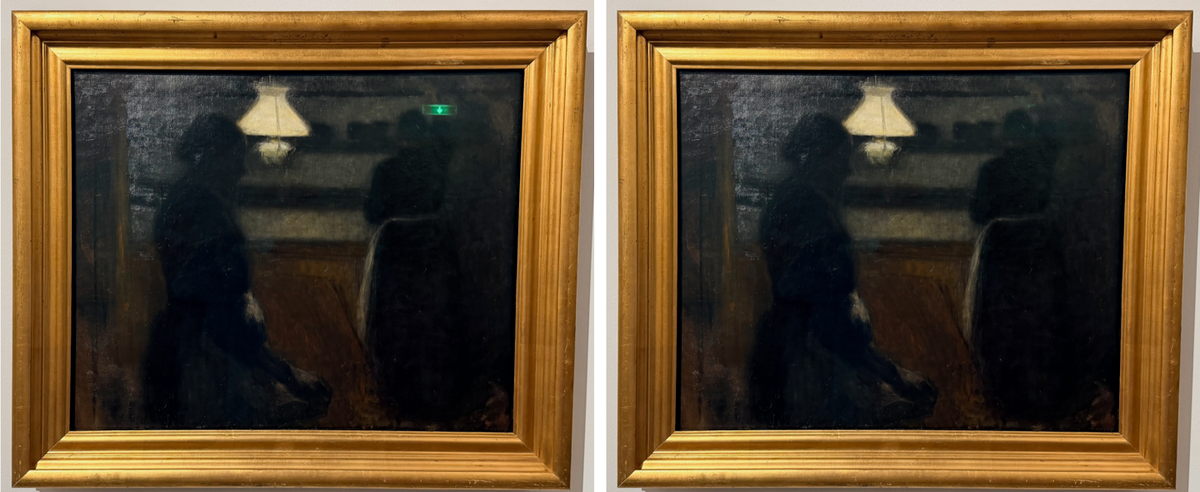
Then I looked at my camera roll. Half my museum photos had something the geometry pipeline can't fix: glass. Skylight streaks smeared across a Hammershøi, a green emergency-exit sign glowing in the varnish of a dark oil painting, spotlights blooming on protective glazing. The perspective was perfect; the painting was still ruined.
This is the story of adding AI-powered reflection removal to the app — and the three design decisions, two dead ends, and one billing surprise along the way.
The one rule: never touch pixels outside the mask #
Reflection removal means inventing pixels — reconstructing what the artwork looks like under the glare. That's a job for a generative model, and generative models have a well-earned reputation for "improving" things you didn't ask them to touch. For photos of artwork, that's disqualifying. Nobody wants an AI subtly repainting brushwork a painter put there 130 years ago.
So the architecture starts from a hard invariant, enforced on the client, not trusted to the model:
Every pixel outside the user's mask is bit-identical to the original. Not "visually identical" — bit-identical.
The flow that guarantees it:
- The user marks the glare with a finger (more on that UX below), producing a grayscale mask — white means "repaint".
- The app crops a padded bounding box around the mask, resizes it to the provider's upload size, and sends
only that cropplus the mask to the AI. - The returned patch is resized back and composited into the full-resolution image
through a Core Graphics clip mask—
CGContext.clip(to:mask:)
with the original drawn first. Where the mask is black, the framebuffer simply keeps the original bytes. No Core Image, no color-managed round trip, no drift. - The mask edge gets a Gaussian feather so the seam blends — but the feather is multiplied by the binary mask first, so softness only ever grows inward. It cannot leak a single pixel past the boundary.
There's a unit test that iterates all 32,000 pixels of a fixture and asserts exact equality outside the mask. It's the most important test in the feature.
A pleasant side effect of sending only the crop: provider output-resolution caps stop mattering. The model sees a 1024-pixel patch; your 24-megapixel export keeps its 24 megapixels everywhere the AI didn't work.
Two providers, one protocol, one asymmetry #
I wanted users to bring their own API key rather than run my images through a server of mine (the app has no backend, and I intend to keep it that way). Two providers made the cut, behind a four-line protocol:
protocol InpaintingProvider: Sendable {
    func uploadSize(for cropSize: CGSize) -> CGSize
    func inpaint(image: CGImage, mask: CGImage, apiKey: String) async throws -> CGImage
}
OpenAI ( gpt-image-1) has a real inpainting API:
images/edits
takes an image plus a mask where transparentpixels mark the repaint region. My masks are white-means-repaint grayscale, so there's a small conversion — alpha = 255 − gray, on a premultiplied black RGBA buffer. A pixel-level unit test guards the inversion, because a sign flip there would silently invert the entire feature.
Gemini (2.5 Flash Image) has no mask parameter at all. The mask travels as a second inline image with strict prompt instructions ("repaint only areas that are white in the mask"). Does the model always obey? It doesn't have to — the client-side compositor enforces the invariant regardless of what comes back. That's the quiet payoff of step 3 above: prompt adherence became a quality concern instead of a correctness concern.
API keys live in the Keychain (kSecClassGenericPassword
, device-only accessibility), never in UserDefaults — and there's a test that dumps UserDefaults.dictionaryRepresentation()
and asserts the key isn't in there.
The detector that marked entire paintings
I wanted the app to propose a glare mask automatically. Version one was the obvious heuristic: a pixel is glare if it's bright and unsaturated (specular highlights wash out color). It worked beautifully on my synthetic test fixtures.
Then I pointed it at real museum photos and it marked 30–56% of the image. Pale painted skies, a beige dress, the white gallery wall — all bright, all unsaturated, all flagged. Meanwhile it missed the actual reflections, because a cyan skylight streak is colored (saturation above the cutoff) and a soft sheen is dimmer than the global brightness bar.
Attempt two: pure local contrast. Glare is additive light, so mark anything brighter than its local surroundings — a morphological white top-hat (luminance minus its opening). Elegant theory. On real paintings, catastrophically wrong in a different way: a painting is full of bright-things-next-to-dark-things. Every pale area within the window of a dark figure lit up. I rendered the detector output as red overlays on my test photos, and the result looked like a crime scene.
That debugging loop — a tiny standalone Swift probe that compiles the detector sources with swiftc
, runs them over real HEIC photos, and writes red-tinted overlay PNGs — turned out to be the most valuable tooling of the project. Thresholds you tune blind are lies; thresholds you tune against overlays converge in two iterations.
The version that shipped is a precision-first hybrid: a pixel is proposed only if it's bright and unsaturated and locally elevated above its morphological opening, with a minimum-blob filter to kill speckle and the wall-margin band excluded entirely (the margin is real wall — bright by nature, never glare worth fixing). Coverage on the same photos dropped to 0.2–6%, sitting right on the actual glare.
The philosophy behind "precision-first" is a cost asymmetry: a missed reflection costs the user one brush stroke; a false positive costs scrubbing an entire painting's worth of wrong mask. Optimize accordingly. In the end, user feedback pushed this to its logical conclusion — auto-detection is now opt-in behind an Auto-detect button, and the screen opens with an empty mask and a brush.
The brush that had to earn its keep #
The mask editor went through three rounds of on-device feedback, each a small lesson in touch UX:
Round one: strokes only appeared on finger-up. The committed mask is rasterized asynchronously (detector proposal + strokes → grayscale bitmap → red tint), and that pipeline only ran when a stroke ended. The fix is a classic drawing-app pattern: render the in-flight stroke as a vector path live during the drag, and keep the last committed stroke's vector on screen until the async raster catches up, then hand off. No flicker, no lag.
Round two: no zoom. Precise glare often needs strokes a few points wide, and fingers are fat. Rather than fight SwiftUI's gesture system (which can't cleanly distinguish one-finger from two-finger drags), I wrapped the canvas in a UIScrollView
via UIViewRepresentable
and set one property:
scrollView.panGestureRecognizer.minimumNumberOfTouches = 2
One finger brushes, two fingers pan, pinch zooms with native physics. The brush radius divides by the zoom scale, so zoomed in 4× you're painting 4× finer in image pixels — precision for free. The coordinate math needed no changes: gesture locations inside a zoomed UIScrollView
arrive in the content's own unzoomed coordinate space, which is exactly what the existing display-to-canonical mapper expects.
Round three: a Clear button. When an auto-proposal isn't wanted, erasing it blob by blob is punishment. One button, one mask.clear()
.
Gotchas worth writing down #
Gemini free-tier keys fail in the most misleading way possible. The key validates fine in Settings (listing models is free) and then every image-generation call returns HTTP 429 — forever. Not rate limiting: the free tier's quota for the image model is effectively zero, and Google reports "no quota" as RESOURCE_EXHAUSTED
. My app dutifully mapped 429 to "The provider is rate-limiting — try again shortly," which sent me retrying for hours. The fix is billing on the key's project — and an app change to surface the provider's own error body ("You exceeded your current quota, please check your plan and billing details") instead of my optimistic guess. If your error mapping throws away the response body, you're throwing away the diagnosis.
** CGImage.cropping(to:) uses a top-left origin.** The entire app lives in Core Image's lower-left coordinate space; this one API doesn't. The flip lives in exactly one wrapper function with a loud comment, because coordinate bugs metastasize.
Async results can outlive the screen that requested them. Fire off a 10-second inpainting call, and the user might cancel, change the crop, or export before it lands. A late result must not resurrect state the user tore down. A monotonic generation counter — bumped on every teardown, captured before every await, checked before every write-back — closed that hole, verified by a test with a gated mock provider that deliberately releases its result after the user has exited.
Testing without a network #
Every provider test runs against a URLProtocol
stub — request assertions (multipart fields, headers, JSON body shape) and canned responses, no live API anywhere in the suite. The one thing stubs can't verify is the real contract: the actual first live call caught a modality quirk in the Gemini request that no fixture would ever have found. Stub everything, then smoke-test each provider once with a real key before shipping. Both lessons are old; both apparently need relearning every project.
The result #
The green exit sign is gone from the Hammershøi. The brushwork around it is untouched — provably, byte-for-byte. And the whole feature stays true to the app's original privacy posture: no backend, no accounts, and the only network calls are the ones you explicitly trigger, to the provider you chose, with your own key.
PictureFramer is iPhone-only, iOS 17+. The straightening pipeline runs entirely on-device; reflection removal is optional and bring-your-own-key (OpenAI or Google Gemini).