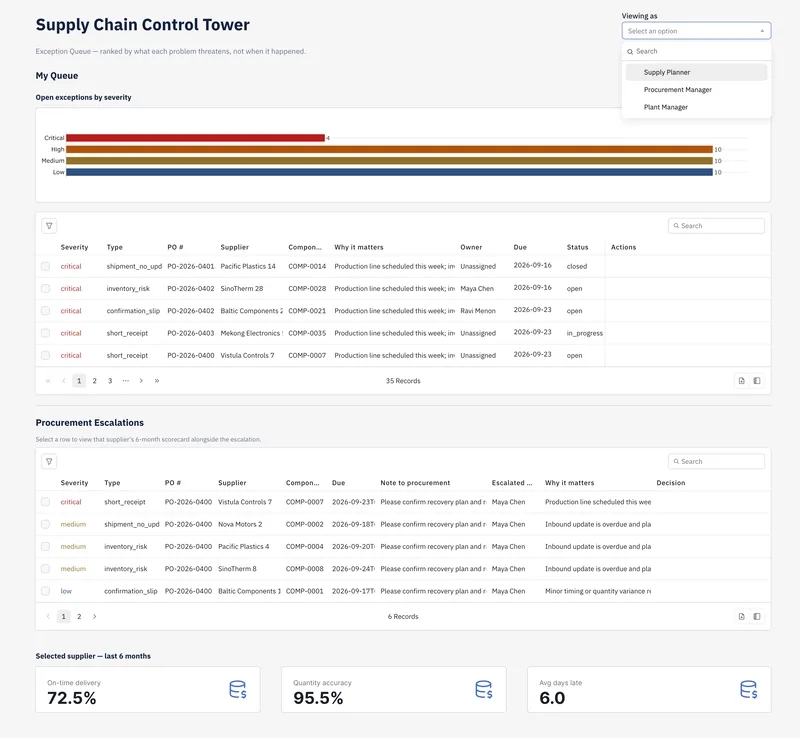
My team at a kitchen appliance manufacturer needed a way to stop jumping between five different spreadsheets to track supplier drift and stockout risks. We ended up using ToolJet MCP to build a control tower that puts exception tracking, supplier history, and inventory projections into one workflow. Instead of manually wiring every component, we had an agent generate the structured ToolJet application, which kept the queries and the UI synced up.
How the control tower handles triage and forecasting #
The setup is split into three main views to stop the planning team from missing critical flags. The first page acts as a triage desk for exceptions. We have it severity-ranked so the highest-risk issues stay at the top regardless of the date. Planners can edit the owner and due date inline, which is way faster than opening a separate record for every single tweak.
If an item needs to go to procurement, there is a modal for escalations. When a planner sends something over, they attach a note, and the system writes the outcome back to the original exception. To make the handoff make sense, the supplier's scorecard pops up right next to the escalation request, showing the 6-month trend and whether that supplier is declining.
The third page is where we handle the "Inventory vs Forecast" check. It specifically flags any component where the current stock won't cover demand until the next inbound shipment lands. It basically closes the loop between seeing a supplier issue and knowing if it's actually going to cause a line stoppage.
Technical requirements for the build #
If you're trying to replicate this, you'll need the ToolJet MCP repository for the setup and supported agents.
- Exception Queue: Must be severity-ranked (not date-sorted) with inline editing for owners and dates.
- Supplier Scorecard: Needs to track 6-month trends, sorted by the fastest-declining suppliers.
- Inventory View: Needs a comparison logic between current stock, forecast demand, and the next inbound shipment date to flag stockout risks.
- Escalation Logic: The procurement modal must carry notes from planning and update the source exception upon resolution.
The consolidated build prompt #
It took us a few passes to get the agent to understand the relationship between the scorecard and the escalation modal. If you're starting this now, don't do it piece-by-piece. Use a single consolidated prompt that defines the data queries and the interface layout simultaneously.
Build a supply chain control tower application with three views.
1. An Exception Queue: severity-ranked, allowing inline edits for 'owner' and 'due date', with a modal to escalate items to procurement.
2. A Supplier Scorecard: showing 6-month trends sorted by declining performance.
3. An Inventory vs Forecast view: flagging components that will stock out before the next inbound shipment.
Ensure the escalation modal displays the selected supplier's scorecard and writes the procurement outcome back to the original exception record.
The whole thing stays together in one ToolJet app, so the data and the UI don't drift apart as the team updates the logic.
Next Why ATS systems basically delete any career that isn't a straight line →
All Replies (4) #
Finally! I spent six months fighting 400-row Excel sheets before switching to a low-code setup. Does it handle PostgreSQL triggers well?
I want to try this tonight. My last project crashed because of API rate limits on the 500-endpoint mark. How's the latency?