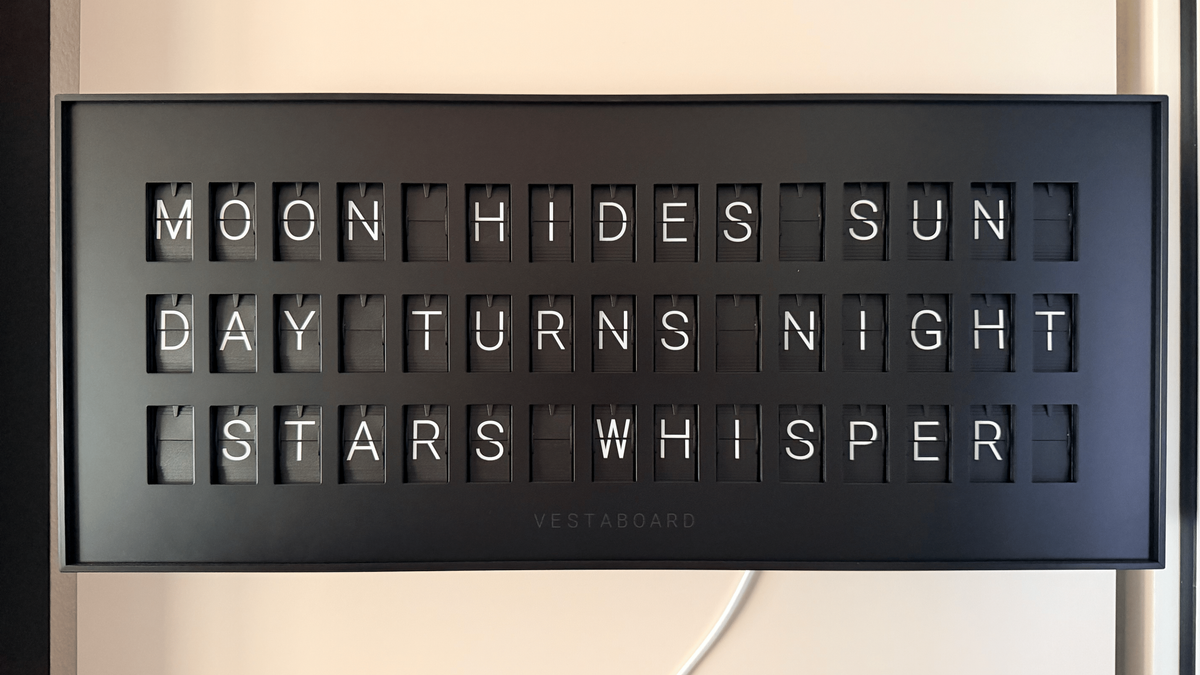
A Vestaboard is a split-flap display — the kind that used to clatter through train-station departure boards — reimagined as a connected home object. It's gorgeous, it's tactile, and it has a wonderfully small canvas: 3 lines of 15 characters, so 45 characters of real content, drawn from a restricted alphabet of letters, digits, a handful of symbols, and a few color chips.
That constraint is exactly what makes it a fun target for a language model. LLMs love to ramble; a Vestaboard Note physically cannot. So I built Vestaboard AI: a small Python service that asks an OpenAI-compatible model for a message, squeezes it through a hard validator until it fits the board, and flips it onto the display on a cron schedule. Configuration happens entirely in a browser, behind a password.
This post walks through what it is, how it works module-by-module, and how it's deployed.
The application can be found on GitHub at https://github.com/techpreacher/vestaboard-ai.
The shape of the problem #
The whole design falls out of four hard constraints, and it's worth stating them up front because they drive every decision downstream:
45 characters of content. The board renders 45 characters across a 3×15 grid. Both the LLM's outputandthe rendered layout have to respect this — a message can be 45 characters but still fail to wrap into three 15-char lines.A restricted character set. Only Vestaboard's glyphs render:A–Z
,0–9
, a specific punctuation set, a degree sign, and color chips. Anything else has to be substituted or rejected.Output is a code grid. The board doesn't take text; it takes a 6×22 grid of integer character codes. Text has to becompiledinto that grid.Two delivery backends. Vestaboard offers a Cloud Read/Write API and a Local API. The code has to treat them as interchangeable.
The guiding principle: never trust the model. The LLM is a suggestion engine. A deterministic, heavily-tested core decides what actually reaches the board.
prompt → LLM generates message → compile to VBML + code grid
       → validate (45 chars / 3×15 / charset) → deliver to board → repeat on schedule
Architecture: two processes, one file #
The system is split into two independent processes that never talk to each other directly. They coordinate through a single config.json
on disk.
config.json (0600, service user)  ← single source of truth
   ▲ write (atomic: temp + os.replace)        ▲ read (poll content hash every 5s)
   │                                          │
vboard-ui  (Streamlit)                 vboard-scheduler  (APScheduler daemon)
 auth + edit config                     generate → compile → deliver
- The UI is the only thing that writes config. It authenticates the user and edits credentials, prompts, and schedules. It can also fire a one-off "test send." - The scheduler daemon is the only thing that delivers. It reads config, builds cron jobs, and runs the generate→deliver pipeline when a job fires.
Why split them? Because the scheduler should keep ticking even while you're re the config page, and either process should be able to restart without taking down the other. A shared file is the entire IPC mechanism — simple, debuggable, and crash-safe.
The Python package (src/vboard/
) breaks down like this:
| Module | Responsibility |
|---|---|
config |
|
Pydantic models; atomic 0600 load/save |
|
logging_setup |
|
| Logger + secret-redaction filter | |
charset |
|
| Text → Vestaboard character codes | |
vbml |
|
| Compile text + color hints → code grid; the 45-char + charset gate | |
llm |
|
| OpenAI-compatible client + prompt scaffolding | |
delivery |
|
VBoard interface, CloudRW impl, Local stub, factory |
|
pipeline |
|
| generate → compile → regenerate → truncate → deliver | |
daemon |
|
| APScheduler + content-hash reload | |
ui/ |
|
| Streamlit auth gate, config editors, preview/test-send |
Dependencies are deliberately lean: pydantic
, httpx
, apscheduler
, streamlit
,streamlit-authenticator
, and bcrypt
. That's the whole runtime.
How it works, end to end #
1. The character set (charset.py
)
The foundation is a lookup table from characters to Vestaboard's documented integer codes. Space is 0
, A–Z
are 1–26
, digits 1–9
map to 27–35
and 0
to 36
, then a punctuation block (! @ # $ ( ) - + & = ; : ' " % , . / ?
and °
), and finally the color chips:
COLOR_CODES = {
    "red": 63, "orange": 64, "yellow": 65, "green": 66,
    "blue": 67, "violet": 68, "white": 69, "black": 70, "filled": 71,
}
Three tiny functions do all the work: char_to_code
(case-insensitive lookup, None
if unsupported), is_supported
, and encode_text
(which silently drops unencodable characters). This module is the single source of truth for "what can the board actually display."
2. Prompting the model (llm.py
)
The LLM client is intentionally generic — it speaks the OpenAI /chat/completions
shape, so you can point it at OpenAI, a local server, or anything compatible by setting a base URL, model name, and key.
The interesting part is the system prompt, which front-loads the constraints so the model gets it right most of the time without a round trip:
You write messages for a Vestaboard split-flap display. Output ONLY the message text. It must fit on 3 lines of at most 15 characters each (45 characters of content total). Use only A-Z, 0-9, spaces, and basic punctuation. You may add color accents using tokens like{red}
or{blue}
at the start of a line. Keep it punchy. No explanations, no quotes around the message.
Two details matter here. First, color is expressed as inline {color}
tokens the model can emit naturally, which the compiler later turns into chip codes. Second, there's a shorter=True
mode that appends "Your previous attempt was too long. Make it noticeably shorter." — this is the retry lever
the pipeline pulls when validation fails. Generation runs at temperature=0.9
for a bit of variety, with a generous read timeout because some endpoints are slow.
3. Compiling and validating (vbml.py
)
This is the gate, and it's pure functions all the way down. compile(text, color_hints_enabled)
does the following, bailing out with a reason string at the first failure:
Strip color hints({red}
etc.) so they don't count as content.Reject unsupported characters— anything that isn't a space and isn't in the charset fails immediately.** Enforce the 45-character content limit**, counting only non-space, supported glyphs.** Greedily word-wrapthe text into lines of ≤15 characters. If it needs more than 3 lines, or any single line exceeds 15, it fails. Lay it onto the grid.**The board is a 6×22 surface; the Note's 15 columns are centered within the 22 (col_offset = (22 - 15) // 2
), and the 3 text lines land on rows 1–3, each line itself centered within its 15. The result is alist[list[int]]
of character codes.Place color chips. When hints are enabled, the first{color}
token becomes a chip at the start of its line.
The output is a CompileResult
carrying the grid, the content length, a valid
flag, and a human-readable reason
when it's invalid. There's also a last-resort truncate_to_fit
that word-boundary-trims a too-long message down to something that does fit — used only after the model has had its chances.
4. The pipeline (pipeline.py
)
run_once
ties generation and validation together with a retry loop. The logic is small enough to quote the heart of it:
for attempt in range(1, MAX_ATTEMPTS + 1):
    text = generate(cfg.llm, prompt.text, shorter=(attempt > 1))
    result = vbml.compile(text, prompt.color_hints_enabled)
    if result.valid:
        break
So: generate, compile, and if it doesn't fit, ask the model again with the "make it shorter" nudge — up to 3 attempts. If all three fail, fall back to truncate_to_fit
rather than give up. Only a valid grid gets handed to delivery. Every failure mode (LLM error, un-compilable output, delivery error, the not-yet-implemented local backend) returns a structured PipelineResult
instead of throwing, so the daemon can log it and move on. Note the dependency-injected generate
and deliver_factory
parameters — that's what makes the pipeline trivially testable without real HTTP.
5. Delivery (delivery.py
)
Delivery hides behind a one-method Protocol
:
@runtime_checkable
class VBoard(Protocol):
    def send(self, grid: list[list[int]]) -> None: ...
CloudRW
implements it by POSTing the JSON grid to https://rw.vestaboard.com/
with the X-Vestaboard-Read-Write-Key
header. LocalAPI
is a stub that raises NotImplementedError
— the interface is ready, the implementation deferred. A make_delivery
factory picks the backend from config. Swapping backends is a one-word config change, exactly as the constraints demanded.
6. The scheduler daemon (daemon.py
)
The daemon turns each enabled prompt's 5-field cron string into an APScheduler CronTrigger
, then sits in a 5-second poll loop watching the config file. The clever bit is how it detects changes:
def _signature(self):
    data = self.config_path.read_bytes()
    return hashlib.sha256(data).hexdigest()
It hashes the file contents rather than trusting mtime
. Filesystem modification-time granularity is one second on some mounts, so an edit landing in the same tick as the previous sync could be missed forever. A content hash can't be fooled that way. When the hash changes, the daemon rebuilds all jobs from scratch — hot reload, no restart, picked up within ~5 seconds.
7. The UI and auth (ui/
)
The front end is Streamlit: an authentication gate in front of pages for credentials, prompts & schedules, and a preview/test-send panel. It's single-user — the password is bcrypt-hashed (never stored or logged in plaintext) via streamlit-authenticator
, and every page lives behind the gate. On first run, the UI prompts you to set the admin password.
Security: secrets that stay secret #
Because the config UI is meant to be exposed to the internet, secret hygiene was non-negotiable from the start:
Atomic, locked-down config writes.save_config
writes to a temp file,chmod
s it to0600
, andos.replace
s it into place — so a reader never sees a half-written file, and the secrets-bearing config is only ever readable by its owner.Centralized secret redaction. Every API key — Vestaboard, local, and LLM — is registered with the logging layer (register_secret
) the moment it's loaded or used. A logging filter scrubs those values from all output, at every level, including tracebacks. Keys simply cannot leak into logs.Hashed password, never plaintext. bcrypt, stored as a hash in config, verified on login.Localhost-only binding. The app speaks plain HTTP and binds to127.0.0.1
only. TLS is the reverse proxy's job.
Deployment #
There are two supported ways to run it, and both run the same two processes against a shared config.
Containers (the quick path)
A multi-stage Dockerfile builds a single image with uv
, running as a non-root user (uid 10001
). compose.yml
then runs that one image as two services — ui
and scheduler
— sharing a named volume mounted at /data
:
docker compose up -d --build
-
The UI is published on only — never directly on a public port.
127.0.0.1:8501 -
Config lives on the
vboard-config
volume at/data/config.json
. No secrets are baked into the image. - Both services run with
no-new-privileges
and all Linux capabilities dropped; the UI has a health check hitting Streamlit's/_stcore/health
.
systemd (the host-native path)
The deploy/
directory ships two unit files that run the UI and scheduler as a dedicated, unprivileged vboard
user out of /opt/vboard
, reading /opt/vboard/config.json
. Install the user, uv sync
the deps, drop the units into /etc/systemd/system/
, and systemctl enable --now
both.
TLS in front
Either way, the app never handles certificates. A reverse proxy terminates TLS and forwards to 127.0.0.1:8501
. Caddy does it in three lines with automatic Let's Encrypt:
your.domain {
    reverse_proxy 127.0.0.1:8501
}
nginx works too — the one thing that matters is forwarding the WebSocket upgrade headers, because Streamlit depends on them.
The flow for an operator is: open the UI, set the admin password, paste in the Vestaboard and LLM credentials, add prompts with cron schedules, hit preview to sanity-check the rendered grid, and walk away. The scheduler picks up every change within five seconds.
What I'd reach for next #
A few things are stubbed with their interfaces already in place: the Local API delivery backend, multi-user accounts, encryption of secrets at rest, and message history / analytics. The delivery Protocol
and the config models were designed so these slot in without disturbing the core.
The part I'm happiest with is the division of labor: the LLM is treated as creative but untrustworthy, and a small, pure, exhaustively-tested compiler has the final say on what the board displays. That's what makes it safe to point an open-ended prompt at a physical object in my living room and let it run on a timer — the model can be as imaginative as it likes, but it will never push something the Vestaboard can't render. Connecting an LLM to a beautiful, constrained little display turned out to be less about the model and more about the gate in front of it.