This past week I built (prompted) a tool I find myself using day to day and wanted to share it with others who may find it useful as well.
“Lacuna” is an opinionated way to invoke LLMs into any text input on your Mac. Specifically, you can type bracketed phrases {such as this}, press Shift-Command-K (or a different shortcut of your choosing), and the tool sends your bracketed phrase + the surrounding text contents to an LLM of your configuration for generating text to replace the bracketed phrase. The program returns 3 candidate phrases and the experience is entirely keyboard navigable.
Demo: https://jackdamon.org/assets/images/lacuna-scheduling-demo.g... Example scheduling workflow using Lacuna’s native UI and sample suggestions.
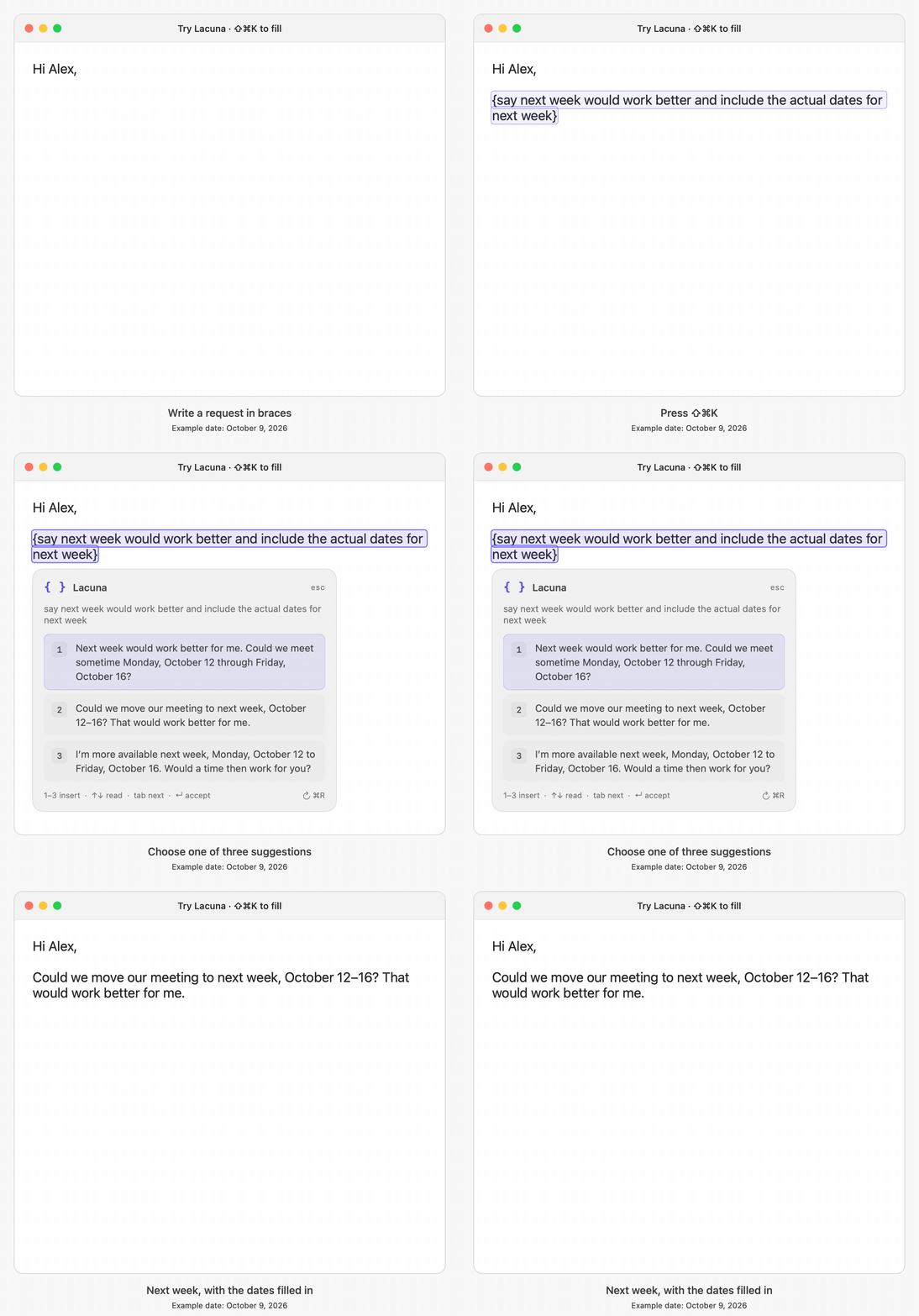
So far I find myself frequently using it when drafting emails where I want help with quick phrasing.
The project was inspired by Rectangle, an open source utility app for window tiling that is keyboard based.
Lacuna is open source and available here: [https://github.com/jdamon96/lacuna](https://github.com/jdamon96/lacuna)

Blog: [https://jackdamon.org/blog/lacuna/](https://jackdamon.org/blog/lacuna/)

Comments URL: [https://news.ycombinator.com/item?id=50025559](https://news.ycombinator.com/item?id=50025559)

Points: 1