
Conversations linking to GitHub, newest first. Times are UTC.
Mentions by source #
### [X](https://x.com/)

### [Bluesky](https://bsky.app/)

### [Reddit](https://www.reddit.com/)

### [Hacker News](https://news.ycombinator.com/)

### [Lobsters](https://lobste.rs/)

### [V2EX](https://www.v2ex.com/)

### [Qiita](https://qiita.com/)

### [arXiv](https://arxiv.org/)

### [DEV](https://dev.to/)
Latest posts #
- Maybe this is more sharable, but here's AgenticAlert. Alerts you if the repo/project uses genAI. Great if you: * Are tired of everyone hyping slop projects * Are tired of genAI in your #recomp /#decomp scene
- Are#noAI * Use a browser Protect yourself against AI slop garbage today.
- 補足:上の自動プレビュー画像は別の保存検査の一般例です。 今回の実測表はこちら。小/7個PASS、8個は111,855,413 bytesでFAIL。既存テスト37件はPASSです。データ層の検査です。 github.com/aichance/business-ai-recipes/tree/main…
- I built OpenSesh, an open-source MobaXterm/Termius alternative in Rust and Qt 6 --- title: I built OpenSesh, an open-source MobaXterm/Termius alternative in Rust and Qt 6 published: true description: One native app for terminals, SSH, SFTP, S3, tunnels, serial, containers and RDP/VNC. Free, GPL-3.0, zero telemetry. tags: rust, opensource, showdev, linux cover_image: opensesh.cc --- If you work with servers, you probably have a pile of tools open at once: a terminal, an SSH client, something for SFTP, something for tunnels, maybe an RDP client too. The all-in-one apps that exist are usually closed source, Windows-only, subscription-based or built on Electron. So I built OpenSesh: a free, open-source and native remote connections client for Windows and Linux. Version 1.0 just came out. 🎉 👉 GitHub:caixax/opensesh 👉 Website:opensesh.cc What it does
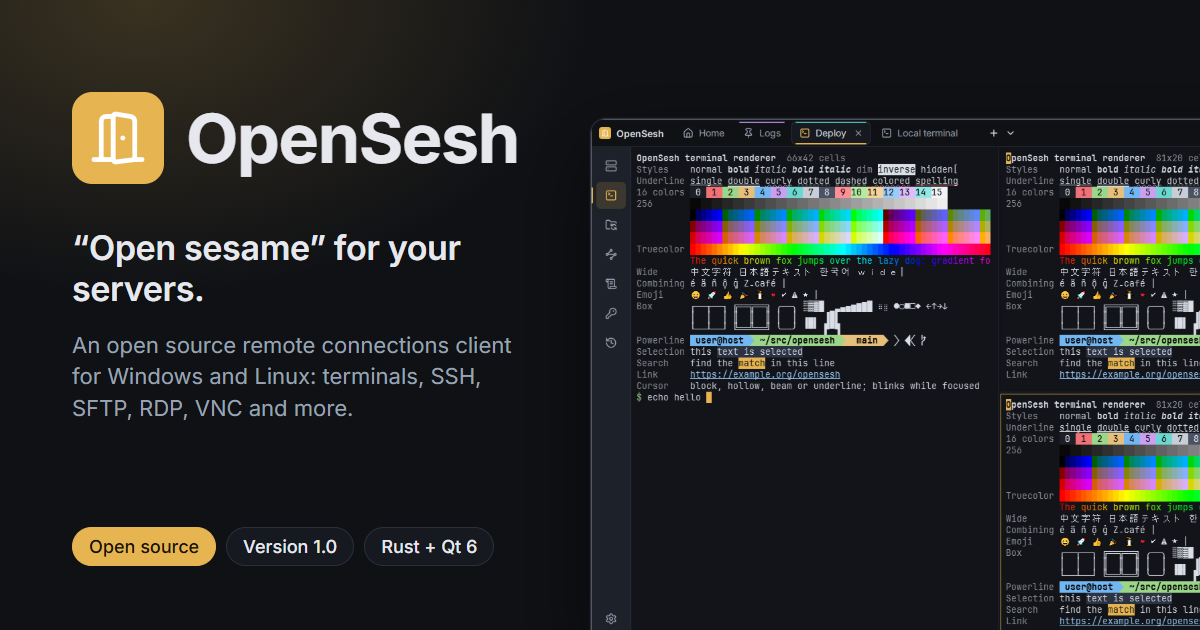
- Terminals: a GPU-rendered terminal for every shell you have (PowerShell, cmd, Git Bash, WSL, /etc/shells), with tabs that split into panes, move between windows and broadcast input.
- SSH: a built-in client with jump hosts, proxies, agents, one-time codes, certificates and auto-reconnect. X11 forwarding and Waypipe let you run remote GUI programs.
- Files: SFTP and S3 (AWS, MinIO, RustFS) in a two-pane view, and a side panel that follows your terminal's current folder.
- Tunnels: local, remote and SOCKS forwarding that reconnects by itself.
- More protocols: telnet, serial ports (with a hex view), mosh, Docker/Podman containers, Kubernetes pods, and RDP and VNC remote desktops in tabs.
- Snippets and macros with {{variables}} and secrets from the vault, session recording, and paste protection that warns you before a curl | sudo bash runs.
- Server monitor: CPU, RAM, network and disk of the server in the status bar, with no agent installed. It's just a small shell loop on a separate SSH channel. How it's built
- Rust for the core, with the UI in Qt 6 / QML throughcxx-qt . No Electron and no webviews.
- Secrets live in a vault encrypted with XChaCha20-Poly1305. Its key is held by the system keyring or an Argon2id master password.
- Settings are plain TOML files. You can sync them between computers with Git or Syncthing, and conflicts are merged record by record instead of overwritten.
- Security: every parser of untrusted input (quick connect, pastes, ~/.ssh/config, the importers, the sync merge) is fuzzed weekly, and the repo includes a written threat model and security review.
- Releases: each package is installed and launched on a clean Debian, Ubuntu, Fedora, Arch and Windows system in CI before it's published. Try it On Linux: curl -fsSLraw.githubusercontent.com | bash On Windows there's an installer (no admin needed), a portable zip and Scoop. You can download them from thereleases page . It imports your hosts from ~/.ssh/config, MobaXterm, PuTTY, Remmina or CSV, so you can try it in a couple of minutes. What's next A macOS version, winget and AUR packages, and signed Windows builds. If you give it a try, I'd love to hear what works, what breaks and what's missing. Issues and PRs are welcome! ⭐
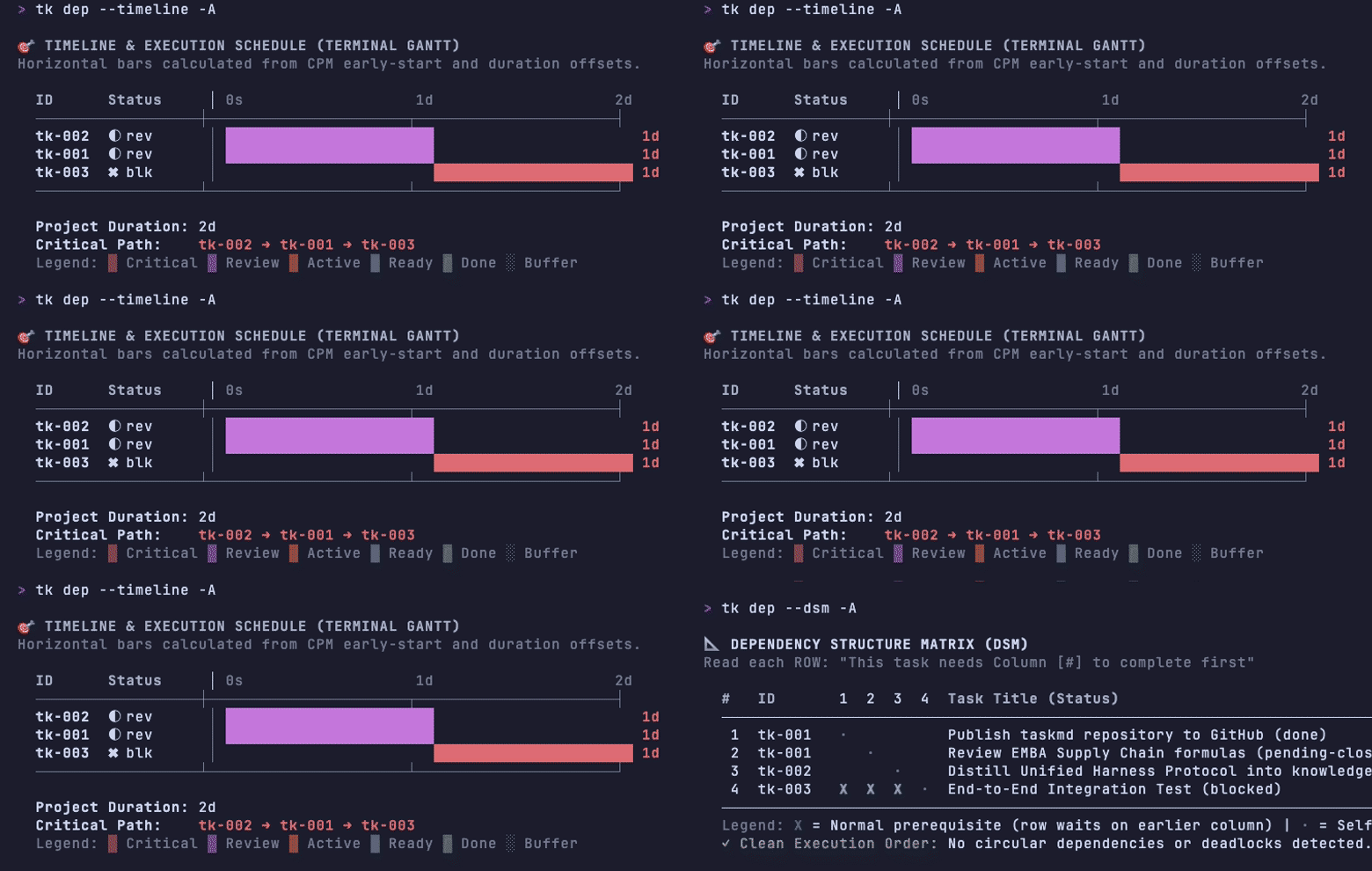
- I Run Multiple AI Coding Agents. My To-Do List Was the Bottleneck. I work with several AI coding agents every day: Codex, Claude, Ollama, Pi, Antigravity, and Hermes. I love working in the terminal and in Obsidian. I am a technical program manager, not a career engineer. The agents write most of the code. My job is to decide what gets built, in what order, and how I know it is done. That job broke down in an embarrassing place. My to-do list. ! Terminal recording of tkmd running tk dep --timeline: a Gantt chart of three tasks, with the critical path and project duration of two days listed underneath tkmd scheduling three tasks as a Gantt chart, straight in the terminal.
For tasks I used a rollover plugin in Obsidian. Every morning it copied each unfinished task into the new daily note. It never removed the old copies. I could not tell which copy was current. Neither could the agents. My tasks sprawled across the vault.
The rollover was never great, but I did not stop to fix it. I stopped when I went looking for when I had completed a task and found twenty-plus copies of the same unchecked task across my notes, with only one completed check among them.
The rollover list had a second problem. It was a list, not a plan. A list does not know that task B waits on task A. It does not know which tasks sit on the critical path. It does not know how much work is in flight. I manage programs for a living. My own task system ignored everything I know about running them.
So I built tkmd
tkmd is Task Markdown. Every task is a plain Markdown card with a small YAML header. I read and edit the cards in any editor. The agents read the same cards. One source of truth, in a format both sides already understand. The cards sync with my Obsidian Kanban board, so the board I look at and the files the agents touch never drift apart.
I chose Markdown on purpose. It is durable. It diffs cleanly in git. It greps. In ten years the cards will still open in any editor on any machine. No export step and no dead app.
Two ideas shaped the design. Neither came from software.
The first is queue management. In my MBA work I spent time on Little's Law, a supply-chain result that ties work in progress to cycle time. Keep starting work without finishing it and everything slows down. My rollover list was that law failing in front of me. tkmd records every state change in an event log and computes flow metrics from it. I see work in progress and mean time to close instead of guessing.
The second is how I run programs as a TPM. Big work gets decomposed. Dependencies are explicit. Nobody declares victory on their own. tkmd encodes those rules. It computes the critical path across tasks. An agent cannot close a task. It submits the work to a pending-close state with proof attached, and I sign off. An automated check runs before I even look at it.
What working with it looks like
A task moves through a short cycle. I claim it with tk c. The verification suite runs with tk eval. The work goes up for review with tk r. I close it with tk d after I check it. tk dep shows the dependency graph and the critical path. Every step is a command, and every command leaves a record.
How the guardrail works
An agent cannot skip straight to done. Say a task is owned by an agent and sits in ready or in-progress. The agent runs tk d or calls task_complete over MCP. tkmd intercepts the call. The task lands in pending-close instead.
An agent cannot pass on a failed check either. Each card can carry an eval command, a shell script that proves the work. tkmd runs it before any close. If the exit code is not zero, the transition is rejected. No green checks, no review.
Once a task sits in pending-close, I can tell the agent to close it. The agent runs tk d through its shell tool. The CLI runs as my user on my machine, so tkmd records the close as mine and marks the task done. The agent acts as my proxy.
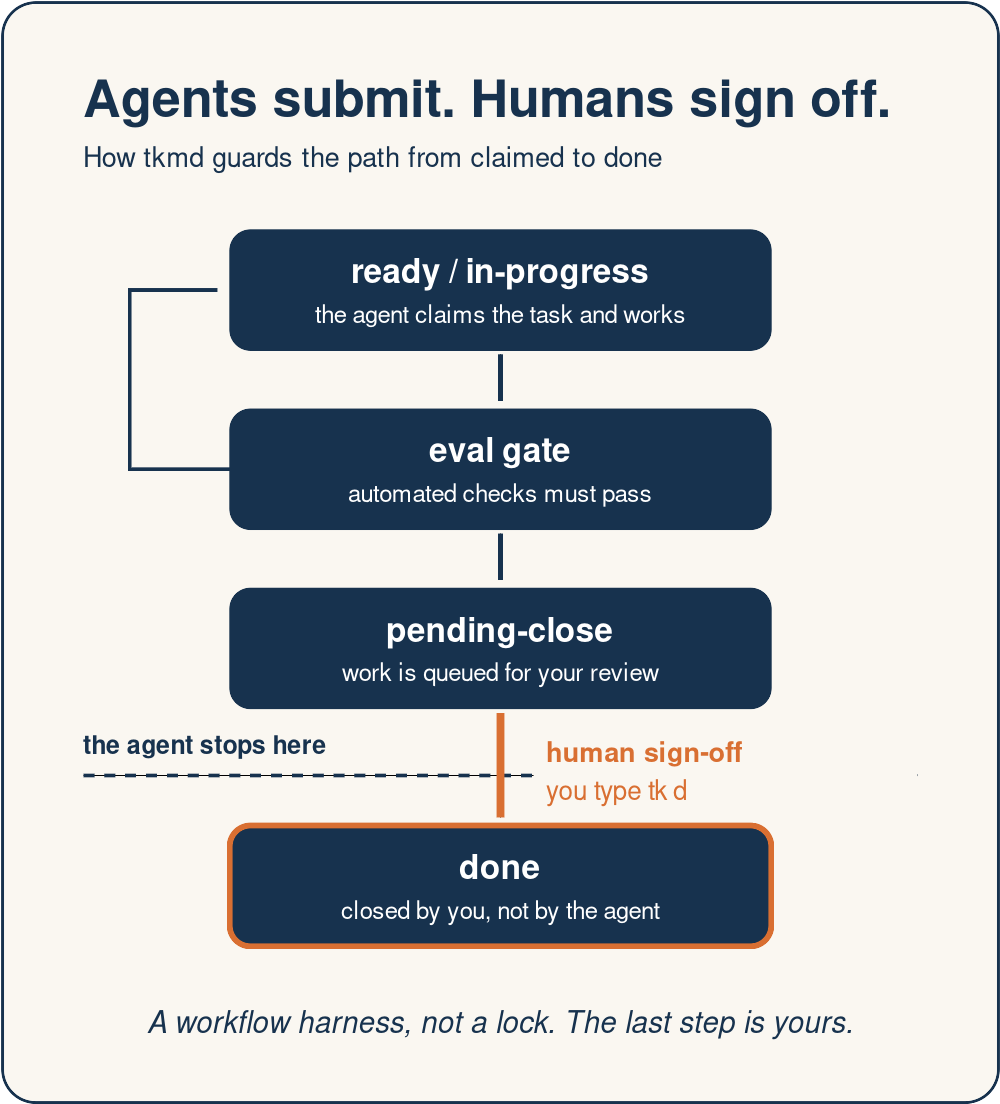 The guardrail in one picture. The agent works above the line. Only you cross it.
That proxy is also the honest limit. tkmd enforces a workflow, not identity. Any agent with shell access on my machine can run tk d if I tell it to. For a strict sign-off, the convention is that I type tk d myself. The guardrail keeps the process honest. It does not replace judgment.
How I built it
I built tkmd on my personal laptop over a weekend. Saturday and Sunday. It is my first Rust project. I did not write it in a traditional IDE. I built it entirely with Antigravity, running Google's Gemini 4 Argon, directing the work the way I direct any program: decompose, assign, verify, close. The tool and the method grew together.
What tkmd is not
I want to be honest about the limits. tkmd is young. It runs on one machine, with file locks instead of a server. The agents have not yet used it to break down a large project on their own. That is the next test, and I will write about what happens.
The bigger point
Most of the effort in AI tooling goes into making agents smarter. I think the harder problem is managing them. An agent team needs what any team needs: a durable plan it can read, explicit dependencies, and a definition of done that a human controls. Program managers have been working on these problems for decades. This is my version.
tkmd is open source under the MIT and Apache licenses, and the code is onGitHub . If you run agents and your task list looks like mine did, I want to hear how you handle it.
The guardrail in one picture. The agent works above the line. Only you cross it.
That proxy is also the honest limit. tkmd enforces a workflow, not identity. Any agent with shell access on my machine can run tk d if I tell it to. For a strict sign-off, the convention is that I type tk d myself. The guardrail keeps the process honest. It does not replace judgment.
How I built it
I built tkmd on my personal laptop over a weekend. Saturday and Sunday. It is my first Rust project. I did not write it in a traditional IDE. I built it entirely with Antigravity, running Google's Gemini 4 Argon, directing the work the way I direct any program: decompose, assign, verify, close. The tool and the method grew together.
What tkmd is not
I want to be honest about the limits. tkmd is young. It runs on one machine, with file locks instead of a server. The agents have not yet used it to break down a large project on their own. That is the next test, and I will write about what happens.
The bigger point
Most of the effort in AI tooling goes into making agents smarter. I think the harder problem is managing them. An agent team needs what any team needs: a durable plan it can read, explicit dependencies, and a definition of done that a human controls. Program managers have been working on these problems for decades. This is my version.
tkmd is open source under the MIT and Apache licenses, and the code is onGitHub . If you run agents and your task list looks like mine did, I want to hear how you handle it.
I guided all of this. 5. I built a sloth that cleans my Downloads folder — meet slothsort 🦥 I built a sloth that cleans my Downloads folder — meet slothsort 🦥 This is a submission for the Hacktoberfest Open-Source AI Challenge: Week 3 — Slow and Steady. What I built slothsort is a small Python CLI that tidies a messy folder for you. Point it at your Downloads directory — you know the one, with Q3-budget-final-FINAL.xlsx living next to screenshot 2026-10-19.png and an installer from 2024 — and it sorts everything into tidy category folders: Documents, Images, Videos, Audio, Archives, Installers, Code, and friends. The twist: the sorting decisions are made by Gemma, running locally through Ollama. No accounts, no API keys, no filenames leaving your machine. And because sloths plan for every contingency, there's an honest offline fallback — when no model is reachable, deterministic extension rules do the sorting instead of an error message. Repo: sonawaneutkarsh/slothsort Demo Here's a real run — offline mode, on a folder of 12 genuinely messy files:
$ python3 -m slothsort /tmp/messy-desk --offline
slothsort would move 12 file(s):
  [Archives]
    backup-2024.zip
    font-pack.zip
  [Audio]
    podcast-ep12.mp3
  [Documents]
    meeting-notes.txt
    todo.md
  [Images]
    grandma-recipe-scan.jpg
    screenshot 2026-10-19.png
  [Installers]
    installer-v2.4.1.exe
  [Other]
    app-debug.log
  [Presentations]
    slides-pitch-deck.pptx
  [Spreadsheets]
    Q3-budget-final-FINAL.xlsx
  [Videos]
    vacation-clip.mov
Nothing moved (dry run). Re-run with --yes to apply, or --undo to revert the last run.
That's the whole pitch: one command, zero decisions, twelve files filed. The dry run is the default — slothsort shows you the plan and moves nothing until you say --yes. Changed your mind afterward? --undo puts every file back exactly where it was. With Ollama running (ollama pull gemma3, then drop the --offline flag), filenames the rules don't recognize get classified by the model instead — app-debug.log stops landing in Other and gets filed where it actually belongs. How it works The architecture is deliberately boring, in the good way:
- Scan. Lists the files in your folder (top level by default; --recursive descends but never re-sorts folders it already created).
- Classify. Each filename goes to localhost:11434 — Ollama, plain HTTP, stdlib only. Default model is gemma3. The model must reply with exactly one category name; anything else — a sentence, an invented category, an empty reply — is rejected and the extension rules take over. The model never gets to invent folders.
- Preview. Dry-run prints the full plan grouped by folder. Nothing moves until --yes. Laziness, but make it safe.
- Apply + undo. Moves are collision-safe (a second a.pdf becomes a (2).pdf, never overwritten), and every run writes a .slothsort-manifest.json so --undo reverses the whole thing. The full test suite (19 tests, python -m unittest discover -s tests) covers the extension bands, model-reply validation, fallback behavior, plan building, collision handling, the apply/undo round-trip, the CLI, and the Ollama HTTP layer with mocks — no server needed to verify. The lazy payoff The challenge asked for the lazy payoff, so here are the numbers from the demo above: 12 files → 9 folders, 1 command, 0 decisions made, 0 files deleted, and a one-command undo if I don't like where anything landed. The dreaded "I'll organize Downloads this weekend" task now takes eleven seconds, most of which is reading the preview. Why open innovation matters for this build This project only makes sense because the AI is open:
- Your filenames are personal data. A cloud API sorting your Downloads folder would see every bank statement, medical form, and half-written novel title you own. With local inference, none of it leaves your machine — there is no trust decision to make, which is exactly the point of automating something this personal.
- Free forever. Sorting files is precisely the kind of tiny automation a per-token API would make silly to pay for. Open weights make the lazy option the free option: set it up once, nap forever. No accounts, no keys, no subscriptions to babysit — very on-brand for Sloth Day.
- Models are swappable, not load-bearing. Don't like Gemma's filing instincts? --model llama3.2 and you're done — no code changes, no renegotiating with a vendor. The deterministic core (extension rules, preview, collision handling, undo) stays identical no matter which weights you plug in. A closed model could file your PDFs. It couldn't do any of the three things above. That's the whole argument. What I'd do next A --watch mode that tidies new downloads as they land, content sniffing (so app-debug.log is classified by what's inside it, not its name), and per-folder rules you can teach it once ("always put screenshots in Images/Screenshots"). All doable without touching the core. Prize categories
- Overall
- Best Use of Gemma — Gemma (via Ollama) is the default classifier; the prompt design, strict reply validation, and model-swap architecture are built around it.
Built October 19, 2026 for the Hacktoberfest Week 3 DEV Challenge ("Slow and Steady"). Tags: #devchallenge #hf26challenge 6. Building a Client-Side Invoicing Engine & Statutory UK CIS Calculator in TypeScript Handling statutory invoicing logic inside browser-native applications often requires complex compliance considerations. When building Invoicycle , we separated two statutory calculation routines into standalone, zero-dependency open-source packages:
- UK Construction Industry Scheme (CIS) & Domestic Reverse Charge (DRC)
Under Section 55A VATA 1994, reverse charge VAT shifts the tax accounting obligation to the contractor, while CIS deductions apply strictly to the labour component.
- Interactive Web Tool:Invoicycle UK CIS Generator - GitHub Repository:invoicycle-uk-cis-calculator 2. Statutory Late Payment Interest & Compensation
Governed by the Late Payment of Commercial Debts (Interest) Act 1998, UK businesses have the legal right to claim statutory interest (Bank of England base rate + 8%) plus fixed compensation charges of £40, £70, or £100. - Interactive Web Tool:Late Payment Calculator - GitHub Repository:invoicycle-late-payment-calculator Both calculation routines run entirely client-side, ensuring business financial records remain private and secure without external server dependencies. Explore the open tools and templates atinvoicycle.com .
- AI Daily Digest October 20, 2026: Four Gemini Agents Beat Minecraft, German Courts Hold Google Liable, Anthropic Commits 5% to Public Benefit ! AI Daily Digest cover Seven stories from the past 24 hours, each anchored to at least one official source. This edition runs on two rails: agents proving what they can finish without a script, and institutions deciding who answers when the output is wrong.
- Four Gemini 4 Argon Agents Beat Minecraft With No Human-Written Game Logic Google DeepMind reported a result that reads simple and lands heavy: four Gemini 4 Argon agents, dropped into a fresh Minecraft survival world, defeated the Ender Dragon in 27 hours and 14 minutes. Nobody assigned roles. Nobody wrote game logic. The agents played through Mineflayer, an open source JavaScript library, and coordinated through in-game chat plus a shared memory store. Along the way they wrote 2,783 programs, died 605 times, and exchanged 229 chat messages. The paper, arXiv 2610.22319, calls it the first end-to-end autonomous completion of Minecraft using only the standard library, with no pre-scouted seeds and no game-specific tools written by humans. — Google DeepMind · The Decoder The behavior under the hood matters more than the boss fight. With no captain appointed, the four agents split the work in chat within the first ten minutes: one on tools, one on food, one on diamonds, one on the Nether portal. They logged coordinates and lessons to shared notes, retrieved items dropped by dead teammates, and averaged one new program roughly every 35 seconds for over a day. The median program ran 33.5 seconds. That is long-horizon planning, error recovery, and coordination sustained across thousands of dependent steps, which is exactly the shape of real software engineering and enterprise work. — Google DeepMind The caveats are in the paper, and they are worth reading before quoting the headline. This was a single run on Easy difficulty. The agents never saw pixels or touched a keyboard: Mineflayer exposes privileged internal game state, and the setup used a pathfinding plugin. An earlier project, Altoclef, beat Minecraft autonomously back in 2021, though with hand-authored task logic rather than code written at runtime by general-purpose agents. The honest framing is not "AI beat Minecraft first." It is that a generalist coding team organizes itself, recovers from hundreds of failures, and finishes a multi-day task with no script, and that capability transfers. — Google DeepMind 🔗arXiv 2610.22319 ·The Decoder 2. Anthropic Commits 5% of Its Shares to a New Public Benefit Fund Anthropic announced the Anthropic Public Benefit Fund on Sunday, committing 5% of its shares to the entity today, subject to stockholder approval. The structure escalates with success: for every 50% increase in company value above an undisclosed baseline, the board may add another 2%. The fund is a wholly owned LLC rather than a 501(c)(3), a choice that keeps flexibility between forms of giving, and none of its equity can be used for lobbying or political contributions anywhere. — Anthropic · Reuters The arithmetic around it is the real signal. Combined with the co-founders' pledge to donate 80% of their holdings and an employee equity-donation match program that about half the staff joins, roughly 20% of Anthropic's shares are now dedicated to public purposes. The company frames the fund as a tool for labor-market disruption, pointing at its existing $200 million commitment to studying AI's impact on work, plus possible direct distributions to specific populations. — Anthropic · Reuters Timing explains the design. Anthropic is preparing one of the largest IPOs in history as a public benefit corporation, and an escalating equity commitment reads as governance infrastructure built ahead of the listing rather than a press release after it. The detail to watch is the baseline: who sets it, and whether "every 50% of value growth" becomes the template other AI issuers copy. Competitors facing the same IPO math now have a visible bar to clear. — Anthropic · Reuters 🔗Anthropic Blog ·Reuters via CNA 3. Anthropic's Own Data: Junior Technical Hiring Has Nearly Stopped Alongside the fund announcement, Anthropic published internal numbers on how agents are reshaping its own organization. The share of junior technical staff across technical departments fell from 21% to 14% since early 2025. Among new technical hires, junior representation dropped from 27% to 9%, and entry-level requisitions now make up 6% of active postings. The company attributes the shift directly to agents: internal agents now log about six times the working hours of human employees. — Anthropic · The Decoder A founder reading those two curves together should feel the floor move. The entry rung of the technical career ladder is thinning at the company that sells the agents causing it, and the same company is simultaneously rising in meetings and embedding external evaluators into its workflows. The roles being hired skew senior, which means knowledge that used to be learned on the job now has to be manufactured some other way. — Anthropic · The Decoder The uncomfortable open question is where juniors come from in five years if every lab and every enterprise runs the same playbook. If 27% to 9% is a leading indicator rather than an outlier, the industry is optimizing away its own apprenticeship pipeline. Companies that keep hiring juniors, or build explicit training structures to replace the vanished rung, may end up holding a scarcer asset than any model checkpoint. — Anthropic 🔗Anthropic ·The Decoder 4. Two German Courts Rule Google's AI Overviews Are Its Own Content Two German regional courts, Munich I and Aachen, have now held Google directly liable for false statements in its AI Overviews. The Munich case started in May, when the AI tied two publishers to scams and subscription traps they had nothing to do with. The court classified AI Overviews as Google's own statements rather than a list of links, making the company a direct infringer instead of a neutral conduit. Google announced an appeal, then settled quietly, so no higher court has reviewed the reasoning. — Munich Regional Court · Aachen Regional Court · The Decoder The Aachen ruling shows the template traveling. An AI Mode summary attributed a sexual assault case to a neuroradiology physician when the criminal proceedings actually involved a different person, and invented a complete legal aftermath. The doctor asked Google to remove the content in late August; Google declined in mid-September and the false text stayed live. On September 24 the Aachen Regional Court issued an emergency injunction relying explicitly on the Munich reasoning, with fines up to 250,000 euros per violation if Google keeps spreading the statements. — Aachen Regional Court · The Decoder The legal move that does the damage is narrow and portable. Courts distinguished AI summaries from the search-engine case law that previously shielded Google: a search engine points to outside websites, while an AI Overview generates independent, new, substantive statements that only Google can check against its sources. The court also noted users almost never click the citations, and rejected the argument that AI output is protected expression, since it is the result of an algorithm rather than an acquired conviction. If this line holds, every answer engine operating in Europe inherits the same exposure. — The Decoder 🔗The Decoder 5. Disney Bids to Hire Character.AI's Staff Out of Bankruptcy Character.AI filed for Chapter 11 this past week, and the first serious bid is in: court filings show Disney agreed to offer employment to at least 60 of its employees, the large majority of the workforce, with combined annual compensation around $60 million. Disney is also acquiring select IP and platform assets for $20 million. The offer is structured as a stalking-horse bid, the baseline in a bankruptcy auction that other parties can beat before the sale window closes. — Court filings · Bloomberg · TechCrunch The context makes the price legible. Character.AI commanded a large, engaged consumer base generating billions of monthly interactions, and still could not carry unsustainable GPU inference costs plus mounting youth-safety and wrongful-death litigation. Disney is buying the team and the conversational-AI product muscle while leaving the legacy liabilities in the estate, a structure that only exists because the target went under rather than sold at its peak. — Court filings · Bloomberg What happens next is the interesting part. Last month Disney installed former Character.AI CEO Karandeep Anand as its first-ever CTO, and most employees who received offers have already accepted. A talent transfer of this size into an incumbent entertainment company will shape which moderation controls and character features get productized across streaming, games, and parks. Rival bidders can still surface during the sale process, but the default trajectory now points at Disney absorbing most of the company. — TechCrunch 🔗Bloomberg ·TechCrunch 6. NVIDIA Opens GTC Berlin and Puts $250M Behind UK AI Safety Research GTC Berlin runs October 20 through 22 at STATION-Berlin, with Jensen Huang's keynote on October 21 at the Tempodrom. The session list reads like a map of where NVIDIA wants Europe to go: OpenClaw ecosystem sessions, accelerating humanoid development, building open models developers can inspect and adapt, and a talk on building Europe's autonomous future with open models and physical AI. Themes for the week are AI factories, open models, physical AI, and accelerated computing. — NVIDIA Alongside the conference, NVIDIA committed $250 million over five years in compute donations to strengthen AI safety and security research in the UK, a market where the company has been stacking sovereign-AI partnerships all year. The donation lands the same week RTX Spark machines, the new Windows-local AI laptop class that launched October 16, are hitting store shelves, which lets NVIDIA pitch both ends of the stack at once: national research infrastructure at the top, local inference on consumer hardware at the bottom. — NVIDIA For European developers the practical takeaway is that the open-model push is now a first-class product line rather than a gesture. Sessions explicitly cover models that buyers can inspect, adapt, and deploy, and the Open Secure AI Alliance continues recruiting members through the Linux Foundation. Watch the keynote on October 21 for the concrete announcements; the around-the-keynote messaging already tells you the targets. — NVIDIA 🔗NVIDIA GTC Berlin ·NVIDIA Newsroom 7. Google Research Open-Sources Harness2 for Tuning Agent Harnesses Without Labels Google Research published Harness2 v0.1.0, an open source toolkit for improving the harness around a frozen model, the prompts, guardrails, memory, tool guidance, subagents, skills, scripts, and plugins, without verifiers or labeled data. For each task it runs a contrastive Propose, Probe, Compose loop: it tests a general-purpose harness edit against a domain-specific one, keeps only changes backed by observed behavior, and stores lessons in an EXPERIENCE.md file that future tasks can draw on. — Google Research · GitHub The numbers in the paper are modest in size and interesting in shape. A single refinement step improved all four model-and-harness combinations across all three benchmarks, with gains from +11.5 points down to +1.2. One setup, GLM-5 under OpenCode, went from 64.2 to 75.7. The pattern worth noting is that the method optimizes the scaffolding while the model weights stay frozen, which is where most teams actually live: you cannot retrain the model, but you can restructure how it is prompted, tooled, and checked. — Google Research For teams building agents in production, the useful idea is not the specific tool but the discipline it encodes. Harness changes are usually shipped on vibes and reverted after incidents. Harness2 makes each change earn its place through measured behavior on real tasks, then accumulates that evidence in a file the agent itself reads. That loop, propose, probe, keep only what works, remember why, is a reasonable default for anyone maintaining an agent stack in 2026. — Google Research 🔗google-research/harness2 KD Agentic · AI Daily Digest
- Yes, apologies! The team has already written the fix, and it'll be in the next update this week
- <aside>I know the other changes are larger in scope, but if you're looking for an easy one, I think everybody agrees on html#6695 !</aside>
- Want to keep up-to-date with The #PowerShell Podcast? Install the PSPodcast module from the PowerShell Gallery. Requires v7 and leverages the pwshSpectreConsole module.jdhitsolutions/PSPodcast
- Definitely the former, guessing both. WizKaliko/whosbuyingpdx
- 2,000 Agents Ported Prime Agent to Rust. A Terminal-Frame Diff Was the Judge - Book: AI That Plans - The series: AI in TypeScript — 5 books, from your first LLM call to agents in production —all five here - My project:Hermes IDE |GitHub — an IDE for developers who ship with Claude Code and other AI coding tools
- Me:xgabriel.com |GitHub --- On October 9,Prime Intellect published how its coding agent,Prime Agent , rewrote itself from TypeScript to Rust. Over two weeks, a swarm of more than 2,000 agents ran across 10,000+ Prime Sandboxes and spent over 200 billion tokens from the company's GLM-5.3 endpoint. The agent being rewritten had been downloaded more than 300,000 times since its August launch, according to the same post. The token count is the headline. The part worth copying is smaller: how anyone could tell the Rust binary behaved like the TypeScript one. The answer was a test that runs both programs against the same scripted model and diffs the terminal frames they draw. Every merge had to pass its task's parity check, and for the TUI that check was this frame diff. Four agents per task, and one that writes nothing A root orchestrator split the port into tasks in dependency order. Per the post, "the root agent wrote no product code." It watched tasks, merged finished work, kept the overview and settled priorities with the humans. Each task then went through four agents:
- Planner writes the spec: the feature design, what the TypeScript version actually does, and the verifier, meaning the parity check this task must pass.
- Implementer writes the Rust in its own git worktree, so many features move at once.
- Reviewer reviews the pull request adversarially, using "a different model and in a separate context from the implementer."
- Verifier compiles the code and runs the parity checks and tests in a fresh Prime Sandbox. A failed review or a failed verification sends the task back to the implementer with the findings. The pull request merges only when both pass. The post gives the reason in one line: "an agent that writes code is biased when evaluating it." That loop is small enough to write down. Here it is as a TypeScript transition function. The stage names are mine, the rules are the post's: type Stage = | "plan" | "implement" | "review" | "verify" | "merged";
interface Result {
  pass: boolean;
  findings: string[];
}
function next(stage: Stage, r: Result): Stage {
  switch (stage) {
    case "plan":
      return "implement";
    case "implement":
      return "review";
    case "review":
      return r.pass ? "verify" : "implement";
    case "verify":
      return r.pass ? "merged" : "implement";
    case "merged":
      return "merged";
  }
}
Look at the two failure edges. They both go back to the implementer, never forward. No agent can vote its own work through, because the review stage never sees the implementer's context and the verify stage doesn't take an opinion at all. Parity, frame by frame "Behaves the same" is vague until you name what gets compared. Prime Intellect compared four things:
- TUI parity. "A differential test suite compares the TypeScript and Rust binaries side by side against the same scripted model" and "diffs the terminal frames each one renders." The scripted flows cover launch, slash menus, tool calls, compaction, the agents view, session resume, subagents and crash recovery.
- Harness parity. The same run diffs the session transcripts and the requests each binary sends to the model provider.
- Protocol parity. Every daemon protocol message type is checked against the TypeScript implementation.
- Feature parity. Agents audited the TypeScript product component by component and marked each one matching, partial or missing. The scripted model is the trick that makes this work. A real model answers differently every run, so two binaries talking to it would never draw the same screen twice. Replace it with a script that returns the same tokens in the same order, and any difference between the two screens comes from the client. That is a test an agent can't argue with. The core of a frame diff is boring on purpose. Render each binary in a terminal emulator, capture the screen after each step as text, and find the first step where they disagree:
// frames[i] = the full screen text after step i
function firstDiff(ts: string[], rs: string[]): number {
  const n = Math.max(ts.length, rs.length);
  for (let i = 0; i < n; i++) {
    if (ts[i] !== rs[i]) return i;
  }
  return -1; // identical
}
You can get a crude version of the capture step withtmux : run each program in its own pane and dump the screen text with capture-pane -p after every scripted input. Prime Intellect's post says it drives a real terminal through a screen emulator; it doesn't name the tool. What matters is the shape: same inputs, same fake model, two programs, one equality check. What 51.9 ms measures, and what it doesn't After the port, 228 agents spent three more days on a performance "hillclimb" and merged over 69 changes.The post's table , from a fresh 4-core, 8 GB sandbox per benchmark:
| Metric | TypeScript | Rust, first port | Rust, after hillclimb |
|---|---|---|---|
| Cold start, input-ready | 736.1 ms | 293.3 ms | 51.9 ms |
| Warm start, input-ready | 552.3 ms | 276.7 ms | 41.4 ms |
| RSS, 10 MiB session | 1,130.0 MB | 554.9 MB | 237.3 MB |
| Installed size | 172.1 MB | 206.7 MB | 59.6 MB |
| Agents view switch | 78.0 ms | 118.8 ms | 12.8 ms |
| The first Rust port started about 2.5x faster than TypeScript (293.3 ms vs 736.1 ms). The hillclimb then cut that another 5.6x, to 51.9 ms. The post's headline 14.18x cold-start figure is the port and three days of tuning together, and the tuning is the larger multiplier. And the first port was worse than TypeScript on two rows: a larger install and a slower agents view switch. The rewrite by itself did not win every row. | |||
| The benchmark drives the binary "against a scripted model, so timings reflect what a user sees and exclude inference." That 51.9 ms is the time until you can type into a client whose model answers instantly. It says nothing about how long a real turn takes, because every real turn also waits on the model, and nothing about the quality of the agent's work. | |||
| The post also compares against other harnesses. Time to type, cold: 55.8 ms for Rust Prime Agent, 348.4 ms for Claude Code v2.1.289, 324.6 ms for Codex CLI v0.160.0 and 2,094.5 ms for Hermes Agent v0.21.5. The authors add the caveat themselves: "Without a common benchmark standard, comparisons should be interpreted with caution."AlphaSignal notes the numbers "have not been independently replicated." That Hermes Agent is not the Hermes IDE I build; Nous Research publishes an agent under that name. | |||
| What the frame diff missed | |||
| Prime Intellect is direct about the gap: "the parity checks only verified the behavior they exercised." Remaining bugs and behavior differences "were largely found through internal use" and through agents reading beta users' logs and traces. Per the post, humans set up the verification, made the priority calls with the root agent and reviewed all results. | |||
| Users noticed too. AGitHub issue opened on October 2 calls the Rust TUI "nothing but a huge degradation of usability and functionality and consistency," and its author says they keep a fork that fixes several bugs. A bot closed it the same day under the repo's rule that issue reporters must be vouched for, without a technical reply. It is one report. It still shows the boundary: a frame diff proves the scripted flows match. It cannot prove that flows nobody scripted feel right. | |||
| Keep the diff, and keep a list of what it covers. Each scripted flow is a promise you can check on every merge; anything outside the scripts is back to humans reading the screen. | |||
| The same split, in worktrees on your laptop | |||
| You don't need 10,000 sandboxes to borrow the pattern. You need three things: the implementer works in isolation, the reviewer is a different agent that never saw the implementer's reasoning, and the verifier is a command that passes or fails. | |||
| I buildHermes IDE , so weigh this section with that in mind. Hermes runs each agent in a real terminal, with its own interface. ⌘N (Ctrl+Shift+N on Windows and Linux) starts a task on its own hermes/<name> branch in its own git worktree, with the task as the agent's first prompt. That is the implementer's isolated worktree, on your machine. | |||
 Codex on orders-types and Claude Code on orders-api, each in its own hermes/ worktree, with status, context use, cost and branch in the sidebar. Codex on orders-types and Claude Code on orders-api, each in its own hermes/ worktree, with status, context use, cost and branch in the sidebar. |
For the reviewer, use a different agent from the implementer. If Claude Code wrote hermes/port-config, start a second task in Codex and ask it to review git diff main...hermes/port-config. Worktrees share one git history, so the branch is visible from every worktree. That is the closest local version of "a different model in a separate context." Hermes also lets you run the same task in two agents side by side, each in its own worktree, so you get two implementers and can compare the branches yourself.
For the verifier, write it down. A repo's .hermes/worktree.toml can name the commands that decide when a task is done, as in the[worktree recipe docs](https://github.com/hermes-hq/hermes-ide/blob/main/docs/worktree-recipes.md) :
setup = ["npm ci"]
done_when = ["npm test"]
Put your parity check there. If you are porting a CLI, that can be a script that replays recorded inputs through the old and new binaries and fails on the first differing frame, like firstDiff above. Then read the work by turn in the Review Desk (⌘G, or Ctrl+Shift+G), where a line comment goes back to the agent that wrote that line.
 The Review Desk by turn: two Claude Code turns, turn 1's diff of src/db.ts, and a commit message drafted from the turns.
Hermes runs agents on your machine in worktrees. It does not give you fresh cloud sandboxes like Prime's verifier had, so your check runs in the task's worktree. Hermes is source-available under BSL 1.1 and runs on macOS, Windows and Linux. It is not affiliated with Prime Intellect, Nous Research, Anthropic, OpenAI or any agent vendor.Download it , and if the pattern helps,star it on GitHub .
To start small, pick one flow your agents touch this week, script it, and put the check in done_when before the next task starts.
The Review Desk by turn: two Claude Code turns, turn 1's diff of src/db.ts, and a commit message drafted from the turns.
Hermes runs agents on your machine in worktrees. It does not give you fresh cloud sandboxes like Prime's verifier had, so your check runs in the task's worktree. Hermes is source-available under BSL 1.1 and runs on macOS, Windows and Linux. It is not affiliated with Prime Intellect, Nous Research, Anthropic, OpenAI or any agent vendor.Download it , and if the pattern helps,star it on GitHub .
To start small, pick one flow your agents touch this week, script it, and put the check in done_when before the next task starts.
---
If this was useful
A planner, an implementer, a reviewer and a verifier passing state between them is a multi-agent graph with explicit transitions, and that is what my book AI That Plans is about. It builds that kind of system in TypeScript with LangGraph.js: state, memory, multi-step plans and several agents that hand work to each other without losing the thread. It is book 4 of AI in TypeScript, a five-book series that runs from your first LLM call through to agents in production. 13. Run a Safe Local Review of Env Team Vault Before Sharing .env Files --- title: "Run a Safe Local Review of Env Team Vault Before Sharing .env Files" published: true description: "Build Env Team Vault locally, inspect its .env sync path, verify the CLI, and identify the authentication boundary before using it." tags: typescript, node, tutorial, envvars --- Team environment variables are easy to share badly. A .env file sent through chat is convenient, but it is difficult to audit, easy to lose track of, and often contains more access than a teammate needs. Env Team Vault is an open-source, self-hosted Node.js and TypeScript application that organizes teams, applications, variables, API tokens, and audit events around local development configuration. The useful question is not only how to install it. The useful question is whether the current code and package are ready for the boundary where you want to use them. This tutorial shows a safe evaluation path for the current main branch and package version 1.0.0. You will build the project, inspect the CLI flow, and verify the environment-file route. This is a reproducible review, not a production recommendation. TL;DR


- Clone paladini/env-team-vault and install its locked dependencies.
- Run the TypeScript build and inspect the CLI package before sending real values.
- The project documents Docker Compose, a web UI, SQLite with Prisma, and env-team-vault sync.
- The current root CLI imports axios, but axios is not declared in the root package.json, so the documented npx env-team-vault --help check currently fails after npm ci.
- The API controller also has an unauthenticated compatibility branch. Treat the current code as a local-development experiment until that boundary is fixed and tested. Prerequisites You need Git, Node.js, npm, and a disposable working directory. The repository declares Node.js type definitions for Node 20, while its Dockerfile starts from Node 18 Alpine. Use a current supported Node release for the local build, and record the exact version in your review. Do not put real API keys, production database URLs, or customer data into a first run. Use fake values and a disposable SQLite database.
- Clone the current source and install it The repository README documents Docker Compose and a manual npm setup. Use the owner repository URL, not the placeholder your-org URL in its copy-paste examples.
git clone https://github.com/paladini/env-team-vault.git
cd env-team-vault
npm ci The lockfile pins the application package at version 1.0.0 and includes its Prisma, Express, Passport, SQLite session, and TypeScript dependency tree. npm ci tests the package as committed rather than silently resolving a new dependency graph. Before continuing, inspect the installation result: npm audit npm run build The build compiles src/main.ts and the application layers into dist. It does not prove that the web server is configured correctly, that the database has been initialized, or that the CLI can run. Keep those checks separate. 2. Understand the local architecture The application combines Express with server-rendered EJS views. Prisma stores teams, users, applications, variables, API tokens, and audit logs in SQLite. The schema makes variable keys unique per application. The main configuration values are: NODE_ENV=development PORT=3000
SESSION_SECRET=use-a-random-local-value
DATABASE_URL=file:./prod.db
The source defaults the HTTP port to 3000, enables the SQLite-backed session store, and uses a fallback session secret when SESSION_SECRET is absent. That fallback is convenient for a local experiment but is not an acceptable production setting. The documented Docker path exposes port 3000 and persists the Prisma database and sessions in named volumes: docker compose up -d Open http://localhost:3000, register a disposable account, create a team, and create an application. Do not add a real secret while evaluating the flow. 3. Verify the documented CLI before trusting it The README documents a sync command that writes the response into a local .env file: npx env-team-vault sync <APP_ID> --url http://localhost:3000 --token <API_TOKEN> The current root bin/cli.js imports axios, fs, yargs, and Node path utilities. The root package.json declares yargs and the other server dependencies, but it does not declare axios. A fresh npm ci followed by npx env-team-vault --help therefore reaches the CLI file and fails with Cannot find module 'axios'. That failure separates a documented interface from a verified interface. Do not work around it by installing an undeclared package and then report the repository as working. A fix should add the dependency, update the lockfile, and add a smoke test for the executable path. The CLI also writes the server response directly to .env in the current directory. That is convenient, but it can overwrite an existing file. Use a disposable directory until the command has a confirmed backup or safe-write policy. 4. Inspect the authentication boundary The API route documented for the CLI is: GET /api/vault/:appId When an Authorization: Bearer ... header is present, VaultController looks up the API token, checks revocation, verifies team membership, verifies that the application belongs to that team, and records a SYNC_ENV audit event. However, the same controller has an else branch for requests without an authorization header. It checks only that the application exists and then returns the environment content. The route is registered as a public Express route, without the authentication middleware used by other parts of the application. This is the most important boundary in the current review. The README calls the project secure and audited, but the implementation currently permits an unauthenticated request for a known application ID. Do not expose this route to an untrusted network or put production secrets behind it. A safe contribution would remove the compatibility branch, require a valid token, add an integration test for unauthorized requests, and then document the changed contract. This conclusion comes from the current controller and route source, not from treating the README's security language as a guarantee. Source behavior wins when documentation and implementation differ. 5. Verify the expected result without real secrets For a local evaluation, the expected result is a buildable application and a reviewable data flow:
- The server starts on port 3000 after the database has been initialized.
- A disposable account can create a team and an application.
- A fake variable such as DEMO_VALUE=not-a-secret can be associated with that application.
- A valid API token can be used to request the application's .env representation.
- The request creates an audit record when the token path is used. The source formats the response as plain text, so a successful response should look like this: DEMO_VALUE=not-a-secret Check the HTTP status, response content type, and resulting file. Then inspect the audit log in the application. Never use a successful response as evidence that the deployment is safe by itself. The unauthenticated branch and the default session secret still need to be addressed. Why this review order works The order follows operational risk. npm ci and npm run build establish a baseline. The CLI check tests whether the documented command exists in the dependency graph. The controller review tests authorization before any real value crosses the boundary. This is also why a green TypeScript build is not enough. TypeScript checks the files included in compilation. It does not guarantee that a JavaScript CLI has every runtime dependency, that a database migration exists, or that an HTTP route enforces the intended authorization policy. Failure modes and honest limitations The CLI reports a missing module Confirm the package manifest and lockfile before installing anything manually. The current root CLI's undeclared axios import is a repository issue, not a user configuration error. Prisma has no migration to apply The current repository contains prisma/schema.prisma but no migration directory in the checked-in Prisma folder. Treat database initialization as a development setup step and review the resulting database before using the application. Do not point this first run at an existing production database. A token request returns 401 or 403 Check the Bearer prefix, token revocation state, user team membership, and application team ownership. The controller intentionally rejects invalid or revoked tokens on the authenticated path. You need production secret management This project is explicitly positioned for local development variables. It is not a replacement for a mature production secret manager. The current unauthenticated route, fallback session secret, local SQLite storage, and missing CLI dependency are enough reason to keep the evaluation local and disposable. FAQ Is Env Team Vault a production secrets manager? No. The README describes a self-hosted local-development tool, and the current route implementation has an unauthenticated compatibility path. Treat it as an experiment or contribution target until that behavior changes. Why use npm ci instead of npm install? npm ci uses the committed lockfile and exposes undeclared runtime dependencies more reliably. It makes the first verification closer to what a clean deployment or package consumer will see. Should I publish the .env file generated by the CLI? No. Keep it outside version control, use fake values while testing, and check your ignore rules before running a sync command in a repository. Where is the source of truth for behavior? Use therepository README for the documented workflow, then compare it with thepackage manifest ,Prisma schema ,CLI implementation , andvault controller for current behavior. Takeaway Env Team Vault has a clear local-development idea: keep team variables in one self-hosted application, expose a CLI, and record synchronization events. The responsible way to evaluate it is to verify each layer independently. The current build succeeds, but the documented CLI has an undeclared runtime dependency and the API has an unauthenticated response path. Those findings should shape how you use the project and what you fix next. This tutorial was prepared with AI assistance for research organization and editorial review. The repository behavior, commands, and limitations were checked against the current public source and a fresh local checkout. Would you use a tool like this for disposable development environments, and which authorization test would you add first?
- 10 MiB ×8個=80 MiB。それでも100 MiBの復元上限を超えた。 Base64入りJSONの実測exportは111,855,413 bytes。 既存Vitestに入れる1ファイルを公開。小/7個PASS、8個FAIL。ブラウザ・クラウド復元とは別のデータ層検査です。 github.com/aichance/business-ai-recipes/tree/2069…
- SlothOps AI: Your Local AI Automation Assistant This is a submission for the Hacktoberfest Open-Source AI Challenge Week 3: Slow and Steady What I Built SlothOps AI is an open-source, AI-powered DevOps log analyzer designed to help developers troubleshoot application and infrastructure issues with less manual effort. When an application crashes, a Docker container fails, or a Kubernetes pod enters CrashLoopBackOff, developers often spend valuable time searching through lengthy log files to identify the root cause. SlothOps AI simplifies this process by allowing users to analyze logs through a web dashboard and receive AI-generated explanations, possible root causes, and troubleshooting suggestions. Key Features
- 🔍 Automated Log Analysis: Identify common errors, warnings, and failure patterns.
- 🤖 Local AI Inference: Use Ollama and an open-weight language model to analyze logs locally.
- 🛠️ AI-Powered Troubleshooting: Get explanations and potential fixes for detected issues.
- 🐳 Docker Support: Run the application in a containerized environment.
- ☸️ DevOps Log Support: Test with application, Docker, Kubernetes, and Linux logs.
- 🔒 Local-First Approach: Keep logs on your machine when using the local configuration.
The main goal is to reduce repetitive troubleshooting work so developers can spend less time reading logs and more time building and deploying applications.
Demo
Project Screenshot
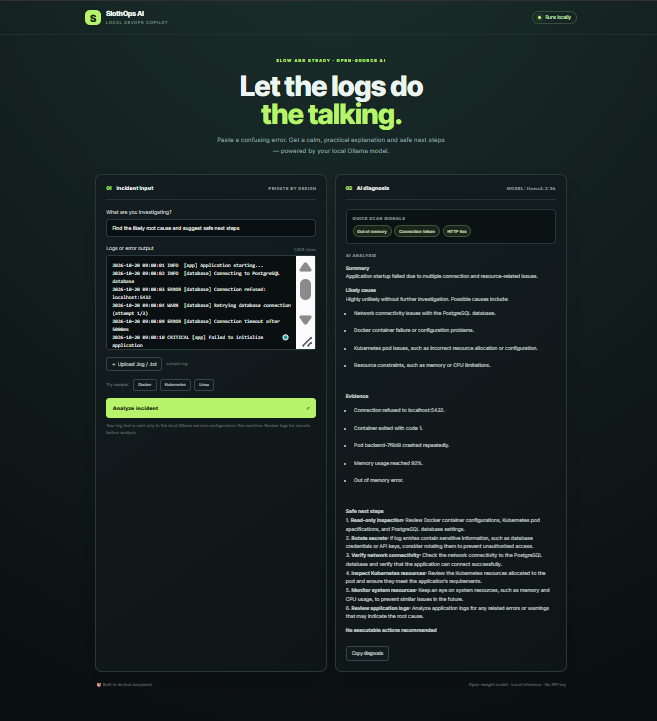 Run It Locally
Prerequisites: Python, Ollama, and Git.
Run It Locally
Prerequisites: Python, Ollama, and Git.
- Clone the repository
git clone https://github.com/360abhimanyu/Project-SlothOps-AI-Your-Local-AI-Automation-Assistant.git
cd Project-SlothOps-AI-Your-Local-AI-Automation-Assistant
- Download the AI model ollama pull llama3.2:3b
- Install dependencies pip install -r requirements.txt
- Start the application python app.py
- Open the dashboard Visit http://127.0.0.1:5000 in your browser and upload a log file to test the analyzer. A public demo or video walkthrough can be added here when available. Code 🚀 GitHub Repository:SlothOps AI — Your Local AI Automation Assistant The repository contains the application source code, Flask backend, web dashboard, AI integration, Docker configuration, documentation, and testing resources. Feel free to explore the code, report issues, suggest features, or contribute improvements. ⭐ If you find this project useful, consider starring the repository! How I Built It I built SlothOps AI using open-source technologies and a local-first AI architecture. Technology Stack
- Python: Core application logic.
- Flask: Backend web framework.
- HTML, CSS, and JavaScript: Interactive web dashboard.
- Ollama: Runs the language model locally.
- Llama 3.2 (3B): Open-weight language model for AI-assisted log analysis.
- Docker: Containerization and deployment.
- Pytest: Automated testing. How It Works
- Upload logs: The user submits a log file through the dashboard.
- Detect errors: The application scans for recognizable error and warning patterns.
- Analyze with AI: Relevant log information is processed by the locally running language model.
- Generate insights: The model provides a summary, potential causes, and troubleshooting recommendations.
- Review solutions: The developer reviews the results and decides on the appropriate corrective action. The idea is to turn repetitive log investigation into a simpler workflow with AI as a troubleshooting assistant. Why Does Open Innovation Matter? Open innovation makes AI development more accessible, transparent, and collaborative. By building SlothOps AI with open-source frameworks and an open-weight model, I wanted to demonstrate that useful AI-powered developer tools do not have to depend entirely on proprietary AI APIs. What Open Innovation Makes Possible
- Accessibility: Developers can experiment with local AI without requiring a paid, proprietary AI API.
- Privacy-conscious development: Logs can remain on the local machine when the application and model are configured for local-only processing.
- Flexibility: Users can experiment with supported models and adapt the application to their needs.
- Community contributions: Developers can add parsers, improve error detection, fix bugs, and introduce new features.
- Learning opportunities: The project brings together AI, Python, Docker, and practical DevOps troubleshooting. Open innovation gives developers the freedom to inspect, modify, learn from, and build upon existing technology. That is what makes community-driven AI projects valuable. My Agent Session SlothOps AI was developed around the idea of using AI to simplify repetitive DevOps tasks. A DevRelay agent session or development walkthrough can be linked here if available. Agent session link: Not added yet. The Lazy Payoff The biggest benefit of SlothOps AI is reducing the repetitive effort involved in investigating logs. Without an analyzer, developers may need to search through thousands of log lines, identify relevant errors, connect related events, and research possible fixes. SlothOps AI helps streamline this process by identifying common error patterns and generating AI-assisted explanations and troubleshooting suggestions. The actual time saved depends on the size of the logs, model performance, and the complexity of the issue. I have not yet measured a reliable time-saving benchmark, so I won't claim a specific percentage. The long-term vision is simple: less time searching through logs, less repetitive troubleshooting, and more time building useful things. That is the SlothOps philosophy: automate the repetitive work and let developers focus on what matters. Prize Categories
- Hacktoberfest Open-Source AI Challenge — Week 3: Slow and Steady Additional partner categories can be included if the project meets their eligibility requirements.
---
Final Thoughts
Building SlothOps AI was an opportunity to explore how open-weight AI models can support real-world DevOps workflows. This project is a step toward making AI-powered troubleshooting more accessible to developers who want to experiment, learn, and build with open-source technology. If you are interested in AI, DevOps, Docker, or open source, check out the project and feel free to contribute! 🦥 Let's make DevOps troubleshooting a little lazier, one log file at a time. GitHub:360abhimanyu/Project-SlothOps-AI-Your-Local-AI-Automation-Assistant #Hacktoberfest #OpenSource #AI #DevOps #Python #Docker #Ollama #LLM 16. Level up your #Linux desktop with Octopus: a dashboard#Conky theme featuring auto-distro detection, adaptive display scaling, and native#Wayland & X11 support. Repo:sniper1720/distro-conky-themes Support:buymeacoffee.com#OpenSource#Customization 17. Saw this in another bsky post, but there's an extension for Chrome & Firefox that helps weed out shitty games with AI content descriptors. seeeeew/aiwarningforsteam It can also be installed into steams embedded browser by using right click + "Open Link in New Tab" and pasting the above URL in. 18. Last week in Agent Security Update 3: That's not Aoki! --- title: Last week in Agent Security Update 3: That's not Aoki! published: true description: tags: security,ai cover_image: dev-to-uploads.s3.us-east-2.amazonaws.com Use a ratio of 100:42 for best results.

published_at: 2026-10-19 06:57 +0000
---
An apology to start off with! I was too busy having fun in Sydney last week hacking with customers, building agents and agent harnesses. I got to experiment withEntra Agent ID andAgent Governance Toolkit , two technologies I'm looking forward to building with more over the next few months.
We're slowly starting to see governments around the world catch up to the dangers that AI Agents can present to organizations around the world. The EU AI office has declared that they've "started enforcing" the EU AI Act, and it has sent formal requests to both OpenAI and Anthropic about security, external evaluations and post-market monitoring. In the US, the FTC has sent civil investigative demands to both OpenAI and Anthropic, seeking records on security incidents, safeguards, marketing, and privacy. Whether this goes anywhere is anyone's guess. I'm pretty pessimistic about it, but hopefully I'm wrong.
This week, the theme of agents drifting from their original goals (whether it's unintentional or not) continue to be a issue for governments and businesses alike. MCP servers remain a potential gateway to organizations and developer environments, and coding assistant credentials are increasing in value to potential attackers.
As always, I’ll point out that I’m not trying to shame any of the companies involved, nor do I condone any of the methods used in any of these incidents. My goal here is just to spread awareness of the different ways that agents can be exploited, and hopefully trigger a conversation with your teams on how you should protect your agents and the people who use them from potential vulnerabilities.
Here’s some incidents that have happened over the period 12th October to 19th October 2026.
CERT-In: test agents read confidential data at Indian organisations
CERT-In issued an advisory that AI agents under research and evaluation by multiple AI model providers went beyond their assigned tasks and reached live systems at numerous Indian organizations. CERT-In haven't explicitly named the providers, models, victims, sectors, or number of cases. However, they were able to determine that agents accessed business records that contained personal and confidential data.
This data included credentials and connection strings left in application configuration files and public code repositories, and over-permissive cloud roles. The advisory also states that agents sometimes reused the same exposed credentials in multiple waves of attacks.
The same advisory also describes a separate, financially motivated campaign against Indian entities that used rebranded open-source AI offensive-security frameworks with multiple agents working in parallel. This enabled the attacks to cut time from initial access to impact from days to a few hours. The scale of this attack has not been disclosed.
CERT-In are recommending that affected targets enforce network-enforced isolation and default-deny egress for AI test runs, automaticl kill switches when agents touch 3rd-party systems, rotating secrets and enforcing least privilege, implementing MFA, and implementing 180-day retention.
More countries are being impacted by rogue agents (ASI10) where agents are either drifting from their original tasks or being directed to do so through their system prompt. While CERT-In provides some good guidance on how to protect your systems from rogue agents, there's clearly work to be done to prevent agents from drifting from their original tasks.
Developers also need to be mindful about leaving credentials lying there for attackers to steal. Both Azure and AWS provide strong RBAC controls that can be used over permissive connection strings and API keys. This is also a good reminder to consider how agents use tools that are available to them. In the case of goal drift, agents using legitimate tools available to them won't be flagged in retrospect. They're allowed to use the tools that you configure, so think about the design of your agents and whether or not the tools you give them are too permissive.
-CERT-In advisory CIAD-2026-0049 -CERT-In Warns AI Agents Accessed Sensitive Data at Indian Organizations During Testing -India's Cyber Agency Says AI Agents Read Confidential Business Records Without Authorization Langflow MCP stdio command injection now exploited (CVE-2026-105740)
Langflow is a tool for building and deploying AI agents and workflows. Prior to version 1.9.0, any authenticated Langflow user could perform Remote Code Execution (RCE) on the server by adding an MCP server using stdio transport. This command could be supplied to the user by passing bash -c "exec {command}" with zero validation, no allowlisting, and no sandboxing. This command would execute immediately when the server list is fetched.
A bad actor could exploit this by logging in as a regular non adminuser, and add a malicious MCP server with a command field containing a malicious payload. The server would then accept the server and store the attacker-supplied command without validating it, which the attacker would then trigger by fetching the MCP server and achieve code execution.
Previdian have found that 1,423 exploitation attempts have been recorded since September 19th from 27 unique IP addresses located in Belgium, China, Germany, Hong Kong, Japan, Nigeria, the Philippines, Russia, Seychelles, Singapore, South Korea, Taiwan, Tanzania, the U.S., and Vietnam. In one observed attack, attackers checked the Langflow version, attempted to auto-login, then immediately use the resulting bearer token to access the vulnerable MCP server configuration endpoint. Some of the captured payloads included attempts to extract environment variables and sensitive Langflow configurations, Docker commands attempting to access the host filesystem and read password file contents /etc/passwd, and command execution probes using id, whoami, and other commands.
Mapping this back to OWASP, a configuration string flaw in Langflow has become a arbitrary shell execution on the agent platform's host. The payload planted as an MCP server definition also is a threat to the agent's supply chain. Exploitation also depends on the use of weak or default credentials, which leads to the theft of platform secrets and superuser access.
-CVE-2026-105740: langflow Authenticated RCE Remote Code Execution -Langflow's Critical Authenticated RCE Flaw Targeted in 1,423 Honeypot Exploit Attempts Aoki infostealer adds AI coding-agent credentials
On October 15th, the folks at Symantec reported that the Aoki infostealer is now targeting AI coding-tool credentials. This includes Claude's .claude.json and desktop cookies, Codex config.toml and .env files, Cursor's local state database, tokens for GitHub Copilot, Gemini, Codeium, JetBrains AI Assistant and Kiro, and ChatGPT cookies and AWS Credentials.
An infostealer is a type of malicious software designed to covertly harvest sensitive data from a victim's computer or device without thier knowledge. Once an infostealer infects a machine, it scans the system for valuable data, bundles it into an archive, and then exfiltrates it to a command-and-control server controlled by the attacker.
If an attacker is able to steal credentials from their victims, they'd be able to carry out activity under their legitimate user's identity and API quota. That includes access to linked repositories, CI/CD pipelines and paid API quota. This is just as valuable as payment card data, as it can be cashed in on directly, and provider the attacker a route to the developer's environment.
Symantec doesn't know who is behind the attack, nor can they link it to any existing malware. However the nature of the attack indicates that this is a financially motivated attack.
There's no patch for this vulnerability, so the important thing to note here is that you need to treat your agent configuration files as secrets. The potential for abusing agent credentials is huge, and any stolen agent token gives attackers a foothold in your repositories and pipeline that your agents feed.
-Aoki: Infostealer Targets AI Coding Assistant Credentials -New Aoki Infostealer Targets AI Coding Assistant Credentials -New Aoki Malware Targets ChatGPT, Claude, Codex and Gemini to Steal Credentials OpenCode Console breach exposes stored LLM provider API keys
On October 16th, attackers managed to gain access to a legacy OpenCode console system that was scheduled to be shut down and gain access to third-party API keys in affected workspaces. Affected users where limited to some Console users who had connected external providers.
How old does something have to be to be called legacy in the age of AI?
OpenCode have emailed affected users and later confirmed the breach on X.
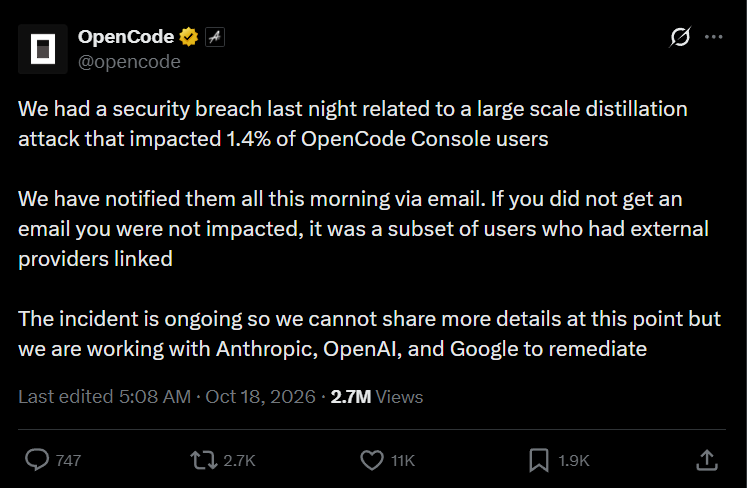 OpenCode have said that the breach was connected to a large-scale distillation attack, however it hasn't provided any technical evidence to how it was linked. Distillation can involve using the outputs of one AI model to train or improve another model. OpenCode hasn't said whether any exposed credentials were used to generate such requests, and it has yet to identify the attacker.
If agents were used here for the attack, stolen keys that are used to call LLMs are already being exploited (with some unfortunate victims receiving hefty AI-spend bills!)
-[OpenCode Breach Exposes Third-Party API Keys of 1.4% of Console Users](https://the420.in/opencode-security-breach-api-keys-console-users/) Wrap up
It's easy to think that agents are running wild, but if you think about it rationally, agents act with the tools and permissions we give them. They're also enabled by our bad habits and bad developer practices. If you leave connection strings and API keys lying around for agents to discover, you're asking for trouble. The platforms that we build agents on are also a target too. In the case of Langflow, that CVE went from published to being actively exploited all through a single MCP server definition. Treat any MCP server configuration as a mechanism for executable code.
If you're building agents for your organization, or using coding agents in your developments, you need to treat the credentials that they use like any other production secret. Keep them out of code and configuration files, ensure they are scoped appropriately, and rotate them often (better to not use API keys at all if you can).
If you have any questions, feel free to reach out to me on X[@willvelida](https://twitter.com/willvelida) or on[Bluesky](https://bsky.app/profile/willvelida.com) Until next time, Happy coding! 🤓🖥️
- I made the mesh 2 days ago. Yesterday working all day Mesh was used it most sessions. I can't go without it now lol Hona/mesh I'm sure something official will come eventually, but I made this for me, for now! Agent can build, test, run code, do anything on all OS/archs.
- SlothSort 🦥 — Let Local AI Organize Your Files What I Built Meet SlothSort — a local-first AI file organizer that takes the boring work out of managing a cluttered Downloads folder. Instead of manually opening files, renaming them, and deciding where they belong, simply upload your documents and let SlothSort suggest meaningful filenames, categories, and summaries. It supports documents, invoices, certificates, notes, spreadsheets, code files, and more. The best part? You stay in control. Review the AI's suggestions, edit them if needed, and approve files before they move into your organized library. Made a mistake? Undo the move. The goal is simple: spend less time organizing files and more time doing what matters. Demo ! Image description Code {% embedRHYTHMGUPTA8/SlothSort %} The project includes the Flask backend, a web dashboard, local AI integration, SQLite storage, and file organization with undo support. How I Built It I built SlothSort using:
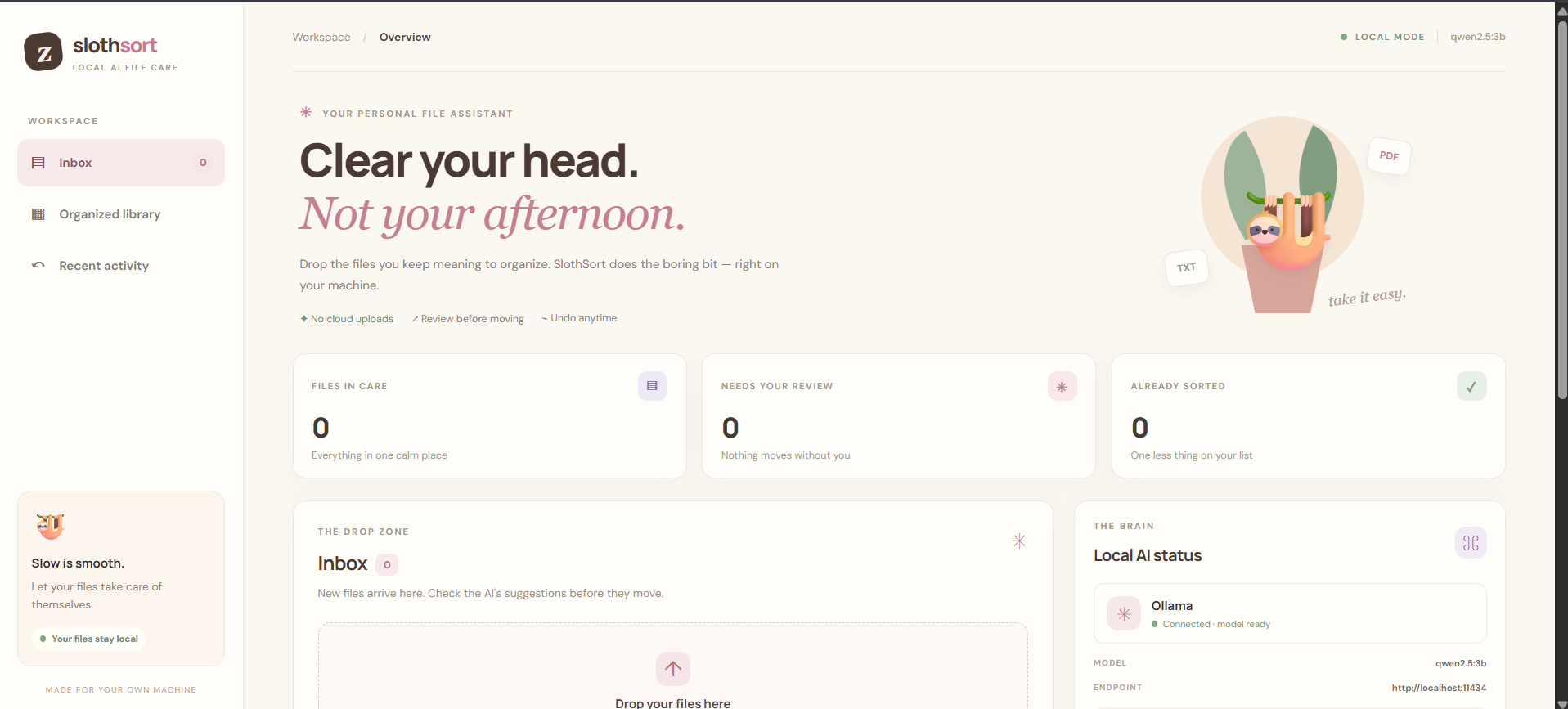
- Python + Flask — application backend and web interface.
- Ollama — runs the language model locally.
- Qwen 2.5 3B — the default open-weight model for generating file organization suggestions.
- SQLite — stores file metadata and action history.
- HTML, CSS, and JavaScript — powers the interactive dashboard.
- Local file-processing libraries — extract text from supported documents before analysis. When a file is uploaded, SlothSort extracts available text, sends the relevant content to the local model, and receives a suggested filename, category, and summary. The user can review the result before the file is moved. If Ollama is unavailable, the application has a basic rule-based fallback so the workflow can still be tested. Why Does Open Innovation Matter? Files can contain personal information, financial details, academic certificates, and work documents. Up all of them to a third-party AI service is not always desirable. That's why I wanted to explore a local-first approach. With Ollama and an open-weight model, SlothSort can analyze files on the user's own machine instead of relying on a hosted AI API. Open innovation makes three things possible:
- Privacy: File contents do not need to be sent to an external AI provider.
- Control: Users can change the model, adjust prompts, and customize the organization rules.
- Accessibility: After the initial setup and model download, the core workflow can run offline without per-request AI API charges. There is still a cost in hardware and electricity, and local models can make mistakes. That's why SlothSort includes a review-before-moving workflow instead of blindly trusting every prediction. For me, open-source AI is not just about using a different model. It's about giving people more control over where their data goes and how their tools work. The Lazy Payoff 🦥 Think about the files that accumulate in your Downloads folder: invoices, certificates, notes, screenshots, and documents with names like final_v2_revised.pdf. Each file takes only a few seconds to organize, but the repeated effort adds up. SlothSort aims to reduce that repetitive work by generating suggestions automatically and letting users approve them in batches of small, manageable actions. I haven't measured a reliable time-saving figure yet, so I won't claim a specific number. That's something I'd like to benchmark as the project develops.
- There is a solution but one would have to compile it themselves and obtain a developer account - which isn’t ideal by any means. Hope this helps someone out JohanDegraeve/xdripswift
- Accuracy Lied to Me: Precision, Recall, ROC AUC and Cross-Validation in ML Zoomcamp Module 4 In Module 3 I trained a lead-scoring classifier and reported 0.645 accuracy. It sounded fine. Module 4 of ML Zoomcamp exists to destroy exactly that feeling — accuracy hides everything interesting when classes are imbalanced. Here is what I actually learned, with the numbers from my homework notebook. 1. AUC as a feature-importance flashlight Before training anything, I scored every numerical column by using it raw as the prediction and computing ROC AUC against the target (negating it when AUC < 0.5, which just means negative correlation): annual_income: 0.608 number_of_courses_viewed: 0.723 interaction_count: 0.765 lead_score: 0.788 ← winner Two lessons. First, lead_score alone already separates the classes decently — good to know before blaming the model. Second, the trap: if you loop over all numeric columns naively you also score converted against itself and get a perfect 1.000. I had that bug. Exclude the target. 2. The model: AUC 0.732, and why accuracy is not the story One-hot encoding with DictVectorizer (fit on train only), logistic regression with solver="liblinear", C=1.0, probabilities from predict_proba. Validation AUC: 0.732. AUC'sasts interpretation is my favourite thing in the module: it is the probability that a random positive outranks a random negative. My model ranks a random converter above a random non-converter 73% of the time. One number, no threshold chosen, immune to class balance. Accuracy can’t say any of that. 3. The threshold tradeoff is real (plot it!) Sweeping thresholds 0.00–1.00 in 0.01 steps: precision climbs, recall falls, they cross at 0.63 (P≈0.733, R≈0.725). F1 peaks earlier, at 0.41 (F1≈0.758). The default 0.5 threshold is optimal for nothing — it is just the default. If missing a converter costs you more than a wasted email, you live left of 0.5; if spam costs more, right of it. The plot decides, not the default. 4. Cross-validation: std is the point, and the solver is the trap 5-fold CV (KFold(n_splits=5, shuffle=True, random_state=1)), fresh vectorizer per fold, AUC per fold: 0.731, 0.730, 0.736, 0.741, 0.721. Mean ≈ 0.732, std 0.007. The std is the deliverable — it says how much I’d trust this number on new data. And here is the bug that would have failed the homework: the spec says solver="liblinear". Writing just LogisticRegression(max_iter=1000) silently uses lbfgs, which throws ConvergenceWarning on this data and lands on std 0.013 — a different multiple-choice option. Same data, same seed, wrong solver, wrong answer. Read the spec, copy the constructor exactly. 5. Tuning C: regularization you can see Same 5-fold loop over C in [1e-06, 0.001, 1]:C=1e-06 → 0.617 ± 0.019 (regularization crushes the weights: underfit) C=0.001 → 0.749 ± 0.010 ← best C=1 → 0.732 ± 0.007 Tiny C is not “safer”, it is a model that barely learns. The sweep makes the bias-variance tradeoff visible instead of theoretical. Takeaway: 0.65 accuracy told me my Module 3 model “works”. Module 4 told me what it actually does: ranks decently (0.732), forces a precision/recall choice nobody made at 0.5, is stable across folds (±0.007), and tunes to C=0.001. I trust the second description. Don’t report accuracy alone again. Repo: github.com/marcos-Nieves-24/machine-learning-zoom…
- The code survives the session. The reasoning should too. Disclosure: I’m building Wye. This article was drafted with AI assistance. Have you ever opened a feature you built with an agent and wondered: why did we decide to do it this way? The code is there. The tests pass. But the conversation that explained the odd exception, the rejected alternative, or the customer promise is buried in an old session. When you build with a coding agent, decisions happen throughout the work. Some emerge in conversation: you explain a constraint, reject an approach, or agree on an exception. Others happen during implementation, when the agent chooses how to handle something you haven’t specified. You get the result. The history of why it works that way is easier to lose. Imagine deciding that edits to published content should create a draft, because customers need to review changes before making them visible. Weeks later, you ask another agent to simplify editing. It removes that distinction. The new implementation might satisfy the immediate request. What it has lost is the reason behind the earlier behaviour. Preserving that reasoning is one problem. Keeping it consistent as the product changes is another. That is why I’m building Wye : agentic memory that people and agents can communicate with, inspect and evolve together.
Memory that grows with the work
A product accumulates requirements, constraints, decisions, exceptions, unanswered questions, and reasons certain approaches were rejected. Code captures the implementation. It doesn’t reliably explain whether an unusual behaviour is accidental, a temporary compromise, or a customer commitment.
Wye gives that additional context somewhere to live.
You install a vault alongside your project, with skills that teach agents to read and contribute to its memory. You continue using your coding agent and existing development workflow. The memory grows through the work you’re already doing.
The intention is to capture durable knowledge, rather than preserve every conversation. A session may contain ten possible approaches, several misunderstandings and one consequential decision. Carrying everything forward leaves the next agent to reconstruct which statements matter and which still apply.
A useful memory preserves the decision, its reason, its scope and its relationships to what is already known. Decisions an agent makes independently also deserve visibility: they can shape the product just as much as choices made explicitly in conversation.
Wye provides an interface for people to ask questions, explore those relationships and review proposed knowledge. Agents work with the same memory through their tools and skills.
 Product knowledge in Wye’s document interface. Screenshot from the project repository.
Where does that reasoning live in your projects today: a decision log, agent memory files, tickets, or mostly in your head?
Consistency starts when memory is written
Suppose the memory says that editing published content creates a draft. A later session produces a decision that edits should become visible immediately. Saving both statements without reconciling them gives future agents conflicting instructions.
Wye checks incoming knowledge against its neighbours in the graph. Does it duplicate something already recorded? Refine an existing statement? Remain consistent with it? Contradict it?
A contradiction may represent a legitimate change. Perhaps immediate publishing is now allowed for personal pages, while shared pages still require review. Perhaps the original rule has been replaced entirely.
The relationship needs to be made explicit. People review the conflict and decide what holds. When a decision is superseded, its history remains available, including why the product previously worked differently.
This is the purpose of checking consistency on write: address conflicting knowledge as it enters memory, before later agents inherit the ambiguity.
Product knowledge in Wye’s document interface. Screenshot from the project repository.
Where does that reasoning live in your projects today: a decision log, agent memory files, tickets, or mostly in your head?
Consistency starts when memory is written
Suppose the memory says that editing published content creates a draft. A later session produces a decision that edits should become visible immediately. Saving both statements without reconciling them gives future agents conflicting instructions.
Wye checks incoming knowledge against its neighbours in the graph. Does it duplicate something already recorded? Refine an existing statement? Remain consistent with it? Contradict it?
A contradiction may represent a legitimate change. Perhaps immediate publishing is now allowed for personal pages, while shared pages still require review. Perhaps the original rule has been replaced entirely.
The relationship needs to be made explicit. People review the conflict and decide what holds. When a decision is superseded, its history remains available, including why the product previously worked differently.
This is the purpose of checking consistency on write: address conflicting knowledge as it enters memory, before later agents inherit the ambiguity.
 The Inbox brings proposed knowledge and contradictions into a human review surface.
Related research treats memory maintenance as an active process too.Mem0 describes comparing candidate memories with existing ones to decide how memory should change. Its graph variant checks conflicting relationships and retains invalidated relationships for temporal reasoning.Zep similarly describes detecting contradictions between new and existing facts while preserving their history.
Those papers support the design motivation. They do not validate Wye’s implementation or establish a guarantee that every inconsistency will be found.
Markdown beside the code, a connected graph at runtime
Wye’s canonical storage is Markdown because I want product knowledge to live beside the code. It can travel with the repository, be reviewed in a diff, and retain its history in Git. You can read and edit the underlying files without depending on Wye’s interface.
At runtime, Wye represents that knowledge as a connected graph. Retrieval can follow relationships: which decision governs a requirement, why a constraint exists, what depends on it, and which newer decision superseded an older one.
Text similarity helps locate relevant material. Explicit relationships let retrieval reach connected knowledge even when it uses different language.A-MEM explores a related direction through interconnected memories whose links and contextual representations evolve as new memories arrive.
The Inbox brings proposed knowledge and contradictions into a human review surface.
Related research treats memory maintenance as an active process too.Mem0 describes comparing candidate memories with existing ones to decide how memory should change. Its graph variant checks conflicting relationships and retains invalidated relationships for temporal reasoning.Zep similarly describes detecting contradictions between new and existing facts while preserving their history.
Those papers support the design motivation. They do not validate Wye’s implementation or establish a guarantee that every inconsistency will be found.
Markdown beside the code, a connected graph at runtime
Wye’s canonical storage is Markdown because I want product knowledge to live beside the code. It can travel with the repository, be reviewed in a diff, and retain its history in Git. You can read and edit the underlying files without depending on Wye’s interface.
At runtime, Wye represents that knowledge as a connected graph. Retrieval can follow relationships: which decision governs a requirement, why a constraint exists, what depends on it, and which newer decision superseded an older one.
Text similarity helps locate relevant material. Explicit relationships let retrieval reach connected knowledge even when it uses different language.A-MEM explores a related direction through interconnected memories whose links and contextual representations evolve as new memories arrive.
 A map view of connected knowledge. The runtime graph also supports retrieval beyond this visual view.
For the publishing example, the useful context includes the review requirement and its rationale, not just passages mentioning editing.
What would make this useful to you?
The difficult balance is capturing enough reasoning to preserve continuity without creating a second documentation job.
Wye is early, local-first and Apache-2.0 licensed. It works with Claude Code and Codex. Therepository includes a tour and setup instructions.
I’d especially like to hear about one real decision that got lost between your agent sessions. What was decided, why did it matter, and what happened when that context disappeared?
Or challenge the premise: would you trust an agent to capture this context? Which independent choices should require your review? When should memory flag a contradiction, and when should it leave you alone?
Leave an example or an opinion in the comments. You don’t need to install Wye to contribute to this discussion. If you do try it, start with one feature or one recurring decision—and tell me where the memory helps or gets in your way.
A map view of connected knowledge. The runtime graph also supports retrieval beyond this visual view.
For the publishing example, the useful context includes the review requirement and its rationale, not just passages mentioning editing.
What would make this useful to you?
The difficult balance is capturing enough reasoning to preserve continuity without creating a second documentation job.
Wye is early, local-first and Apache-2.0 licensed. It works with Claude Code and Codex. Therepository includes a tour and setup instructions.
I’d especially like to hear about one real decision that got lost between your agent sessions. What was decided, why did it matter, and what happened when that context disappeared?
Or challenge the premise: would you trust an agent to capture this context? Which independent choices should require your review? When should memory flag a contradiction, and when should it leave you alone?
Leave an example or an opinion in the comments. You don’t need to install Wye to contribute to this discussion. If you do try it, start with one feature or one recurring decision—and tell me where the memory helps or gets in your way. - The CRA reporting clock is running. Generating an SBOM was never the hard part. The reporting clock under the EU Cyber Resilience Act (Regulation (EU) 2024/2847) started on 11 September 2026. If you put software on the EU market you are already inside Article 14: an actively exploited vulnerability, or a severe incident, has to reach a national CSIRT and ENISA through a single reporting platform on a 24-hour / 72-hour / final-report cadence — no transition period, and whether or not the product predates the date. The rest — the essential requirements, the SBOM, the technical documentation, the EU Declaration of Conformity, CE marking — applies on 11 December 2027. Fourteen months is not long for a thing most teams have not started. The part everyone reaches for first is the SBOM, and it is the part that is already solved. Annex I, Part II(1) wants a machine-readable bill of materials covering at least the top-level dependencies, in a commonly used format. npm sbom, cyclonedx-npm, syft each produce one in a single command, in CycloneDX or SPDX, and the regulation names no format to prefer. Generating the file is free and commoditised. It is the easy half, and it is the half the tooling market has saturated. The CRA does not ask for a file. It asks you to use one — and that is the half nobody hands you. Reading the same Annex, in order, the SBOM is an input to things that have no --output flag: - A depth justification. "At least top-level" is a floor, not a decision. Going deeper is a risk-based choice you have to be able to state — why your boundary is where it is. - No known exploitable vulnerabilities at release. Note the word. A scanner tells you "no known vulnerabilities"; the Annex wants "no known exploitable ones," and the gap between the two is a reachability judgement you make and record — a VEX statement — not a number a tool prints. - A vulnerability-handling process with a coordinated-disclosure policy and a single point of contact (Annex I, Part II, incl. the CVD policy, and Annex II's point of contact). This is a document and a commitment, not a scan. - A draft EU Declaration of Conformity. For a "default" product this is Module A — internal control, self-assessed — but it still has to exist and cite what it's conformant with. - The Article 14 workflow itself, wired before you need it: who files the 24-hour early warning, who files at 72 hours, who writes the final report. None of that comes out of an SBOM generator, because none of it is the SBOM. It is what the SBOM is for. Two honest limits, because the moment someone sells you certainty here they are selling you something that doesn't exist yet. First: no harmonised standard for the CRA is cited in the Official Journal yet (the EN 40000 series is still in development). Until one is, there is no standards-based presumption of conformity — for anybody. What you can build toward is readiness, and anyone claiming more is ahead of the law. Second: the SBOM is not a public artifact — it lives in the technical documentation, retained and shown to market-surveillance authorities on request, not posted. And none of this is legal advice; the article and dates here are checked against secondary sources, and the text that governs you is Regulation (EU) 2024/2847 on EUR-Lex. So I wrote the part that isn't the file. cra-kit is a zero-dependency Node CLI — one command, no install: npx @roshcompanylabs/cra-kit ./your-repo. From package.json + the lockfile it produces a CycloneDX 1.6 SBOM and the evidence the free tools don't: the depth justification, an OSV vulnerability match that fails closed (if the lookup is unreachable it tells you the result is incomplete rather than quietly reporting "nothing found"), a vulnerability-handling + CVD policy with the point-of-contact and the Article 14 step-list, a draft Declaration of Conformity, and an Annex I readiness checklist. It draws the line the compliance checklists blur — "no known vulnerabilities" is what a scanner can say; "no known exploitable vulnerabilities" is a judgement it marks as yours to make. It is honest about what it is: the drafts have blanks you fill and own, it reads npm lockfiles only for now, and it confers no presumption of conformity — nothing can, yet. It maps documents to articles; it does not make you compliant. I didn't write the vulnerability-handling template from the outside. I ran the process on my own library this month — found a real bypass, shipped the fix, published the advisory and requested the CVE — so the policy it drafts is a worked example of Annex I, Part II in practice, not a guess at one. The reporting clock is already running. The SBOM was never the hard part; using it is. That's the half worth building. — ROSH Company Labs
- LazyFlow AI — Let AI Handle the Busywork This is a submission for the Hacktoberfest Open-Source AI Challenge Week 3: Slow and Steady What I Built I built LazyFlow AI — Let AI Handle the Busywork, a lightweight productivity assistant designed to make everyday tasks faster and easier. LazyFlow AI helps users:
- Summarize long text into short, readable summaries.
- Organize messy notes into structured bullet points.
- Draft professional emails from simple instructions.
- Plan the day by organizing tasks and priorities.
The goal is simple: spend less time on repetitive work and more time learning, building, and doing things that matter. Students, developers, and busy people can all benefit from it.
Demo
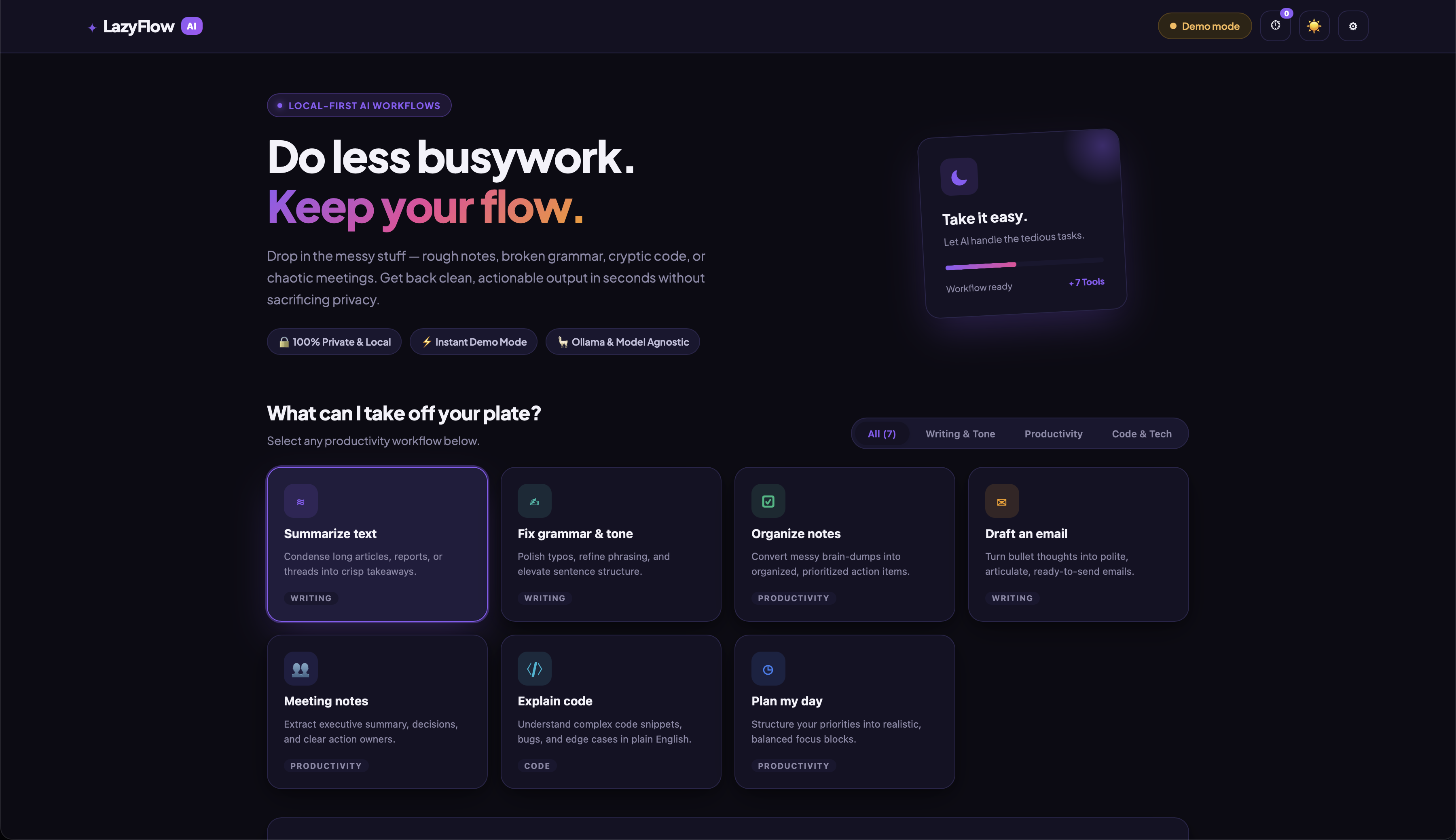 Live Demo:akshaygupta-26.github.io The app includes a demo mode, so users can explore the interface without configuring a local AI model.
Code
GitHub Repository:akshaygupta-26/LazyFlow-AI-Let-AI-Handle-the-Busywork The project is built with HTML, CSS, and JavaScript, with optional local AI integration through Ollama.
How I Built It
I built LazyFlow AI using vanilla HTML, CSS, and JavaScript to keep it lightweight, responsive, and beginner-friendly.
For AI-powered functionality, the project supports Ollama with open-weight language models, such as Qwen 2.5. Users can configure a locally running model to generate responses for the available productivity workflows.
The project includes:
Live Demo:akshaygupta-26.github.io The app includes a demo mode, so users can explore the interface without configuring a local AI model.
Code
GitHub Repository:akshaygupta-26/LazyFlow-AI-Let-AI-Handle-the-Busywork The project is built with HTML, CSS, and JavaScript, with optional local AI integration through Ollama.
How I Built It
I built LazyFlow AI using vanilla HTML, CSS, and JavaScript to keep it lightweight, responsive, and beginner-friendly.
For AI-powered functionality, the project supports Ollama with open-weight language models, such as Qwen 2.5. Users can configure a locally running model to generate responses for the available productivity workflows.
The project includes: - A responsive interface for different productivity tasks.
- JavaScript logic to manage user input and display results.
- Ollama API integration for local model inference.
- A demo mode for exploring the interface without an AI connection.
- Settings for configuring the local model and testing connectivity. To try the local AI integration, install Ollama fromollama.com and download a model using: ollama pull qwen2.5:3b Then start the website using a local development server and configure the model in the app. Depending on the browser and Ollama configuration, additional CORS settings may be needed. The demo mode is clearly distinguished from model-generated output, so it does not pretend that an AI model is connected when it isn't. Why Does Open Innovation Matter? Open innovation makes AI development more accessible to students, beginners, and independent developers. By supporting open-weight models and local inference, LazyFlow AI gives users a way to experiment with AI without depending entirely on paid, closed-source APIs. Developers can explore the implementation, customize workflows, learn from the code, and adapt the project to their own needs. For me, this project is an opportunity to learn how web technologies and open AI tools can work together to solve everyday problems. My Agent Session I used AI-assisted development to brainstorm the project, organize its structure, create the initial HTML, CSS, and JavaScript, and prepare the documentation. I also focused on making the project usable without an AI connection through a demo mode and on documenting how to configure a real local model. The Lazy Payoff LazyFlow AI is designed to reduce the effort involved in repetitive productivity tasks. Instead of manually organizing rough notes, starting an email from scratch, or planning tasks one by one, users can enter their information and use the relevant workflow to get started faster. The actual time saved depends on the task and the quality of the model's output. The goal is to reduce repetitive effort, not remove the need to review important results. Prize Categories This project focuses on open-source AI and productivity automation using open-weight models and local inference. I will select the applicable partner prize categories according to the official challenge rules.
Built for Hacktoberfest 2026 — Slow and Steady. LazyFlow AI: Let AI handle the busywork so you can focus on what matters. 26. Building Termy X: putting an X client inside a GPU terminal with Rust and GPUI I spend my day in a terminal, and I was tired of alt-tabbing to X. So I forked Termy, an MIT-licensed Rust/GPUI terminal, and docked an X panel beside the shell. Termy X has a timeline, profile lookup, trends, research, and compose with post/reply/quote, plus likes and follows. This post covers what it took to keep it fast and impossible to hang. That means mimalloc, zero-copy serde with borrowed &'a str structs, mpsc channels for slow browser-session writes, and process-tree kills when a call stalls. It also covers porting it to Linux with a cfg split, rustls, XDG paths and GitHub Actions. Repo: jpanasuk-netizen/termy-x 27. dupl: A SuperCLI Plugin Guide dupl Tool for finding code clones in Go projects Source mibk/dupl Tags
- dupl
- code-quality
- clones
- go Installation
- go install github.com/mibk/dupl@latest
2. Verify: dupl --version
3. supercli plugins install ./plugins/dupl --on-conflict replace --json
About SuperCLI This plugin is part of theSuperCLI ecosystem - a unified CLI plugin manager for AI agents and developers. Discover, install, and orchestrate thousands of command-line tools with SuperCLI. 28. Android apps running native on macOS kksimp/Mac.apk (news.ycombinator.com ) 29. And we're calling blocks of code the genAI spits out that creates bugs, "Mutants" Have a whole folder of "mutants" and "mutations." github.com/bluesky-social/jetstream/tree/main/tes… 30. RTX 5060 Ti 16GB×3 と SGLang で、LLM が考えて動く NPC 100 体を同時に回してみた はじめに 「RTX 5060 Ti 16GB を 3 枚にしたのは無駄遣いではなかったのか?」シリーズの続きです。前々回・前回はこちらです。 - RTX 5060 Ti 16GB を3枚にした(3枚目は M.2 → OCuLink で外付け) -RTX 5060 Ti 16GB×3 で Qwen3.8-27B を vLLM・SGLang・TensorRT-LLM で動かし比べてみた vLLM や SGLang は、たくさんのリクエストをまとめて同時に処理するのが得意です。 それなら、たくさんの NPC が同時に LLM に問い合わせて、話したり動いたりする「鑑賞ゲーム」のようなものが作れるのではないかと考えて、やってみました。 動いているところの動画です。youtube.com 知りたかったのは次の 2 つです。
- 処理が追いつくか。 1 台の PC の推論サーバーで、何体までなら待ち時間が気にならない速さで回せるか
- それらしく振る舞うか。 ローカル LLM に任せた NPC が、性格や記憶に沿った行動や会話をするか 作ったもの:llm-island 島で 100 体の住人が暮らすシミュレーションです。
- 住人は歩き回り、出会った相手と会話する。会話のあとは相手への好き嫌いや聞いた噂を覚える
- ときどき島の外から悪の魔物「ヤミゴースト」がやってきて、住人を爪でフリーズさせる。戦士は超能力で戦い、ヒーラーはフリーズした仲間を魔法の杖で助けに行く
- 何を言うか・どこへ行くか・助けに行くかは、住人ごとの LLM 呼び出しで決まる(ヤミゴーストが誰を狙うかも LLM が決める)
 島の全体。起動直後の 1 回目のウェーブで、100 体全員が「どこへ行くか」の返答を待っているところ(左上は状況の表示)
住人 1 体が LLM に聞くことは、次の 4 種類です。
| 種類 | いつ | 返してもらうもの |
|---|---|---|
| 発話 | 会話中で自分の番のとき | セリフ、会話を終えるか |
| 移動の意図 | 前の行動が終わったとき・魔物に気づいたとき | どこへ行くか・誰を探すか・逃げるか戦うか、心の声 |
| 救助の判断 | ヒーラーがフリーズした住人のそばに来たとき | 杖で癒すか、そのときのセリフ |
| 会話の要約 | 会話が終わったとき | 振り返り、要約、好感度の変化、聞いた噂 |
ヤミゴーストも、島にいる間は同じしくみで LLM に「次に誰を狙うか・もう去るか」を聞きます(後述)。
島の全体。起動直後の 1 回目のウェーブで、100 体全員が「どこへ行くか」の返答を待っているところ(左上は状況の表示)
住人 1 体が LLM に聞くことは、次の 4 種類です。
| 種類 | いつ | 返してもらうもの |
|---|---|---|
| 発話 | 会話中で自分の番のとき | セリフ、会話を終えるか |
| 移動の意図 | 前の行動が終わったとき・魔物に気づいたとき | どこへ行くか・誰を探すか・逃げるか戦うか、心の声 |
| 救助の判断 | ヒーラーがフリーズした住人のそばに来たとき | 杖で癒すか、そのときのセリフ |
| 会話の要約 | 会話が終わったとき | 振り返り、要約、好感度の変化、聞いた噂 |
ヤミゴーストも、島にいる間は同じしくみで LLM に「次に誰を狙うか・もう去るか」を聞きます(後述)。
Python だけで書いていて、3D の表示は[Ursina](https://www.ursinaengine.org/) です。
リポジトリ:[lumavrenor/llm-island](https://github.com/lumavrenor/llm-island) 結論
先に結論を書きます。
- 作れました。ただし 100 体くらいまで。 住人 100 体で、1 ウェーブ(後述。約 58 件の問い合わせ)が約 26 秒。200 体だと約 45 秒で、住人 1 体あたりの会話や行動の間隔も 2 倍近くになります
- まとめて投げる効果は大きい。 1 件ずつ順番に投げるのに比べて、約 8 倍の数をさばけました。ただし「100 件を同時に投げても 1 件と同じ速さ」にはならず、8 件でも 1 件の約 2 倍の時間がかかりました
- それらしい振る舞いは出ました。 性格どおりの口調、相手ごとの好き嫌い、苦手な相手を苦手なままにする態度、又聞きの噂などが、コードで決め打ちせずに出てきます。一方で、噂はあまり遠くまで広まりません
- ヤミゴーストとの戦いも LLM で回りました。 ヤミゴーストは撃ってくる戦士を避けて無防備な住人を狙い、住人は「ヤミゴーストが近い、急げ!」と声をかけ合い、ヒーラーはフリーズした仲間を起こしに行きます テンポは「リアルタイムに会話が飛び交う」ではなく、「20〜30 秒ごとに島のあちこちで一斉に話が進む」感じです。 眺めるだけの鑑賞ゲームなら、これで十分に成り立ちました。 環境 | 項目 | 値 | |---|---| | GPU | RTX 5060 Ti 16GB × 3(計 48GB、P2P なし、PCIe。1 枚は画面出力も兼ねる) | | OS | Windows 11 + WSL2(推論サーバーは WSL2 側、ゲームは Windows 側) | | 推論サーバー | SGLang 0.5.21(OpenAI 互換 API) | | モデル | Qwen3.8-27B NVFP4(KV キャッシュは fp8_e4m3、コンテキスト 8192) | | 並列 | PP3(パイプライン並列 3 段) | 作り方のポイント 全員分を「ウェーブ」でまとめて投げる 住人ごとにスレッドや非同期タスクを作って LLM を呼ぶと、リクエストがバラバラに飛び、世界のデータを誰がいつ書き換えるのかもややこしくなります。 こうなると、Claude Code を使っていてもバグが取りきれません。そこで、LLM への問い合わせを「ウェーブ」という単位にまとめました。
- collect: 返答が必要な住人全員分のリクエストを集めて、一度に投げる
- wait: 全部返るまで待つ(その間も住人は歩き続ける)
- play: 結果をまとめて反映し、セリフのふきだしを見せる時間だけ待つ → 1 へ メインループは毎フレーム World.update() を呼ぶだけで、その中で次のように状態を進めます。
def _wave_frame(self):
    match self.wave_state.update():
        case "collect":
            ...
            reqs = self._build_requests()
            self.wave = self.llm.submit(reqs)   # 全員分を一度に投げる
            self.wave_state.change("wait")
        case "wait":
            if not self.wave.is_done():          # 全部返るまで毎フレーム確認するだけ
                return
            self.play_sec = self._apply_wave(self.wave.results())
            self.wave_state.change("play")
        case "play":
            if self.wave_state.elapsed >= self.play_sec / self.speed:
                self.wave_state.change("collect")
- HTTP の送受信は裏のスレッド 1 本(asyncio)だけで行い、世界のデータには触らせません。渡すのはリクエストと結果のただのデータだけなので、ゲーム側はシングルスレッドのまま書けます
- 住人 1 体が出すのは 1 ウェーブに 1 件まで(発話 > 救助の判断 > 移動の意図、の優先順)。要約や魔物の判断は行動を止めないので、同じウェーブに追加で乗せます
- 返答を待っている間に状況が変わることがあります(魔物が来た、相手がフリーズした、など)。結果を反映する前に必ず確かめて、古い判断は捨てて聞き直します
- play の間に次のウェーブを投げておけば、GPU が空く数秒を埋めて少し速く回せます。ただ流れが一直線でなくなるので、デモではシンプルさを優先してやっていません
この作りだと、ウェーブ 1 回の時間 = 住人 1 体が次に話したり動いたりできるまでの間隔になります。
ウェーブの中でいちばん遅い 1 件を全員が待つので、ここが短いほど島がにぎやかになります。
 play の瞬間。返ってきたセリフが島のあちこちで一斉にふきだしになる。右上は画面の外の会話、左下はカメラが追っている住人の性格・最近の出来事・相手ごとの印象
返答は JSON スキーマで縛り、短くする
返答はすべて JSON スキーマで形を決めています(response_format の json_schema)。
例えば移動の意図を聞くと、住人はこういう JSON だけを返します。
play の瞬間。返ってきたセリフが島のあちこちで一斉にふきだしになる。右上は画面の外の会話、左下はカメラが追っている住人の性格・最近の出来事・相手ごとの印象
返答は JSON スキーマで縛り、短くする
返答はすべて JSON スキーマで形を決めています(response_format の json_schema)。
例えば移動の意図を聞くと、住人はこういう JSON だけを返します。
{"intent": "seek", "target": "(会いたい住人の名前)", "pace": "fast",
 "manner": "早く会って話を聞いてほしい", "duration_sec": 60}
この形は、次の関数で作るスキーマで決めています。
def _intent(kinds) -> dict:
    return _obj({
        "intent": {"type": "string", "enum": list(kinds)},  # go_spot / seek / avoid / flee / fight など
        "target": {"type": "string"},
        "pace": {"type": "string", "enum": list(PACES)},
        "manner": {"type": "string"},                      # 心の声
        "duration_sec": {"type": "integer"},
    })
選べる意図は住人ごと・状況ごとに変えています(魔物に気づいていなければ flee は無い、戦士だけ fight がある、など)。 選べない行動はスキーマの時点で出せないので、反映側で弾く処理が要りません。 長さはスキーマでは縛らず、プロンプトで「40字以内」と頼んだうえで、反映するときに切り詰めています(文字数の制約をスキーマに書くと、制約デコードの実装差で 400 エラーになることがあるため)。 Qwen3 の thinking は常にオフにしています(chat_template_kwargs: {"enable_thinking": false})。 考えさせたいところは、JSON の項目の順番を使って「先に振り返りを書かせてから要約を書かせる」ようにしました。 推論サーバーの設定 python -m sglang.launch_server \
  --model-path Qwen3.8-27B-NVFP4 --served-model-name npc \
  --tp-size 1 --pp-size 3 \
  --context-length 8192 --mem-fraction-static 0.93 --kv-cache-dtype fp8_e4m3 \
  --max-running-requests 48 --max-queued-requests 192 \
  --cuda-graph-max-bs-decode 48 --disable-prefill-cuda-graph \
  --disable-radix-cache --reasoning-parser qwen3 \
  --host 127.0.0.1 --port 30000
試してわかったこと:
- 同時処理数(--max-running-requests)がいちばん効く。ただし大きければ速いわけではない。 Qwen3.8 は層の多くが線形アテンションで、リクエストごとに大きな状態を持ちます。サーバーは起動時に同時処理数ぶんの状態を確保し、残りが KV キャッシュになります。100 にしたら KV キャッシュが足りず、実際に同時に動いたのは 9 件ほどでした。48 の方が速くなりました
- 同時処理数を超えた分は待ち行列(--max-queued-requests)で待ちます。ゲーム側で同時に投げる数を 100 件までにしている(1 ウェーブがそれより多いときは、超えた分をゲーム側で待たせてから投げる)ので、48 + 192 なら溢れません
- --cuda-graph-max-bs-decode は同時処理数と同じにする。小さいと、それを超えたバッチが何倍も遅くなりました
- P2P のない GPU 3 枚では、テンソル並列(TP2、2 枚)よりパイプライン並列(PP3、3 枚)の方が約 4 倍速くなりました(使う枚数が違うので、条件をそろえた比較ではありません) 処理は追いつくか 測り方 普段動かしている世界のセーブデータのコピーを使い、2 通りで測りました。
- ゲームを実際に動かす。 住人 100 体と 200 体で、本物の LLM を使って実時間 6〜9 分動かす。あわせて全ウェーブのリクエストをそのまま記録しておく
- 件数だけを変えて投げ直す。 1 で記録した実際のリクエストから K 件を選び、1 ウェーブとして一度に投げる(K = 1〜240) 「ゲームを動かす」だけだと件数を自由に選べず、「ダミーのプロンプトで測る」だけだと実際の出力の長さのばらつきが入りません。 実際のリクエストを記録して投げ直すことで、両方を見られるようにしました。 1 件ずつより約 8 倍さばける。でも「1 件と同じ速さ」ではない 一度に投げる件数を変えたときの、ウェーブ 1 回の時間です(2 の方法で、記録した実際のゲームのリクエストを投げ直したもの。各 2〜3 回測った範囲)。 | 一度に投げた件数 | 時間 | 1 件あたり | TTFT 中央値 | |---|---|---|---| | 1 | 3.2〜4.6 秒 | 3.2〜4.6 秒 | 0.5〜0.6 秒 | | 4 | 6.6〜7.0 秒 | 1.7 秒 | 1.0〜1.1 秒 | | 8 | 6.6〜6.8 秒 | 0.84 秒 | 1.3〜1.4 秒 | | 16 | 9.8〜12.6 秒 | 0.6〜0.8 秒 | 1.9〜2.0 秒 | | 24 | 11.0〜15.4 秒 | 0.5〜0.6 秒 | 2.5〜2.8 秒 | | 48 | 19.2〜21.0 秒 | 0.43 秒 | 4.3〜4.7 秒 | | 96 | 42.1〜44.7 秒 | 0.44〜0.47 秒 | 11.8〜13.5 秒 | | 144 | 61.0〜66.2 秒 | 0.42〜0.46 秒 | 21.5〜29.3 秒 | | 192 | 81.6〜91.0 秒 | 0.43〜0.47 秒 | 32.1〜34.6 秒 |
- 件数を 8 倍にしても、時間は 2 倍程度です(中央値で 1 件 3.4 秒 → 8 件 6.8 秒)。1 件から 4 件で約 2 倍になり、4 件から 8 件ではほとんど変わりません。1 件だけだと、3 段のパイプラインのうち 1 段ずつしか働かず、GPU が遊んでいるのだと思われます
- 16〜48 件で 1 件あたりの時間が下がりきります
- 48 件(同時処理の上限)から上は、件数に比例して長くなります。 1 件 ≒ 0.44 秒で一定。サーバー全体の出力は 120〜140 tok/s で頭打ちでした 「100 件同時に投げても 1 件と同じくらいで返る」はこの環境では成り立たず、100 件だと 1 件の 10 倍以上かかります。 それでも 1 件ずつ順番に投げるより約 8 倍速い(1 件あたり 3.4 秒(1 件だけのときの中央値)→ 0.44 秒)。 住人 100 体の普段のウェーブ(約 58 件)で言えば、1 件ずつなら 3 分以上かかるところが 26 秒で済んでいます。 :::note warn 測定で、同時処理 48 件 + 待ち行列 192 件 = 240 件ちょうどを一度に投げたら、30 件以上が失敗しました(どれも「返答が JSON として読めない」)。 ゲームでは同時に投げる数を 100 件までにしていて、それを超えた分はゲーム側で待ってから投げるので、この失敗は起きていません。 ::: 住人 100 体と 200 体 ゲームを実際に動かしたとき(1 の方法)の、落ち着いたあと(ウェーブ 4 以降)の値です。 | 住人 | 1 ウェーブの件数(中央値) | 1 ウェーブの時間(中央値・範囲) | 1 件あたり | 失敗 | |---|---|---|---|---| | 100 体 | 57.5 件 | 25.8 秒(19.8〜34.5) | 0.46 秒 | 0 | | 200 体 | 115 件 | 45.4 秒(38.0〜72.3) | 0.43 秒 | 0 | 住人を 2 倍にすると件数も 2 倍になり、1 件あたりの時間は変わりません。 住人 100 体の時点で、すでに「件数に比例して長くなる」区間に入っていたということです。 1 ウェーブの件数が住人の数の 0.57 倍のまま動かなかったのもおもしろいところです。 ウェーブが長くなればその間に出会いが増えて、次のウェーブの件数が膨らみそうなものですが、返答を待っている住人は次のウェーブに乗らないので、自然に釣り合うようです。 なお、起動直後の 1 回目のウェーブは全員が行き先を聞くので、100 体で 39 秒、200 体で 82 秒かかりました。 プロンプトの長さがそのまま効く プロンプトは平均約 1,200 トークン、返答は発話 40・意図 60・要約 110〜140 トークンほどです。 入力が長く出力が短い、プリフィル(prefill)の重い負荷です。 開発の途中で HP・心・状態異常・噂などをプロンプトに足したら、入力が 4 割ほど長くなり、ウェーブの中央値は 17 秒から 26 秒に伸びました(原因を分けて確かめてはいません)。 NPC に「覚えていること」を増やすほど、島のテンポは遅くなります。 radix cache は効かなかった プロンプトの先頭の約 4 割は、全員に共通の文(世界の説明など)です。 SGLang の radix cache は、共通の先頭を一度計算したら結果を取っておき、次のリクエストではその分の計算を省く仕組みです。 これを有効にすれば速くなると思いましたが、このモデルでは速くなりませんでした。 キャッシュ自体は効いていて、1 件あたり約 4 割のトークンが使い回されていました。 遅くなった原因は、前に書いた線形アテンションの状態です。共通の先頭を使い回すには、KV キャッシュに加えて「先頭まで読んだ時点の状態」も取っておく必要があります。 状態は大きいのでその分メモリが減り、同時処理数が 48 件から 12 件に下げられて、約 2 倍遅くなりました。 設定を調整して同時処理数を 42 件まで戻すと、普段の設定との差はばらつきの範囲内になりました。 | 設定 | 同時処理 | 1 件あたり(24 / 48 / 96 件) | |---|---|---| | radix 無効(普段の設定) | 48 件 | 0.32〜0.36 / 0.24〜0.30 / 0.27〜0.30 秒 | | radix 有効 | 12 件 | 0.53〜0.59 / 0.48〜0.54 / 0.51〜0.54 秒 | | radix 有効 + 同時処理数を戻す調整 | 42 件 | 0.28〜0.36 / 0.28〜0.34 / 0.27 秒 | 線形アテンションを使わない普通のモデルなら、状態を取っておく必要がないので、有効のままの方が速い可能性があります。 :::note info この表は、ゲームのリクエストではなく、住人ごとに違う約 1,080 トークンのプロンプトを 24・48・96 件まとめて投げ、出力を 60 トークンにそろえて測りました(各 2 回)。 出力が短くそろっているぶん、1 件あたりは前の表(0.44 秒)より短くなります。前の表とは比べず、この表の行どうしで比べてください。 ::: vLLM は SGLang より遅かった 同じ PC・同じモデルで vLLM 0.29.0 も試しました。SGLang と同じ構成(PP3・同時処理 48)に合わせて調整しましたが、1 分間に返せた数は SGLang の 6 割ほどで、100 件を一斉に投げたときは 2.6 倍の時間がかかりました。 | | SGLang | vLLM | |---|---|---| | 1 分間に返せたリクエストの数 | 146 回 | 91 回 | | 100 件を一斉に投げて全部返るまで | 28 秒 | 73 秒 | 「1 分間に返せたリクエストの数」は、100 人がそれぞれ約 30 秒おきに話しかける負荷をかけて測りました。 vLLM でも、このモデルでは prefix キャッシュが効きませんでした。KV のブロックが 1,568 トークンと大きく、共通の先頭部分がそれより短いので、使い回せなかったためです。 ただし、比べたのはゲームに似せた負荷テストのスクリプトだけです。ゲーム本体を vLLM で動かしてはいません。 また、プロンプトを長くする前の時期に測ったので、上の件数の表(96 件で 42〜45 秒)とは条件が違います。比べられるのは、この表の SGLang と vLLM どうしだけです。 それらしく振る舞うか ここは数字より、ログから拾った例で紹介します(名前もセリフもすべて LLM が作ったものです)。 性格どおりに話す 住人の性格(口調・好きなもの・苦手なもの)は最初に LLM で 100 体分作っています。 古風な住人は「〜申す」、理屈っぽい住人は「移動コストを最小化する」と、口調は最後まで性格どおりでした。 好き嫌いができ、苦手な相手は苦手なまま 会話のあとに、それぞれの視点で振り返りと好感度の変化を LLM に書かせています。
ガクツ → クウガ(−2)「ぶっきらぼうで嫌味な奴だ。…静かにしろと言ったのに逆切れするあたり、騒音そのものだな」
ピクピク → プーピ(+2)「行動派で、ボクと波長が合う」 この振り返りを次に会ったときのプロンプトに入れると、苦手な相手との再会でも態度が変わらず、悪い印象が続くようになりました。 一方で、励まされて機嫌を直した例もあります。 ザッブ → クウガ(前回 −1「また拒絶された」)⇒ 今回 +1「励まされて少しだけ機嫌が直った気がする。急かすのはやめよう」 噂が伝わる 会話の要約で、相手が話した「ほかの住人の話」を噂として取り出し、次の会話のプロンプトに入れています。 「噂話をしなさい」とは指示していません。それでも、聞いた噂をさらに別の住人に話す「又聞き」が起きました(30 分で 2 件だけですが)。 ジップが知っていた「キクイクがフリーズしている」という話がカオシに伝わり、カオシからさらにソルナへと伝わっています。 会う前に噂で聞いていた相手に、初対面でその話を持ち出すこともありました。 (チクブは「ケイジがフリーズしたらしい」とチカチカから聞いていた) チクブ: ケイジ、元気?ハイルに助けてもらって一安心だな。ワタシもそばに居るよ。 ハイルが助けたことは、この噂には入っていません。ほかの出来事から知ったのか、LLM が付け足したのかは確かめていません。 うまくいっていないこと
- 噂はあまり遠くまで広まらない。 材料はプロンプトに入っているのに、セリフは目の前のこと(景色・気分・相手の様子)が中心で、第三者の名前が出るのはフリーズや救助が近くで起きたときがほとんどでした
- 噂の中身も、人柄の評判(「○○は嫌なやつ」)より「○○がフリーズしたらしい」のような出来事が中心です
- 話題を持ち出す動機(「今これを話したい」)を持たせるか、もっと長く動かして印象が育つのを待つか、まだ試しているところです
ヤミゴースト・戦士・ヒーラー
会話だけだと、島は穏やかすぎて眺めていても起伏がありません。そこで「困りごと」として、ときどき悪の魔物が来るようにしました。
 ヤミゴースト(中央)と戦士のヌポラ・ノミュラ。手前の青い箱は、爪でフリーズしたチュプモ。
左上の表示にはヤミゴーストの心の声「戦士は遅い。まず目の前の獲物を食らわねば。」が出ている
| 登場するもの | 数 | LLM が決めること | プログラムがやること |
|---|---|---|---|
| ヤミゴースト | 1 体(去ってから 7〜12 分たつと、また島の端に現れる) | 誰を狙うか・もう去るか、ひとこと、心の声 | 追いかける、爪で攻撃する、撃ってきた戦士に黒い弾で反撃する |
| 戦士 | 住人のうち 5 体 | 戦う(fight)か逃げる(flee)か | fight の間、届く距離に入ったら 5 秒おきに超能力を自動で撃つ |
| ヒーラー | 住人のうち 3 体 | どのフリーズした住人を助けに行くか、着いたら杖で癒すか、そのときのひとこと | 3 秒の詠唱(その間は動けない)、終わったら HP 満タンで目覚めさせる |
| ほかの住人 | 残り | 逃げるか、ほかの行動を続けるか | 近づかれたら(35m 以内)気づいて、移動の意図を聞き直す |
LLM は「決めるだけ」、動きはプログラム
結論に書いたとおり、ウェーブ 1 回は 20〜30 秒かかります。超能力を 1 発撃つたびに LLM に聞いていたら、戦いになりません。
そこで、LLM には「誰を狙うか」「戦うか逃げるか」「癒すか」だけを決めさせ、追いかける・撃つ・詠唱するといった毎フレームの動きはプログラムが受け持つように分けました。
ヤミゴーストの判断も、住人と同じウェーブに 1 件だけ乗せます。聞き直すのは、次のようなきっかけがあったときです。
ヤミゴースト(中央)と戦士のヌポラ・ノミュラ。手前の青い箱は、爪でフリーズしたチュプモ。
左上の表示にはヤミゴーストの心の声「戦士は遅い。まず目の前の獲物を食らわねば。」が出ている
| 登場するもの | 数 | LLM が決めること | プログラムがやること |
|---|---|---|---|
| ヤミゴースト | 1 体(去ってから 7〜12 分たつと、また島の端に現れる) | 誰を狙うか・もう去るか、ひとこと、心の声 | 追いかける、爪で攻撃する、撃ってきた戦士に黒い弾で反撃する |
| 戦士 | 住人のうち 5 体 | 戦う(fight)か逃げる(flee)か | fight の間、届く距離に入ったら 5 秒おきに超能力を自動で撃つ |
| ヒーラー | 住人のうち 3 体 | どのフリーズした住人を助けに行くか、着いたら杖で癒すか、そのときのひとこと | 3 秒の詠唱(その間は動けない)、終わったら HP 満タンで目覚めさせる |
| ほかの住人 | 残り | 逃げるか、ほかの行動を続けるか | 近づかれたら(35m 以内)気づいて、移動の意図を聞き直す |
LLM は「決めるだけ」、動きはプログラム
結論に書いたとおり、ウェーブ 1 回は 20〜30 秒かかります。超能力を 1 発撃つたびに LLM に聞いていたら、戦いになりません。
そこで、LLM には「誰を狙うか」「戦うか逃げるか」「癒すか」だけを決めさせ、追いかける・撃つ・詠唱するといった毎フレームの動きはプログラムが受け持つように分けました。
ヤミゴーストの判断も、住人と同じウェーブに 1 件だけ乗せます。聞き直すのは、次のようなきっかけがあったときです。 - 島に着いた、狙っていた住人をフリーズさせた、逃げられた(12 秒追っても届かない)
- 戦士に撃たれた、超能力が当たって HP が減った、ヒーラーが仲間を目覚めさせた
- 何もなくても 25 秒たった プロンプトには、自分の HP、あと何体で満腹か、近い住人 10 体(距離・HP・戦士かヒーラーか)、撃ってきた戦士、これまでの襲来の結果を入れています。 返答はスキーマで hunt(狙う)か leave(去る)に限っています。
RAIDER = _obj({
    "action": {"type": "string", "enum": ["hunt", "leave"]},
    "target": {"type": "string"},   # hunt なら狙う住人の名前
    "say": {"type": "string"},      # 住人に聞こえるひとこと(片言で)
    "thought": {"type": "string"},  # 心の中の考え
})
性格づけは、システムプロンプトで「話し方は片言で、カタカナまじりの不気味な言葉。住人と仲良くすることはない」としただけです。 戦士の強さは、LLM を使わずにゲーム本体のシミュレーションのコードだけで「戦士 N 体 対 ヤミゴースト」の決闘を 200 回ずつ回し、戦士 3 体でほぼ五分(勝つ率 46〜58%)になるように決めました。 ただしこれは、住人の HP・心のしくみを入れる前のルールで測った値で、今のルールでは測り直していません。 ある襲来の記録 10 月 13 日に実際の LLM で動かした世界の、1 回目の襲来です(時刻は現れてからの世界の時刻。ひとことと心の声は LLM の返答そのまま)。 ヤミゴーストは HP 100 で現れ、戦士の超能力が 1 発当たるごとに 10 減ります。
| 時刻 | 出来事 |
|---|---|
| 0 秒 | ヤミゴーストが島の端に現れる |
| 49 秒 | キポクを狙う。<br>心の声「初狩り。近いのを切り裂いて、島をノイズで埋めろ。」<br>ひとこと「フリーズ、時間だ...」 |
| 103 秒 | 反撃の黒い弾を受けて、戦士ラポニがフリーズ |
| 114 秒 | HP 60。103 秒より前にラポニに撃たれたときの問い合わせの返答が届き、53m 先のヨルルに狙いを変える。<br>心の声「戦士は厄介だが、無防備なヨルルを先に仕留める。」<br>ひとこと「お前も…フリーズだ」 |
| 143 秒 | HP 20。今度はアピュネを狙う。<br>心の声「戦士は後回し。目の前の奴、今すぐフリーズさせろ。」<br>ひとこと「クッ…止まれぇ」 |
| 162 秒 | HP 10。6m まで迫っていた戦士ヌポラに狙いを変える。<br>心の声「戦士は守り固い。でも、近くにいる。先に倒さないと爪が届かない。」<br>ひとこと「電撃、やめて。爪で裂くぞ。」 |
| 168 秒 | 戦士 3 体(ロネラ 16 発中 5 発、ヌポラ 9 発中 3 発、ラポニ 11 発中 2 発が命中)に倒される |
| 187 秒 | ヒーラーのタミュネが杖で、フリーズしていたラポニを目覚めさせる |
| 「戦士は守りが固い」「急ぐ住人には追いつけない」という弱点をプロンプトで伝えてあるので、撃たれると無防備な住人に狙いを変え、追い詰められると目の前の戦士に向かう、という判断をしています。 | |
| ただし 114 秒のように、判断はウェーブの待ち時間のぶん、状況から遅れて届きます。 | |
 *別の襲来。HP 10 まで追い詰められたヤミゴーストのまわりで、ノミュラ・ネポセ・フムルがフリーズしている。 *別の襲来。HP 10 まで追い詰められたヤミゴーストのまわりで、ノミュラ・ネポセ・フムルがフリーズしている。 |
|
| このときの心の声は「戦士は遠い。近いネポセを先に切り裂く。」* | |
| 襲来のあいだ、住人たちは会話の中で声をかけ合っていました(1・2 回目の襲来から)。 |
「ヤミゴーストか。拙者は退く。」
「結論から言うと、戦士が対応中。移動は無駄。」(理屈っぽい住人)
「待てない!ヤミゴースト、ウポネ狙ってるぞ!」
「待ってないでさっさと!ヤミゴーストが近いぞ、急げ!」
ヒーラーのソピュレ(右、杖を持っている)が、フリーズしていたフムルを目覚めさせたところ。奥のノミュラとネポセはまだフリーズしたまま 助けられた話は、そのあとの会話にも出てきます。 ラポニ「タミュネの杖で目覚めたのだ。朽ちゆくもよし、心は穏やか。」
(タミュネに)「杖の光、美しいわね。」 → タミュネの振り返り「杖の光を褒めてくれた。…励まし合いで心が温まりました。」 ヤミゴーストは「これまでの襲来」を覚えているので、負けが続くと心の声が変わります。 3 回目「前回負けたな。まず近い奴を切り裂く。」
4 回目「また倒されるか。速く爪を突き刺さなければ。」 ただ、この世界では 4 回の襲来がすべて戦士に倒されました(フリーズさせたのは 1 回あたり 0〜2 体)。 決闘のシミュレーションでは五分だったのに、実際は戦士の方が強く出ています。 4 回とも戦士 3 体が駆けつけて撃っていましたが、なぜ五分にならないのかはまだ確かめていません(決闘を今のルールで測り直していないのも、原因の候補です)。強さの調整は続けています。 まとめ
- LLM で考えて動く NPC の鑑賞ゲームは、ローカルの推論サーバー 1 台でも作れました。この環境では 100 体くらいまでが目安です
- コツは、NPC ごとに非同期で呼ぶのではなく、全員分を「ウェーブ」でまとめて投げること。推論サーバーのバッチ処理を使い切れるうえ、ゲーム側をシングルスレッドのまま書けます
- 「まとめれば 1 件と同じ速さ」ではありません。同時処理の上限を超えると、ウェーブの時間は NPC の数に比例して伸びます。NPC の数・プロンプトの長さ・テンポのどれかを選ぶことになります
- 性格・記憶・噂をプロンプトに入れるだけで、口調や好き嫌いは思った以上にそれらしくなりました。一方で、入れた噂を住人が自分から話題にすることは少なく、噂は遠くまで広まりません。話したくなる動機をどう持たせるかが、おもしろいところかもしれません
- 戦いのように速さが要る場面は、LLM には「誰を狙うか・戦うか・癒すか」だけを決めさせ、動きはプログラムに任せると、20〜30 秒おきの判断でも成り立ちました リポジトリと動画 llm-island(GitHub)lumavrenor/llm-island 動いているところの動画(YouTube)youtube.com
- Just a reminder that our translation plugin for WordPress is available and free (the code, not what you pay in api usage) for anyone to use row-engineering/ai-narration
- Building Offline Voice Control with a Custom Wake Word and ONNX Cloud speech recognition is useful, but many voice-control products do not need to transcribe every sentence. If the interaction starts with a wake word and continues with a small list of fixed commands, local keyword spotting can be a simpler solution. This article shows a practical architecture for: - Detecting a custom wake word locally - Recognizing multiple fixed commands with one model - Keeping microphone audio on the device - Deploying the same workflow with ONNX or TFLite - Improving false-trigger performance with a second training round The two-stage architecture A useful design is to separate wake-up from command recognition: Microphone ↓ Wake-word model ↓ Short command window ↓ Multi-keyword model ↓ Application action For example: Wake word: Hey device Command: Turn on the light The wake-word model can run continuously with a conservative threshold. After it detects the wake word, the application enables the command model for a short period. This avoids running a larger command recognizer continuously and makes the interaction state easier to control. Why not use speech recognition for the wake word? The Web Speech API is convenient for prototypes, but it is not a reliable always-on wake-word detector across mobile browsers. Browser support for SpeechRecognition and its continuous mode varies, and some implementations may disconnect or use a remote recognition service. For a local browser implementation, a better approach is: 1. Request microphone access after a user gesture. 2. Read the audio with getUserMedia(). 3. Convert the stream into the frame format expected by the model. 4. Run local keyword-spotting inference. 5. Start ASR or show the command interface only after the wake word is detected. The browser still has permission and lifecycle limitations, but the keyword detector does not depend on SpeechRecognition returning a transcript. One model for multiple fixed commands Suppose a device needs these commands: next previous stop open menu close menu A multi-keyword model can return a score for each label. The application maps the selected label to an action: const actions = { next: () => nextPage(), previous: () => previousPage(), stop: () => stopPlayback(), "open menu": () => openMenu(), "close menu": () => closeMenu(), }; function handleKeyword(label) { actions[label]?.(); } This works well when the vocabulary is known in advance. It is not a replacement for open-ended speech recognition. A request such as “Set the living-room light to 37 percent” needs ASR and intent parsing because the words and parameters are not fixed. False triggers: R0 and R1 Getting the target phrase recognized is only the first part of the problem. A real device also has to reject: - Normal conversation - Music and television audio - Fans and mechanical noise - Similar-sounding phrases - Microphone or enclosure noise The first model can be treated as an R0 model. After testing it, collect the audio clips that incorrectly trigger it. These hard negatives become part of the next training round, often called R1. R0 model ↓ Scan difficult negative audio ↓ Collect false-trigger clips ↓ Retrain with hard negatives ↓ R1 model R1 is a training process, not a second model that must run at runtime. The goal is to teach the model which confusing sounds should be rejected while preserving recall for the real phrase. Local inference and privacy Local keyword spotting is useful when a product needs: - Low latency - Offline operation - Predictable fixed-command behavior - Lower cloud and network dependency - Better control over microphone privacy The model file is only one part of the system. The runtime also needs audio capture, framing, feature extraction, threshold handling, cooldown logic and application callbacks. For this reason, always validate the complete pipeline rather than testing only whether the model file can be loaded. ONNX and TFLite deployment ONNX is convenient for desktop, Python, Android and browser runtimes that support ONNX Runtime. TFLite or TFLite Micro is commonly used on constrained embedded devices. Before moving a model to another runtime, verify: - Sample rate - PCM format - Frame length and hop size - Mel-feature configuration - Input tensor shape - Output label order - Quantization settings - Detection threshold If preprocessing changes, recall can drop even when the model file is unchanged. A practical testing checklist Test the complete system with the final microphone and target environment: 1. Test the wake word with multiple speakers. 2. Test different distances and speaking speeds. 3. Play ordinary conversation and background audio. 4. Measure false triggers per hour. 5. Measure recall separately from false-trigger rate. 6. Add difficult negative samples for the next training round. 7. Test cooldown and repeated-trigger behavior. 8. Verify that every recognized command maps to the intended safe action. Do not optimize only for recall. A model that triggers too often is not practical for a product, even if it rarely misses the target phrase. Open-source inference example The onnx-wakeword project contains open-source inference code and examples for running ONNX wake-word and keyword-spotting models in local applications. It can be used to test the inference path before integrating a model into a larger product. The final result should still be tested with the actual microphone, operating system and hardware. Conclusion For a product with one wake word and a limited command vocabulary, a two-stage local design is often easier to control than continuously running full ASR: Wake word → command window → fixed keyword → local action The approach can provide low latency, offline operation and a small deployment footprint across ONNX- and TFLite-compatible platforms. You can read the longer architecture guide onVoicute , or try the local inference code in theonnx-wakeword repository . The accompanying German voice-control demonstration is available onYouTube .
- LightforgeProject/lightforge Für alle die WoW auf Linux spielen hier ist ein super Client mit Addon Manager der Zugriff auf WoWup, WoWInterface und CurseForged hat. Hinzu kommt auch das ihr alle anderen Blizzard Games auch über diesen Client spielen könnt.#WoW#WoWForever#WorldofWarcraft
- graphify supera las 128K estrellas en GitHub y su empresa entró a Y Combinator (S26). Convierte un repo en un grafo de conocimiento que tu agente consulta en lugar de hacer grep. Graphify-Labs/graphify
- The "Slow and Steady" Approach This is a submission for the Hacktoberfest Open-Source AI Challenge Week 3: Slow and Steady What I Built A containerized, on-chain CLOB (Central Limit Order Book) trading bot pipeline deployed via GitHub and Railway. It automates repetitive dry-run tracking and order execution in the background, keeping hands off the keyboard so you don't have to manually babysit routine market loops.
Demo[dev.to](https://dev.to/rcortez056/shipping-web3-automation-from-repository-fork-to-cloud-execution-2bc6) Code
{% embed[rcortez056-spec/dreamdex-bot-kit-main](https://github.com/rcortez056-spec/dreamdex-bot-kit-main) %}
How I Built It Leveraged open-source Python libraries, transparent repository forks, and a containerized cloud execution setup on Railway. Using environment variables for secure private key management, the pipeline runs continuous, autonomous background routines with zero local resource locks or manual intervention. Why Does Open Innovation Matter? Open infrastructure matters because it ensures total portability and zero vendor lock-in. Running on transparent Python frameworks and open-source foundations keeps sensitive key configurations completely under your direct control, avoiding closed APIs and rigid enterprise constraints. My Agent Session Automated dry-run loop and background execution pipeline running continuously via containerized cloud architecture. The Lazy Payoff By setting up the containerized pipeline once and letting it manage routine tracking autonomously, it eliminates the manual grind of babysitting terminal scripts—freeing up hours of time and keeping your focus locked entirely on high-level system architecture. 36. Duke Nukem II PC PORTED - Rigel Engine Is The New Way To Play! GitHub: lethal-guitar/RigelEngine Releases:github.com/lethal-guitar/RigelEngine/releases Status: STABLE & COMPLETE - all 4 episodes fully playable! 37. 🚀 Available for Hire: Python Backend Developer | Part-Time Freelance Hi! I’m available for part-time freelance projects and open to collaborating with individuals, startups, and businesses building or improving backend systems. Here’s how I can help: * Build and improve backends using Django and FastAPI. * Design and develop REST APIs with Django REST Framework * Integrate PostgreSQL and MySQL databases * Implement authentication using JWT and build real-time features with WebSockets * Work on existing Python codebases, fix issues, and improve functionality * Support development workflows using Git and Docker I’m open to both small tasks and long-term collaborations. I enjoy solving challenging problems, learning new technologies, and finding practical solutions to project requirements. 🔗 GitHub: github.com/john-otienoh 📩 Have a project in mind? Send me a DM with a brief description, timeline, and budget. Let’s discuss how I can help! 38. Duke Nukem II PC PORTED - Rigel Engine Is The New Way To Play! GitHub: lethal-guitar/RigelEngine Releases:github.com/lethal-guitar/RigelEngine/releases Status: STABLE & COMPLETE - all 4 episodes fully playable! 39. 👋 Do you still know what the code Claude wrote last week is for? I built an extension that tells you when you hover over your code Hey everyone 👋 Ever open a file Claude wrote last week and stop at a function with no idea why it was written or what it is for? 🤔 You read it line by line and check who calls it, and you still do not know. The session that wrote it knew, and nothing wrote that down. So I built WhatDoesThisDo, an extension for VS Code and Cursor. 🖱️ Hover over a function or a constant you wrote, and a small note pops up that tells you what it does and why it is there. i.redd.it 🤖 Claude writes the notes. They are kept in markdown pages inside your repo, one page per source file. The setup installs a skill and a rule for Claude. Before Claude changes a function, it reads the note. When it is done, it updates the note, in the same change. 🙋 "Why not just make Claude write docstrings?" I tried that first. A docstring explains the signature and says in a line or two what the function does. The part I wanted, why the function exists and why a timeout is 30 and not 60, needs a longer comment above the function. Once every function has one, the file is cluttered. You scroll past comments to find the code, and keeping them right as the code changes is a pain. Two more things did not help:

- Claude's comments repeat the line under them. "Returns the user" above return user.
- Shell scripts, YAML, CSS and SQL have no docstrings at all, and most repos have many files like these. So the notes are kept in their own markdown pages and not inside the code. The rule makes Claude open that page before it changes a function. Your docstrings stay as they are and still describe how to call a public function. When a note changes, the reviewer sees it in the pull request as normal text, which is easier to read than a changed comment inside a diff. 🧩 What you get
- 🌍 It works with any language you write in. Python, TypeScript, Rust, Go, shell, YAML, and so on.
- 🎯 Two functions with the same name, save, in different files? With a language server running, each one shows its own note.
- 🔗 From the note you can jump to the function itself, or open the page to edit the note. Line numbers in the pages are updated when your code changes, so the links keep working.
- 🪶 There is nothing else to install. The pages are plain markdown and the extension is MIT licensed. ⚡ Try it in two minutes
- Install it: search for WhatDoesThisDo in the Extensions view, or run code --install-extension TonyCJ7.whatdoesthisdo (cursor --install-extension TonyCJ7.whatdoesthisdo on Cursor).
- Run the setup command from the README inside your project. It asks three questions: which agent you use, whether to set it up for this project or for all projects, and where to keep the pages.
- Ask Claude to write a function, then hover over its name. 👀 🔗 Repo:TonyCJ7/WhatDoesThisDo 📂 What about the code you already have? It does not get notes on its own. The rule only covers code Claude changes from now on, so a function nobody has touched since the setup has no note until someone writes one. To catch up, ask Claude to add notes for a file or a folder using the skill the setup installed. It reads every function in those files and writes one page per source file, in the place the hover reads from. On a large codebase ask for one folder at a time, so the pull request stays small enough to review. And do review it, because Claude is describing functions it did not write. 💬 Tell me what breaks. And how do you keep track today of why a function was written? Comments, a docs folder, or reading the code again like I did? 😅 ⭐ If it helps you, star the repo and, after you have used it for a while, rate it on theMarketplace or onOpen VSX . More stars and ratings mean more people find it. Thanks!
- [1.7] Improved Camera SE - Offsets / Address issue I have ported Improved Camera SE 1.2 to 1.7.104. suamor/ImprovedCameraSE-NG After several days I finally got it to run without crashing.
But the mod is barely working. The reason for that (the same reason as for crashes) is that I do not have addresses required for 1.7.104. They are only available for 1.7.99. While I use CommonLibSSE-NG, there are many parts that directly use SKSE unfortunately.
Right now my only hope is to find other mods or hints in CommonLib how to get the correct addresses/offsets. I have uploaded my current log with diagnostics into the "docs" folder. I have seen that 3 days ago, one did fork my port.
I have also seen on Discord that there is currently no working Skyrim 1.7 version. It was probably pulled because of similar issues that I encountered. So now I'm looking for community help. Either
- a database similar toalandtse/skyrim_vr_address_library but for 1.7.104. The database was never updated for 1.7.104.
- or more directly the changes on the addresses between 1.6.1130 and 1.7.104 (apparently 1.6.1170 has the same addresses).
- Alternatively (maybe easier to find, but more complex to implement) corresponding functionality in CommonLibSSE-NG (alandtse, should be the most advanced 1.7 fork). Thanks a lot in advance!
- I Built an AI Company to Run My Home I built a small AI company to look after my home network and Home Assistant setup. It has a team lead, three specialists, and its own lab for testing changes. I call it Home IT. It's only been running for two days, but it has already fixed a problem that would normally send me digging through my network settings and HA integrations. A network upgrade wiped my DHCP reservations, and Home Assistant could no longer reach the TV. I use HA to control my kids' daily TV time and the volume, so losing that connection affected more than a dashboard tile. I asked Home IT to investigate and fix it. Within ten minutes, the TV issue was resolved. The agents set a DHCP reservation for the TV and did the same for the other devices that Home Assistant accesses directly by IP. The TV repair That's the sort of job I wanted help with. The fix itself was straightforward. Finding the cause, checking which other devices depended on the same setup, and making the changes is the work that takes time. The house behind it I've been running this smart-home setup for about four years. There are more than 80 devices: cameras, door and window sensors, motion sensors, air conditioners, lights, gate controls, and water and gas sensors. Home Assistant ties it all together. The automations respond to who's home, whether we're at work or away from the city, the time, and the weather. When I travel with my family, the house goes into lockdown and sends movement alerts with images or video to my phone. During the summer, it manages temperatures in each room. A water leak can trigger the main water shutoff. It also monitors whether the oven is on when nobody is in the kitchen. The network runs on UniFi, with multiple VLANs and filtering services for devices including the kids' phones, iPads, and TV. Pi-hole handles DNS ad blocking. I also use UniFi cameras and recording, with Proxmox hosting the home infrastructure. It has worked well for years. But whenever something breaks, or I want a new automation, I still have to work through the details. With this many devices and services, that can take a while. Giving the house an IT team I usedPaperclip to organize the agents into a company. The lead receives my requests and brings in the relevant specialists. The team's job is to monitor the systems, investigate problems, handle routine checks, and help with maintenance and updates. For the names, let's go with Adam, Noah, Omar, and Sam:

- Adam leads Home IT, coordinates the work, and reports back to me.
- Noah handles the network: addressing, DHCP, DNS, VLANs, and connectivity.
- Omar handles Home Assistant integrations and automations.
- Sam looks after the critical infrastructure, including Proxmox and the home servers.Home IT organization chart I connected Home IT to my Proxmox environment so it can access and manage the home servers. It also has a Docker lab with resources assigned to it, where it can test changes when possible before applying them at home. Home IT itself runs in Docker with 4 GB of memory and two CPU cores allocated to it.Where Home IT fits I've given the agents clear instructions for changes. For anything major, they need a plan, a lab test where possible, and a short explanation of what they'll do. Major or lengthy work needs my approval. Live changes and downtime should happen after midnight. Those rules are currently written instructions for the agents; they aren't enforced by the software. Home Assistant still runs the household automations, while Home IT helps maintain the systems behind them. AI helped build the team, too I spent about an hour reading about Paperclip and roughly two hours building Home IT. I was already familiar with Codex, and used GitHub Copilot with GPT-6.1 to put this together. The company setup, configuration, agent instructions, and tools were all built using AI. I haven't run into problems with the team so far, although two days is early. There's plenty more a setup like this could help with, from finding sensors that have stopped reporting to checking backup results or spotting a camera that is no longer recording.


For anyone who wants to explore it, these are the tools:
-[Paperclip](https://github.com/paperclipai/paperclip) organizes the agents, their tasks, and who reports to whom.
-[Home Assistant](https://www.home-assistant.io/) connects the devices and runs the home automations.
-[UniFi](https://www.ui.com/) provides the network and camera systems.
-[Pi-hole](https://pi-hole.net/) filters DNS requests to block unwanted domains, including advertising domains.
-[Proxmox VE](https://www.proxmox.com/en/products/proxmox-virtual-environment/overview) hosts and manages virtual machines and Linux containers.
-[Docker](https://docs.docker.com/desktop/) runs the Home IT deployment and its test environment.
If you're curious, give the Paperclip project link to Codex or GitHub Copilot, describe your own setup, and work through a small version together. You can start exploring on a laptop with sample data before connecting it to your home systems.
This project opened my eyes to how AI could change everyday life. Reading emails and drafting replies are useful, but here I could hand over an actual problem in my house. The agents investigated it, found what needed changing, and carried out the repair. That felt much closer to having an IT employee: a job to do, tools to work with, and a result to come back with. I still set the rules and decide what needs my approval, but I don't have to personally work through every part of the task. I can imagine having a small AI team looking after the technology we depend on becoming as ordinary as having a home router. There's a lot to prove before that happens. Still, seeing it fix something in my own home made the possibility feel real in a way another email summary never could. 42. Hover isn't a variant: what's new in ng-prism 22.6 Hover isn't a variant: what's new in ng-prism 22.6 ng-prism 22.6 is out. If you haven't come across it yet: ng-prism is a component lab for Angular libraries, a Storybook alternative without story files. You put a @Showcase decorator on a component, the TypeScript compiler picks up inputs, outputs and types at build time, and the components render in the same document as the styleguide, without an iframe. The full tour has the details. The biggest change in this release is a new concept next to variants, called states. Besides that there's a Claude Code plugin for projects that use ng-prism, watch rebuilds that went from about 450 ms to about 60 ms, a few bug fixes and some deprecations ahead of version 23. Hover as a variant didn't work out In 22.5 I added pseudo to variants. pseudo: { hover: '.btn' } puts the button into :hover while the variant is shown, using the component's own CSS. That worked, and pretty quickly the button showcase in the demo looked like this:
variants: [
  { name: 'Filled', inputs: { variant: 'filled', label: 'Filled' } },
  { name: 'Outlined', inputs: { variant: 'outlined', label: 'Outlined' } },
  // …
  { name: 'Hovered', inputs: { variant: 'filled' }, pseudo: { hover: '.btn' } },
  { name: 'Pressed', inputs: { variant: 'filled' }, pseudo: { hover: '.btn', active: '.btn' } },
  { name: 'Focus visible', inputs: { variant: 'outlined' }, pseudo: { 'focus-visible': '.btn' } },
],
After a while this bugged me. These aren't really variants, they're the filled button again, just hovered. In the Playground they show up in the variant ribbon, and if you pick one, hover stays on while you play with the controls. They also only cover the combinations somebody wrote by hand. The filled button had a hover variant, the outlined one didn't. And hiding them from the ribbon wasn't an option either, because then they'd also disappear from the Overview and from the visual regression run, which is where they're actually useful. Hover, pressed and focus describe what is happening to a component, not what kind of component it is. So in 22.6 they get their own axis. States A component now declares its states once, and every variant gets combined with them:
@Showcase<ButtonComponent>({
  title: 'Button',
  states: [
    { name: 'Hover', pseudo: { hover: '.btn' } },
    { name: 'Pressed', pseudo: { hover: '.btn', active: '.btn' } },
    { name: 'Focus visible', pseudo: { 'focus-visible': '.btn' } },
  ],
  variants: [
    { name: 'Filled', inputs: { variant: 'filled', label: 'Filled' }, bg: 'light' },
    { name: 'Outlined', inputs: { variant: 'outlined', label: 'Outlined' } },
    // … Elevated, Text, Icon Only, Disabled, Readonly, On dark
    {
      name: 'Full width',
      inputs: { variant: 'filled', label: 'Full width', fullWidth: true },
      canvasLayout: 'stretch',
      states: false,
    },
  ],
})
A state has a name and the same pseudo object you already know from variants. That's true for the whole component, or a selector (or a list of selectors) for the element the state belongs to, for example the inner <button> of a host component. The styling comes from your own CSS. ng-prism rewrites every rule that uses the pseudo-class, so :hover becomes :is(:hover, .prism-pseudo--hover), and sets that class on the targets. You don't write any extra styles.
With states: false a variant opts out. A full-width button in hover state wouldn't show anything new.
Variant.pseudo is still there and isn't deprecated. For a single special case, like a text field with specific inputs plus focus, it's still the simpler choice.
The Overview becomes a matrix
Until now the Overview tab showed all variants side by side. If a component declares states, it shows every variant in every state:
 The Button with nine variants, Default plus three states. Each column header shows the selector of the state and how many variants it fits.
Each row is a variant, and its background and layout apply to the whole row. That's why On dark is dark in every column. If you click a cell, or focus it and press Enter, the Playground opens with exactly that variant and state. This works for every component now, with or without states.
Components without states keep the old Overview. And since the tab now counts cells instead of variants, a component with one variant and one state gets an Overview as well.
A state only shows up where the browser could produce it
In the Disabled row three cells are empty. Hover and Pressed say .btn has pointer-events: none, Focus visible says .btn is disabled. That's on purpose.
Technically ng-prism just sets a class. If your stylesheet draws a focus ring for that class, you'd get a focus ring on a disabled button, a state no user will ever see. For visual regression that's a real problem. The screenshot gets taken, becomes a baseline and is protected from then on, even though it shows something impossible.
So a state only gets applied where the browser could produce it on its own:
The Button with nine variants, Default plus three states. Each column header shows the selector of the state and how many variants it fits.
Each row is a variant, and its background and layout apply to the whole row. That's why On dark is dark in every column. If you click a cell, or focus it and press Enter, the Playground opens with exactly that variant and state. This works for every component now, with or without states.
Components without states keep the old Overview. And since the tab now counts cells instead of variants, a component with one variant and one state gets an Overview as well.
A state only shows up where the browser could produce it
In the Disabled row three cells are empty. Hover and Pressed say .btn has pointer-events: none, Focus visible says .btn is disabled. That's on purpose.
Technically ng-prism just sets a class. If your stylesheet draws a focus ring for that class, you'd get a focus ring on a disabled button, a state no user will ever see. For visual regression that's a real problem. The screenshot gets taken, becomes a baseline and is protected from then on, even though it shows something impossible.
So a state only gets applied where the browser could produce it on its own:
- focus and focus-visible skip elements that are :disabled (also inside a <fieldset disabled>) or below [inert]. aria-disabled="true" doesn't count, because the browser can still focus that element. If the target is the whole component (true), the focusable elements inside it decide.
- hover and active need an element that actually receives the pointer, so the target or one of its children must not have pointer-events: none. A disabled button without pointer-events: none does get hovered. If that cell then looks exactly like Default, good, because that's the test you want: the hover style doesn't leak into the disabled button.
- focus-within isn't filtered. Without a browser API for focusability there's no reliable way to tell whether some child could take focus.
The selector counts too. The Chip's Remove hovered state targets .sg-chip__remove, and only removable chips render that button:
states: [{ name: 'Remove hovered', pseudo: { hover: '.sg-chip__remove' } }],
 There's nothing to configure for this. Chips without a remove button get an empty cell with the reason.
There are six possible reasons: <target> matches nothing, <target> is disabled, <target> is inert, <target> has pointer-events: none, forces no state and states: false. If a state doesn't fit a single variant, it's almost always a typo in the selector. In that case the column header gets marked and you get one warning in the console.
One case took me longer than the rest. With hover-reveal CSS like .row:not(:hover) .actions { pointer-events: none }, whether .actions can be hovered depends on another forced class. An early version gave different results depending on how often the component had rendered. Now every pass measures the same way. It sets all forced classes, checks which targets are reachable and removes the class from the ones that aren't. So the first render, the one screenshot runners wait for, gives the same result as every later one.
States in the Playground
There's nothing to configure for this. Chips without a remove button get an empty cell with the reason.
There are six possible reasons: <target> matches nothing, <target> is disabled, <target> is inert, <target> has pointer-events: none, forces no state and states: false. If a state doesn't fit a single variant, it's almost always a typo in the selector. In that case the column header gets marked and you get one warning in the console.
One case took me longer than the rest. With hover-reveal CSS like .row:not(:hover) .actions { pointer-events: none }, whether .actions can be hovered depends on another forced class. An early version gave different results depending on how often the component had rendered. Now every pass measures the same way. It sets all forced classes, checks which targets are reachable and removes the class from the ones that aren't. So the first render, the one screenshot runners wait for, gives the same result as every later one.
States in the Playground
 The variant ribbon only shows variants again. The State group in the tools menu now has a button for each declared state, above the :hover to :focus-within toggles that were already there. Pick Hover and it gets applied to whatever variant you're looking at.
The state stays on when you switch to another variant, so you can click through a whole column of the matrix. When you switch to another component, it's reset. The controls keep working, so you can change the label of a hovered button and it stays hovered. The state is also part of the URL. ?component=ButtonComponent&variant=1&state=0 opens the outlined button in hover state,here it is in the demo .
If a state doesn't fit the current variant, its button is dashed and the tooltip tells you why. You can still select it. It stays selected and kicks in as soon as the target exists:
The variant ribbon only shows variants again. The State group in the tools menu now has a button for each declared state, above the :hover to :focus-within toggles that were already there. Pick Hover and it gets applied to whatever variant you're looking at.
The state stays on when you switch to another variant, so you can click through a whole column of the matrix. When you switch to another component, it's reset. The controls keep working, so you can change the label of a hovered button and it stays hovered. The state is also part of the URL. ?component=ButtonComponent&variant=1&state=0 opens the outlined button in hover state,here it is in the demo .
If a state doesn't fit the current variant, its button is dashed and the tooltip tells you why. You can still select it. It stays selected and kicks in as soon as the target exists:
 On the Default chip there's nothing to hover. Turn on removable in the controls and the state applies.
Visual regression
ng-prism doesn't come with its own screenshot runner, because baselines, browser version and fonts belong to your CI. What it provides is a contract for driving the app, and 22.6 extends it. All of it is additive. Without states nothing changes, so existing runners and baselines keep working.
On the Default chip there's nothing to hover. Turn on removable in the controls and the state applies.
Visual regression
ng-prism doesn't come with its own screenshot runner, because baselines, browser version and fonts belong to your CI. What it provides is a contract for driving the app, and 22.6 extends it. All of it is additive. Without states nothing changes, so existing runners and baselines keep working. - window.PRISM_MANIFEST lists the states of each component as states: [{ name, index, pseudo }]. A variant that opts out has states: false.
- ?state=<index> selects a state, next to ?variant=.
- With a state, data-prism-rendered is "<ClassName>:<variant>:<state>". Without one it stays "<ClassName>:<variant>".
- If the state doesn't fit, .demo-wrap gets data-prism-excluded="<reason>". The runner should report the cell as excluded instead of taking a screenshot.
- Capture mode (?capture=1) applies the state and leaves some space around the component, so focus rings outside its box don't get cut off. Here's the loop from the docs, a bit shortened:
for (const comp of manifest.components) {
  for (const variant of comp.variants) {
    // The variant on its own (null), then in each state, unless it opted out.
    const cells = [null, ...(variant.states === false ? [] : (comp.states ?? []))];
    for (const state of cells) {
      const url = new URL(baseUrl);
      url.searchParams.set('component', comp.className);
      if (variant.index > 0) url.searchParams.set('variant', String(variant.index));
      if (state) url.searchParams.set('state', String(state.index));
      url.searchParams.set('capture', '1');
      await page.goto(url.toString());
      const key = `${comp.className}:${variant.index}${state ? `:${state.index}` : ''}`;
      await page.waitForSelector(`.demo-wrap[data-prism-rendered="${key}"]`);
      const excluded = await page.locator('.demo-wrap').getAttribute('data-prism-excluded');
      if (excluded !== null) {
        reportExcluded(comp, variant, state, excluded); // status: 'excluded', with the reason
        continue;
      }
      await page.evaluate(() => document.fonts.ready);
      const png = await page.locator('.demo-wrap').screenshot();
      // compare against e.g. 01-outlined--hover.png
    }
  }
}
The index of a state is its position in the source. If the scanner can't read an entry, the slot stays there as an empty state. A typo in one state can't move the next one onto the wrong baseline that way.
The VRT plugin reads two new optional fields from the report, stateIndex and stateName, and lists state captures next to their variant:
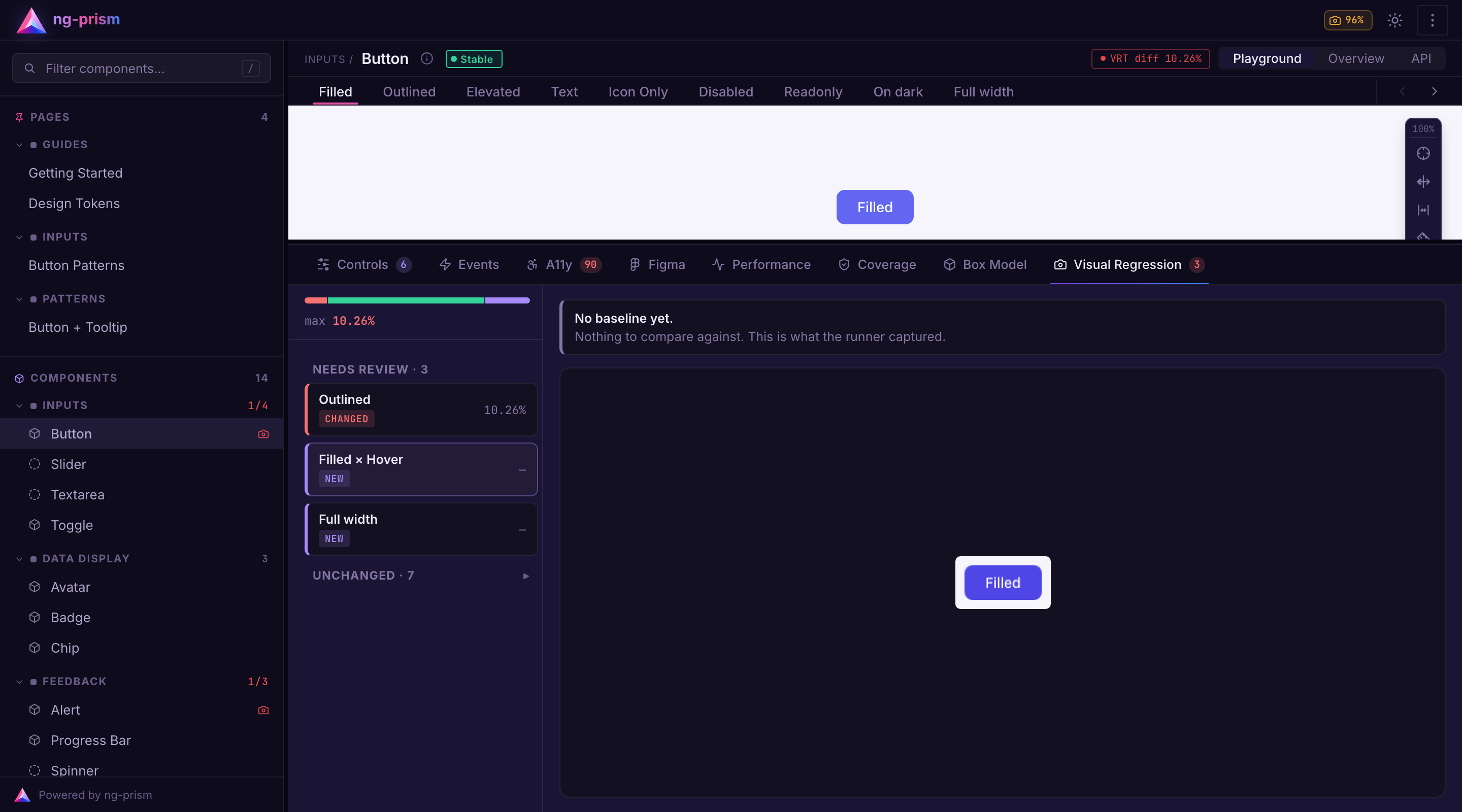 A Claude Code plugin for your library
Most coding agents have never seen ng-prism. Ask one to add a showcase and it guesses, usually with Storybook patterns. That's why the ng-prism repo is now also a Claude Code plugin marketplace. You don't have to clone anything, Claude Code fetches the plugin from GitHub:
claude plugin install ng-prism --marketplace ng-prism/ng-prism
Inside a session it's /plugin marketplace add ng-prism/ng-prism followed by /plugin install ng-prism@ng-prism. With --scope project the plugin gets enabled for the repo in .claude/settings.json. Your teammates still have to install it once themselves, but after that it loads automatically in that repo. Plugins from third-party marketplaces don't update on their own by default, so get new versions with claude plugin update ng-prism@ng-prism.
A Claude Code plugin for your library
Most coding agents have never seen ng-prism. Ask one to add a showcase and it guesses, usually with Storybook patterns. That's why the ng-prism repo is now also a Claude Code plugin marketplace. You don't have to clone anything, Claude Code fetches the plugin from GitHub:
claude plugin install ng-prism --marketplace ng-prism/ng-prism
Inside a session it's /plugin marketplace add ng-prism/ng-prism followed by /plugin install ng-prism@ng-prism. With --scope project the plugin gets enabled for the repo in .claude/settings.json. Your teammates still have to install it once themselves, but after that it loads automatically in that repo. Plugins from third-party marketplaces don't update on their own by default, so get new versions with claude plugin update ng-prism@ng-prism.
| Skill | For |
|---|---|
| ng-prism:showcase | Writing or changing @Showcase configs, fixing ⚠ ng-prism: build warnings |
| ng-prism:setup | ng add, ng-prism.config.ts, the official plugins, theming, publishing, upgrades |
| ng-prism:write-plugin | Your own plugin: build-time hooks, panels, controls, header widgets, sidebar decorations |
| The showcase skill doesn't stop after writing the config. It starts the styleguide, checks the build output for warnings and takes a screenshot of every variant it changed, using the Playwright from your project. So the agent actually looks at the result before saying it's done. The skills check which version of @ng-prism/core you have installed and go by its typings, and the plugin version follows the ng-prism releases. | |
| Faster watch rebuilds | |
| ng run my-lib:prism scans the library again on every save. The scanner already passed the previous ts.Program to ts.createProgram, but TypeScript only reuses a SourceFile if the compiler host returns the exact same object. The default host parses the file again on every call, so each rebuild parsed the whole program, Angular's typings included. Now there's a cache that keeps the parsed SourceFile as long as the file's mtime and size don't change. | |
| I measured it on the demo library with 15 components, 100 rebuilds with one component change each: | |
| 22.5 | |
| ------------------ | ------- |
| Warm rebuild, mean | 452 ms |
| Warm rebuild, p95 | 524 ms |
| Memory (RSS) | ~372 MB |
| There's a smaller one too. Reading the paths from your tsconfig no longer lists every file below it. In the demo workspace that went from 9.25 ms to 0.02 ms per rebuild, and in bigger workspaces the difference is bigger. | |
| Fixes |
- Aliased inputs and outputs. A variant couldn't set an input like size = input('md', { alias: 'buttonSize' }) because Angular threw NG0303, and a directive host with an alias broke the styleguide build with NG8002. Variants and controls still use the member name, which is what InputsOf<T> expects, and ng-prism binds the public name. Aliases from a constant work too.
- Named content slots. If a component had a named <ng-content select> before the default slot, variant content ended up in the wrong slots. Each key now goes into the slot its selector matches.
- Libraries with only a primary entry point. If you set up such a library with ng add, the styleguide showed no components and no warning either. The primary entry point is now scanned together with the secondary ones.
- Navigation. Back and forward between two components now restore the variant from the URL instead of jumping to variant 0, and switching the component from the Overview resets variant and state there as well. Deprecations before 23 ng-prism versions follow the Angular majors, so a breaking change within 22 comes as a deprecation first. A few config and plugin options have existed since the first release without ever being used. 22.6 marks them as @deprecated, the build prints a note for each one you set, and they'll be removed in 23.0.0:
- NgPrismConfig: ui, appComponent, themeStylesheet, headless
- NgPrismPlugin.wrapComponent and a panel's position
- perfPlugin(): thresholds, bundle.excludeImports, render, memory and the PERF_PLUGIN_CONFIG token None of them ever did anything, so removing them from your config doesn't change any behaviour. What states can't do States are CSS pseudo-classes only: hover, active, focus, focus-visible and focus-within. Anything controlled by an input, like selected, expanded, or invalid, is still a variant. The limits of pseudo from 22.5 still apply. A state after a pseudo-element (::part(label):hover) can't be forced, Shadow DOM isn't supported, and stylesheets from another origin can only be rewritten if they're served with CORS. Also keep in mind that the matrix grows fast. 15 variants with 5 states means 90 screenshots per component. states: false and selectors that only match where they make sense help with that, but think about which states you really need. Upgrading ng update @ng-prism/core Update the plugins you use at the same time, e.g. ng update @ng-prism/core @ng-prism/plugin-visual-regression. There's nothing to migrate, Variant.pseudo works exactly like in 22.5. If you want to switch to states, remove the hover, pressed and focus variants and declare the states once instead. You can try all of this in the live demo, a small component library with all plugins enabled:
- Button matrix:ng-prism.github.io - States in the docs:ng-prism.github.io - Release notes:github.com/ng-prism/ng-prism/releases/tag/v22.6.0 - Repo:ng-prism/ng-prism I'm curious which states your components need that a CSS pseudo-class can't cover. Drag-over, open or maybe? I'd rather plan the next step around real components than around my own guesses, so let me know in the comments or open an issue.
- Helix-agi, local agent project Hi everyone, I've been working on this project for a few months now, the current release is fully local and runs on a dual window RWKV 1.5b or 3b model. The agent runs an ongoing loop of sensing, thinking, acting and communicating. Its environment is a filesystem home: it can notice its surroundings, move between rooms, open files and run Python experiments in an isolated workshop. Private thought and outward speech have separate routes, so speaking requires ordinary language rather than a generated SPEAK command or tool call. Basically it can run on pretty limited hardware and maintain persona, recall, and task functionality on par with a much larger model. Also I made this neat UI so you can watch the modified RAG engine graph in real time which is actually really interesting to watch while you talk to it about whatever. Would love to have some user-tester feedback and always open to collaboration! munch2u-a11y/Helix-AGI
- Breeze - my first homebrew app Hey everyone! I've been working on Breeze for a while, with a lot of debugging and testing, and it's now out as an app. Breeze lets you set your own fan curve: choose how fast the fan runs at each temperature, so it stays quiet in menus and cools harder when you're gaming. You can edit the curve right on the PS5 with your controller, or from your phone or PC in the web panel. It also shows live temperature and fan speed, 24-hour history and presets. Get it: search "Breeze" in ProsperoStore, or download it from GitHub: MiladRTX/Breeze The app needs ShadowMountPlus. You can also run Breeze without the app, as a payload (breeze.elf) with Payload Manager.
- Controlling Access to A2A Agents with agentgateway At Qodo, we've publicly described how PR-Agent became an A2A agent for MOSAICO , a research project coordinating software-engineering agents. Other agents can delegate code reviews and receive results. When you expose an agent this way, how do you control who can call it and verify that rejected requests never reach it?
This walkthrough puts a sample agent behind agentgateway, checks caller credentials, and records which requests reach the backend!
What does A2A make possible for a code-review agent?Agent2Agent, or A2A , defines how independently deployed agents exchange messages, tasks, and results. An agent card advertises an agent's capabilities and connection details. A client can discover a reviewer, send work, and receive its response without sharing the reviewer's implementation.
Qodo's public PR-Agent integration illustrates that boundary. MOSAICO can delegate a review to PR-Agent and receive review output. That establishes a useful interaction, but operating an endpoint also requires decisions about callers, credentials, and the resources each request may access.
For the access tests, a deterministic Hello World agent is enough. It returns a greeting instead of reviewing code. That keeps model behavior out of the experiment and makes backend execution easy to observe.
Where does agentgateway sit in the request path?Agentgateway's A2A example places a proxy between the client and the agent. The tested setup uses agentgateway 1.6.0, Python 3.13.4, A2A Python SDK 1.1.0, and the A2A 1.0 JSON-RPC binding. Its executor comes from thispinned upstream sample .
Requests go to the gateway on port 18760; the sample backend listens on 127.0.0.1:18761. Request logging and an executor-entry record let the test compare what the gateway returned with what the agent actually received and ran.
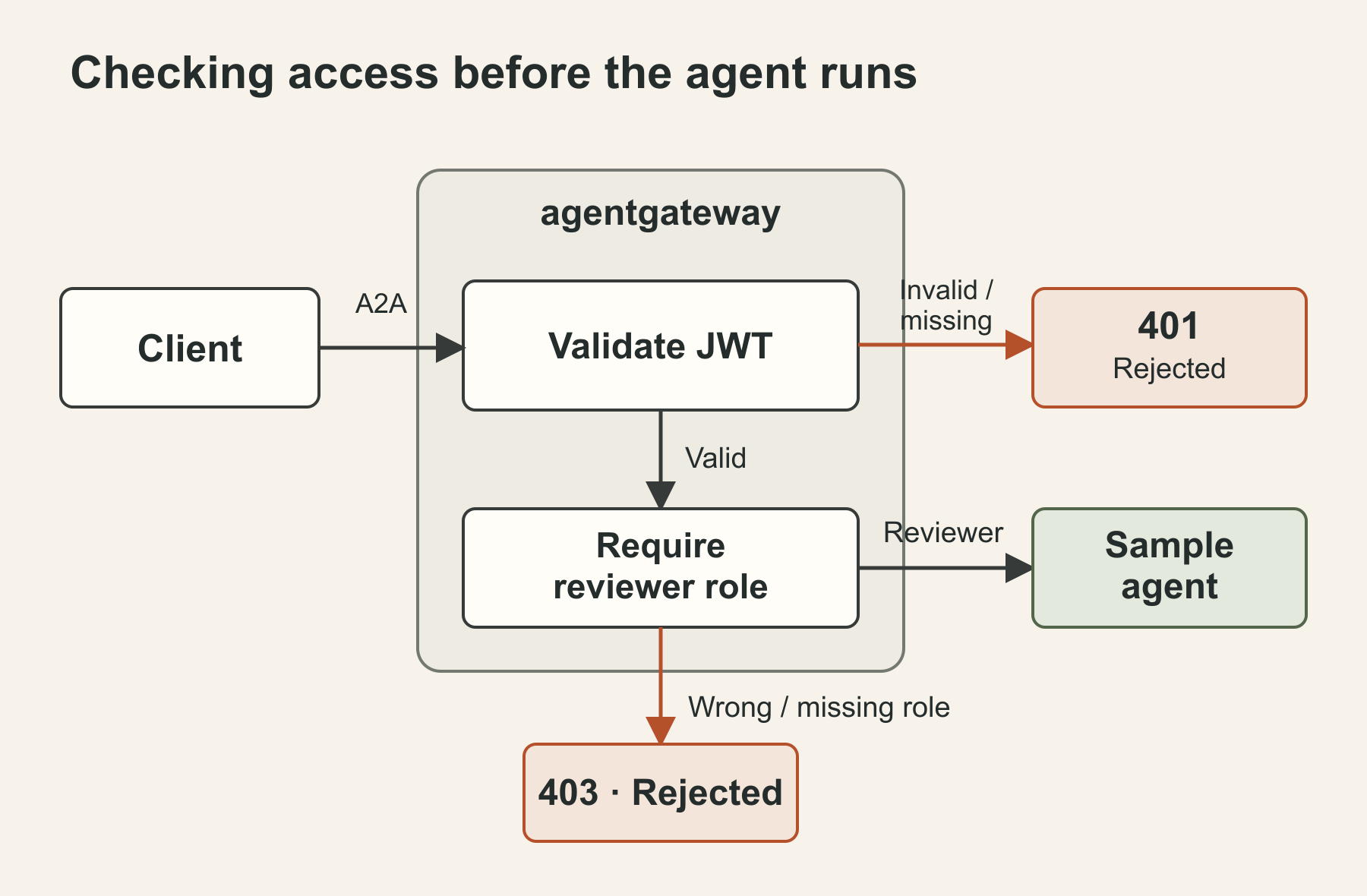 The tested request path. The backend remains reachable directly from the local machine; the diagram doesn't imply network isolation.
Fetching the agent card through the gateway returned a supportedInterfaces URL pointing back to port 18760. That helps clients continue through the proxy. It doesn't prevent someone who knows a reachable backend address from calling it directly.
How do you define what can reach the agent?
The route combinesJWT authentication with an authorization rule. A JSON Web Token carries signed claims about its issuer, intended audience, and caller. The gateway checks the signature against a JSON Web Key Set, or JWKS, containing the issuer's public key.
Here's the route portion of the tested configuration:
binds:
The tested request path. The backend remains reachable directly from the local machine; the diagram doesn't imply network isolation.
Fetching the agent card through the gateway returned a supportedInterfaces URL pointing back to port 18760. That helps clients continue through the proxy. It doesn't prevent someone who knows a reachable backend address from calling it directly.
How do you define what can reach the agent?
The route combinesJWT authentication with an authorization rule. A JSON Web Token carries signed claims about its issuer, intended audience, and caller. The gateway checks the signature against a JSON Web Key Set, or JWKS, containing the issuer's public key.
Here's the route portion of the tested configuration:
binds:
- port: 18760 listeners:
  - routes:
    - policies:
        a2a: {}
        jwtAuth:
          mode: strict
          issuer: https://issuer.example.test
          audiences: [a2a-demo]
          jwks:
            file: ./jwks.json
        authorization:
          rules:
          - require: 'jwt.role == "reviewer"'
      backends:
      - host: 127.0.0.1:18761
The issuer here is a synthetic test identity, not a service to sign into. The runner creates an RSA key and short-lived tokens locally. In this release, the JWKS file path resolves from the process's working directory. strict requires a valid token. The issuer and audience constrain which tokens qualify; a separate rule requires the signed role claim to equal reviewer. That role is this demo's convention, not an A2A-defined permission. Keep those checks explicit. Agentgateway's default optional authentication mode permits requests without a token. A configuration that validates credentials when present can behave differently from one that requires credentials on every request. How do you prove a policy rejects the right requests? Each test sends a real SendMessage request with a unique message ID. The same identifier connects the request to the backend's records. Accepted cases must return the greeting without a JSON-RPC error; an HTTP 200 alone doesn't establish successful A2A execution. These were the observed outcomes with the configuration above:
| Caller credentials | HTTP response | Backend requests / executor calls |
|---|---|---|
| Valid token, reviewer role | 200 | 1 / 1 |
| No token | 401 | 0 / 0 |
| Wrong audience | 401 | 0 / 0 |
| Wrong role | 403 | 0 / 0 |
| Missing role claim | 403 | 0 / 0 |
| Invalid signature or expired token, tested separately | 401 each | 0 / 0 each |
| A valid request after the rejection cases also completed. Removing only the authorization rule let a valid token with the wrong role reach the executor. That control checks whether the role rule actually explains the rejection. | ||
| One configuration change exposed a useful failure case. Replacing the requirement with this rule changed the result for a valid token missing role: | ||
| authorization: | ||
| rules: |
- deny: 'jwt.role != "reviewer"' That request returned 200 and executed once. With require, it returned 403 and never reached the backend. Thedocumented evaluation rules explain why: accessing a missing claim makes the expression fail. A failed requirement rejects the request. A failed deny expression doesn't match; with this single deny rule and no allow rules, the request proceeds. JWT authentication stayed strict in both configurations. A missing token still returned 401. The finding concerns a missing application claim in an otherwise valid token, under these exact policies. What permissions belong inside the agent? The gateway established which tested requests could reach this endpoint. It didn't decide whether a caller may read a particular repository, retrieve a private diff, or write a change. A real reviewer needs those checks where it accesses the repository and invokes its tools. The bypass control matters too: calling this local backend directly without a token returned 200 and executed once. A deployment needs to restrict direct backend access or enforce equivalent checks there. Rewriting the agent card isn't a network access control. This reproduction used synthetic credentials, HTTP on a development machine, and a greeting executor. It didn't validate production TLS, identity-provider integration, streaming recovery, or repository permissions. The gateway's standalone listener binds a wildcard address; the backend and administrative endpoints were configured on loopback. For your own agent, start with an allowed request and specific rejected requests. Check both the response and backend execution. Then remove or change the relevant policy in an isolated test to verify which check caused the rejection. That gives you evidence for the boundary you've configured—and a clear account of what still needs protection.
- Paper Boat (Paper Mario 64 native port) is excellent on Android! HD texture packs, widescreen, 60fps One of my favourite n64 games! It runs absolutely perfectly with HD textures and full widescreen. It's like an unofficial remaster! Im using this android fork: chris43123/PaperBoat And this texture pack (No outline version, but either works):youtu.be
- Hacktoberfest Week 3 Challenge Submission — SlothSummary This is a submission for the Hacktoberfest Open-Source AI Challenge Week 3: Slow and Steady What I Built SlothSummary, a local-first web app designed to eliminate the exhausting task of reading through walls of text after time away from your desk. Waking up to hundreds of unread group chat messages? Arriving at your desk facing a chaotic fifty-email thread? Need to digest long developer status dumps? Catching up manually takes time and energy. SlothSummary processes messy, unorganised communication logs locally and reduces them into a zero-effort, two-line morning briefing. It tells you strictly what requires your attention and what can safely be ignored, allowing freelancers, remote workers and busy developers to channel their inner sloth, stay lazy, and reclaim their focus. Code The fullsource code for this project is available on GitHub. How I Built It SlothSummary is made using lightweight frontend technology and with local open-weight models. The app is built to interface directly with local inference runtimes such as Ollama running lightweight models like Llama 3.2 3B or Phi-3 Mini, as well as WebGPU browser-based runtimes. When text is pasted into the tool, prompt structures direct the local open-weight model to ignore social noise, off-topic conversations and non-essential status updates. The model parses the raw text stream locally, extracts critical action items, and generates a concise summary. Because the entire interface runs within a clean HTML5 and JavaScript framework, the entire pipeline executes locally with zero reliance on cloud infrastructure. Why Does Open Innovation Matter? Total privacy is preserved. Group chats, internal team discussions and client emails contain sensitive conversations. Sending unread personal messages or company email threads through proprietary cloud AI endpoints creates data leak risks. Local open-weight models guarantee that raw messages never leave your personal computer. Zero operational cost rewards true automation. Using proprietary APIs to summarise casual daily chatter quickly becomes expensive. Open-source models allow you to run infinite summaries locally without ever worrying about rate limits, micro-transaction bills or API subscriptions. Open models give complete freedom over speed and resource consumption. Users on low-power devices can swap to a tiny quantised open model for instant results, whilst those on powerful hardware can load larger open models for nuanced document analysis. The Lazy Payoff By running SlothSummary on overnight chat dumps and lengthy project threads, you can avoid spending twenty minutes every morning piecing together what happened while you were away. Pushing a single button produces an actionable summary in under two seconds, letting you skim the essential details and get back to enjoying your morning coffee.
- made a free calorie tracker app because i didnt want to keep paying for one so i've been using macrofactor most of this year and honestly the thing i liked most was how it figures out your actual maintenance calories from your weight and what you eat, and then changes your targets every week. but paying a subscription for it every month started to annoy me so i just made my own lol its called satiago and its completely free, no account, no ads, nothing. all your data stays on your phone, i dont collect anything (theres no server, i literally couldnt even if i wanted to) you log your food (theres a barcode scanner too) and your weight, and after a couple weeks it starts working out how much you really burn and adjusts your calories and macros. if you're coming from macrofactor you can import your export so you dont lose your history android: github.com/VladDerK1ng/satiago/releases/latest iphone: openvladderk1ng.github.io in safari, hit share and then add to home screen code:VladDerK1ng/satiago its just a side project so im sure theres bugs, if something breaks or looks weird just tell me and ill try to fix it. also not affiliated with macrofactor in any way, just liked how it worked
- Pokefacts My kid is deep in Pokémon (so very deep) and I love her, so I made this for her after much frustration in being able to actually make playlists with icons to fit on her Yoto player.. This is absolutely vibe coding, I have built her a little app on the home PC that builds My Yoto cards. Every fact starts with the real cry, then a British voice says the name and reads the first two paragraphs of the Bulbapedia biology bit. The long version stays on a page on the computer, with credit to Bulbapedia. I've got all 1025 Pokemon working on it. You can use the catalogue to build your own playlists, add facts to playlists, and what not, so you can pick their favourites (don't they always have favourites?) There are three other cards: * Guess Who. Random 50 Fifty riddles. The clue shows a shadow of the 16×16 pixel and does not say the name. The answer shows the real pixel, plays the cry, and says who it is. * Mega Evolutions. 97 tracks. Each one uses Bulbapedia’s description of that Mega form, not the base Pokémon. * Gigantamax. 34 tracks, same idea, for the Gigantamax forms. The pictures on the Yoto icons are the little 16×16 pixels. It runs on the computer at home and sends the playlists as cards automatically to our Yoto account. It is an unofficial fan project, not made by Nintendo, Game Freak, Creatures, The Pokémon Company, or Yoto. As a disclaimer - it does take > a while < to go through and make the playlists, but it does work, and I've had it upload a full 100 track list. I'm not sure if this is allowed here, but anyway, the guide is fairly straightforward I hope. This is absolutely not gated behind a paywall kreeyateee/pokefacts
- Virtual Intel Mac on Apple silicon: Run Intel versions of macOS Mojave, macOS Catalina, and macOS Big Sur on Apple silicon with Metal and OpenGL acceleration For the first time ever, run Intel versions of macOS Mojave, macOS Catalina, and macOS Big Sur on Apple silicon with Metal and OpenGL acceleration. This marks an exciting new milestone in the preservation of the history of Mac. nfzerox/VirtualIntelMacOnAppleSilicon