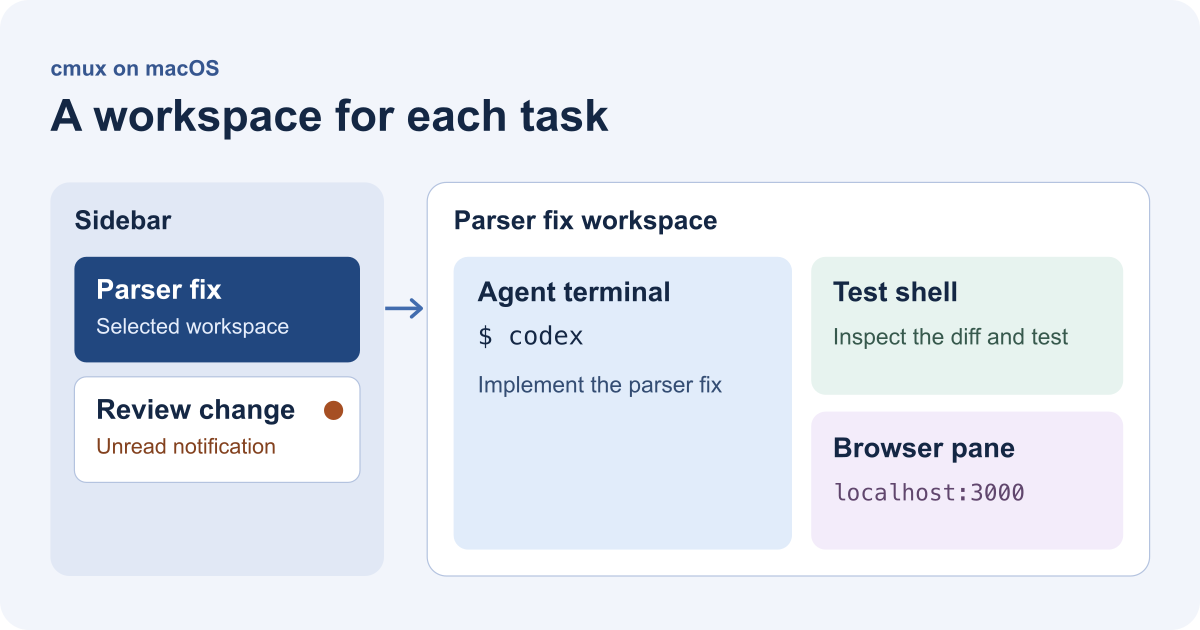
When an agent finishes a change, I want to find its terminal, see the diff and run the tests. With several tasks in flight, I also want to know which one is waiting for me. cmux is a Ghostty-based Mac terminal that puts those tasks in a sidebar and lets me keep a shell, an agent and a browser together.
This is a companion to the Herdr post. The examples use the macOS app and CLI, checked against cmux 0.65.2.
Give each task a workspace #
I use a workspace for one change. Inside it, I split the terminal when the new pane should share the same checkout. For a parser fix, that might mean Codex on the left and a shell for tests on the right. A browser split is useful when the change has a page to inspect. The review in the figure has its own workspace, so I can switch to it without rearranging the parser layout.
You can install cmux with Homebrew or get the installer from the download page.
brew tap manaflow-ai/cmux
brew install --cask cmux
Open the app. Create a workspace from the command palette, change to the repository and run codex, claude or opencode as you would in any terminal. Install and sign in to the agent on the machine where it will run. The cmux CLI is available inside its terminals. To use it from another terminal, run Shell Command: Install 'cmux' in PATH from the cmux command palette. Getting started
Launch agents from the command line #
Once I know the layout I want, I can launch the workspaces from an existing cmux terminal. The two directories in this example are separate checkouts of the project.
cmux new-workspace --name "Parser fix" --cwd "$HOME/code/parser-fix" \
  --command "codex"
cmux new-workspace --name "Review change" --cwd "$HOME/code/parser-review" \
  --command "claude"
cmux list-workspaces
Switch between tasks by clicking the sidebar. A script can take a workspace reference from cmux list-workspaces and pass it to cmux select-workspace --workspace. Run this from a terminal in the parser workspace to open a shell beside the agent. You can also target the workspace explicitly with --workspace.
cmux new-split right --command 'cd "$HOME/code/parser-fix"'
That shell is where I inspect git diff and rerun tests. If the app serves a page on port 3000, cmux browser open http://localhost:3000 opens it in a browser pane. I give parallel edits separate Git worktrees because splits and workspaces can point at the same directory. For a review, I give the reviewer the commit or diff I want it to inspect. CLI reference
Follow the notifications #
An unread badge gives me a place to start when I return. Press ⌘⇧I for the notification list, or ⌘⇧U to jump to the latest unread notification. The pane will tell you why it rang. An agent may be asking a question, waiting for a decision or reporting a finished turn.
To try the routing, run this from a cmux pane and switch to another workspace during the five-second delay.
sleep 5
cmux notify --title "Parser fix" --body "Ready for review"
For automatic alerts, cmux uses agent integrations and terminal notification sequences. If the test notification works but Codex stays silent, check cmux hooks --help. In the version used here, cmux hooks setup --agent codex installs the Codex integration. Desktop banners may be suppressed while you are looking at cmux, so check the sidebar and notification panel too. Notification guide
What happens when cmux opens an SSH workspace #
There are two ways to SSH from a cmux terminal. Typing ssh workbox starts ordinary OpenSSH in the current pane. The remote SSH server starts a shell. If that connection dies, expect the shell and its foreground jobs to end unless you put them in a separate session with something like tmux or Herdr.
Typing cmux ssh workbox creates a managed SSH workspace in the Mac app and uses the same SSH host alias. On a supported host, cmux copies over a versioned helper called cmuxd-remote if it is missing. An SSH channel talks to a bridge on the host, which connects to a background daemon for that workspace. The daemon holds the remote pseudoterminals (PTYs), so a shell and the agent it starts can stay alive when the bridge disconnects. The Mac draws the terminal and sends your input. The agent runs as your remote user, with the remote checkout, dependencies and model login. Remote daemon and PTY lifecycle for cmux 0.65.2
The relay also carries browser traffic and notifications. The browser pane appears on the Mac, but http://localhost:3000 in that pane reaches a development server on the remote host. A remote cmux notify can send a message back to the Mac sidebar. cmux SSH guide
What survives a disconnect #
- Wi-Fi drops or the Mac goes to sleep. The SSH connection can drop while the daemon and the remote shell keep running. cmux retries with backoff and can reattach to the same PTY when the network returns, provided the session still exists.
- You close one terminal view. A persistent PTY can stay alive if its owning workspace is still open. Detached PTYs are subject to the daemon's idle timeout. Use
cmux ssh-session-listin that workspace andcmux ssh-session-attach --session-id SESSION_IDto return to a session listed there. - You type
exitin the remote shell. That shell ends. A separately running tmux or Herdr server can still hold its own terminals. - You explicitly close the owning cmux workspace. cmux asks the remote daemon for that workspace to shut down. Treat this as the end of its managed shells. An independent tmux or Herdr session can continue.
- The remote host reboots. The original processes end. An agent may be able to resume its conversation from disk. An interrupted test command needs to be started again.
Quitting and reopening the app can restore a saved SSH session when cmux has retained the session ID and the remote daemon still has its PTY. For a run I want to retrieve by name from another client, I use a separate remote session. cmux reconnect behavior · Remote daemon lifecycle
Leave an agent running in a named session #
From the Mac, open the connection with cmux ssh.
cmux ssh workbox --name "Remote parser"
From the remote shell, enter the checkout and start or reattach the named session.
cd ~/code/parser-fix
tmux new-session -A -s parser
Run the agent inside tmux. With default tmux keys, Ctrl+B, then D detaches. Later, run tmux attach -t parser from any SSH client on the same host. For an existing Herdr session, run herdr in the remote terminal to return to its panes. tmux getting started · Herdr remote sessions
If you want each remote tmux session to appear as its own cmux sidebar entry, cmux also has a Remote tmux beta. With the setting enabled and tmux 3.2 or later on the host, cmux ssh-tmux workbox mirrors sessions, windows and panes. In that view, closing a mirrored pane closes it on the remote tmux server too. Remote tmux guide
I would start with two workspaces and one test notification. Give each workspace a name you will recognize an hour later. Once you can get back to the right pane and see what it was doing, add a remote session for the task you want to leave running.