This is the first post in a series about building and operating our own agent harnesses at Firetiger. In this installment, we explain why we created NXL: a declarative, domain-specific language for defining agents as structured graphs with built-in concurrency. In later posts, we’ll share what widespread production use taught us about long-running agents, user experience, and other challenges we’ve faced along the way.
At Firetiger, we run a lot of agents. Agents for detecting issues, agents for monitoring pull requests, agents for doing investigations. As these agents grow in complexity and scope, we’ve started to hit new sorts of scaling limits in our ability to comprehend and manage them.
Agents, to us, are looped LLM message completion calls with tool use: you have a prompt, a collection of tools, and you call the LLM repeatedly, asking it for the next message in an ever-growing message history, until the LLM calls a special “job_done”-sort of tool, signaling that it has completed the goal set out in the prompt.
For well-focused goals, this works astonishingly well. The frontier labs have trained their models mercilessly to work at this, and the LLM will doggedly pursue a specified goal and do a pretty good job, if given good tools and a tight, focused success criteria.
But what if the goal is not well-defined? What if it’s an interactive bot, and you have no idea if the user is going to be asking for customer support, or looking for docs, or needs help with billing, or is just goofing off? Then you can imagine a two-phase approach. You might have a system prompt like “Figure out the user’s intent, and write a plan document using the write_plan tool. Then, follow the plan, and call plan_complete when you are done.”
This works okay but it has a few problems. The first problem is distraction. Your system prompt contains instructions that the LLM is told to ignore until it reaches a particular “phase.” But the message history that the LLM message completion APIs have no strict notion of “phases”; they just see a linear sequence of user and assistant messages traded back and forth, so they need to dynamically infer what vague phase they are in, and focus their attention on just that part of the system prompt.
As a task becomes more complex, and has more phases and possible permutations, this explodes. For N phases, only 1/N of the tokens in the prompt are relevant. Not only is this wasteful in tokens, it also can confuse weaker models, leading to mistaken reasoning and other faults.
Things get even worse if there is any sort of path dependency: “If the user asked for billing support, first check if they have an account; if they do, then check the account status. If they don’t, follow up with messages to clarify what account they are asking about…”. This spiderweb of a workflow gets very complex, very fast.
For today’s models, our experience is that they do well with up to about ten sub-tasks delineated in the system prompt. Beyond that, we see steps getting skipped sometimes and agents getting confused.
A second problem is modularity. If you have multiple agents to handle different features, you might well want to reuse piles of logic. For example, Firetiger’s agents need to work with telemetry data for lots of different purposes. Sometimes this is about investigating an issue a user reported, sometimes it’s about getting a baseline on API usage to help come up with metrics targets for a new feature - lots of possibilities. But all tasks that involve looking at telemetry have an agentic phase for schema exploration: we want the agent to do a few queries like ‘SELECT * LIMIT 1’ from relevant data tables to sniff around and get a sense of the shape of logs and metrics.
When prompts are just strings with a sequence of stepped instructions, this gets hard to manage. String concatenation works for a while, but gets unwieldy, and how do you deal with the spiderwebbing complexity of a branching workflow that can take many paths?
The third big problem with simple, mono-prompt agents is permission boundaries. In multi-stage workflows, it is natural to have a changing, dynamic landscape of permissions. Looking up customer identities can be necessary in one phase, but potentially risky in another phase. Sending Slack messages or emails might be the entire goal of a late phase, but completely inappropriate at another phase.
With agents built with a single large prompt, the best you can do is forceful language: “NEVER use the send_slack tool UNTIL you have found the root cause,” or whatever. Models continue to improve in their ability to obey these instructions, but it’s never perfect, and as the context window fills they lose attention and deviate. This is a bad combination: more complex tasks naturally require more turns, and thus take more tokens, but as token usage grows, instruction obedience drops. So, unfortunately, on the most complex tasks, you see the least obedience to permission boundaries expressed through prompts.
Graphs #
In light of all of this there is a better way to describe agents. Rather than a single monolithic system prompt with an append-only log of message history, agents need to have a more stateful existence.
Each phase of the workflow describes a new state that the agent should be in, and that state governs what the system prompt is, what tools are available, and our presentation of the message history when calling the LLM provider.
In addition, the agents need to be able to transition to different states. LLM message completion APIs are somewhat limited, so the only way to express this is through tool calls, but fair enough: for all the edges (that is, possible state transitions), our LLM API calls should have corresponding tools for changing to the new state. The system prompt, narrowly scoped to the current state, can describe the conditions for that transition, and we can be more confident that we won’t see too much distraction as long as the node’s outbound cardinality isn’t too crazy.
This isn’t a totally novel concept. LangGraph was early to recognize that graphs are the right way to describe long-running agents, and many other agent runtimes support graph representations in some fashion.
At Firetiger, we weren’t quite satisfied with these, though, for a few reasons. First, the SDKs generally try to do too much: many (like LangGraph especially!) seek to be general-purpose graph computation engines, which makes them far too expressively powerful and hard to program.
Second, the graph itself in existing SDKs is defined within general-purpose code. In LangGraph, the agent’s graph is defined through Python classes and method calls, for example.
This is unfortunate because we’re big believers in dynamically generating agents - that is, agents writing agents. But if you give agents the ability to write arbitrary Python code, you can’t describe any of the invariants of the system you’ve made. All bets are off - the planner might do
anythingwith this power.
A custom agent DSL #
Our favorite way to give LLMs just the right amount of power is custom programming languages, so that’s what we’ve made: a domain-specific language (DSL) for defining agents as graphs. I’ll cut to the chase and show the syntax for a little customer support agent:
agent chatbot {
  entry triage
  task triage {
    model light
    prompt {
      You are Firetiger's investigation assistant. The user has just sent a message.
      Your job is to classify it and route to the right specialist task.
      If the request is ambiguous, ask the user to clarify before routing.
    }
    returns {
      task[context=kept]:investigation
      | task[context=kept]:account_setup
      | task[context=kept]:billing_help
      | ask {
          question: string "Clarifying question for the user"
        } -> task:triage
    }
  }
  task investigation {
    model heavy
    input {
      symptoms: string "What the user is seeing or reporting"
    }
    tools {
      query
      bash
      task:explore_schema
      task[context=summarized]:investigate_hypothesis
    }
    prompt {
      Deeply investigate the following issue: ${symptoms}
      Start by identifying useful metrics with the explore_schema tool; call it in parallel
      if you're working on more than one table.
      [...]
    }
    returns {
      ask {
        question: string "Follow-up question for the user"
      } -> task[context=kept]:investigation
      | output {
          root_cause: string "The identified root cause or best hypothesis"
          evidence: string "Key evidence supporting the conclusion"
          recommendation: string "Suggested next steps or fix"
        }
    }
  }
  task explore_schema {
    [...]
  }
  [other tasks elided for brevity]
}
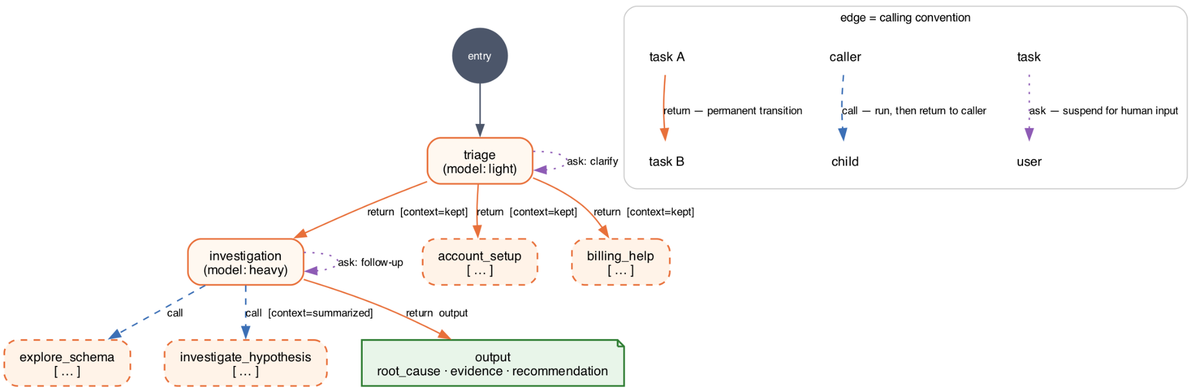
In graph form:
We call this little language NXL, and it runs on a custom runtime we call " Pugmark". There are quite a few things going on here. But the core idea is that this declarative language is a complete definition of an agent. It can safely be authored by an LLM without fear that the AI can go off the rails, since it's a narrow and declarative system rather than a complete imperative language.
But it still has lots of expressive power. The snippet above shows some of the capabilities.
The most important unit in a block of NXL code is the task. A task contains a prompt, a set of tools, and typed specifications of inputs and outputs. At runtime, Pugmark evaluates a NXL document against the existing history of messages (user-sent ones, LLM-generated text, tool calls, and tool results) to figure out which task is currently active, and uses that to invoke the LLM with the appropriate prompt and tools.
Some of the tools are the traditional expected ones, like bash and query, but tools can also be references to other tasks. This permits a stack-based approach to graph traversal. Or, these other tasks can be invoked in parallel and concurrently, with a model analogous to fork/join.
The task is always driving towards some destination which is described structurally in the return block. Tasks might return typed data (which gets realized as structured outputs), or they might return other tasks, representing a task transition which is not stack-based, and is instead a tail call that sets a new state.
Graph structure and task calling #
So, we have three ways that tasks reference each other, which sets up three calling conventions that establish the graph structure:
-
Call: this runs in the foreground, stepping into a new task with a different prompt and tools and view of the history, and then returns back to the caller task
-
Fork: this runs in the background, kicking off a new task and giving the caller agent a tool result with a token that can be presented to poll for the child task's result
-
Return: this transitions from one task to another permanently.
This is a rich set of primitives for describing complex workflows. Tasks can be nested and composable, using tools of abstraction and reuse to share logic like "here's how to explore the database schema" without resorting to string concatenation in mega-prompts.
Each of these calling conventions can also be augmented with special rules for how the message history should be presented in LLM calls. When traversing a task boundary, the message history can be hidden, or kept in its entirety, or summarized. Each is useful in different contexts. The definition language here puts that into the graph explicitly.
Summarization is, perhaps, the most interesting of these. We implement this with a light-model prompt during the task transition, requesting generation of a summary. This acts a little like a compaction step, but one focused more tightly on a temporary goal.
We’ve tried a variety of the latest LLMs, and they’re all able to successfully use this task + concurrency model to decompose and solve problems. Since NXL’s conception, other agent harnesses have come out with their own interesting concurrency models (e.g.
), leaving interesting ideas and tradeoffs for us to evaluate.
Claude Code Workflows## Structured inputs, structured outputs
Tasks here can have typed inputs and outputs. This makes it possible to templatize the prompts of subtasks based on input parameters provided by the LLM when it invokes tools to perform transitions in the graph.
To make that more concrete, take this example:
  task investigation {
    model heavy
    input {
      symptoms: string "What the user is seeing or reporting"
    }
    prompt {
      Deeply investigate the following issue: ${symptoms}
      [...]
    }
  }
The "symptoms" input parameter here will be presented in the tool definition shown to the LLM, so that it will provide that parameter whenever it invokes investigation tool as a task: call_task({"symptoms": "database appears slow"})
This structure can be used to templatize prompts, or can also be used to parameterize and limit the scope of tools through partial application. A task that takes as a user ID as an input, for example, can be set up to have constrained tools:
task lookup_user_details {
    model light
    input {
      user_id: string "ID of the user to lookup"
    }
    tools {
      query
      find_user_activity(user=user_id)
      get_user_email(id=user_id)
    }
    returns {
      output {
        user_activity_levels: string "Estimates of how much the user is using the product"
        email: string "The user's email address"
      }
    }
  }
The Pugmark runtime will present "masked" tools which have fixed parameters. This is a nice strong contract to make sure subtasks in a workflow are focused, without resorting to all-caps shouting in system prompts to keep things on track. While this example is a poor one - it could be just a function call, wrapped in a tool - it's a useful pattern for fuzzy work investigative tasks that need to have constrained capabilities or tight focus.
These tasks have structured outputs, too, through the returns clause. This works like any structured output: a tool is made available to the LLM which takes the specified parameters, and can be called to emit output that conforms to a specified shape.
The type system for these inputs and outputs is primitive, but good enough: we support booleans, strings, numerics, enumerations, and arrays of those primitive types. Having such a barebones type system helps avoid excessive complexity in input and return structure - we've found its better to keep things simple, there.
Runtime execution model #
The Pugmark runtime is a sophisticated system worthy of its own blog post, but it's pretty essential to how NXL works.
Pugmark represents an ongoing execution of an agent as a session. This session is stored with a clever system of manifests in object storage. The Pugmark runtime gets invoked for a particular session, retrieves the current session state and associated NXL graph, computes a single turn, and writes the new state atomically back into object storage.
We use object storage triggers (like S3 notifications) to re-invoke Pugmark, triggering the next turn. This is our core runtime loop: An object is written into S3, triggering Pugmark, which writes an object into S3, triggering Pugmark, and so on. Execution stops through special control messages that indicate completion.
For NXL-based agents, a single turn of the Pugmark runtime usually corresponds to a single LLM call, or a single round of tool execution in response to an LLM call's response. Since we write those atomically, we get durable execution of the graph at every step of execution. Each user message, tool call, assistant message generation, and so on is handled and immediately persisted. We don't have a single long-running process representing the LLM message history in memory; the process is generally quite short-lived, lasting only a few seconds per turn.
This makes extremely long-lifetime agent sessions possible. We have sessions that will last for multiple weeks in some cases. They can survive software updates, recover from outages, and keep chugging along.
We also get a globally consistent read view of the LLM session, just by reading the Pugmark session state. This makes building UIs on top of NXL agents relatively straightforward, compared to (for example) multiplexing a websocket stream popping out of a single process.
NXL in production #
We've been converting our systems to NXL and find that it significantly improves performance on long-horizon, complex tasks. This broadening of the task horizon has been a theme of the last year in software development, as we've gone from code completion, to code assistants, to code authors. Many of those gains are from model improvements, but we believe many are also due to growth of techniques: tool calling brought us from code completion to assistants, and planning brought us to wider code authorship.
Of course, it hasn’t been completely smooth sailing to this point. It’s really hard to build an application and a good user experience that deeply uses agentic reasoning and automation.
NXL helps us solve some, but not all, of the important problems. Long-running agents sessions, agent versioning, harness design, and UX design are all tricky hurdles between a capable agent and a product that puts its capabilities to useful work.
Stay tuned for Part 2…