Previously: One Week, 20 AI Agents: What the Whole Team Actually Did, a roundup of what every agent on the team did in one week.
Back in post 1 I listed my agents by job. We’ve now covered the books, the trading bots, the bonus scouts, the Kraken and options scanners, and the land. Next on the list is the least exciting and most necessary one: running the business.
I use Odoo, an open-source ERP, for projects, timesheets and expenses. My “sole proprietor Odoo bot” keeps it in shape. This post covers the three jobs it does: logging time for the other agents, building reports, and its biggest project, a reader for scanned paper timesheets, which it handed off with a document on Oct 20.
Job 1: Timesheets for 20 agents #
If you run a business, your time has to land somewhere. Mine is split across business lines: software, consulting, KDP books, securities, crypto and overhead. And a lot of the “time” is now agent time. At first, every agent messaged the Odoo bot whenever it did some work. That got noisy fast. So the Odoo bot set up a drop folder instead:
- Each agent appends rows to its own CSV: date, hours, Odoo project, business line, a “bot activity” tag and a short description.
- The rules fit in one line: append only, never edit another bot’s rows.
- A routine imports everything into Odoo on weekdays around 6:24 PM PT. Imported rows move to a dated folder, and failed rows go to an errors folder with the reason.
- Need a new project? Append a line to a requests file. Don’t message.
Over 10 import days from Oct 6 to Oct 21, the folder took in 236 rows, totaling 37.3 hours:
-
Trade bot status: 223 rows, 28.8 hours. That’s mostly one 0.1-hour row per hourly check on the crypto market-making bot.
-
Small business capital: 6 rows, 5.5 hours.
-
Web radio: 7 rows, 3.0 hours.
Job 2: Reports #
The bot also audits the Odoo project list and writes up what it finds. One audit found 75 projects (69 active and 6 archived) and 57 open tasks, and it flagged the cleanup work:
- 21 active projects had no tasks, and 27 had no customer.
- 29 active projects had an end date in the past but weren’t marked complete.
- 12 hadn’t been touched since Aug 1.
- 74 of 75 had no health status set.
It also builds a daily field summary for a consulting client’s project manager: days covered, who worked, on which projects, expenses, a per-day narrative, gaps and open questions. It went through 7 versions, covering Aug 31 to Oct 2 and then Oct 5 to Oct 18.
Job 3: The scanned-paperwork reader #
This is the big one. Paper still runs the field side of a construction business: handwritten weekly timesheets, daily production reports and crumpled receipts. Someone has to type them into Odoo.
So the agent built a service that does the first pass:
- Watch a chat channel in Odoo. Someone posts a photo or PDF of the paperwork, and the service polls about every 5 minutes. Each file is fingerprinted, so a duplicate gets a pointer instead of a second run.
- Clean up the image: render the page, fix the rotation, deskew, find the grid lines.
- Classify the page: timesheet, production report, receipt, or unknown.
- Read the fields: names, dates, clock times, daily and weekly totals, job codes, crew hours, receipt totals.
- Check the math: do the clock times match the daily total? Do the days add up to the week? Do the crew hours match the report’s total? Does the job code on the timesheet match that day’s production report?
- Flag everything it isn’t sure of as a numbered issue (U1, U2…), each with a cropped image of exactly what it read.
- Post the results back to the channel: a spreadsheet, a summary and the issue list.
Two design choices I like:
- It never invents a name. Employee names come from Odoo at runtime, none are hard-coded, and they’re matched in order: alias, exact name, unique first name, then fuzzy. If a first name matches two people, it raises an issue instead of guessing.
- It proposes, and a human approves. It can draft timesheet lines and expense entries, ranked HIGH, MEDIUM or LOW. But “approve” is deliberately a stub that replies “not enabled.” Writes into Odoo need my explicit sign-off.
The honest part: the accuracy table #
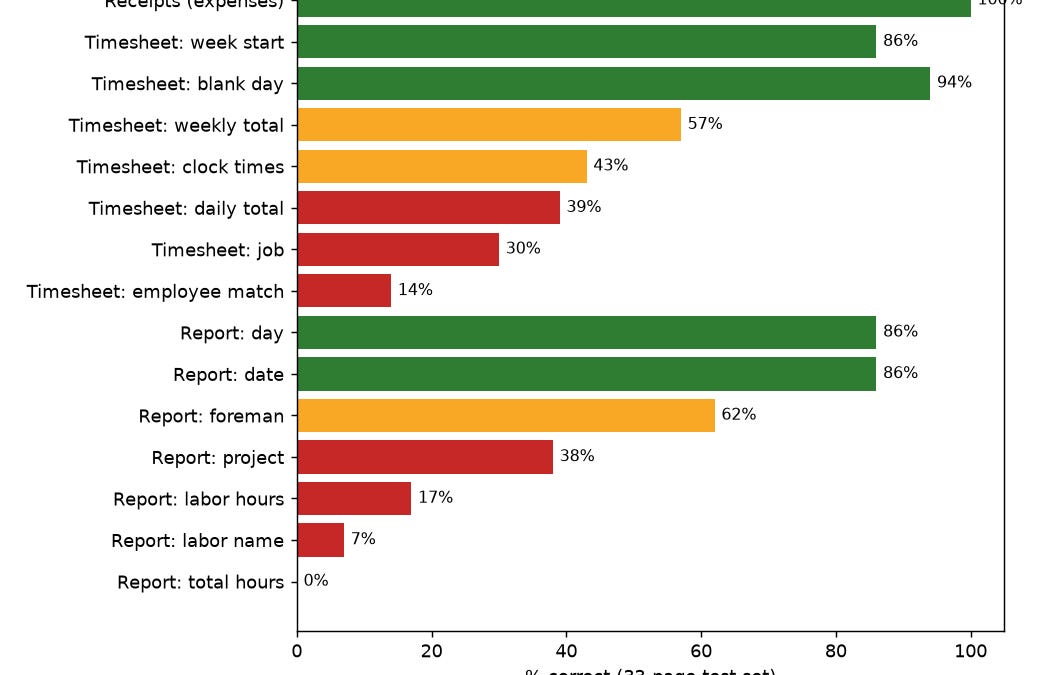
On Oct 20 the agent wrote a full handoff document: how the code is organized, how to deploy it, every config setting, and the accuracy numbers, field by field, on a 33-page test set.
Field-level accuracy from the agent’s own handoff doc, on a 33-page test set. Green is 80% or better, red is under 40%.
The good:
- **Page classification:** 32 of 33 correct (97%).
- **Receipts:** 25 of 25 expense totals correct (100%).
- **Timesheet week start:** 86%.**Blank days:** 94%.
The bad:
- **Timesheet clock times:** 43%.**Daily totals:** 39%.**Job:** 30%.
- **Employee match:** 14%.
- On production reports: labor hours 17%, labor names 7%, and total hours 0%.
Handwriting is hard. Printed receipts are easy. The agent didn’t round any of it up. It put the 0% in the doc right next to the 100%.
Speed: about 25–70 seconds per handwritten page and 1–6 seconds per receipt on an 8-core machine. On the 4-core server it’s about 2 minutes per handwritten page and 10 seconds per receipt.
In a smoke test on the server, it got the receipt exactly right. It read a timecard as 35 hours instead of the true 32, and flagged it. It read a week as starting 11/21 when it was really 9/21, and the production report lost one crew row.
The doc also lists two date fixes that are not implemented yet: don’t let a low-confidence week-start override a correctly read report date, and if the week start is unreadable, work it out from the week-ending date.
Where it stands #
- The code: done, tested, and in a private repo.
- The server: the container image is built (about 2.4 GB) and the service file is staged, but it isnot started. It’s waiting on an Odoo bot user, an API key and a channel.
- Writing to Odoo: only tested against a fake Odoo, never live.
What I learned #
- Low accuracy is fine when the agent knows where it’s wrong. At 14% on names, this would be useless if it guessed. Because it flags every uncertain field with a crop, a human checks 20 flags instead of retyping 20 pages.
- Give agents a mailbox, not a phone. The timesheet drop folder replaced a stream of messages with one append-only file per agent.
- Ask for the handoff doc. The most valuable thing the agent produced wasn’t code. It was a plain description of what’s done, what’s a stub, and what’s broken, that anyone could pick up.
— Blake
Previously: One Week, 20 AI Agents: What the Whole Team Actually Did, a roundup of what every agent on the team did in one week.