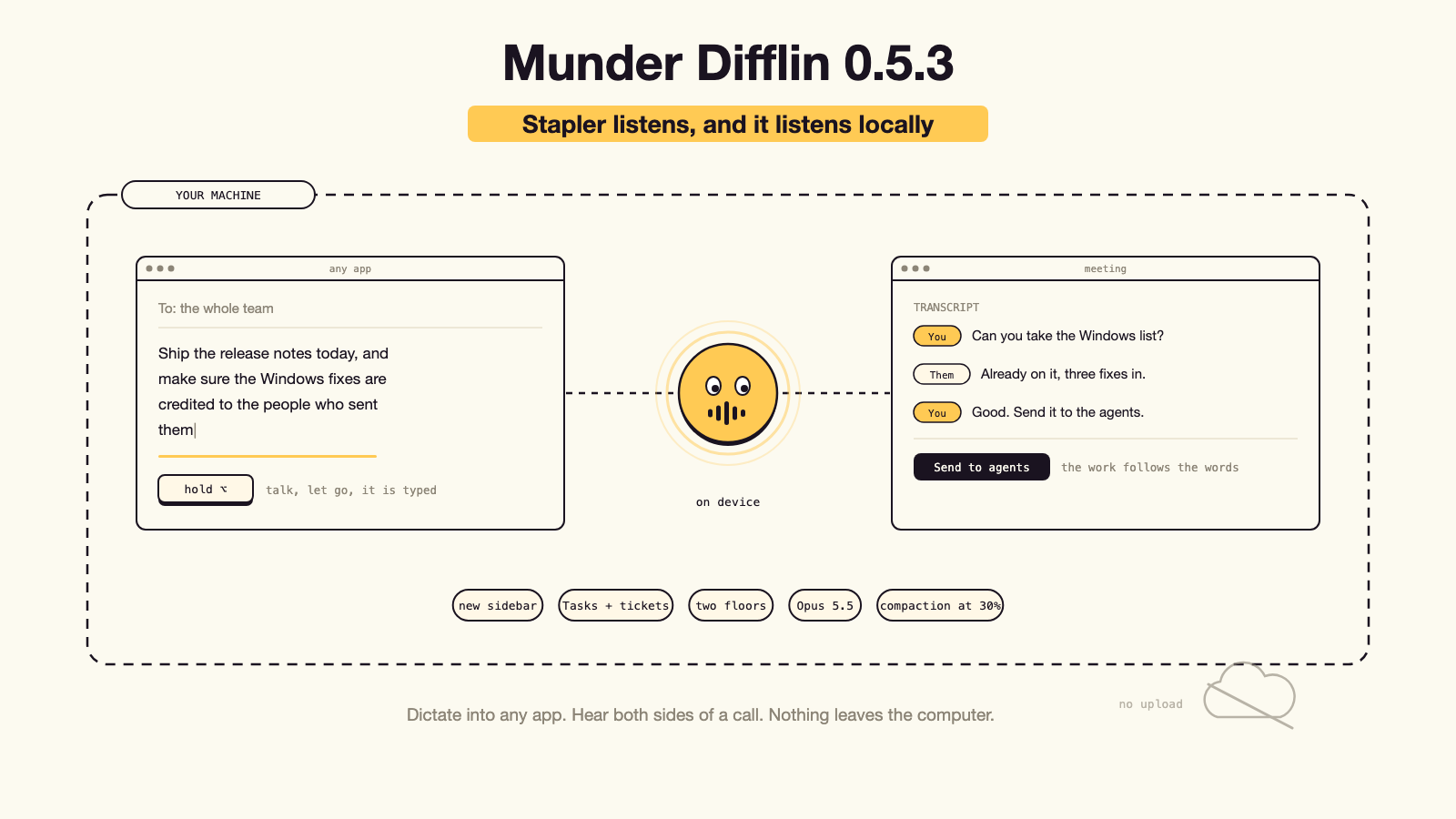
0.5.3 turns the Stapler into dictation for any app and a meeting recorder that hears both sides of a call, all on your machine. Plus the new sidebar, a Tasks tab with real ticket keys, two floors on one computer, Opus 5.5 as the default, and a long list of fixes.
0.5.3 is the release where the app starts listening. Stapler transcribes on your machine: hold a key and talk into any field in any app, or start a meeting and get a transcript that knows which voice was yours. Transcription runs on the computer, so by default no audio leaves it. Also in: the new agent sidebar in both skins, a Tasks tab with real ticket keys, a second floor on the same machine, Opus 5.5 as the default Claude model, compaction that runs sooner on purpose, and a long list of fixes.
Most of what we shipped this year made the agents easier to watch. 0.5.3 makes them easier to talk to, which turns out to be a different problem and a more interesting one.
The founder’s way of putting it: cancel your Granola and Wispr Flow subscriptions, because the Stapler now does both, on your own computer.
The headline: Stapler transcribes, on your machine # #
Stapler is the capture button in the corner of the app. In 0.5.3 it does three things with your voice, and all three run locally.
Dictate into any app. Hold Option on the Mac, or Control+Alt+Space on Windows and Linux running X11, talk, and let go. The words land in whatever field is in front of you, in any application on the machine, which means the app is a dictation tool on days when you are not running agents at all. The audio streams
while you hold the key, so the words arrive a moment after you release it. The composer mic. The mic in the composer works with whichever engine you picked, in both skins and in the orchestrator’s prompt bar. Briefing an agent out loud is faster than typing it, and the things you say are longer and more specific than the things you type.
Meetings hear both sides. Press Stapler when the meeting starts, or use the meeting key: Shift+Command+Space on the Mac, Control+Shift+Space on Windows and Linux. Your microphone is written as You and the call’s audio as Them, taken from the system itself: screen audio on the Mac, the system loopback on Windows, the PulseAudio or PipeWire monitor on Linux. Settings has the switch and a line saying whether it works on this machine. If a call is playing through the built in speakers, the meeting mic cancels the echo so the other side does not end up inside your own lines, and the Stapler suggests headphones.
When it ends you have the transcript, on disk, and you can correct it, add a description under the title, and send it to one or more agents to do the follow up work. The audio itself is never changed. That last part is what a notes app cannot do: the transcript is not the deliverable, the work that follows it is.
Where the words are actually made #
The default engine is auto, and it picks the nearest thing to your machine. Apple’s on device recogniser handles dictation on macOS 26 and is warmed at launch so the first one does not wait. A Whisper model that ships inside the app handles meetings, and handles everything on every other machine: Windows, Linux, older and Intel Macs. Groq is the last resort and only runs if you pasted a key and nothing local is there.
The bundled model is base.en at 60 MB. If you want more accuracy, small.en is an optional 190 MB download in Settings, and a missing model falls back to the bundled one rather than failing.
By default nothing leaves the machine: no upload, no account, no per minute fee, and it works on a plane. Text arrives within a second of releasing the key, and on clean dictation about 97 to 99 percent of words come out right in our tests. Each transcription also starts clean now, so the end of one meeting no longer shapes the start of the next.
Dictation into any app on a Mac asks for two permissions, Microphone and Accessibility. A Dictation & Meetings section in Settings holds the engine, the model, the shortcuts, the other side of calls and your own words, on top of a built in vocabulary of 126 tech names: companies, models, tools and startup words, so Anthropic, Claude, Kubernetes and ARR come out spelled right.
0.5.3 transcribes English. The bundled model is English only; on macOS 26 dictation runs on Apple’s engine, which follows the Mac’s language and we have tested it in English. Other languages arrive as a model download in a later release.
The Stapler itself got easier to live with too. It has eyes, a level meter and a sound while it listens. Its panel is compact, with collapsible sections and one Save. It takes several screenshots in one message, its To menu remembers who you picked, and its cards open whole instead of half off the edge of the screen.
The new agent sidebar, in both skins # #
The sidebar that tells you what every agent is doing is new in 0.5.3, and the new agent cards are in the free Classic office as well as in Pro.
Each agent gets a row with the things you actually check: status, which engine it is on, which model, a context gauge, the ticket it is working, and the live action it is taking right now, plus the Asked you, Finished and Crashed lines. There are notes and a search box over them. Hover a ticket and its details open beside the sidebar rather than over the rows below. A right click menu on the row does the common jobs without a trip to another screen, and the card strip along the bottom of the floor gives you everyone at a glance.
Keep my agent order is a setting: turn it on, Save, then drag an agent by the handle under its picture, or a project by its name. Left off, the sidebar orders itself the way it always did. In Pro you can also drag the sidebar’s edge to change its width, and it stays where you put it across launches. If you want less on screen, one setting shows only agents and notes.
Status words say what they mean. Needs you means the agent is waiting on you. Waiting means it is waiting on another agent. The status dots are readable in both themes.
Under all of it, a fix that is invisible and worth more than it sounds: one update now redraws one row, so a busy floor no longer repaints the whole list.
Tasks get a tab, a key and a clock # #
Work that agents do now looks like work you can track.
- A Tasks tab sits beside Inbox and Terminal on an agent’s screen, so you can see what one agent is carrying without leaving it.
- Tickets have three letter keys , like V53-299 or MTK-122, assigned by the harness. A key you can say out loud is the difference between “that task” and a thing two people can refer to.
- Tasks carry their times , and the Tasks screen filters by Today, This week, This month or All time.
- A card dropped anywhere in a column lands in that column, instead of only on the exact row under the pointer.
Two floors on one machine # #
New Floor asks where to start and runs a second office in parallel on the same computer, on its own hive, under one licence for the machine. When more than one is open the offices are numbered so you can tell them apart. A single hive is only ever open in one floor, which is the rule that keeps two offices
from writing over each other.

## Opus 5.5 is the default [#](#opus-55-is-the-default)
Claude’s Opus 5.5 is now the default Claude model rather than an option you have to go and find. Model names come from the live catalog, so a new model shows up without waiting for us to ship a release. The model an agent is running shows in the sidebar and survives a restart, and every engine is listed wherever an agent’s engine is chosen, the orchestrator’s included.
Compaction now runs sooner, on purpose # #
Automatic compaction runs every 40 minutes at 30 percent of the context window, and it is the same 30 percent whether the model holds two hundred thousand tokens or a million.
That is a move in both directions. Before 0.5.3 the default was every two hours at 60 percent, and 40 percent on a million token window, so the app now compacts earlier and more often than it used to.
It is an operating opinion, not a benchmark result, and it is worth saying which. Compaction is cheap and losing the thread is not, so an agent should compact early rather than work from a summary of a summary. The million token window loses its looser bar too: one bar for every model size.
Two smaller things went with it. The scheduled maintenance pass and the trigger carried different intervals, 60 minutes and 120 minutes, and the pass now runs on the trigger’s own interval instead of a second number. The pass is off by default; that is the interval it uses when you switch it on. And a rule you have edited yourself keeps your numbers: only untouched defaults move with the release.
Agents are easier to start, restart and steer # #
- A missing CLI is a card, not an error. Install it from the agent’s terminal and only that terminal restarts. You cansign in from inside the app for every engine, andSet up manually is there for when an install or a sign in fails.
- Command and Restart live in the right panel. An agent’s start command can be edited, Restart is always there, a stopped agent restarts from the panel, and the orchestrator’s command is editable too.
- Restart keeps the session for every engine that can resume one, and says so when it cannot. Restart & Continue frees a Claude session something else was holding.
- Send now goes straight in. On a queued message it types into Claude Code at once, even mid turn, ahead of the rest of the queue. Other engines take it first when they are idle.
- Ask me is on every agent’s Inbox, answered from one box over the composer, with Dismiss all, questions grouped by who asked and a badge while one waits. An open question is never answered by the app: a queued message waits while a multiple choice question is on screen.
- Attach PDFs, videos and folders from the composer, and paste an image into a Pro composer.
- Temps are on by default again , so the orchestrator starts one when you ask.
Settings, redesigned # #
One Save for everything. Every section waits for it, anything that did not save is named, and leaving with unsaved changes asks first. Long paragraphs are gone in favour of collapsible sections and tooltips.
Inbound integrations now cover Telegram, Linear, GitHub and your own webhook, each with the agent that answers it. A webhook shows Creating address until it is live and says which agent takes it. Agents can edit connections themselves, and Settings never saves over a change an agent made. Keys & Secrets holds your provider keys and your own custom secrets, encrypted. Worktrees lists the folders on disk and deletes one on request. If the webhook or Slack port is taken, the server moves to a free one and Settings tells you which.
The IDE # #
Command+I opens the IDE from any screen. Find and replace is in the open file, on Command+F on the Mac and Control+F on Windows and Linux. Unsaved text is never lost: it always keeps a tab, the IDE asks before closing, it comes back the way you left it, and quitting warns only for windows that are open.
The fixes people asked for # #
The ones most likely to have annoyed you:
- A restarted agent’s terminal takes the mouse again. Restart an agent and the terminal was dead to clicks and scrolling until you restarted the app. Fixed, and the terminal takes the width of its pane.
- The hive folder no longer swallows agents’ git folders. Codex runs were quietly pulling agent git directories into the hive repository’s object database and the disk kept filling. Fixed, and the space comes back.
- A crashed agent keeps its uncommitted work and restarts in that folder.
- The Stapler stays where you put it. Its drag is driven by the real pointer, so the disc can no longer walk away from your cursor, and Reset puts it back in the middle of the screen without needing a Save. It also survives a monitor arriving, leaving or waking.
Four came from people outside the team, on Windows, through the public repository:
- An agent no longer stops at Claude Code’s folder trust dialog (#607 ,@himeshram ).
- config.json and the hive’s registry and task files are written whole , temp file then rename, so a crash or a locked file mid write can no longer empty your settings, your roster or your board (#529 ,@UsryAce ;#578 ,@TTAWDTT ).
- **Antigravity is found** at its own install location ([#592](https://github.com/chaitanyagiri/munder-difflin/issues/592) ,[@HsienW](https://github.com/HsienW) ), and the
Windows tests run the same on every machine ([#403](https://github.com/chaitanyagiri/munder-difflin/issues/403) ,[@oleg-ai-dev](https://github.com/oleg-ai-dev) ).
Plus the rest that landed through September: release drop pictures and fonts, Stapler drift and dark mode, the sent to toast, memory cards that no longer clip in Chinese, status dots, the canvas design skill install, model changes that stick, IDE tabs that survive, the blank agent after a restart, every engine listed in the picker, concise output, the Slack port clash, a deleted config at launch, Grok staying light in a light app, a file share that closes its public link when it expires, the crash row with a Restart button, and an editable orchestrator command. Arabic now reads right to left across the app and the terminal, and code in the IDE reads left to right in every language.
What is not in this release # #
Two things, said plainly rather than left for you to discover.
- The Kimi scroll and queue bug. We could not reproduce it. It is open and next in line for a fix.
- The Brooklyn 99 skin. Needs a rebase from its author.
Getting it # #
The app updates itself: you will see the new version offered, and the release notes appear once on first launch. To install fresh, the releases page has macOS, Windows and Linux builds.
Munder Difflin is free and open source. The Pro annual plan is on a launch offer at $150 USD, adjusted for purchasing power so it is as low as $100 a year in some countries. If this is your first look, [your first
hour with Munder Difflin](https://munderdiffl.in/blog/your-first-hour-with-munder-difflin/) is the fastest way in, and [why we
built it](https://munderdiffl.in/blog/why-we-built-munder-difflin/) explains the idea behind the floor.
FAQ #
What is new in Munder Difflin 0.5.3?
Dictation into any app on macOS, Windows and Linux, meeting transcripts that hear both sides of a call and label them You and Them, transcription that runs on your machine, the new agent sidebar in both skins, a Tasks tab with three letter ticket keys, a second floor on the same computer, Opus 5.5 as the default Claude model, automatic compaction every 40 minutes at 30 percent of the context window, and a long list of fixes.
Does the transcription send my audio anywhere?
Not by default. A Whisper model ships inside the app and runs on your computer, and on macOS 26 dictation can use Apple's on device recogniser. Groq is a fallback that stays off until you paste a key. Your prompts and the files an agent reads still go to whichever AI engine you picked, the same as before.
How does it record the other side of a call?
Through the system's own audio: screen audio on the Mac, the system loopback on Windows, and the PulseAudio or PipeWire monitor on Linux. Your microphone is written as You and the call's audio as Them. Settings has the switch and a line saying whether it works on this machine.
Is Munder Difflin free?
The app is free and open source. What you may pay for is the AI engine behind it, and several engines have a free path. Some features are in the paid Pro build, and this post says which.
How do I update?
The app checks for updates and offers the new version when one lands. You can also download 0.5.3 directly from the releases page for macOS, Windows or Linux.