On the 28th of July, the 2026-07-28 (unsurprisingly) version of the Model Context Protocol (MCP) was released. This comes with a plethora of changes and features long-awaited by MCP Server maintainers. Notable changes in the core protocol include:
-
Statelessness
- no handshake
- no session header
- no long-lived connection
-
New
Mcp-MethodandMcp-NameHTTP headers -
Server-initiated requests replaced by Multi Round-Trip Requests (MRTR)
The headline statelessness change has been a long time coming and makes it much easier for MCP server developers to scale without having to juggle state on their end. However, what I am most interested in is a particular extension of the protocol, whose framework the release notes describe as now being “formally locked in”: MCP Apps. As mentioned, apps are currently an extension, but with the recent MCP roadmap update, there are plans to include the Tasks extension in the core protocol eventually, which may mean the same for apps at some point.
Since the introduction of agents in the AI space, text has been the main (and usually only) medium through which they could communicate. Markdown could be rendered (and indeed HTML), but these were all LLM-generated. This meant that:
- information output in tables could not be guaranteed to be true,
- all structures were static, save for what could be handled by HTML and CSS,
- and the layout could differ with every agent invocation.
For self-developed agents, syntactic correctness could be ensured as part of structured outputs (via constrained decoding). However, this was much more difficult, if not impossible, to guarantee if a third-party agent, such as Claude or ChatGPT, used your MCP server. If an agent called a tool which produced a lot of data, it was mostly up to the agent on the other side to decide how to display it in terms of layout, depth, and to make sure it got all of the values right in the first place.
With MCP Apps, a whole new world has opened up not just in terms of being able to make sure the user sees the right information in the right way, but also in the level of interactivity a user can have in the middle of (and around) the chat box. Now, alongside tool call responses, MCP Apps permit an isolated, interactive, and stateful UI to be returned from server to client which can then be embedded in-line with the agent’s answers. Concrete examples of potential use cases include custom dashboards using your enterprise styling, interactive data tables, and forms for users to interact with systems outside the chat.
Timeline #
Building on MCP-UI and the OpenAI Apps SDK, MCP Apps were proposed in November 2025, went live in January 2026, and their extension framework is now formalised as of the 2026-07-28 protocol version. Despite this long timeline (relative to the speed of AI progress nowadays), support has been lacklustre and is still catching up. ChatGPT’s original implementation was the OpenAI Apps SDK, but it now supports MCP Apps natively. Other clients which support MCP Apps today include Claude and VS Code GitHub Copilot Chat.
Initially apps built using MCP Apps and the OpenAI Apps SDK were the preserve of only large companies – Figma and Slack as MCP Apps launch partners, and Booking.com and Spotify among earlier Apps SDK adopters. However, with framework support getting better, it’s becoming much easier for smaller companies and developers to make their own. Next, I’ll show you how to start working with MCP Apps utilising FastMCP and Prefab.
Usage #
First let’s set up a simple MCP server:
from contacts import search
from fastmcp import FastMCP

mcp = FastMCP("contacts")

@mcp.tool
def search_contacts(query: str) -> list[dict]:
    """Find contacts matching a free-text search of name, role, company or department."""
    return search(query)

if __name__ == "__main__":
    mcp.run()
As the function name lets slip, the above permits searching for contacts in a database (I have imported the search logic itself, as it is not relevant to the discussion at hand about MCP). Decorations provided by FastMCP allow for setting up an MCP quickly and simply, with the docstring acting as a description for the tool.
Whilst the above would work as a barebones MCP server, it is not particularly user-friendly. It only returns the data to the AI agent directly, and from there it is up to the agent about what to display and how to display it:
For two similar questions, the AI has returned slightly different data in slightly different formats. Whilst this may merely count as an inconvenience, the main issue is hidden: how can you be sure that the data that has been output, token-by-token by the AI, is correct?
In a bid to resolve this, let’s turn to MCP Apps:
from contacts import search
from contacts_2_ui import contact_carousel
from fastmcp import FastMCP
from fastmcp.tools import ToolResult

mcp = FastMCP("contacts")

@mcp.tool(app=True)
def search_contacts(query: str) -> ToolResult:
    """Find contacts matching a free-text search of name, role, company or department."""
    results = search(query)
    names = ", ".join(contact["name"] for contact in results)
    return ToolResult(
        content=f"{len(results)} contacts: {names}",
        structured_content=contact_carousel(query, results),
    )

if __name__ == "__main__":
    mcp.run()
The difference in the code is minimal:
app=Truein the tool decoration,- returning
ToolResultencompassingcontentandstructured_content.
Setting app=True lets FastMCP know that you wish for this tool to produce an MCP app alongside returning the data to the AI as before. This combination is expressed as ToolResult with content the same as what was returned in the prior snippet whereas structured_content contains the new, complementary app: contact_carousel (shared at end).
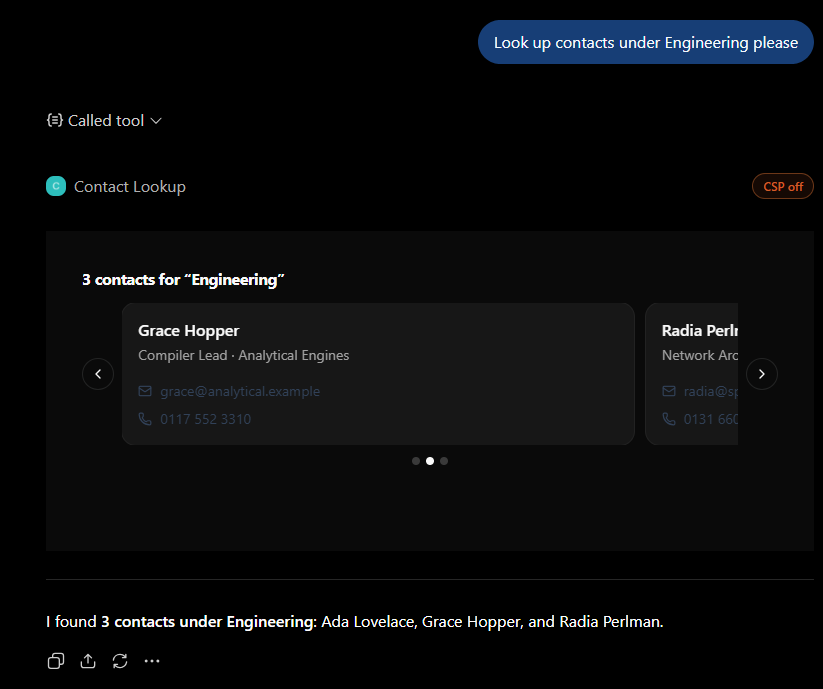
Once again, the output from the AI itself differs both in content and layout. However, now we have the deterministic MCP app which provides all the content we define it to and in the shape we design. Note also that this carousel is not just a static, rendered markdown structure, but a bespoke HTML and JavaScript component, displayed in-line in the ChatGPT chat interface. This means not only can it follow whatever shape you like, it can also take on whatever enterprise styles you desire (regardless of whether they clash with ChatGPT!), and it can also have increased interactivity to improve user engagement.
Whilst this change has ameliorated the experience greatly (in my view, anyway), it is still read-only. It tends to be that a UI talks to a backend via API calls, turning a simple display into somewhere a user can act. By default, MCP Apps are effectively sandboxed (the ‘CSP off’ badge is rendered whilst the app is in developer mode). This can be altered in configuration, but the intended path is to define additional MCP tools instead – sticking to the one protocol. Direct API calls would require their own credentials, whereas (handily) tool calls inherit those of the server.
Another useful feature is that tool visibility is readily configured. This allows for risky operations to be executed by a human user through the app, but not directly invoked by the AI.
from contacts import search, update
from contacts_3_ui import editable_carousel
from fastmcp import FastMCP
from fastmcp.apps import AppConfig
from fastmcp.tools import ToolResult

mcp = FastMCP("contacts")

@mcp.tool(app=AppConfig(visibility=["app"]))
def update_contact(contact_id: int, email: str, phone: str) -> str:
    """Save edits to a contact. Callable by the app, hidden from the model."""
    return update(contact_id, email=email, phone=phone)

@mcp.tool(app=True)
def search_contacts(query: str) -> ToolResult:
    """Find contacts matching a free-text search of name, role, company or department."""
    results = search(query)
    names = ", ".join(contact["name"] for contact in results)
    return ToolResult(
        content=f"{len(results)} contacts: {names}",
        structured_content=editable_carousel(query, results, on_save=update_contact),
    )

if __name__ == "__main__":
    mcp.run()
In the snippet above, an extra tool has been added: update_contact. Unlike search_contacts, it renders no UI of its own, but its visibility is restricted to the app, so the model never sees it. The only other change compared to before is that contact_carousel has become editable_carousel (shared at end), which in turn takes the new tool as an argument. That’s all it takes to allow for write actions to be executed from the MCP app:
Now, not only can you see the returned data in the same format, in the same depth, and with guaranteed correctness, but you can also alter it, without leaving such dangerous operations to an unaccountable model, and without leaving the chat. This is particularly good for non-technical users, who may not recognise when an AI agent plans to take a perilous, mutating action.
This simple showcase affords just a glimpse of the capabilities of MCP Apps. No longer do you have to make a bespoke agent to escape the dominance of fuzzy, generated markdown; you can now hand work to an AI agent and be assured that what the user sees is what you defined. What I most look forward to is this: bespoke features inside non-bespoke agents – your own tools, UIs, and most importantly, guarantees, in someone else’s chat window.
Carousel Code #
I extracted out the code for the carousels, as they weren’t the focus. Here is the full code for them:
Contact Carousel Code #
from prefab_ui.app import PrefabApp
from prefab_ui.components import (
    H2,
    Card,
    CardContent,
    CardDescription,
    CardHeader,
    CardTitle,
    Carousel,
    Column,
    Icon,
    Row,
    Text,
)

def _field(icon: str, value: str) -> None:
    with Row(gap=2, css_class="items-center text-sm text-slate-700"):
        Icon(icon, size="sm")
        Text(value)

def _card(contact: dict) -> None:
    """One contact as a card."""
    with Card(css_class="w-full text-left"):
        with CardHeader():
            CardTitle(contact["name"])
            CardDescription(f"{contact['job_title']} · {contact['company']}")
        with CardContent():
            with Column(gap=2):
                _field("mail", contact["email"])
                _field("phone", contact["phone"])

def contact_carousel(query: str, results: list[dict]) -> PrefabApp:
    """The whole view: a heading and one card per contact."""
    with PrefabApp() as app:
        with Column(gap=3, css_class="w-full p-3 text-left"):
            H2(
                f"{len(results)} contacts for “{query}”",
                css_class="text-base font-bold",
            )
            with Carousel(visible=1.2, gap=12, loop=False, show_dots=True):
                for contact in results:
                    _card(contact)
    return app
Editable Carousel Code #
from collections.abc import Callable

from prefab_ui.actions import CallTool, SetState, ShowToast
from prefab_ui.app import PrefabApp
from prefab_ui.components import (
    H2,
    RESULT,
    Button,
    Card,
    CardContent,
    CardDescription,
    CardHeader,
    CardTitle,
    Carousel,
    Column,
    Else,
    Icon,
    If,
    Input,
    Row,
    Rx,
    Text,
)

def _field(icon: str, value: str) -> None:
    with Row(gap=2, css_class="items-center text-sm text-slate-700"):
        Icon(icon, size="sm")
        Text(value)

def _card(contact: dict, on_save: Callable) -> None:
    contact_id = contact["id"]
    with Card(css_class="w-full text-left"):
        with CardHeader():
            CardTitle(contact["name"])
            CardDescription(f"{contact['job_title']} · {contact['company']}")
        with CardContent():
            with If(f"!editing_{contact_id}"):
                with Column(gap=2):
                    _field("mail", f"{Rx(f'email_{contact_id}')}")
                    _field("phone", f"{Rx(f'phone_{contact_id}')}")
                    Button(
                        "Edit",
                        size="sm",
                        variant="outline",
                        on_click=[
                            SetState(
                                f"draft_email_{contact_id}", Rx(f"email_{contact_id}")
                            ),
                            SetState(
                                f"draft_phone_{contact_id}", Rx(f"phone_{contact_id}")
                            ),
                            SetState(f"editing_{contact_id}", True),
                        ],
                    )
            with Else():
                with Column(gap=2):
                    Input(name=f"draft_email_{contact_id}", value=contact["email"])
                    Input(name=f"draft_phone_{contact_id}", value=contact["phone"])
                    with Row(gap=2):
                        Button(
                            "Save",
                            size="sm",
                            on_click=CallTool(
                                on_save,
                                arguments={
                                    "contact_id": contact_id,
                                    "email": Rx(f"draft_email_{contact_id}"),
                                    "phone": Rx(f"draft_phone_{contact_id}"),
                                },
                                on_success=[
                                    SetState(
                                        f"email_{contact_id}",
                                        Rx(f"draft_email_{contact_id}"),
                                    ),
                                    SetState(
                                        f"phone_{contact_id}",
                                        Rx(f"draft_phone_{contact_id}"),
                                    ),
                                    SetState(f"editing_{contact_id}", False),
                                    ShowToast(f"{RESULT}", variant="success"),
                                ],
                                on_error=ShowToast("Could not save.", variant="error"),
                            ),
                        )
                        Button(
                            "Cancel",
                            size="sm",
                            variant="outline",
                            on_click=SetState(f"editing_{contact_id}", False),
                        )

def editable_carousel(query: str, results: list[dict], on_save: Callable) -> PrefabApp:
    state: dict[str, object] = {}
    for contact in results:
        state |= {
            f"editing_{contact['id']}": False,
            f"email_{contact['id']}": contact["email"],
            f"draft_email_{contact['id']}": contact["email"],
            f"phone_{contact['id']}": contact["phone"],
            f"draft_phone_{contact['id']}": contact["phone"],
        }

    with PrefabApp(state=state) as app:
        with Column(gap=3, css_class="w-full p-3 text-left"):
            H2(
                f"{len(results)} contacts for “{query}”",
                css_class="text-base font-bold",
            )
            with Carousel(visible=1.2, gap=12, loop=False, show_dots=True):
                for contact in results:
                    _card(contact, on_save)
    return app