GeaStack Open source
personal.
We let you write it in TypeScript, JSX, and CSS.
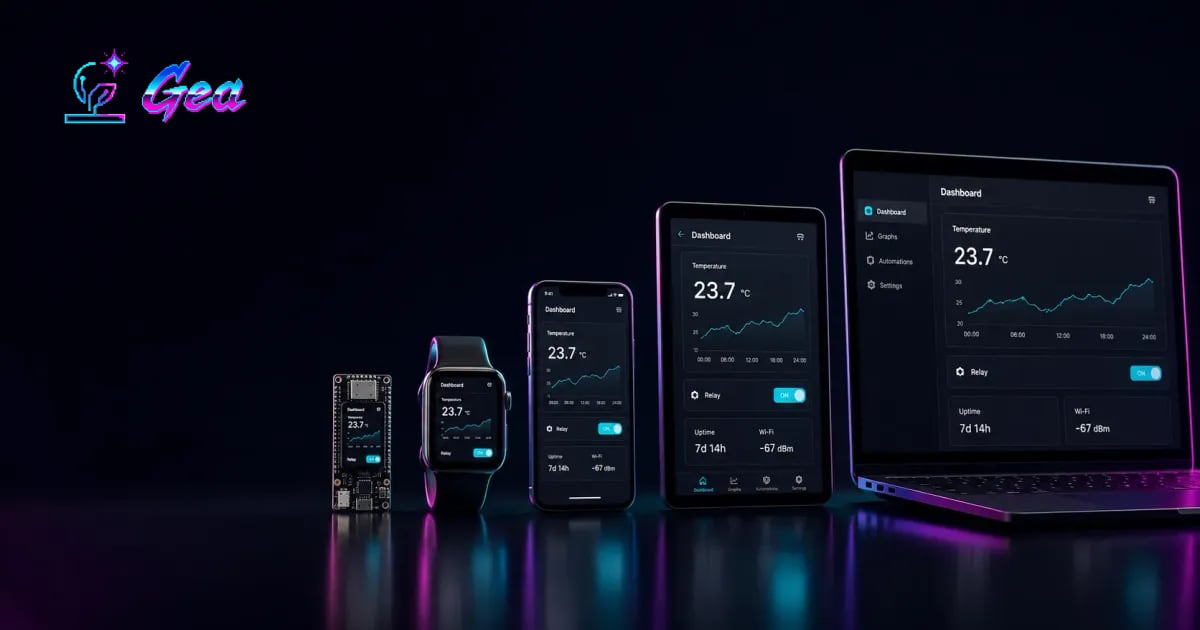
GeaStack brings Gea’s reactive UI to devices. Our geatsc compiler turns supported app code into C++, and the gea CLI handles browser previews, native builds, and flashing.
Build with your coding agent →
Why GeaStack
From a web framework to our own devices. #
JavaScript is enough.
We believed the language already gave us the tools to model an app. Classes keep state and behaviour together, properties hold values, methods change them, and getters calculate derived values. We built Gea for the web around that belief.
In Gea, stores are reactive classes. You change their data directly with code like this.count++ or this.users.push(user). Components describe the interface in JSX, and CSS handles its appearance. Gea analyses JSX at build time and generates the DOM update code. Its runtime observes state changes and applies those updates, taking the repetitive wiring out of application code.
Gea remains an independent web framework, with its own examples and benchmarks. Its apps run as JavaScript in the browser. We wanted to carry that way of writing apps onto our own hardware, which became the starting point for GeaStack.
Then we wanted to take it onto a guitar.
We play MIDI guitar and wanted a controller we could attach to our guitar to manage sounds while playing. We already had a way of building interfaces that we liked. We wanted to use that same approach on a small device, which meant taking Gea’s application model beyond the browser.
That guitar work also led to CoyoPedal, our open-source ESP32-S3 amp and effects processor. Its GeaStack touchscreen UI runs alongside a dedicated audio engine. You can play the browser version or read how we made NAM A2-Full fit on the chip.
The app had to run on a small chip.
On an ESP32, memory and processing time are tight. We wanted to keep writing TypeScript, JSX, and CSS while running compiled code on the device. That is where geatsc, our TypeScript-to-C++ compiler, comes in: it translates supported application code into C++, which the board’s toolchain builds into firmware.
We used that path to build touch interfaces and brought familiar web APIs to embedded devices. Some examples are fetch for network requests, Canvas 2D for drawing, and localStorage for saving state.
From a small screen to native desktop apps.
The next step was to bring the same development model to desktop and mobile platforms, so you can use the same codebase across supported targets and compile it natively where a native target is available. Each target supplies the rendering, input, and platform APIs the app needs.
On macOS, that includes real AppKit controls. Our Notes demo uses native views and a toolbar, with application state and interface code written in TypeScript and JSX. Gea still manages the reactive UI; the target connects it to the operating system.
Then we took a Three.js game to Xbox.
We also wanted to bring browser game development to native targets. We compiled Three.js games for Xbox, including Aviator and SkyTail, the game featuring our coyote mascot. The launch walkthrough shows SkyTail running on both Xbox and macOS.
The compiler opened another direction: native HTTP services. We could compile supported Node-style server code and measure it against the same code running in Node.js. The benchmarks show throughput, memory, startup, and latency together.
Xbox support is experimental and the repo is private. Watch the Xbox and SkyTail walkthrough →
And we ended up building GeaStack.
What started with a guitar controller became a way to build native applications in TypeScript, from an ESP32 to an Xbox. We brought the framework, compiler, and device targets together as GeaStack, so you can use them to build your own apps.
We invite all of you to build cool stuff with it. Our public repositories are open source, each under its own licence, and we’d love to see your contributions. Share what you’re building in our Discord, report an issue, or send a pull request.
We believe in PERSONALIZED
HARDWARE.
Code
From app state to native code. #
With GeaStack, we write the app in TypeScript, JSX, and CSS, then compile it for the device.
Store
counter-store.ts
import { Store } from '@geastack/core'

class CounterStore extends Store {
  count = 0

  increment() {
    this.count = this.count + 1
  }
}

export const counter = new CounterStore()
We use a Store when several components need the same state. If only App needs the count, we can keep it on the ReactiveComponent itself.
Component
App.tsx
import { ReactiveComponent } from '@geastack/core'
import { counter } from './counter-store'
import './styles.css'

export class App extends ReactiveComponent {
  template() {
    return (
      <div class="screen">
        <span class="count">{counter.count}</span>
        <button onClick={() => counter.increment()}>
          +
        </button>
      </div>
    )
  }
}
Pressing + calls counter.increment(). Gea updates the displayed count when the store changes.
Shortened from the shared-store counter tutorial. Follow it for the complete app and styles.
Compiling for the device
geatsc and our Gea compiler plugin compile the supported application code and its reactive UI into C++. The target’s toolchain builds it with the renderer and device APIs. On an ESP32, the resulting firmware runs without a JavaScript engine.
- App source Stores, components, and CSS
- geatsc + Gea plugin Generate C++ and UI bindings
- Target toolchain Build with theruntime anddevice APIs
- Native app or firmware Run on the selected device
We keep layout and appearance in CSS, with Canvas 2D for custom drawing. Supported styles and APIs depend on the target.
Where would you run your app?
Compare the targets →
Targets
Choose where it runs. #
Taking the same development model from an ESP32 to a Mac or Xbox needs a connection to each platform. We call that a target: its build tools, renderer, and host APIs. Application code can be shared, while controls and device-specific features may need target-specific work.
- NATIVE / EMBEDDEDEmbedded
- ESP32 & RP2350 firmware with Gea rendering and board-specific input and drivers. Flash over USB; update supported boards over Bluetooth or Wi-Fi.@geastack/targets on npm ↗Agent skills: Build an app ↗Custom boards ↗Add a target ↗OTA updates ↗
- NATIVE / APPLEmacOS & iOS
- Native Mac and iPhone apps using AppKit and UIKit integrations. Requires Xcode; device builds also need signing setup.@geastack/apple on npm ↗
- NATIVE / WINDOWSWindows
- The Win32 target turns Gea components into Windows controls, such as buttons and text fields.@geastack/windows on npm ↗
- NATIVE / LINUXLinux
- The Linux target uses the shared Gea raster pipeline with SDL2. Current focus: Raspberry Pi OS on Raspberry Pi 5.@geastack/linux on npm ↗
- NATIVE / EXPERIMENTALXbox Series X/S Experimental
- We build apps for consoles with Developer Mode enabled, including controller input and audio. We use Microsoft’s UWP app format and Direct3D graphics through ANGLE. The repo is currently private. Watch the Xbox demo →
- WEB / DEVELOPMENTBrowser
- The simulator and web target let you preview an app on your computer. We test how its drawing and input compare with device behaviour.@geastack/simulator on npm ↗Agent skill: App builder and web preview ↗
- WEBVIEW / ANDROIDAndroid
- The Android target packages web-rendered Gea apps as an APK. The current renderer uses Android WebView.@geastack/android on npm ↗
- NATIVE / SERVERNative services
- node-compat compiles supported Node-style HTTP services to native executables. We test response parity against Node.js.@geastack/node-compat on npm ↗
- NATIVE / GRAPHICS3D graphics
- native-webgl-angle connects Three.js to native graphics on macOS through ANGLE and Metal.@geastack/native-webgl-angle on npm ↗
Rendering and API support vary by target. Native compilation, browser rendering, and Android WebView are distinct execution paths.
Browse all agent skills ↗ · Set up your coding agent →
You can explore the app model before choosing hardware.
Start with a browser preview →
Get started
Build your first app. #
Build with your coding agent
Copy this prompt into your agent. Our skills cover app structure, supported APIs, styling, and the build workflow.
Or build the counter yourself
Our first embedded tutorial builds a touchscreen counter and installs it on a board over USB. We use a Waveshare ESP32-S3 Touch AMOLED 2.06 and a USB data cable. Other supported boards work with their own alias.
01### Create the projectInstall the CLI and start the project wizard:
npm install --global @geastack/cli
gea create component-counter
Choose 2, Example application , then1, Component Counter from the gallery. The CLI creates the project, selects ESP32, enables BLE updates, and runsnpm install .When it finishes, open the project folder:
cd component-counter
02### Look at the appThe project contains three source files and a font. The app extends ReactiveComponent , so changingcount updates the number on screen.
- src/index.tsx
- Calls
mount(App)to put the app on screen. - src/App.tsx
- Holds the counter state, button handlers, and JSX.
- src/styles.css
- Defines the layout, colours, and font. Read the complete component and styles in the tutorial →
03### Register the boardConnect your board over USB and run:
gea setup
Choose 1, Known supported board , pick your board, and acceptamoled as its alias. Confirm the USB connection, leave the optional OTA host/IP empty, and save the setup.Follow the board setup prompts in the tutorial →
4.
04### Check, build and flashCheck the app and fix any type errors before building:
npm run check
Then build the firmware and flash the board:
gea build
gea flash --monitor
The first build can take a few minutes. Once flashing finishes, tap the buttons on the display to change the count. Keep the USB cable connected for the next lessons. If you have several boards registered, add --board amoled to select this one.
Keep building with the tutorial
Lessons 2 and 3 continue in the counter project. Lesson 4 starts a new app.
Examples
See what we’ve built. #
These are some of the apps we built along the way: small-screen interfaces, native desktop controls, and games. Watch a device demo and follow its source link.
Launch walkthrough · Xbox + devices
SkyTail & Xbox games
We show SkyTail running on Xbox, build and flash an ESP32 app, and walk through native macOS interfaces. The launch stream explains the compiler, framework, and idea behind GeaStack.
Canvas · maps
Maps on an ESP32
Pan and zoom OpenStreetMap tiles on a microcontroller using the Canvas API.
Native controls · macOS
Native macOS Notes
A split view, toolbar, and reactive store, written in TypeScript, JSX, and CSS.
Networking · ESP32
Weather on an AMOLED display
A weather interface with live conditions and a forecast on an ESP32 board.
CSS 3D · ESP32
CSS transforms on an ESP32
A rotating cube built with CSS 3D transforms and rendered on the microcontroller.
2D game · ESP32
Platformer on an ESP32
We run a 2D game with coins, jumps, and enemies on a microcontroller, using TypeScript, JSX, and CSS.
Touch input · ESP32
Smart AC dial
We use touch input and reactive state to build a draggable climate-control dial on an ESP32.
Adaptive UI · e-paper
Colour and e-paper displays
We adapt one app to a colour panel and an e-paper display using CSS media queries.
Benchmarks
Measure the native path. #
Native compilation also gave us a way to build server applications. We tested a supported node:http app in Node.js and compiled with geatsc, alongside Rust and C++ servers handling the same request. These results measure that HTTP workload on one host.
Eight workers per server. Memory is peak proportional set size (PSS), which apportions shared memory across processes.
2.25× Raw HTTP throughput vs Node
6.6 MiB Peak PSS · Node: 303.0 MiB
6 ms Startup · Node: 143 ms, 8 workers
| GET / · 8 workers · published npm packages · September 20, 2026 | |||
|---|---|---|---|
| Server | Requests / sec | Peak PSS | p99 latency |
| --- | --- | --- | --- |
| node:http / Gea | 265,873 | 6.6 MiB | 3.96 ms |
| node:http / Node | 118,142 | 303.0 MiB | 3.38 ms |
| Rust / axum | 215,753 | 4.2 MiB | 1.49 ms |
| C++ / Drogon | 267,832 | 8.0 MiB | 3.05 ms |
p99 is the time within which 99% of requests completed, measured in the last round. Lower is better.
Linux · Xeon E3-1231 v3 · Node 24.21.0 · compiler 1.0.15 / node-compat 1.0.11. wrk -t4 -c64, two 8-second rounds after warmup. Server and load generator share CPUs at 8 workers; these are host-limited HTTP results, not application-wide speedups.
Latency tradeoff: p99 was 3.96 ms native versus 3.38 ms on Node. Higher throughput did not produce lower tail latency in this run.
Full methodology, latency, controls, and raw results →
Embedded UI benchmarks
We’re also working on benchmarks comparing GeaStack’s performance with other embedded UI frameworks.
FAQ
Frequently asked questions. #
What can I build with it? #
We provide the pieces for screen-based apps such as weather displays, touch controls, notes apps, and games. We also have a native HTTP server path. The Examples tab shows concrete apps and their code.
Do I need to know C++ or electronics? #
We write app code in TypeScript; the compiler generates C++ for native builds. You can start in the browser without wiring a device. Working with hardware later involves choosing a supported board and following its setup. Custom drivers and target integrations may require C++ and platform SDK work.
Can I compile any TypeScript project? #
Support depends on the language features, packages, and APIs your app uses. See the compatibility limits and how to check your code with the compiler.
Is the UI running in a browser? #
It depends on the target. Embedded and native desktop builds render on the device; the browser and Android targets use a browser engine. See how each target renders the UI.
Do I need a board to start? #
You can start with the browser simulator. A physical device is still needed to check hardware-specific behaviour such as touch input, sensors, display timing, and flashing. The embedded tutorials cover the first USB flash, state, Bluetooth updates, and network requests.
What about Node compatibility? #
We compare supported HTTP behaviour with Node byte for byte: parsing, bodies, keep-alive, framing, streaming, and malformed input. Check our parity suite for what is covered.
Which licence applies? #
Licences differ by package. We list them on the limits and licence page, with links to the licence files and commercial licensing enquiries.
Repos & packages
Find the pieces. Read the source. #
We publish the tools and target integrations on npm. Start with @geastack/cli to create an app, then follow the setup for your target. Below, we’ve grouped the packages with their source repos so you can find what to install and where to contribute.
Compiler & framework
Targets & runtimes
targets
Embedded boards, build and flash support, and OTA clients.
apple
AppKit and UIKit targets and Apple SDK bindings.
windows
Win32 controls and Windows SDK bindings.
linux
Gea raster rendering on Linux, focused on Raspberry Pi OS.
android
Android packaging for web-rendered Gea apps.
simulator
Browser development loop and the web target.
node-compat
Native runtime support for Node-style HTTP services.
native-webgl-angle
WebGL through ANGLE and Metal for the Three.js path.
Examples & community
If something fails, open an issue in the relevant repo with the smallest example you can share, your target, package versions, and the build output.