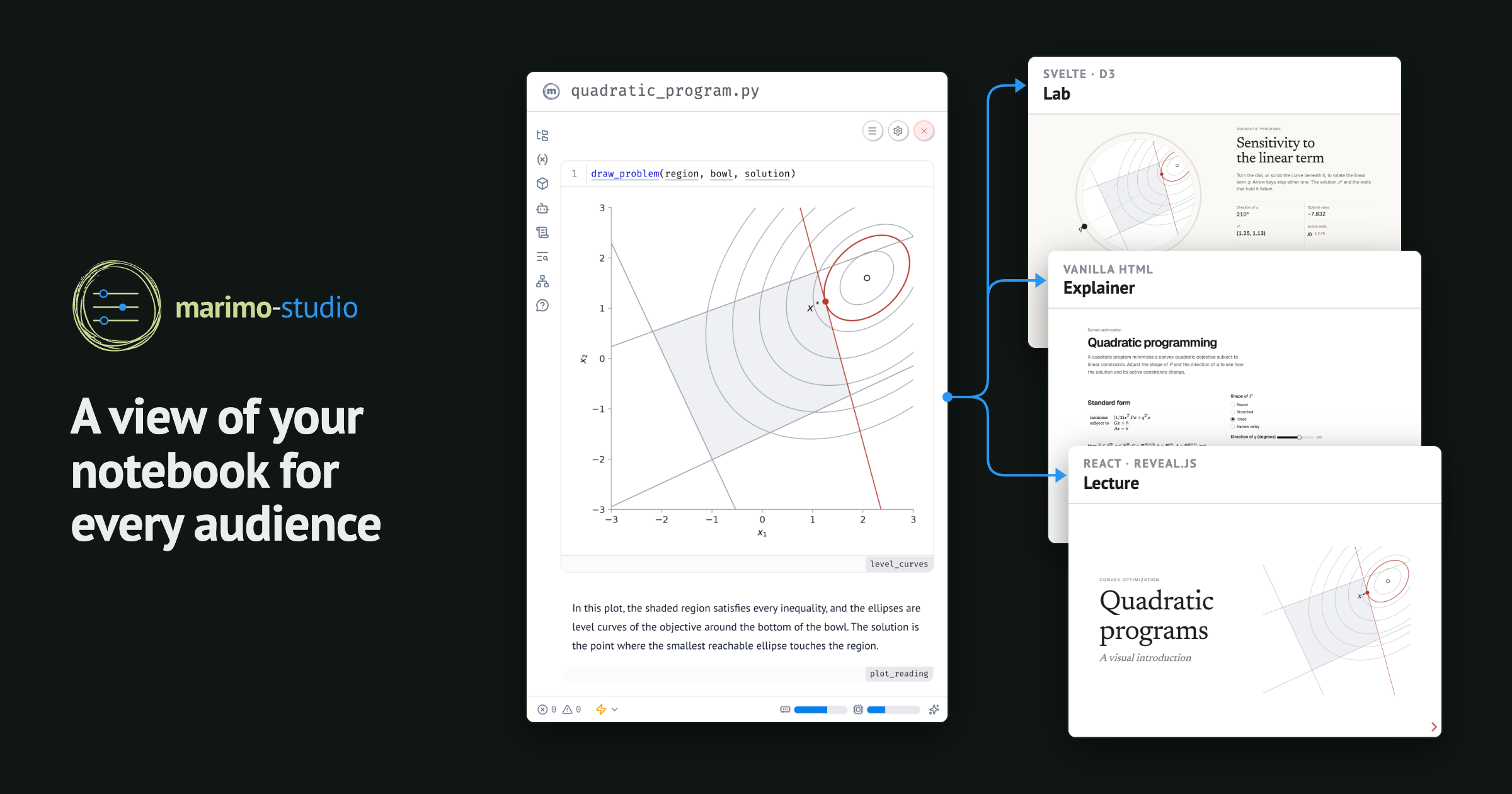
Build a view of your notebook for every audience, in any web framework, with every result traced back to the Python behind it.
Your marimo notebook is where your computational work lives: the data, the definitions, and every assumption behind a result. Each audience you share it with has different needs and expects an experience tailored to them: a lecture for students, an article for readers, a dashboard for your team.
Today we’re introducing
marimo-studio, which gives
each audience its own view of the notebook:
- Any frontend. Each view is its own web project, in whatever framework you like.
- Separate files. Views live next to the notebook, so coding agents build them without editing your analysis.
- Traceable results. Every number on a page traces back to the notebook cell that computed it.
- Prepared static exports. Studio prerenders a view’s states at build time, so it runs as static files on GitHub Pages or any host, with no Python runtime to load. Readers see the results and never the notebook source, which keeps sensitive work private.
Copy this instruction for your coding agent to get started:
Your agent reads the instructions Studio ships with the package, then builds a single notebook with the two requested views.
#
Notebooks usually reach their audiences in one of two ways. The first is a copy of the notebook for each audience. The copies drift: a fix made in one never reaches the others, and the slides end up disagreeing with the article.
The second is to put the presentation into the notebook, with HTML templates, CSS, and layout code in cells next to the calculations. The notebook gets harder to read and to review, because a font change and a formula change land in the same file.
Coding agents make the second path more tempting. They write frontend code well, so a polished page is one request away. When the agent works inside the notebook, though, each design request also edits the file that holds your analysis. We wanted agents to take on the frontend work while the analysis stays put, so Studio keeps the two in separate files.
#
Notebooks do all kinds of work. Some teach an idea, some dig through data, and some explain how a model behaves, and one notebook often has to serve several kinds of readers at once. With Studio, the same notebook serves every one of them.
quadratic_program.py teaches quadratic programs, a kind of optimization
problem. The same notebook becomes a slide deck for the lecture, an explainer
to read at your own pace, and a lab where you drag a dial and watch the
solution move.
The deck runs on React and [Reveal.js](https://revealjs.com/), the explainer
is plain HTML, and the lab is a [Svelte](https://svelte.dev/) app.
athletes.py digs into the roster of the Rio 2016 Olympics. The same analysis
opens as a report you can filter by sport, an explorer with linked charts, and
a 3D tour of every athlete.
The report is plain HTML, the explorer links its charts with
[Mosaic](https://uwdata.github.io/mosaic/), and the tour runs on
[Three.js](https://threejs.org/).
occupancy.py predicts whether a room is occupied from its sensor readings.
The same model shows up as a monitor of the room, a review where you move the
decision threshold and watch the errors change, and a report you can download
as a PDF.
The monitor is an Observable Notebook Kit page, and the review and the report are React apps.
The examples gallery has more.
#
Each view is an ordinary frontend project, saved as a folder next to the notebook. A coding agent works with its HTML, components, and build config the same way it would in any web project:
Studio builds plain HTML, React, Svelte, and Observable Notebook Kit projects out of the box, and a provider API connects any other frontend project and its build command. Preview rebuilds on every save, so you can watch a view take shape and steer it as you go.
#
Inside a view, two elements and one attribute reach into the notebook by name:
| In the view | What the page gets |
|---|---|
<marimo-cell> element |
A cell’s output, with live controls |
<marimo-output> element |
One object, even one the notebook never shows |
mo-value attribute, on any element |
One value, as data for the page’s own code |
Views can lean either way. The Explainer mostly places the notebook’s own cells,
while the Lab reads values and draws nearly everything itself with Svelte and
[D3](https://d3js.org/).
Each figure and number a view shows comes from one named notebook cell. When you change a control in a view, marimo reruns the cells that depend on it and the view updates, so every view agrees with the notebook.
The same link makes every result in a view auditable. Studio resolves each name
to the cell that produces it, and marimo’s dataflow
graph leads from that
cell to the data, definitions, and assumptions behind it. A reviewer checks a
number on the page by reading the Python that computes it, and
marimo-studio validate reports any name a view uses that the notebook no
longer defines.
Values reach the page through standard DOM events. mo-value sets
marimoValue on its element and dispatches marimo-value-updated each time
the notebook recomputes the value, so any page can listen for it:
The React and Svelte starters wrap the same events for you: React views get a
useMarimoValue hook, and Svelte views a use:observeMarimoValue action.
#
A view can be shared as a folder of static files on GitHub Pages or any other
static host. You choose how the exported view runs. A browser export runs
the notebook in each visitor’s browser with [Pyodide](https://pyodide.org/), a
build of Python for WebAssembly. A prepared export runs no Python at all, on a server or in the browser.
Prepared exports are new, and
marimo-export powers them.
Studio runs the notebook ahead of time for the control settings a view lists
and saves each result as static files. Visitors move between those saved
states, and the notebook source stays with you. Every view on this page is a
prepared export. We’re excited to share more about the approach, and how it
builds on marimo’s cell cache, in an upcoming post.
When a notebook needs live Python, for example to read files on a server, use
credentials, or call a service, marimo run serves the same view from a Python
server.
#
Python app frameworks such as [Streamlit](https://streamlit.io/) and
[Reflex](https://reflex.dev/) let you build an interactive app by writing its
interface in Python. Frontend-first tools such as
[Observable Framework](https://observablehq.com/framework/) and
[Evidence](https://evidence.dev/) start from the page, and pull in the data it
needs from scripts or queries.
Studio sits between an ordinary marimo notebook and the frontend ecosystem that already exists, and it turns the frontend-first order around. The notebook is the center. It holds the analytical context, the decisions and knowledge its author builds up: where the data comes from, how each number is defined, and which assumptions a model makes. Like a semantic layer, it defines what the numbers mean, and every view reads from it.
[Malloy](https://github.com/malloydata/malloy) and
[Malloyyo](https://github.com/malloydata/malloyyo) take a similar approach, with
agents building dashboards over a semantic model written in Malloy. In Studio, the context lives in a marimo notebook written in Python and SQL, and views can
use any frontend framework. This fits how coding agents already work. They write good Python in notebooks and good frontend code in web projects, and Studio lets them do each where it belongs, with no new app framework to learn. As agents make views inexpensive to build, the analytical context behind them is worth more, and Studio keeps that context in one notebook that grows with every change its author makes.
#
The notebook behind every view is a regular marimo notebook, so everything built
for marimo keeps working with it. It runs in a
[sandbox](https://docs.marimo.io/guides/package_management/sandboxes/) with its
own dependencies, serves as an app, and pairs with your coding agent through
marimo’s AI sidebar or marimo pair.
marimo-lens shows what this makes possible. Select
part of a page, describe a change, and Lens hands your agent the selection, your note,
and the notebook cells behind it. With Studio, Lens works in the notebook and
in every view, so the agent can tell whether a change belongs in the view or in
the notebook.
In the recording, restyling a table changes only the view. Labeling the figure changes the notebook, and the label appears in both at once.
#
Studio is available on PyPI as marimo-studio. The
[documentation](https://marimo-team.github.io/marimo-studio/) walks through
[a first view](https://marimo-team.github.io/marimo-studio/guide/getting-started),
[authoring with a coding agent](https://marimo-team.github.io/marimo-studio/guide/coding-agents),
and [running or exporting a view](https://marimo-team.github.io/marimo-studio/guide/run-and-share).

If something breaks or you have an idea, please
[open an issue](https://github.com/marimo-team/marimo-studio/issues).
On a personal note, before I started developing marimo itself, I was a user developing with marimo. One of the things that drew me to it was that a notebook could also be an interactive web app. I still value that. But the more notebooks I wrote, the clearer the gap became between the interface I need as the author and the one the people reading my notebooks actually want to use.
Studio is my answer. Each reader gets a page made for them, and the notebook stays the place where I work, a regular marimo notebook ready for whatever marimo adds next. I can throw away any view without throwing away the attention I invested in the analytical context that produces it.