Test Your Auth Flow Without Production (Sponsored) #
Authentication is often the least-tested part of an app. Live environments need network access and real credentials, while mocks miss the failures that break production.
@workos/emulate runs the WorkOS API locally for development and CI. Seed users, organizations, RBAC roles, and SSO connections, then test full AuthKit login flows, signed webhooks, token refresh, and error handling. Responses and event shapes come from the WorkOS OpenAPI spec, so tests exercise the same surface your app uses in production.
Imagine a scenario where a developer builds an AI-based coding assistant that runs on a desktop computer. The model is available to download, the application is quite straightforward, and the machine has plenty of storage. But when the program tries to load the model, it runs out of memory.
This is where local AI development becomes a hardware problem.
Merely down a large AI model to our computer doesn’t mean we can actually run that model. In fact, even if we successfully load it, we can’t guarantee a useful response time.
A large AI model can run on modest hardware only by reducing the memory it occupies, reducing the calculations it performs, or moving some work to slower hardware. Several techniques can help deal with these requirements. In this article, we’re going to look at these techniques. Here’s what we will cover:
- What running a model actually means
- What makes it difficult to fit a model on smaller hardware
- Why make the effort to run locally
- Quantization: Giving each weight a smaller representation
- Layer-wise off: Move weights as they are needed
- Mixture of experts: Use selected parts for each token
- Distillation: Let a larger model teach a smaller model
- Pruning: Remove work that contributes less
- Speculative decoding: Propose several tokens before checking them
What Running a Model Actually Means #
An AI model contains numerical values called parameters. These are also known as weights. They influence how input becomes output. During training, these values are adjusted so that the model becomes better at its task. An 8B model contains approximately eight billion parameters or weights.
These weights are organized into layers. Each layer performs calculations on incoming information and passes its results to the next layer.
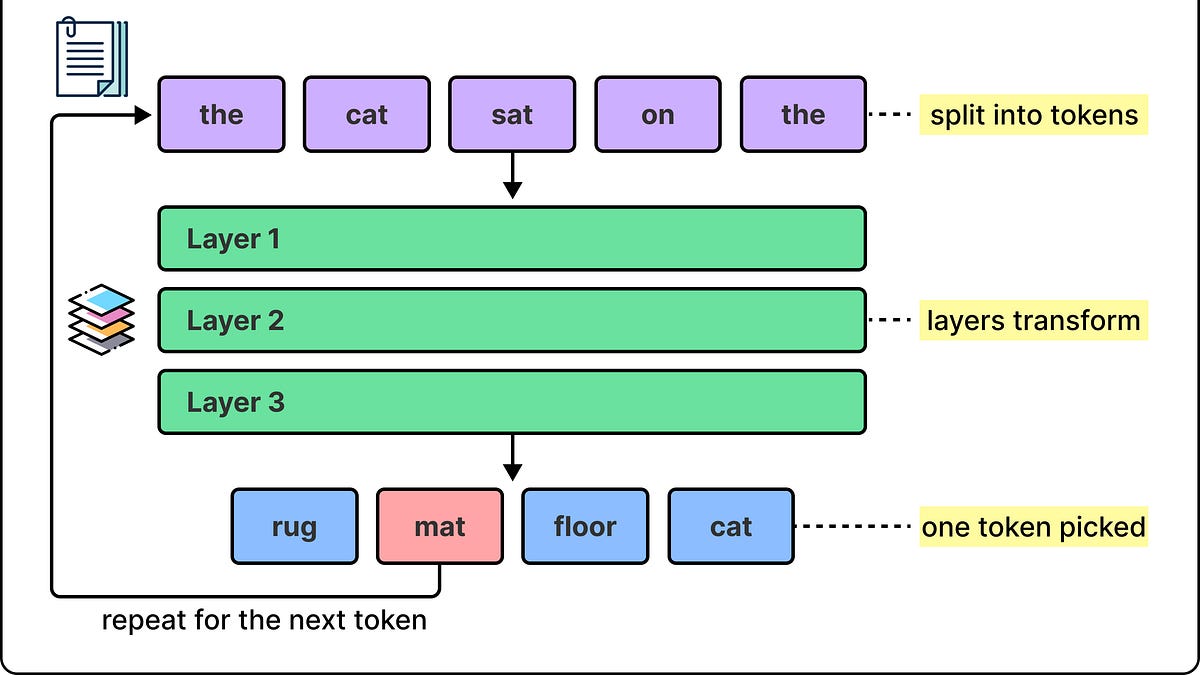
In a language model, the input text is first divided into tokens. These tokens can represent words, parts of words, or even punctuation. The model processes them and produces probabilities for the next token. Once a token is selected and added to the sequence, the generation of text continues.
Producing a complete answer is all about repeating this process.
A couple of points to keep in mind here are as follows:
- Using an already trained model is called inference. The model’s weights normally remain unchanged while it answers a question.
- Training requires additional calculations to update those weights, making the process quite demanding. It requires expensive infrastructure.
This difference helps explain why a model trained on expensive infrastructure can sometimes run on an ordinary computer. The main thing we are discussing here is not the training aspects, but the inference part of a model.
[Webinar] How to stop babysitting your agents (Sponsored) #
Agents can generate code. Getting it right for your system, team conventions, and past decisions is the hard part. You end up wasting time and tokens in the correction loops.
More MCPs, rules, and bigger context windows give agents access to information, but not understanding. The teams pulling ahead have a context layer to give agents exactly what they need for the task at hand.
Join us for a FREE webinar on Sep 23 to see:
- Where teams get stuck on the AI maturity curve and why common fixes fall short
- How a context layer solves for quality, efficiency, and cost
- Live demo: the same coding task with and without a context layer
If you want to maximize the value you get from AI agents, this one is worth your time.
What Makes it Difficult to Fit the Model on Smaller Hardware #
Every parameter or weight occupies memory. A value stored using 16 bits requires two bytes. Following from this, 8 billion parameters require approximately 16 GB for the raw weights alone. Temporary calculations, software overhead, and information retained during generation require additional space.
The location of that memory plays a pivotal role. A computer’s RAM is its main working memory. A discrete graphics card has separate memory called VRAM. A desktop with 32 GB of RAM and 8 GB of VRAM doesn’t automatically provide one equally fast memory pool with 40 GB of space. Though computers with unified memory do share memory between processors, they still face capacity limits.
A large SSD can hold the model file. However, executing the model requires its data to reach the processor. If we constantly have to retrieve weights from storage, it is much slower than keeping them in working memory.
Either way, memory capacity is only one of the constraints. Neural networks also perform a large number of multiplications and additions. Though a CPU can execute these operations, a GPU is much more effective at performing many similar numerical operations in parallel. However, a GPU still needs sufficient memory and support for the numerical operations used by the model.
Lastly, even when a model fits in memory, the processor must read its weights and other information quickly enough.
Memory bandwidth measures how much data can move between memory and the processor in a given time. For many workloads involving one user generating text, moving model data becomes a major limit.
Text generation and inference also has two stages:
- During prefill, the model processes the supplied prompt, which allows considerable parallel work.
- During decoding, it produces output tokens in sequence.
These stages can have different bottlenecks. A model can fit in memory and still respond too slowly to be useful.
Why Make the Effort to Run Locally? #
Local execution can make existing hardware useful for experimentation and reduce dependence on rented computing resources. This can matter for private documents and proprietary source code.
Offline availability matters for desktop assistants, remote installations, and products that cannot assume a reliable internet connection. Local execution also gives developers more control over model versions and application behavior.
However, local execution is not automatically cheaper for every workload.
Hardware, electricity, maintenance, and response speed all matter. Occasional use of a hosted service can be economical, while frequent use may make local hardware more attractive. The comparison depends on the actual application.
Let us now look at a few techniques that can help run a big model on cheap hardware.
Quantization: Give Each Weight a Smaller Representation #
Quantization reduces the precision used to represent numerical values. In a simplified scheme using steps of 0.1, the value 0.73 could be approximated as 0.7. The approximation introduces an error, but that error may be small enough for the application to tolerate.
See the diagram below that shows the process of quantization:
Real methods map weights onto a smaller set of possible values. For example, a 4-bit code has sixteen possible values. Groups of weights can use separate scaling information to map these codes onto appropriate numerical ranges.
The potential savings are substantial. An 8B model whose weights require 16 GB at 16-bit precision has a raw weight size of approximately 4 GB at 4-bit precision. Reducing the theoretical weight size from 16 GB to 4 GB can leave room for other allocations. Its parameter count remains unchanged. But each parameter is stored more compactly.
The tradeoff is a possible degradation in answer quality. The extent of this degradation depends on the model, compression method, and the task at hand. A configuration that handles ordinary conversation well may perform less reliably on particular coding problems.
Lower precision also does not guarantee a proportional speed improvement. Some implementations store 4-bit weights while performing calculations at higher precision. Efficient execution depends on hardware support and the software handling those conversions.
Quantization can be applied after training. This is known as post-training quantization. However, training can also account for the errors it introduces. Application developers often begin with an existing quantized version and evaluate whether its output remains suitable.
Layer-Wise Off: Move Weights as They Are Needed #
Quantization changes how much space weights occupy. Off changes where they reside or where their calculations execute.
During a forward pass, information progresses through the model’s layers. The GPU doesn’t need every layer’s weights at precisely the same moment. A system can keep most weights in RAM, transfer one layer onto the GPU, execute it, and release that GPU copy before another layer. Other layers may remain permanently on the GPU.
This approach is known as layer-wise off. It allows execution without placing the entire model in GPU memory simultaneously. More aggressive arrangements can keep weights on disk and bring them to RAM before execution.
The trade-off with this approach is around repeated movement of data. For example, if a hypothetical setup transfers 10 GB of weights per generation step over a connection sustaining 10 GB per second. Those transfers alone require approximately one second per step. This shows why reducing GPU memory requirements can also make generation much slower.
These transfers may repeat as the model generates successive tokens. A model that produces an answer eventually may still be unsuitable for an interactive assistant. Off systems can improve efficiency by reusing transferred weights across batches of requests, which is quite useful when individual response latency is less important.
Another arrangement assigns some layers to the CPU and others to the GPU. Weights remain with their assigned processor, while intermediate results move between processors. Suitable software can also run a model entirely on the CPU if enough RAM is available.
These approaches make larger models accessible. But their response times must be measured.
Mixture of Experts: Use Selected Parts for Each Token #
Mixture of Experts (MoE) changes the model’s architecture.
In a conventional dense transformer, each token passes through the same major computational blocks. However, in a sparse MoE model, certain blocks contain multiple alternative networks called experts. A small routing network selects which experts should process a particular token.
For example, a layer might contain 8 experts while using only two for each token. Another token can be sent to a different pair. The outputs of the selected experts are combined and passed onward. An expert is usually just a component inside the model, rather than a complete chatbot. Its role is learned during training and need not correspond neatly to a specific subject such as mathematics or history.
MoE introduces a distinction between total parameters and active parameters. Total parameters strongly influence weight storage. On the other hand, active parameters help indicate how much computation happens for each token.
The inactive experts still need to be stored somewhere because later tokens may use them. Keeping all experts resident supports fast execution. Off experts introduces transfer costs. A model with relatively few active parameters can therefore still require substantial memory. For example, if a hypothetical MoE contains 40 billion parameters, four-bit raw weight storage still comes to about 20 GB. A small active subset doesn’t change that storage calculation.
MoE can provide substantial model capacity while doing less computation per token than a dense model with the same total parameter count. However, it cannot automatically make a large model suitable for a low-memory laptop.
Distillation: Let a Larger Model Teach a Smaller One #
Knowledge distillation uses a larger model to help train a smaller model.
The larger model is called the teacher, and the smaller model is called the student. The student learns from information produced by the teacher, such as its predictions. Once training is complete, the student can operate independently.
For example, a large teacher could help produce training examples for a smaller model that categorizes support requests and drafts short responses. The student may learn to perform that particular task well while requiring much less memory and computation. Distillation produces a different, smaller model. It doesn’t mean that the original large model has somehow been stored perfectly inside a smaller file. It is possible that the student model may preserve useful behavior while losing some breadth, reliability, or ability to handle unfamiliar problems. In other words, a strong result on a narrow task doesn’t establish equivalence across all tasks.
Creating the student requires training work, but that cost can be paid once, and the resulting model deployed many times. An application developer can also choose an already distilled model.
Pruning: Remove Work That Contributes Less #
Pruning attempts to remove weights or larger components whose removal causes an acceptable loss in quality.
One approach sets selected weights to zero. This produces sparsity, meaning that many entries in the model’s numerical structures are zero. Another approach removes larger structures, such as groups of computation units or complete layers.
However, setting values to zero doesn’t automatically make execution cheaper. An ordinary array still occupies space when some entries are zero, and standard calculations may continue processing those entries.
Actual savings require an appropriate compressed representation, an execution engine that can skip the removed work, or structural changes that make the model smaller. Hardware support also matters.
Therefore, pruning is useful when the modified model and its execution software work together. Removing too much can damage performance, and additional training may be needed to recover quality.
The Conversation Has Its Own Memory Requirements #
After shrinking the weights, another problem can occur. Short questions work, but a long document causes an out-of-memory error.
During generation, a transformer stores certain intermediate results from earlier tokens in a key-value cache, usually called the KV cache. Reusing these results avoids repeating some previous calculations. The cache is working data for the sequence, separate from the learned weights.
For models that retain cached results for the entire sequence, the cache grows as the sequence becomes longer. Serving several distinct conversations generally requires additional cache memory too. The model file stays the same size while the workload’s memory requirements increase. One solution is to reduce the amount of context supplied.
A document assistant can retrieve relevant passages instead of inserting entire documents. Conversation history can be limited while preserving information needed for the current task.
Another option is to quantize the cache or move some of it into CPU memory. These choices can affect quality or speed.
Better Software Can Make the Same Hardware More Useful #
The inference runtime is the software that executes the model. Its implementation can make a substantial difference even when the weights remain unchanged.
One example is FlashAttention.
Attention is the mechanism that allows a token’s representation to incorporate relevant information from other tokens. A straightforward implementation can create large intermediate structures and move significant amounts of data through GPU memory.
FlashAttention reorganizes this calculation into blocks and makes better use of the GPU’s fast internal memory. It computes exact attention while reducing memory traffic and intermediate storage requirements. It does not reduce the number of model weights.
Another example is PagedAttention, which was introduced with vLLM. It manages the KV cache in blocks, reducing memory wasted through inefficient allocation and duplication. This is especially helpful when serving many requests whose lengths change during generation.
Serving software can also group requests into batches, allowing multiple requests to share the work of reading and using model weights. This can improve total throughput. However, more simultaneous requests also require more working memory.
Speculative Decoding: Propose Several Tokens Before Checking Them #
Speculative decoding addresses the sequential nature of text generation.
In this approach, a small but fast draft model proposes several tokens. The larger target model then evaluates those proposed tokens together. Since the candidate sequence is already available, the target can perform verification with more parallelism than ordinary token-by-token generation permits.
Accepted tokens become part of the output. When a proposal is rejected, the algorithm uses the target model to produce an appropriate correction and continues. The speed improvement depends on how often the draft agrees with the target and the cost of verification.
The target model still needs to run, and a separate draft model can require additional memory. Speculative decoding therefore becomes useful after basic memory requirements have been addressed. It doesn’t by itself make an oversized target model fit.
Conclusion #
Let us return to our example of a system with 32 GB of RAM and 8 GB of VRAM. An 8B model’s theoretical weight requirement falls from 16 GB to 4 GB through four-bit quantization. A compatible runtime, a moderate context, and one active request provide a reasonable starting point for evaluation.

If memory remains insufficient, some layers or cache data can be offloaded. If transfers make generation too slow, a smaller model may deliver a better experience. Each adjustment should be checked against realistic tasks.
An evaluation process should measure answer quality, peak memory use, time to first token, and generation speed. For example, background document processing can tolerate delays that would frustrate a user waiting for code suggestions.
Quantization, off, architectural choices, and execution improvements can work together, but their savings don’t simply multiply. They affect different parts of the workload. The goal is a configuration that meets the application’s quality and response-time requirements within its hardware budget.