Providing our employees access to frontier AI capabilities is a top priority at Databricks, and consequently, it is important to us for them to use new models instantly when they become available. At the same time, it is nontrivial to give more than 10,000 people rapid access to a new model because:
This post discusses a set of techniques we’ve employed to give most employees at Databricks “Day 1” access to new models, while allowing us to assess whether models are indeed good long-term workhorses. These techniques rely heavily on Unity Gateway to adaptively release, evaluate, and incorporate new models. The week of September 21 was a critical test of these abilities when Opus 5, GPT-6 Sol and GPT-Luna were released in rapid succession. During the week, Databricks provided all employees with Day 1 access, and by Day 3, we had gathered enough data to confirm that these models were on the efficiency frontier, leading to their incorporation into our broader infrastructure.
At a high level, new model releases at Databricks go through a pipeline that looks as follows:
To make model management across closed and open model providers easier, we leverage our own Databricks Unity Gateway for all internal use. This is our central hub for AI governance, cost management, and observability, so it's natural that we start here.
The Gateway is where we enable all employees to access the newly released model. Server-side configuration is not enough, though. Our employees are using Claude Code, Codex, and the Omnigent meta-harness on their laptops, and we need to distribute the new model configuration to them.
That's where Unity Gateway CLI (UG CLI) comes in. The UG CLI is already running on everyone's laptop, deployed via our Mobile Device Management. Whenever someone starts Claude Code, Codex, or Omnigent, the UG CLI runs to check for new models, tools and skills, and updates the local harness's configuration. UG also lets us centrally designate default vs. experimental models, prepare models for smart routing, and collect traces to evaluate each model rollout.
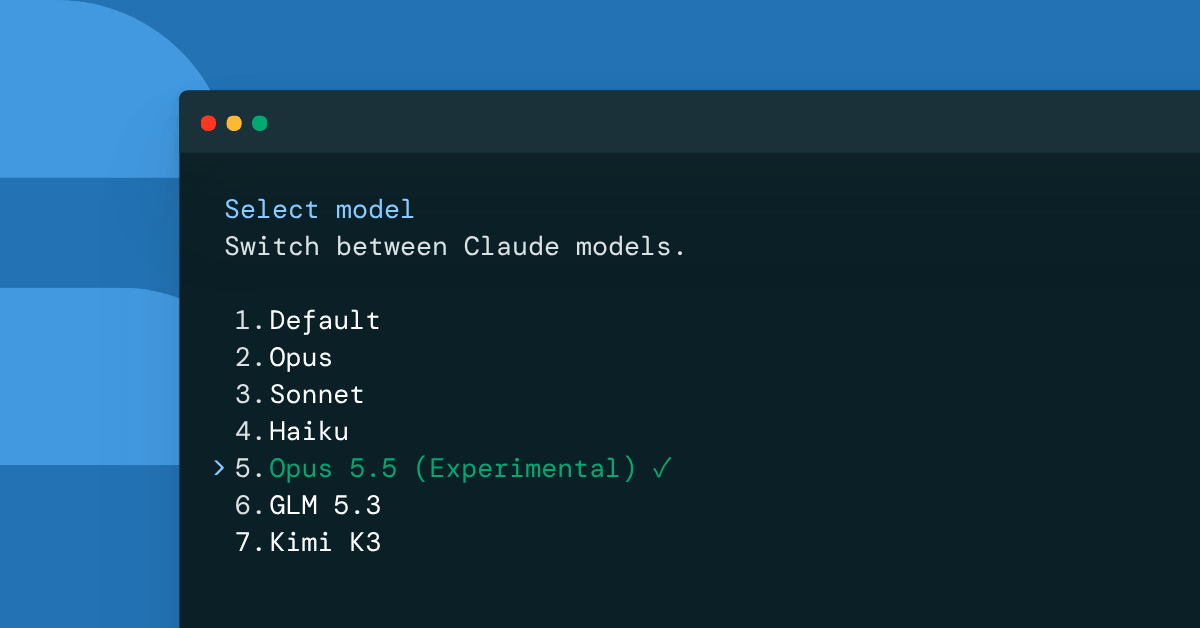
We configured Unity Gateway to push experimental configurations for Opus 5.5 and Sol 6. These models now show up with this tag, so that employees can select it but understand it's a new model that may or may not be best in class or stick around forever:
Claude Code / model output clearly designates Ous 5.5 as Experimental
We have previously written about how we configure per-user budgets for AI spend. Since then, we have expanded our total budget architecture to include four principal budgets, each defined on a per-user basis:
On day one of the model launch, we made Opus 5.5 and Sol 6 available to all employees via Unity Gateway and tagged them for the experimental budget. We then used the next few days to collect data to decide what to do next — drop the experimental tag or remove it from the model catalog that our developers see.
Budget setup overview, reflecting the four budgets
In order to determine whether the model is at the efficiency frontier, we rely on three signals:
For Opus 5.5 and Sol 6, all three metrics tell us a pretty consistent story. Benchmarks, such as our OfficeQA Pro V2, show that Opus 5.5 is clearly on the cost/quality frontier, a huge step up on both axes from Opus 5. GPT-6 Sol scores somewhere in between GPT-5.6 Sol and GPT-5.6 Terra on both cost and quality.
User reports broadly agree that for engineering and debugging tasks (the vast majority of our early adopters are engineers), Opus 5.5 is a big step up in quality from Opus 5 and Opus 4.8, and its writing style is vastly preferred. Whereas GPT-6 Sol is occasionally a downgrade in quality compared to GPT-5.6 Sol.
Cost tracking allowed us to compare early adopters' usage with the same group's usage a week earlier. Maintaining the same cohort proved crucial because early adopters tend to be power users of AI rather than average users.
We wanted to normalize costs to a $/session basis, since users who are trying out a new model will sometimes increase their usage in terms of number of sessions as they experiment. We found that using a basic $/session comparison was still misleading because the distribution of sessions was also changing: early adopters were trying harder problems with the new models than their average session.
As a result, we stratified sessions based on whether they were single- or multi-turn and whether they made any file edits, and then reweighted the distribution accordingly. The table below shows the results for Opus 5.5 vs. Opus 4.8 and GPT-6 Sol vs. GPT-5.6 Sol.
| Cost comparison | Old Model (avg $/session) | New Model (avg $/session) | Delta | | Opus 4.8 vs. Opus 5.5 | $5.94/session (Opus 4.8) | $4.23 (Opus 5.5) | −29% |
| GPT-5.6 Sol vs. GPT-6 Sol | $4.52/session (GPT-5.6 Sol) | $2.34/session (GPT-6 Sol) | −48% | The GPT numbers are not too surprising given that the price was cut by 50%. But we were pleased that Opus 5.5 also represents a significant price reduction for our real workloads, given our prior experience with Opus 5.
We were able to provide employees experimental access to Opus 5 and GPT-6 Sol and Luna on Day 1 of model launch. Within three days, we had gathered enough data to confirm that these models were on the efficiency frontier and decided to move them out of the experimental budget and into standard circulation as generally available models.
Over the next week, we will go a step further for Opus 5.5 to make it the default for Claude Code, given its clear position as higher-quality and lower-cost than its predecessors.
Our experience with GPT-6 Sol suggests that it will not replace GPT-5.6 Sol as the default for Codex. However, we will include GPT-6 Sol in our smart router’s toolkit, given its cost advantage over 5.6 Sol.
Overall, we found this playbook effective at quickly assessing model quality and cost, enabling us to rapidly adopt the latest models that prove their worth. This flexibility matters now more than ever, with new models arriving almost daily.
Subscribe to our blog and get the latest posts delivered to your inbox.