In March 2026, we shipped the Knock Agent: an AI agent for managing all your customer messaging resources in Knock. It can create and update workflows, templates, and audiences, help segment users, and answer questions about how your customer messaging is performing. The agent can be invoked from the Knock dashboard, a connected Slack workspace, the API, or our MCP server.
In this post, we'll take a look behind the scenes at how we architected and built our agent using bash, a virtual file system, and our management API.
Defining the vision for our agent
Our vision was to create an agent that could manage everything that can be accessed from the Knock dashboard. We wanted the agent to create messaging that uses your company's design system, matches the tone of voice, and understands how your data is modeled.
To bring this vision to life, we needed to create a rich agent harness that could access the full breadth of data in your Knock account and use that context while creating your messaging and answering any questions.
We built our first prototype to operate exclusively on workflows, which is a deep domain with plenty of nuance around how it works. We used a tool-per-type pattern, where each tool exposed a primitive from our management API, such as adding a delay step to a workflow, or building an email template using our visual blocks language. The tool description encoded the idiosyncrasies of working with that tool and gave examples, while the tool input described the field types and what was required.
While this worked and led to good results, we realized that this approach would not scale: we'd be exposing a tool per resource in the management API, which would bloat the context window of the agent without us implementing a more sophisticated tool routing layer or introducing a scripting language for the agent to use. Fewer tools, more files
We found a blog from the team at Vercel, "How to build agents with filesystems and bash", where they describe building an agent for d0, their internal data tool. They explain how the filesystem is a great way for an agent to discover the context it needs, and how you can map a domain to a filesystem to power this context layer.
At Knock, we've long had a CLI which enables teams to pull down their Knock resources, such as messaging templates and components, and operate on them locally via the filesystem.
The idea here was simple: instead of exposing tools that mirror our management API, we give the agent a filesystem with the contents of your account, and the ability to use bash to script on top of that filesystem. That way, the agent can explore the filesystem to gather context, using bash to efficiently write scripts as needed.
When the agent wants to make an edit to a workflow or template, it modifies a file in place in the filesystem and calls back to Knock to persist that change.
This pattern is much closer to Claude Code and other coding agents than other in-product assistants, and it fits the philosophy we've already established with our CLI and local-first approach to maintaining your customer messaging.
A bash for agents, in Elixir
Over the 2025 holidays, Malte from Vercel released just-bash. The idea was simple: let agents have a unix filesystem and a bash environment, without booting a Linux image. In practice, that meant creating a virtual bash implementation in TypeScript with a virtual filesystem that an agent could call.
Knock is a company firmly rooted in the Elixir ecosystem. We wanted a virtualized bash interpreter of our own. Our options were to 1) forgo the work we had done on our agent and rebuild it in TypeScript, or 2) port a version of the library to Elixir.
Fortunately, a library like just-bash
is a reproducible target for an agent. It has a well-defined surface area and a thorough test suite covering the commands it supports (jq, ls, cat, etc.) — fixtures our Elixir port reuses verbatim.
In one of the all-time nerd snipes, we convinced agent-pilled friend of Knock, Ivar Vong, to give it a go. Many tokens later, we had a complete bash interpreter and virtual filesystem in Elixir, which he also called just-bash, with an extensive test suite and a robust security model.
Why not a sandbox?
The obvious question: why not give the agent a full computer via a sandbox rather than a virtual filesystem? After all, there are a number of vendors we could have picked to power it.
We believe a full sandbox is—at this stage—overkill for our simple needs. Starting a sandbox comes at a performance cost compared to the virtual, in-memory option, and introduces harder synchronization problems for content and changes made outside our app which we wanted to punt on for now.
We will revisit this decision should the complexity scale tip. Adding a full scripting language (like Python) outside of bash for the agent to write might be the deciding factor. We follow the principle of decoupling the hands from the brain, so moving to a real sandbox should just mean swapping calls to the virtual one for the real one.
Wiring it together
Armed with just-bash
in Elixir and all of the building blocks, we assembled our filesystem-backed agent.
We run a typical agent loop on top of the Anthropic API directly, using different models for the task at hand. That agent loop is backed by a durable workflow that can safely retry steps, using the excellent Oban library in Elixir that backs its state with Postgres.
Within an agent session, we attach a sandbox which includes the just-bash
instance and the full virtual filesystem. A sandbox for us is just another process that runs in our Elixir cluster. Sandboxes are started lazily whenever a request first needs to use the filesystem. This ensures that requests that don't need the filesystem return quick answers with a minimal footprint.
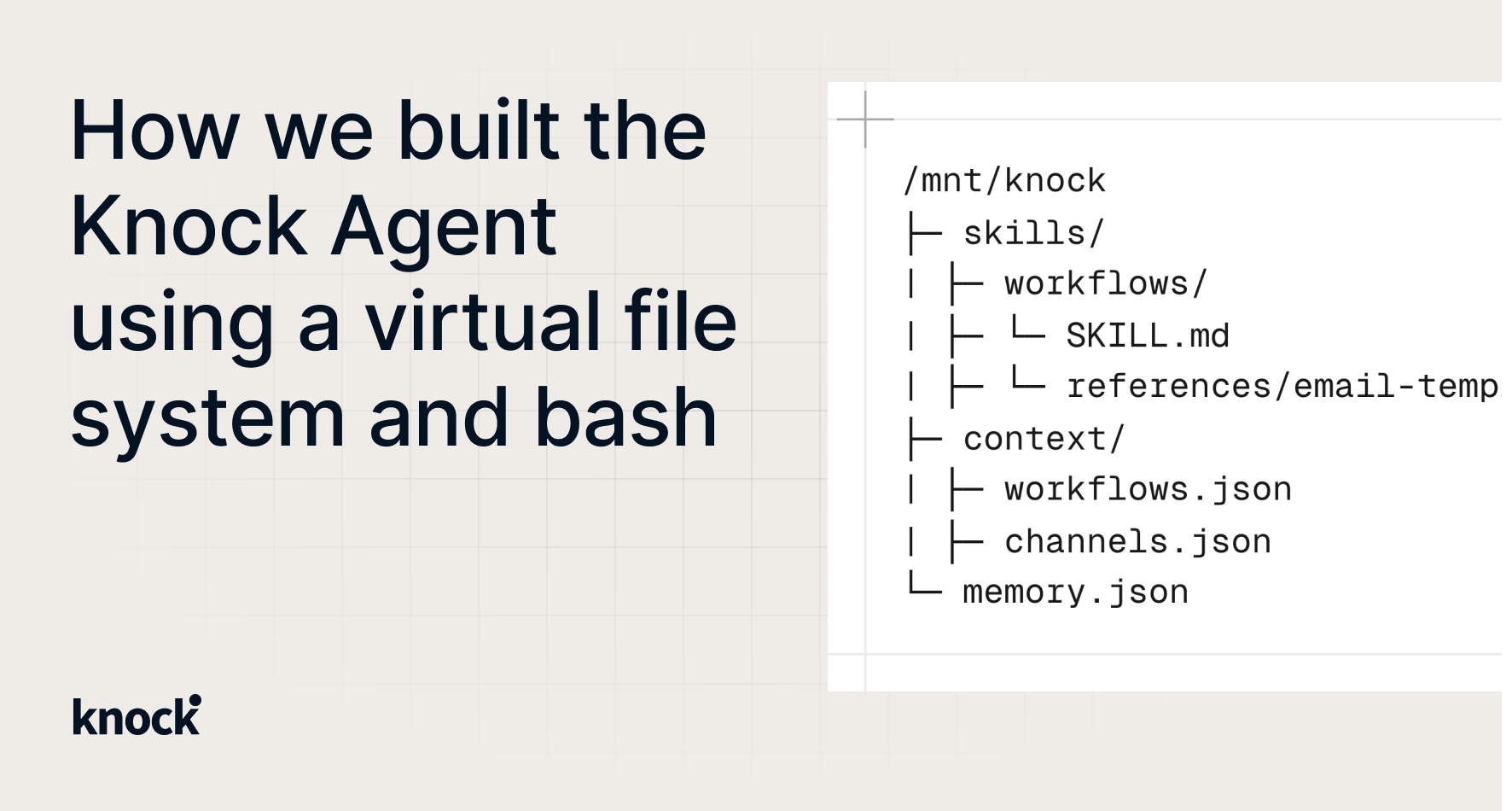
When we don't have an existing sandbox process running, the filesystem is bootstrapped with the metadata of the objects in the account. This ensures that the agent has a full catalog of resources that it needs, but that we can lazily load the full, larger resources before the agent needs to operate on them.
Here's what that filesystem looks like:
When the agent wants to explore specific workflows or templates, it can request that they be loaded into the filesystem in bulk by calling the load_resources
tool.
The sandbox process is long-lived, so subsequent turns will have this content loaded and ready to operate on. This is perfect for multi-turn conversations where you go back and forth with the agent to make a series of updates to a workflow or message template.
We expose a few other tools for the agent to work with:
bash
– executes bash commands.read_file
– reads a file from the filesystem, preferred overcat
.edit_file
– makes a targeted edit to a file (replace string x with y).write_file
– writes an entire file to the filesystem.upsert_resource
– persists changes made on a resource in the filesystem back to Knock.
The only tool of note here outside of file operations is the upsert_resource
tool. It persists filesystem changes back to the Knock account by reading a bundle stored on the virtual filesystem and calling the same internal methods as our management API.
Our agent loop emits a full event log of the prompt it received, actions it performed, and the response it sent. This event log is buffered in memory and written asynchronously to a Postgres store as the agent executes. The event log is compacted and formatted for subsequent turns to preserve context. We format and stream the log to connected clients using an NDJSON stream.
Teaching the agent new skills
We started with a single domain that the agent could manage—workflows and templates—but we knew we wanted our agent to be able to work with everything in Knock.
At first, we put all the product information about workflows and templates into the system prompt, but we knew that wouldn't scale. Instead, we moved resource-specific information into skills that the agent could "learn," and steered the agent to read those skills before it edits a resource.
Each skill includes the necessary information the agent needs to understand the nuances of working with that resource, as well as common pitfalls to avoid. Skills are available on the filesystem and are baked into the system prompt at invocation time so the agent knows about the full breadth of skills available to it.
When the agent wants to learn a new skill, it calls the skill
tool. This ensures that the full metadata of the skill is retrieved and added to the agent's context window, and gives a convenient way for us to evaluate and monitor that the agent is following its skills.
We also introduced customer-defined skills in the same manner, so skills can be a mix of system and customer-defined, each loaded into the system prompt for discovery, and into the filesystem for access.
CLI over tools
Not all of the data within your Knock account is well-suited to be represented as static files. Take the logging data Knock generates. This is best served by a query the agent can run at execution time to fetch a page of scoped logs.
Instead of introducing even more tools to expose every resource within Knock to the agent, we introduced a CLI to the agent as a custom command (knock
), registered to our just-bash
instance.
Now, when the agent wants to query API logs (or workflow run logs to aid with debugging), it can call knock api_logs list
or knock messages list
. We teach the agent how to work with the CLI via a debugging skill, but because the CLI exposes a --help
command for each resource, it's easy for the agent to learn to operate with minimal steering and a high degree of success.
Observability and evals
Like any production system, we wanted good visibility into what the agent is doing and how it operates, as well as a test suite to verify its behavior.
For observability, we emit traces from the agent loop in standard OpenTelemetry format. We forward these traces to both Honeycomb and Braintrust. Braintrust is useful as a tool to do deeper analysis of agent sessions, while Honeycomb is our go-to for our service traces. On the evals side, we built a homegrown evals system based on the insights shared in the excellent post by Anthropic, "Demystifying evals for AI agents". Our evals measure trajectory, check the outcome has one or more expected properties or shape, and score the output using an LLM-as-judge. We run our evals nightly and measure on a pass^k to ensure accuracy of our agent on common tasks.
Future improvements
We're excited to continue to invest in our agent, on top of this filesystem-based foundation. Some future improvements we're considering include:
Introducing better compaction for long-running agent sessions. We currently have some naive mechanisms here but want to refine our session summarization logic so that our agent can work on long horizon tasks.Improving the breadth and depth of our evals. We've focused primarily on the most common operations to start, but we're looking to add more cases to our evals, especially for more complex workflow building and editing.Exploring subagents for focused work. We're evaluating how subagents could handle context gathering, analysis, and other discrete tasks outside of the main agent loop.
Our filesystem-backed agent provides a solid foundation for us to iterate on as we expand the capabilities of what our agent can do. Using the filesystem as an efficient context retrieval mechanism has enabled us to ship an intelligent agent that can perform the complex tasks we're seeing customers ask in production. We've already expanded the agent surface to be invoked from the API, Slack, and our MCP server and look forward to adding more capabilities to the agent in the future.