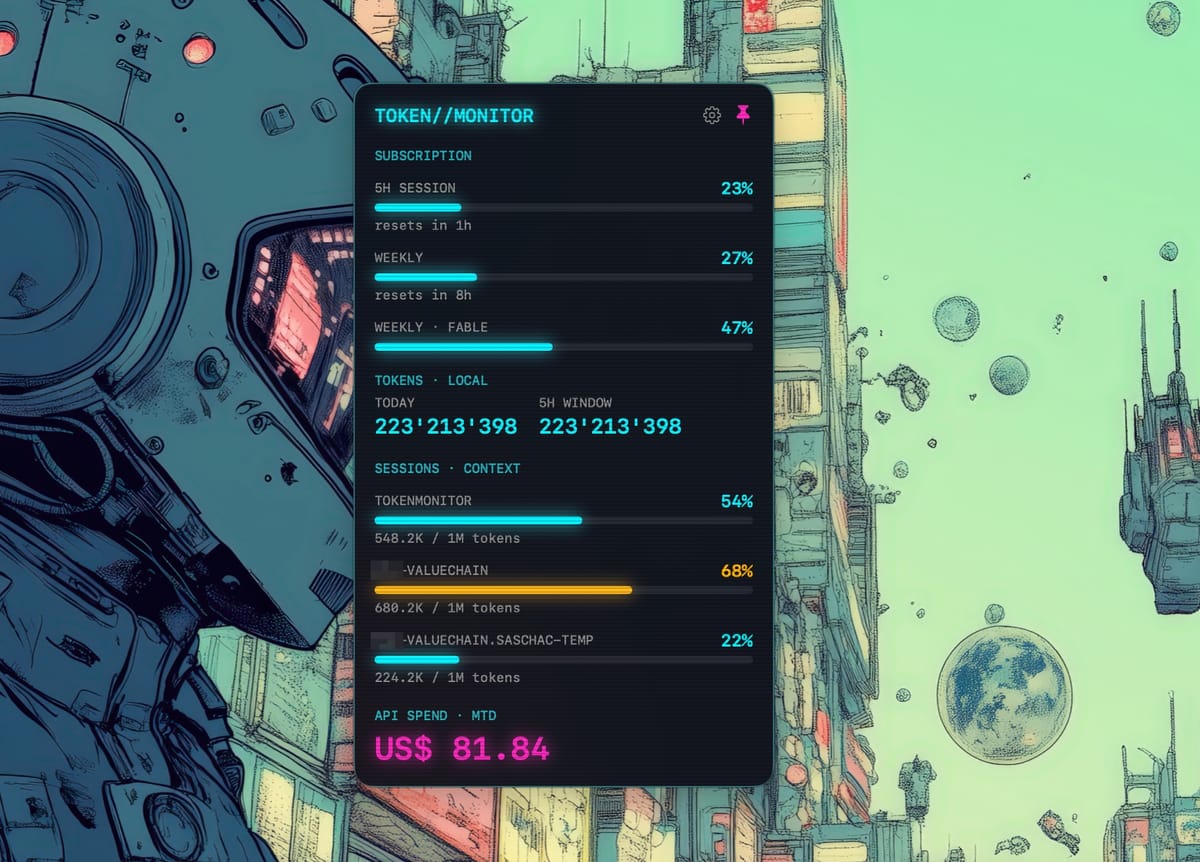
How a weekend itch turned into a notarized, cyberpunk-styled menu-bar app — and what I learned about undocumented OAuth endpoints, JSONL transcript spelunking, and the dark corners of NSPanel.
Why #
If you use Claude Code a lot, you live with three nagging questions:
How close am I to my 5-hour and weekly subscription limits? The CLI shows this if you ask, but I wanted it glanceable, all the time.How full is the context window of each session I have running? With multiple terminals open, one of them is always creeping toward compaction — and you only find out when it happens.What is my Anthropic API spend this month? Separate from the subscription, easy to forget, occasionally alarming.
There are excellent terminal tools in this space (ccusage being the best known), but I wanted a native macOS menu-bar app: always visible, pinnable above every window, zero terminal real estate, and — because dashboards should be fun — styled like a cyberpunk "Neon HUD" with glowing gauges and CRT scanlines.
So TokenMonitor was born. It shows:
Subscription usage— 5-hour session %, weekly %, and per-model weekly limits** Local token counts**— today and the current 5-hour window** Active sessions**— one gauge per running Claude Code session, showing context-window fill (e.g.533.9K / 1M tokens
)API spend— month-to-date, via the Admin API
Fittingly, the app was built almost entirely with Claude Code — including the feature that watches Claude Code.
How it works #
Where the data comes from
TokenMonitor has four independent data sources, and the core architectural rule is that each one is allowed to fail without taking the others down:
| Source | Mechanism |
|---|---|
| Subscription usage | Claude Code's own OAuth token (read from the Keychain) against the usage endpoint |
| Local token counts | Parsing ~/.claude/projects/**/*.jsonl transcript files |
| Active sessions + context | Tail-parsing the newest usage entry of each recently-written transcript |
| API spend | Anthropic Admin API cost report, with an Admin key you provide |
| Context windows | Anthropic Models API (/v1/models ), fetched once per launch |
The subscription endpoint is undocumented — it's what Claude Code itself uses. I verified it with a quick spike before building anything on top of it, and the provider is written to degrade to "unavailable" the day it changes. Rule of the codebase: never crash because a data source moved.
The interesting part: per-session context gauges
Claude Code appends to a session's .jsonl
transcript in real time — one line per event, and every assistant message carries a usage
block. That means the current context size of a session is simply, from its newest usage entry:
context = input_tokens + cache_read_input_tokens + cache_creation_input_tokens
TokenMonitor scans the transcript tree, treats any file written in the last 5 minutes as an active session, and reads only the last 256 KB of each file backwards until it finds a usage entry — transcripts grow to tens of megabytes, and nobody wants a menu-bar app that re-reads all of them every 30 seconds.
Two gotchas surfaced immediately in real use:
Background Agent SDK sessions. Tools like claude-mem spawn headless SDK sessions in your project directory. They have their own transcripts and context windows, so the panel showed "duplicate" rows with the same project name and different percentages. The fix: transcript entries carry anentrypoint
field (cli
vssdk-py
), so SDK sessions are filtered out.Wrong context windows. I initially hard-coded 200k for everything. Then a session showed 649k of context — impossible. Current models (the Claude 5 family, Opus/Sonnet 4.6+) have1M-token windows. Instead of chasing a hard-coded table forever, the app now queries the Models API at launch (it happily accepts Claude Code's OAuth token) and readsmax_input_tokens
per model, with a static fallback for offline use. New model launches need no app update.
Native shell, honest panel
The UI is SwiftUI hosted inside a hand-rolled, non-activating NSPanel
— not MenuBarExtra
, which can't reliably float above full-screen apps or pin. Details that took real debugging:
- The panel
auto-sizes to its content(
NSHostingView.preferredContentSize
) and keeps itstopedge anchored under the menu-bar icon, so the session list grows downward and shrinks back. - Menu-bar managers (Ice, Bartender) park hidden status items
offscreen—NSScreen.main
can even benil
for a non-activating app — so the panel clamps itself into the visible screen frame rather than opening 60 points above your display. - Left-click toggles the panel; right-click shows a transient About/Quit menu (assigned only during the click, so left-click keeps working).
Engineering setup
Swift 6 strict concurrency, all data-layer typesSendable
TokenMonitorKit— an SPM package holdingalllogic (parsers, API clients, aggregator), zero AppKit imports, fastswift test
loop (41 unit tests)Thin app shell— status item, panel,@Observable
view models that own the polling (30 s local, 60 s network, exponential backoff)XcodeGen— the.xcodeproj
is generated fromproject.yml
and gitignoredTest-driven throughout— every feature and bug fix in this app started life as a failing test, including the SDK-session filter and the context-window mapping
Signing and notarization
Release builds are signed with a Developer ID Application certificate, hardened runtime, and a secure timestamp, then notarized with notarytool
and stapled. The non-obvious flags that make notarization pass: CODE_SIGN_INJECT_BASE_ENTITLEMENTS: false
(no debug get-task-allow
entitlement) and OTHER_CODE_SIGN_FLAGS: --timestamp
. Gatekeeper verdict on the shipped app: source=Notarized Developer ID
.
How to use it #
Download the latest release (see below), unzip, dragTokenMonitor.app
to Applications, launch.Keychain prompt: on first launch macOS asks to let TokenMonitor read the password for "Claude Code-credentials" — click** Always Allow**. The app reads Claude Code's OAuth tokenread-onlyto query your subscription usage. (Approval is tied to the app's code signature, so it persists across launches of the same signed build.)Optional — API spend: generate an Admin API key (sk-ant-admin…
) in the Anthropic Console and paste it into the app's settings (gear icon). The key is validated live against the API before it's stored in your Keychain. Without it, everything else still works.Pin the panel with the pin button to keep it floating above all windows; unpinned, it closes on an outside click.- Watch the SESSIONS · CONTEXT gauges as you work — cyan is comfortable, amber means the window is filling, magenta means compaction is around the corner.
There's no Dock icon (LSUIElement
) — the app lives entirely in the menu bar. If you use a menu-bar manager, set TokenMonitor to "Always show".
Download #
Releases:github.com/TechPreacher/TokenMonitor/releases— signed and notarized, currently v1.1.0Source:github.com/TechPreacher/TokenMonitor— MIT licensed
Requirements: macOS 15+. Build from source with Xcode 26+ and XcodeGen (xcodegen generate
, then build the TokenMonitor
scheme).
Caveats, honestly #
- The subscription usage endpoint is unofficial and may break without notice; the app degrades to local transcript data if it does.
- Context percentages are derived from transcript usage entries — they track what the API reported for the lastturn, so they lag by one message. - Not affiliated with or endorsed by Anthropic. The app reads your own local data and calls Anthropic APIs with your own credentials.