OpenSpec Desktop is now in early beta. A new way to explore changes, review specs, and work with your existing coding agents. Download link at the bottom.
This early release is for people already using OpenSpec. It needs the OpenSpec CLI installed and set up in your project. If you're new to OpenSpec, start with the CLI for now. We're working on a better path for new users.
Why we built this #
As coding agents become more capable, we've been thinking a lot about how developers can stay involved in the decisions that matter.
Generating specifications alone doesn't solve the problem. Agents can produce a well-defined specification built on assumptions that don't match what we intended. Getting that right still requires human judgment, and we think there's an opportunity to build a better interface for applying that judgment.
That's why we're building OpenSpec Desktop. We want to help developers better understand the work being done, stay involved in the decisions being made, and ultimately have greater confidence in what agents produce.
How it fits in #
Our initial release works with Claude Code, Codex, GitHub Copilot, and OpenCode. We've spent the most time with Claude Code and Codex, so we'd especially like to hear how it goes with GitHub Copilot and OpenCode.
We've tried to keep the workflow as close to the existing OpenSpec experience as possible, with a few changes to make better use of the desktop interface.
Explore, plan, and implement #
Exploration now maintains a running view of what you're working through. Think of it as a small HUD that helps you keep track of what's been decided, what's still open, and where you are in the process. This is particularly useful for longer exploration sessions where it's easy to lose track of earlier discussions.
At any point during exploration, you can start drafting a change. You don't necessarily need to finish exploring first.
The app gives you an initial view of the capabilities you're adding or modifying, so you can start shaping the scope of a change before writing anything to disk.
From there, the agent can work through the requirements, which you can review and refine directly in the app.
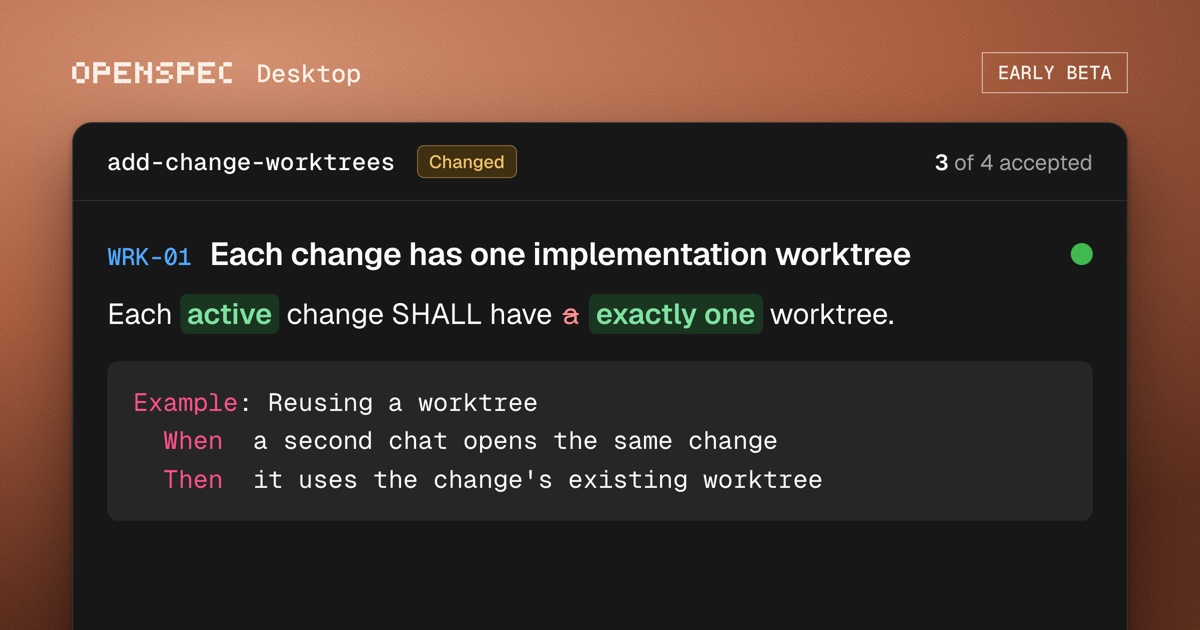
We've added OpenSpec-specific views to make this easier. Rather than working entirely through chat or reading generated Markdown files, you can navigate through requirements, annotate them, and make changes using a more focused review interface.
Once you're happy with the requirements, you can pass them into a new chat to begin implementation.
The idea is to make it easier to move between exploration, specification, and implementation, while keeping the developer involved in the decisions along the way.
Still an early beta #
OpenSpec Desktop is currently available for macOS. Windows support is coming.
There are still a few rough edges and missing features. This is still experimental and unpolished. Expect the interface to change as we try different approaches and learn what works. It doesn't replace everything in the CLI yet.
For now, you'll need to have the OpenSpec CLI installed and set up in your project before using the desktop app.
We're also still working through support for custom schemas. There are a lot of different configurations in use, and we haven't been able to test every variation. If you're using a custom schema and something isn't working as expected, please let us know.
What's coming #
We'll continue building out the desktop experience, including better archive management, syncing, spec generation, and change validation.
We're also exploring features for teams to better coordinate work across the entire lifecycle, from initial intent through to a shipped PR.
We'd love your feedback #
This is still an early release, and there's a lot we want to experiment with.
We're particularly interested in hearing what works, what doesn't, and what you'd like to see next.
You can submit feedback and feature requests directly from the bottom-left corner of the desktop app, or in our Discord.
We'll be reading these closely. Everything you submit will be read by an actual human on our team.
Install #
$ curl -fsSL https://openspec.dev/install.sh | sh
- macOS only (Apple silicon), Windows soon
- requires an existing OpenSpec CLI installation
- requires GitHub sign-in
- unsigned for now (Apple hasn't verified this build, so you're trusting the download from us. Signed builds are coming.)
- macOS may ask for your keychain password to access your saved sign-in. Expect this again after updates while builds are unsigned.
Give this a try #
Start a chat with /explore and work through a change. The Exploration keeps your decisions and open questions beside the conversation.
When you're ready to propose it, click Draft for an outline of the changes, capabilities, and requirements. Keep exploring and ask the agent to update the draft until it captures what you mean.
Click Review to work through the full requirements and design. Leave comments, review the agent's edits, and accept what you agree with. Create writes the OpenSpec change to your project.
Then choose your coding agent and click Build to apply it.