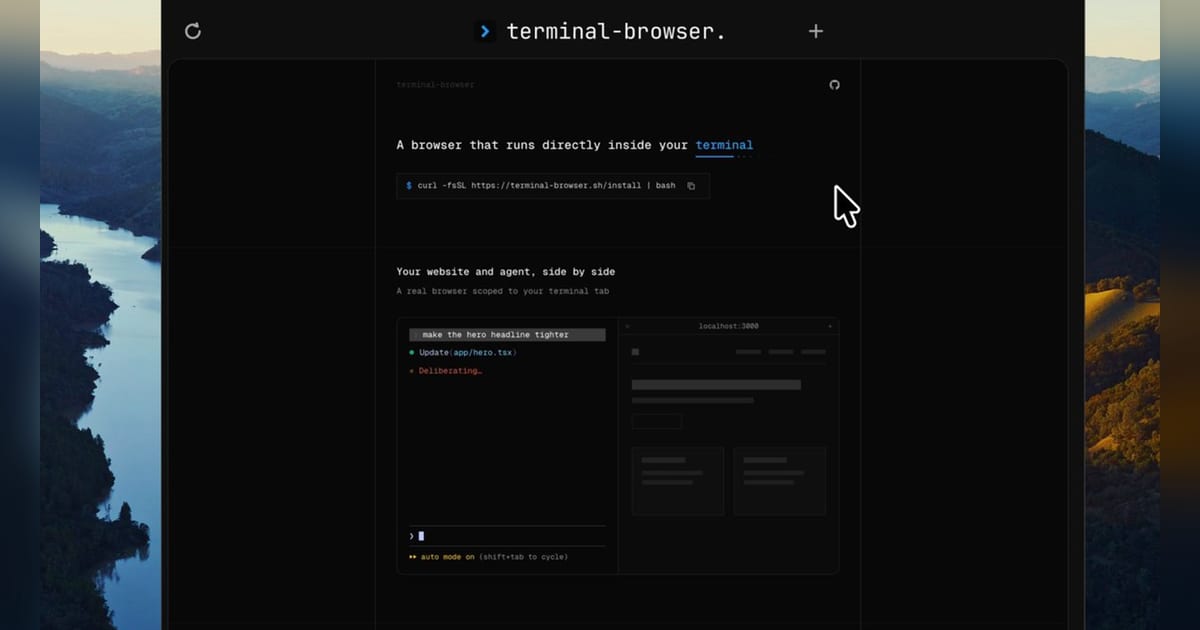
Rob Pruzan (@RobKnight__), founder of San Francisco developer-tools maker Zenbu, released terminal-browser on Thursday, July 30th, putting a Chromium browser inside the same terminal where developers run coding agents.
https://x.com/robknight__/status/2082859704955642254?s=46 In a thread on X, Pruzan demonstrated a developer previewing a local website beside an agent, opening an agent-generated HTML plan in a split pane and giving the agent command-line control over an active browser. He published the source code and implementation notes under an open-source license.
Pruzan is building Zenbu alone. Y Combinator lists Zenbu in its Spring 2026 batch with a team size of one. Before starting Zenbu, Pruzan worked on Vercel's Next.js team, where he says he built an internal development environment. He also co-authored React Scan, an open-source React performance tool whose repository has accumulated more than 21,000 GitHub stars.
That background explains terminal-browser's narrow focus. Pruzan is treating the browser as a component of an agent development environment rather than a separate destination for manual browsing. Zenbu's broader product is an extensible IDE for managing coding agents, and Pruzan described it in YC's launch materials as "the IDE I wanted" for his own daily work.
A browser scoped to the terminal tab
Developers can launch terminal-browser directly, open a specific URL or create a split pane with commands such as terminal-browser
, `terminal-browser open <url>`

and `terminal-browser --split right`
. The terminal-browser ls
command returns open browser instances, while terminal-browser action
exposes those running instances to an agent-compatible command-line interface.
The distinction matters when an agent is editing and testing a web application. A developer can keep the agent, shell process and live preview within one terminal tab instead of tracking a separate browser window. Pruzan's demo shows an agent opening a checkout page and interacting with it, a workflow aimed at visual inspection and browser-based QA during code generation.
Pruzan also built HTML planning into the pitch. A developer can ask an agent to write a plan as an HTML file and open it beside the conversation, replacing a plain-text plan with a rendered document that can include richer formatting and controls. The website demonstrates an approval button inside one such plan, although terminal-browser's public materials do not describe a standardized approval protocol between the page and the agent.
The project supports remote development as well. Zenbu says terminal-browser can display a site running on a machine reached over SSH without requiring a separate port-forwarding workflow. The browser process runs near the remote application while its output appears in the developer's local terminal.
Chromium pixels without a browser window
Terminal-browser uses the kitty graphics protocol to send images to terminals capable of displaying pixels. The project's documentation names Ghostty, Kitty, cmux and VS Code among the compatible terminals, while the product site also lists WezTerm.
Underneath, terminal-browser uses Electron's offscreen rendering API to access output produced by Chromium and pass those pixels to the terminal. Mouse positions, clicks and keyboard events travel in the opposite direction as synthetic Chromium input. On macOS, the implementation also includes a background Swift component for input events, including trackpad gestures, that the terminal does not expose directly.
Pruzan built the browser shell with a Rust graphics engine and defined its interface in React through a custom renderer, according to the repository documentation. The README still lists Linux support, Chrome extensions and a design mode on the roadmap, an indication that the release remains early. The repository showed 429 stars, 18 forks and 80 commits on July 31st.
An agent-workflow wedge into an existing category
Browsers have run in terminals for years. Carbonyl, which has more than 19,000 GitHub stars, runs a modified Chromium build in a terminal and supports media, WebGL and WebGPU. Browsh uses Firefox to render modern websites as terminal-friendly text and graphics, with remote access and lower-bandwidth browsing as its core use cases.
Pruzan is pursuing a different workflow. Terminal-browser preserves a pixel-based Chromium view while adding split panes and command-line control for coding agents. He told one user that terminal-browser trades frame rate for fidelity compared with Carbonyl and argued that its Chrome base gives agents access to stronger debugging tools.
Agent-focused projects such as Browser Use already let models click, type, fill forms and test websites. Terminal-browser applies that control to a browser the developer can see inside an existing terminal session. The developer and agent operate against the same visible instance rather than handing the work to a detached automation process.
Zenbu's bet is that coding agents will pull more of the software-development loop into terminal-based workspaces. Browser preview, planning and QA are three of the remaining tasks that routinely force developers back into separate graphical applications. Terminal-browser gives Pruzan a standalone open-source product for testing whether those functions belong inside the agent workspace he is building around Zenbu.
YC's published standard deal invests $500,000 in each accepted batch company: $125,000 for 7% and another $375,000 through an uncapped most-favored-nation SAFE. For a one-person Zenbu, that structure provides capital to turn terminal-browser from a technical demonstration into a maintained part of a broader agent IDE.