AI makes ad hoc operational work so easy that we stop building the tools around it.
Why write a script when you can just ask Claude or Copilot to restart the canary? Why build a dashboard when ChatGPT can summarize today’s deploy status in 15 seconds?
Because that 15-second conversation, repeated by 50 engineers 20 times a day, stops being convenience and starts becoming a tax.
Let’s walk through a real example: restarting a canary deployment.
Manual AI-assisted workflow:
- You: “Check the health of the canary deployment for payment-service”
- AI: calls monitoring API, returns data (~800 tokens)
- You: “It looks unhealthy, restart it”
- AI: calls deployment API, confirms restart (~600 tokens)
- You: “Monitor it for the next 5 minutes and confirm if it stabilizes”
- AI: polls metrics, returns confirmation (~900 tokens)
That’s ~2,300 tokens per restart. Three restarts a day across a team = ~200k tokens/month. For a task that takes one CLI command.
Now compare:
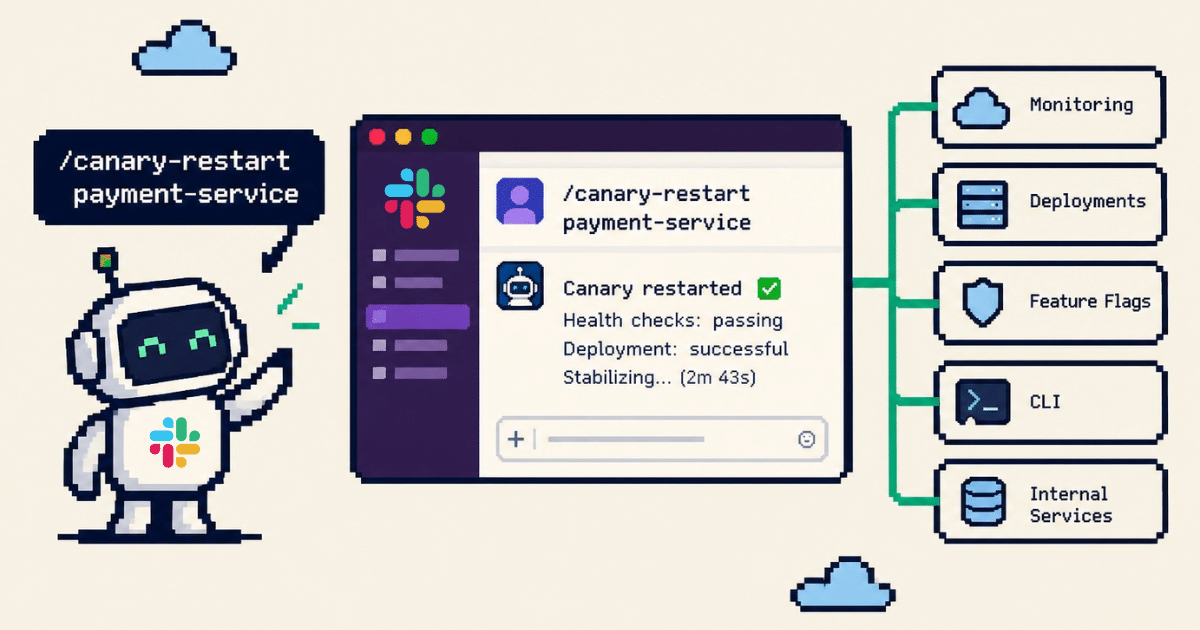
/canary-restart payment-service
One message, zero AI tokens. The bot routes the intent to an internal tool that handles health checks, restart logic, and confirmation, all without an LLM in the loop.
Use AI to build the tool once, so you don’t keep paying for the conversation.
Why Slack? #
Because that’s where the work already happens.
Incidents get declared in Slack. Deploy notifications land in Slack. Someone pings you in Slack asking “is prod healthy?” The response to that message shouldn’t require opening a terminal, switching to a dashboard, or navigating to another tool.
Your team already works in Slack, so your commands, context, and decisions should live there too, directly connected to the machines.
The alternative is telling every engineer: “When something breaks, leave the place where your team is coordinating, open a different tool, figure out what command to run, then come back here to tell everyone what happened.” We’ve been doing that for years and it’s never been good. We just didn’t have a better option.
The bot is there to connect, not to decide #
This is where most Slack bot projects go off track: they pack business logic directly into the bot itself. Message handlers start calling APIs, transforming data, and handling retries, and before long the bot turns into a monolith.
The Slack bot should be thin. It does exactly three things:
- Parse the incoming command or message
- Route it to the right internal service
- Format the response back to the user
No business logic, no database queries, no retry loops, and no secret management.
The actual work lives in your internal tools and services. The same ones your GUI calls, your MCP server exposes, your CLI wraps, your CI/CD pipeline triggers. The Slack bot is just one connector among many.
The tool service owns the business logic. Every connector, GUI, MCP, Slack, CLI, is a thin shell that calls the same service. Write the logic once, expose it everywhere.
Choose configuration over code for adding tools #
If adding a new Slack command requires a PR, a deploy, and someone from the platform team to review it, you’ve already lost. It won’t get done.
Adding a tool should be a configuration change:
tools:
  - name: canary-restart
    description: "Restart a canary deployment"
    endpoint: http://tool-service/internal/canary/restart
    parameters:
      - name: service
        type: string
        required: true
    acl:
      - platform-team
      - oncall

  - name: feature-flag
    description: "Toggle a feature flag"
    endpoint: http://tool-service/internal/feature-flags/toggle
    parameters:
      - name: flag-name
        type: string
        required: true
      - name: environment
        type: string
        default: staging
    acl:
      - developers
The bot reads this config, registers the slash commands, and routes them. The tool service behind those endpoints can be built and deployed independently, by any team, in any language, on any cadence.
This separation means:
- The ops team owns tool-service deployments and logic
- The platform team owns the bot and routing config
- Any engineer can propose a new tool by opening a config PR
- No one ever modifies bot code to add a capability
The bot becomes part of the infrastructure (quiet, reliable, and rarely changed). The tools behind it keep moving forward.
This is what it looks like in practice #
Incident response, today without a bot:
Alert fires, someone opens PagerDuty, 5 people join a Slack huddle, one person shares their screen navigating dashboards, someone else runs CLI commands, results copy-pasted back to the thread.
Incident response with a bot connector:
Alert fires, /incident declare payment-service-health-check-failing, bot creates incident channel, rolls back the canary, posts the deploy diff, pings the on-call, everyone joins the channel with full context already there.
Feature flag management, today:
“Can someone toggle the new checkout flow to 10% in staging?”, wait for platform team to wake up, ticket, CLI command, “done”.
Feature flag management with a bot connector:
/feature-flag new-checkout-flow --env staging --rollout 10, bot calls the feature-flag service, responds with confirmation, done in 3 seconds.
None of these Slack commands contain business logic. They all call the same internal services your MCP server, admin GUI, and CLI already use. The bot is just the most accessible surface.
Practical takeaways #
| Principle | Why |
|---|---|
| Build tools, not conversations | A tool costs you once. A conversation costs you every time. |
| Slack as the pane of glass | Don’t make engineers leave the coordination layer to do the work. |
| Bot is connector, not brain | Business logic in shared services. Bot only routes and formats. |
| Tools as config | Adding a command shouldn’t mean deploying the bot. YAML config, picked up live. |
| One service, many surfaces | Same tool service behind GUI, MCP, Slack, CLI. Write once. |
| ACL on every tool | Not every slash command is for every user. Build access control in from the start. |
Put operational logic in internal services, not Slack bots or CLIs #
This isn’t about Slack bots, MCP servers, GUIs, or CLIs. They’re all just ways to connect things. What really changes is this:
Stop scattering operational logic across interfaces. Centralize it in internal services. Then build whatever connector makes sense for the context. Slack for incident coordination, MCP for AI agents, GUI for exploratory work, CLI for automation.
And when someone asks “can we add that to the bot?”, the answer should be yes, and it should take 5 minutes and a config change, not a sprint. If it can’t, the architecture is wrong.