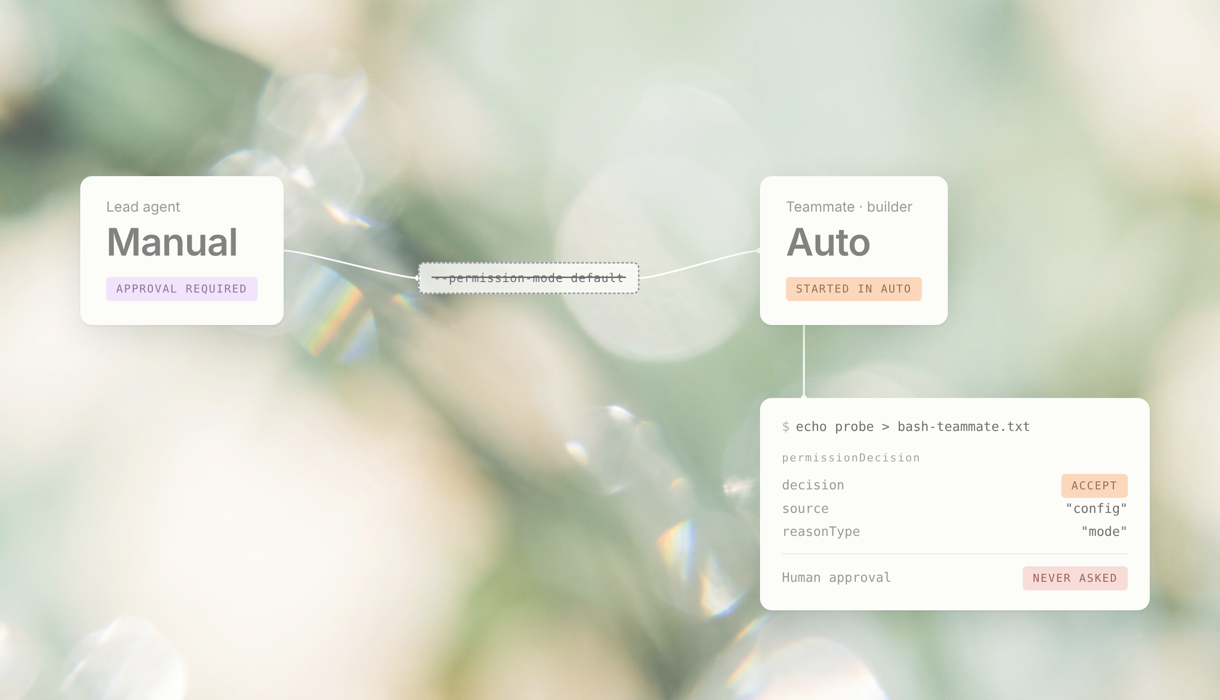
We set Claude Code to manual mode and asked a lead agent to delegate a task. The teammate started in auto mode, and its file write was approved without a human prompt.
We didn’t expect a tiny test file to lead us to Anthropic’s security team. But that’s exactly where this research took us.
We independently uncovered and reproduced a permission flaw in Claude Code Agent Teams, reported it privately to Anthropic, and received a thank-you from their security team for our investigation. Anthropic later released a fix for the same issue.
Auto mode had already become the default for many new Claude Code sessions. So when a developer deliberately chooses Manual instead, there’s probably a reason. They want to review and approve commands before they run.
In our research, that choice quietly disappeared when a lead agent delegated a routine task.
At Bluebear, we study the security of autonomous AI agents working inside organizations. We were exploring how intent and authority carry over when agents delegate tasks to one another: does the receiving agent understand what it’s supposed to do, and what it’s actually allowed to do?
A small command with a clear answer #
To make the permission behavior easy to verify, we deliberately chose a simple command:
echo probe > bash-teammate.txt && cat bash-teammate.txt
It creates a small file and prints its contents without touching secrets, production servers, or deleting anything. We knew what should happen, and we could verify what actually happened.
We first ran an equivalent file-write command (echo probe > bash-g1.txt) in a Claude Code session set to manual mode. Claude Code asked for approval, which we declined, and the write was blocked.
Next, we asked a lead agent running in manual mode to create a teammate named builder and hand off the writing task. The file appeared, but no approval request accompanied it.
We never enabled auto mode for builder, and the delegation request didn’t ask for it either. Yet the new teammate started in auto mode.
What you lose #
The small test file wasn’t the problem. The developer had deliberately chosen Manual, but the teammate could still write the file without asking for approval.
Auto mode’s automated safeguards were still active, but they weren’t a substitute for the human approval the developer had chosen to keep.
In a real project, that same loss of control could affect configuration edits, package installs, or changes to test files.
We reproduced the behavior on versions 2.1.304 and 2.1.306, in a macOS environment where teammates were launched as separate processes in tmux panes.
We started with a different question #
One question in our original research was simple: if two agents have the same name, how does the system know which one should receive a message?
In an early experiment, we created two background agents named Alice. When the second tried to message the first by name, its message was delivered back to itself. The second registration had replaced the first agent’s entry in the name mapping.
This experiment involved ordinary background agents, not Agent Teams, which uses a different naming mechanism.
That observation led us to look more closely at how Claude Code creates and tracks different types of agents. We started tracking which process ran each agent and which context shaped its decisions.
Then we spotted another mismatch: the lead agent was recorded as default (the internal name for manual mode). However, the Agent Teams teammate spawned by the lead was recorded as auto from the very start.
At that point, we had only made an observation, not proven that the teammate could actually skip permission checks. It could have been a display bug, an intentional exception, or a difference in labels that had no effect on execution.
We needed to find out whether that mismatch actually changed how the teammate’s commands were approved.
Why a blocked command hid the problem #
First, we tried running delete operations in a sandbox. Both the lead and the teammate were blocked. But that told us nothing about whether Manual mode had been preserved, since both paths reached the same outcome.
So we switched to a harmless file write. In Manual, it required human approval. In Auto, it could go through without asking.
We wanted to test whether the user still had a decision to make, not whether the command was dangerous.
”I asked you to do this” isn’t “I waived approval prompts” #
This is the distinction at the center of the finding.
In our experiment, we explicitly asked the lead to delegate a file write. There was no impersonated message and no hidden instruction buried in an external file. On the surface, if the user asked for a file to be created and the agent created it, where’s the problem?
The problem is that the user should also choose how execution gets approved.
A developer can ask an agent to “fix the tests” while still expecting to review a shell command before it runs. They can approve the goal of the work without pre-approving every path the agent might take to get there.
That’s exactly the separation a tool-level approval control is designed to provide.
Proof in the permission decision #
An agent saying “done” isn’t sufficient evidence. We examined the original Bash invocation, the tool result, and the file that appeared on disk. Then we tied those to the permissionDecision record in the teammate’s original execution transcript:
{
  "decision": "accept",
  "source": "config",
  "reasonType": "mode"
}
The system approved the action based on the teammate’s permission mode, without waiting for the user’s answer.
In a manual mode control session, a human rejection stopped an equivalent write action. We also tested a subagent running within the main process, rather than a separate Agent Teams teammate in tmux. It requested human approval before the write, and rejecting that request prevented execution. Because this setup used a different execution path, we didn’t rely on it alone.
The more decisive control was on the same tmux path as the problem case. We enabled a local setting, permissions.disableAutoMode: "disable", which disables auto mode. This time, the new teammate started in manual mode. The approval request came back, and rejecting it prevented the write.
We also had to separate the product from our research environment. During a different time window, a Hook we had installed in our lab was independently approving requests. We kept those runs but labeled them as Hook-influenced, and excluded them from the evidence for the finding. The executions highlighted in our report were approved by Claude Code’s permission mechanism, not by the Hook.
The flag that never arrived #
To understand how this happened, we traced the process of teammate creation.
On the path we tested, Claude Code passes the lead agent’s permission mode through a function that translates it into arguments for launching the child process. Under the conditions present in our research environment, default wasn’t translated into an explicit flag.
The new agent’s command line contained no --permission-mode flag at all.
In August 2026, Anthropic announced that auto mode would become the default for new Claude Code sessions on Pro, Max, and Team plans, unless a different default was preserved.
That makes the missing flag particularly important. When Auto is the default, a new process that isn’t explicitly told to stay in Manual may start in Auto instead.
Our transcripts showed exactly that outcome: the lead was in Manual, and the teammate was in Auto before it had taken its first action.
Code analysis supported the missing flag; the process arguments and runtime state showed the result. We didn’t isolate the exact code path that selected Auto as the child’s starting mode, but the failure in the permission-policy handoff was clear.
The Agent Teams documentation states that teammates start with the lead agent’s permission mode, with an explicit exception for dontAsk, and that their approval prompts appear in the lead session. Our lead ran in manual mode, so that exception didn’t apply.
The mismatch persisted. In one run, the same teammate stayed in auto mode across three separate work cycles with s between them. It continued taking actions without human approval. A second teammate in the same team also started in auto mode.
What we did — and didn’t — prove #
In terms of risk, the small file was a measuring instrument. What disappeared was the moment when a developer could look at the command and say, “that’s not what I meant.”
In a real workflow, that moment can be the difference between an intended change and a change to code or configuration that the user would have rejected.
We did not demonstrate arbitrary deletion, bypassing of deny rules, access to another account, or a remote attack chain. We demonstrated the loss of an explicitly chosen human-approval control, with writes that actually occurred.
That’s a focused finding, and it has security significance on its own, without the need to invent an extreme scenario.
We brought our findings to Anthropic #
We uncovered the issue during our own security research, reproduced it across Claude Code versions 2.1.304 and 2.1.306, and privately reported it to Anthropic through HackerOne on October 22, 2026, before the fix was released.
Our report included execution transcripts, permission decisions, actual file writes, and an analysis of the process that caused the teammate to start with the wrong permission mode.
Anthropic’s security team confirmed that our findings matched the exact permission-inheritance issue they were already tracking internally. They thanked us for the detailed investigation and follow-up, and acknowledged the care that went into our report. We also shared our draft with them as part of coordinated publication.
On November 3, 2026, Anthropic released Claude Code v2.1.317, including a fix for Agent Teams teammates in tmux or iTerm2 starting in auto mode when their lead was in manual mode.
For developers using Agent Teams in split-pane mode, the practical takeaway is straightforward: update to v2.1.317 or later. Our tests confirmed the issue in 2.1.304 and 2.1.306; we did not establish the first affected version. In our pre-fix tests, disabling Auto through permissions.disableAutoMode also restored the manual approval step.
Our investigation shows why testing the actual permission decision matters. A teammate can complete its assigned work, report success, and still have operated under a different approval policy from the one its user selected.
Let intent travel with the task #
If you build multi-agent systems, here’s a practical test. Start with a user who chose a restrictive permission policy. Delegate a task through every supported launch path. Then inspect the decision when the new agent asks to act.
A copied setting or a UI label isn’t enough. You need to prove that execution still honors the user’s choice.
And this isn’t unique to permission modes. Earlier Claude Code fixes addressed other settings that didn’t carry over correctly to split-pane teammates, including effort levels, configuration restrictions, and tool deny rules.
The common lesson is simple: passing along the task isn’t enough if the rules governing that task get lost along the way.
At Bluebear, we think about this gap every day. Permissions tell you what an agent can do, but they don’t tell you whether an action fits the task and the mandate you set. As agents hand work to other agents, your mandate has to travel with every handoff.
Because the most important security failures aren’t always the ones that stop a task. Sometimes they’re the ones that let it succeed, without the approval you thought was required.