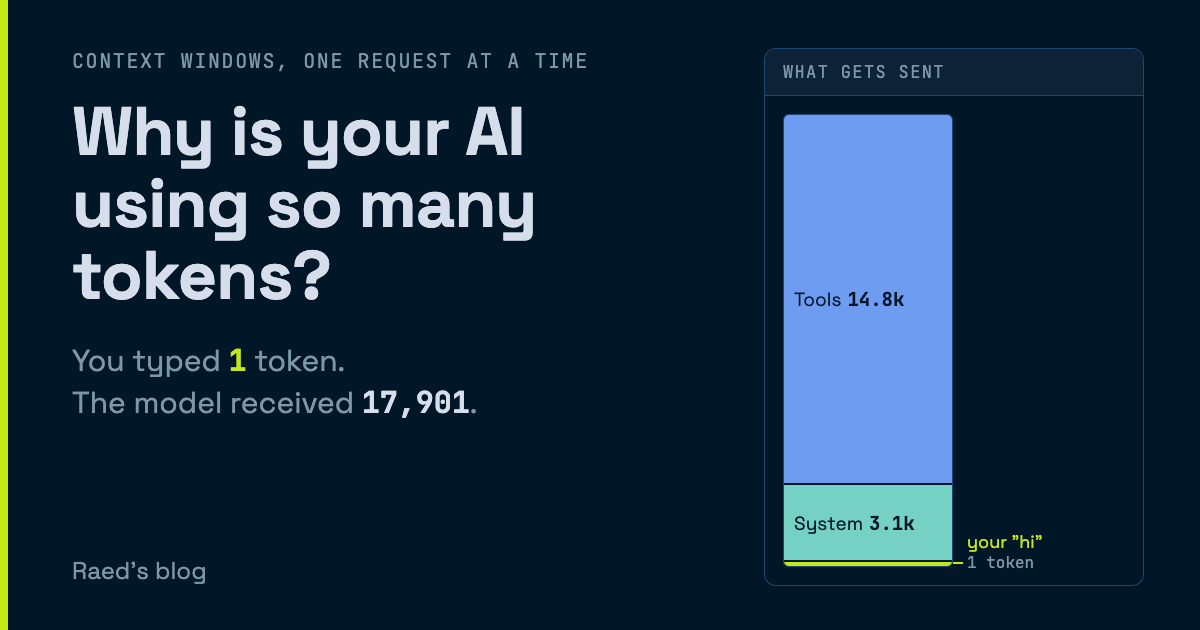
You type “hi” into an AI assistant, and without warning the usage meter shows 18,000 tokens. One of them is yours. Let’s try to see where the rest went.
⚠️ Best viewed on desktop
What you see
New chat
What gets sent
0 tokens in context
Requestnot sent yet
Billed so far$0
Claude Sonnet 5.5 list prices, Nov 2026
The AI chat app shows you a conversation. The model has no idea what that is.
The model sees a single block of text, rebuilt from scratch and sent in full every time you submit a message, and it forgets all of it the second the answer is sent.
The panel shows both sides: the chat interface you see, and what actually gets sent to the LLM.
You open a new chat with an assistant that can read your Drive and your inbox, and type “hi”.
Before your message, the app puts a system prompt in front of it. That is where the instructions live, like who the assistant is and what it must never do.
A few thousand tokens usually, before your first message.
Then come the tools. Every action the assistant can take (search your Drive, edit a document or draft an email) is described in the request with a name, a description and a JSON schema telling the agent how to call it.
The model can only call what it has been told exists, so all of that ships with every request.
Your “hi” is now the smallest thing in an 18,000-token prompt. Every connector you add makes it bigger whether it’s used or not.
If you use Claude Code, /context shows you this breakdown for your own session.
The model replies with 11 tokens.
Output is the expensive part, 4x-8x the input token price on most models.
You send a second message.
The model has no memory of your first request.
Every turn, the app sends the entire conversation again: tools, system prompt, your “hi”, its reply, and then your new message at the bottom.
Every chat API works this way.
The conversation lives in the client, and each request carries the whole history. The interface just pretends to blur the line between what the model does and what the application around it handles for you.
Keep talking and each request is a little bigger than the one before.
You paste last quarter’s report, and it rides along on every request after that.
After 6 turns you have typed ~2,600 tokens, and the model has received ~120,000 tokens.
Every request pays again for everything before it. Without caching, that total grows with the square of the conversation’s length.
You ask the model a complex question, which triggers some reasoning.
The chat shows a collapsed “Thought for 21s”. That was 2,100 tokens of text the model wrote (to itself) before answering.
Thinking tokens are ordinary output tokens. They are billed at the output price, even when the app shows you only a summary or nothing at all.
Most modern models will keep that thinking in every turn of the conversation. That is an additional 2,100 tokens you carry around, for output you don’t even see.
All of this would be painful (and prohibitively expensive) without caching.
In practice, the provider keeps your conversation in its memory for a little bit of time.
When the next request starts with exactly the same tokens, that part is a cache hit.
The striped blocks are hits. On Claude Sonnet 5.5, a cache read costs 0.05x the normal input price.
Only what is new since the last request gets written to cache, at 1.25x.
The catch: cache has a short lifetime. For Anthropic, it is 5 minutes, and every hit resets the clock, so it stays warm while you are replying.
Then you go get a coffee…
You come back and ask where you were.
The cache is gone, so the whole thing is processed and written to cache again at 1.25x. That request costs about 15 times the one before the coffee break.
The cache covers everything from the top of the prompt down to the first token that differs.
Since tools are defined at the very top, changing them invalidates the entire cache. You connect Slack in the middle of the session. Its tool definitions land at the top of the prompt, and your cache is reset.
You want your agent to be capable and smart.
You ask it for a complex report. The assistant calls a tool, gets the result, and calls another one.
Each step is a separate request, and each one re-sends everything before it plus the latest tool result.
You sent one message and the model received 4 requests.
The weekly updates it read are now the biggest block in the prompt.
When an assistant works through your files, tool results are where the context goes.
So far the panel has been zoomed in. This is the same conversation drawn against a 200,000-token context size. This is the hard limit on how much the model can read in one request.
Newer models go up to a million tokens.
An afternoon of report work later, reading spreadsheets, email threads and PDFs, the prompt has crept up to the dashed line, the compaction threshold.
Every document it read is still in there, sent again on every request.
When the context crosses that threshold, the assistant compacts it.
The model writes a summary of the conversation so far, and the app replaces the older turns with that summary.
Tools and the system prompt stay where they are, and only the most recent messages survive next to the summary.
Most agentic harnesses will do this automatically before the window fills.
In Claude Code, the /compact command triggers it manually.
The chat history isn’t impacted, so the UI lies to you. The model no longer has any of it. All it has is a 3,400-token summary of what happened.
You ask what the Q2 report said about the vendor contract.
The summary kept the conclusion and dropped the text, so the model can tell you what it decided back then but not what the report said.
The context window is the only memory the model has. Everything in it is paid for again on every request, and whatever gets compacted out is gone for the model while it stays on your screen.
I hope that helped demystify how agents work and why you’re using so many tokens so fast.
If you have any questions, feel free to leave a comment below.