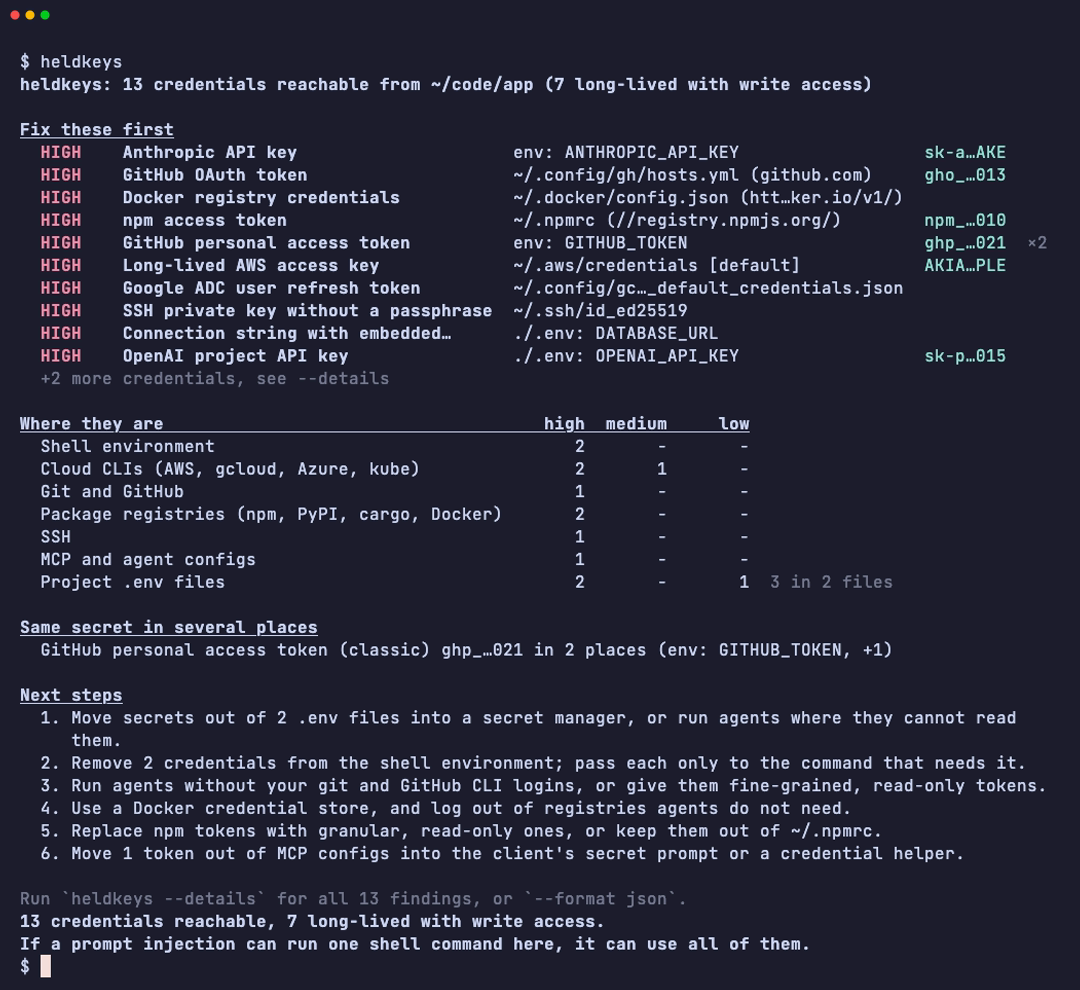
I built heldkeys, an open-source CLI that shows which credentials an AI agent can reach from where it runs: your laptop, a sandbox or a CI job. A coding agent in your terminal runs as you, so it can use your cloud logins, your git and package tokens, the .env files in every repo you cloned and the API keys sitting in your MCP configs. That is fine until a prompt injection in an issue, a web page or a README talks it into running a command. Secret scanners tell you what was committed to a repo. heldkeys tells you what a process running as you could use right now.
Get started #
brew install hugomn/tap/heldkeys
heldkeys
Run it in the same terminal your agent uses. It is read-only, makes no network calls and finishes in well under a second. Here is what it prints on a test machine built from the fake credentials in the repo:
The report fits on one screen. It starts with the credentials to fix first, ranked by how long each one keeps working and whether it can change things, because a long-lived token with write access is a much bigger risk than a short read-only session. Below that you get where the rest live, secrets that show up in several places, and concrete next steps. heldkeys --details lists everything, and --format json, markdown or sarif feed other tools.
It looks where credentials actually live: environment variables, AWS, gcloud, Azure and kubeconfig logins, git credential files and helpers, the GitHub CLI, npm, PyPI, cargo and Docker registry tokens, SSH keys without a passphrase, AI tool logins like Codex and Claude Code, project .env files (including old copies in editor history), and tokens in the MCP configs of Claude, Cursor, VS Code and others.
As a gate in a sandbox #
If your agents run in a container, the same binary checks what the sandbox exposes from the inside, like a mounted Docker socket, a Kubernetes service account token or a reachable cloud metadata endpoint. heldkeys preflight turns that into a pass or fail check, so you can put it in front of the agent in the entrypoint:
COPY --chmod=0755 heldkeys /usr/local/bin/heldkeys
ENTRYPOINT ["/bin/sh", "-c", "heldkeys preflight --fail-on long-lived-write && exec \"$@\"", "heldkeys-gate"]
CMD ["your-agent", "--its-flags"]
When the sandbox holds a credential it shouldn’t, the container refuses to start and tells you why:
The Linux binaries are static, so this works in any image, distroless included. You can also check a container that is already running with heldkeys scan --docker <container> or --kube <pod>.
In CI #
I think the newest risk is in GitHub Actions. Teams are adding agents to workflows that react to issue comments and pull requests, and some of them hand the agent a write token or repository secrets while it reads text anyone on the internet can write. heldkeys ci reads your workflow files and flags that combination: agent steps on untrusted triggers with secrets or write permissions, agents working inside a checkout of an outside pull request, unpinned agent actions and unrestricted shell access. Run inside a job, it also lists what that job can reach.
The easiest way to run it is the GitHub Action:
jobs:
  heldkeys:
    runs-on: ubuntu-latest
    permissions:
      contents: read
    steps:
      - uses: actions/checkout@v7
        with:
          persist-credentials: false
      - uses: hugomn/heldkeys@v0
On a workflow that runs Claude Code on issue comments, with a write token, cloud keys and a checkout of the pull request, it looks like this:
For workflow security in general, zizmor already does a great job, so heldkeys only has rules for agent steps.
What it found on my machine #
I ran it on my own laptop first, and it found the things that pile up over the years: an old plaintext git credentials file, a token exported in my shell profile and SSH keys without a passphrase. I would not have listed any of them if you had asked me, and every agent I started could use them. Cleaning up took about twenty minutes. Git now uses the system keychain, the package token loads only inside the projects that need it, and the keys have passphrases.
Why you can trust it with your secrets #
A tool that reads every credential on your machine has to earn that. Values only ever show up as short fingerprints like ghp_…021, and a test runs every fixture through every output format and fails if any part of a fake secret leaks. There is no telemetry and no update check, it never calls the providers behind your credentials, and it writes nothing to your machine. The threat model covers what it defends against and what it can’t see, like browser sessions, secrets that only live inside the OS keychain, and git history, where gitleaks and TruffleHog are the right tools.
If you run it, I’d love to hear what it found and which credential locations it should learn next. Issues and pull requests are welcome on GitHub.