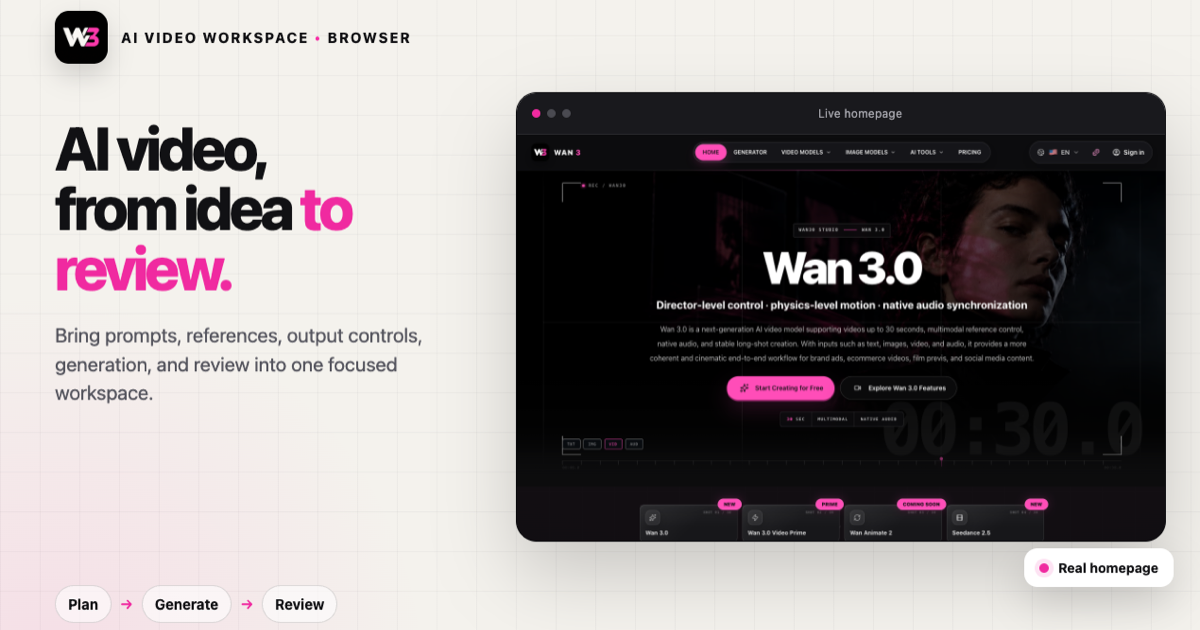
Director-level control · physics-level motion · native audio synchronization
Wan 3.0 is a next-generation AI video model supporting videos up to 30 seconds, multimodal reference control, native audio, and stable long-shot creation. With inputs such as text, images, video, and audio, it provides a more coherent and cinematic end-to-end workflow for brand ads, ecommerce videos, film previs, and social media content.
Wan 3.0 is a multimodal AI video model that turns text, images, video, and audio into complete clips up to 30 seconds, with 480P, 720P, and 1080P output.
Start with a simple idea or existing assets. Wan 3.0 understands subjects, scenes, motion, camera direction, and sound together to create more coherent ads, product films, short stories, and social content.
01 / Wan 3.0
02 / Wan 3.0
03 / Wan 3.0
04 / Wan 3.0
Core features
Wan 3.0 core capabilities
Create more complete, stable, and controllable AI video content with long-form generation, multimodal references, long-take consistency, and high-quality motion effects.
01
Up to 30-second video generation
Wan 3.0 supports AI video generation up to 30 seconds, giving creators room for more complete stories and complex scenes while maintaining continuous character motion, stable environments, coherent camera logic, and narrative continuity over longer sequences. It is ideal for brand films, product launches, narrative shorts, and social media content.
02
Multimodal reference control
Use text descriptions, character images, product images, video clips, and audio assets to control results precisely. Wan 3.0 understands these references together to keep character identity, product appearance, visual style, and motion direction consistent, moving beyond simple prompt generation toward more precise creative control. 03
Stronger long-take consistency
Wan 3.0 is optimized for longer videos, maintaining consistent character appearance, stable facial details, natural motion continuity, and visual coherence across complex scenes and multiple shots. It is well suited to AI micro-dramas, film concepts, game cinematics, and branded storytelling.
04
High-quality motion and physical effects
Wan 3.0 has a stronger understanding of video motion and can handle fast action, complex interactions, camera movement, and environmental changes. People, objects, and scenes move more naturally, with dynamic effects that better reflect real-world physical relationships.
Product FeaturesProduct features
Six ways to create with WAN30, from video generation to image editing.
Master the Wan 3.0 creation workflow. Go from a text prompt or reference image to HD AI video output—handling creative direction, control, generation, and download in one unified workspace.
Platform advantages
Why choose Wan 3.0?
From long-form video storytelling and multimodal references to character consistency and professional motion control, Wan 3.0 gives creators and teams a more complete set of AI video production capabilities. Advanced AI video generation
Wan 3.0 understands complex scenes, character movements, and camera language, helping creators turn product showcases, brand campaigns, and story concepts into more natural, fluid, cinematic video content.
Longer videos and complete storytelling
Generate videos up to 30 seconds to express more complete stories, continuous action, and complex scene changes—ideal for ads, narrative content, product introductions, and continuous-shot projects.
Precise control with multimodal references
Use text, images, video, and audio to control character appearance, product details, visual style, movement direction, and scene effects more precisely. Stable character and scene consistency
Maintain character traits, product details, and the overall visual style across continuous shots and complex content—ideal for branded content, digital characters, and serialized stories.
Professional motion effects and camera control
Understand complex motion relationships, object interactions, and camera changes to generate more natural action and more cinematic visuals.
Designed for creator and enterprise workflows
Covers content production needs across social media, ecommerce marketing, advertising, branded content, and AI video teams.
01 / 06
Creator workflows
What creators look for in a production workflow
Practical workflow notes organized around common video, design, brand, and content-production needs.
★★★★★
“Pre-visualize scenes, pitch mood boards, and create reference directions before the shoot.”
林乔 Lin Qiao
Example creator·Creative Director
★★★★★
“Turn campaign concepts into motion-ready briefs for social cuts, launches, and performance tests.”
Ethan Cole
Example creator·Filmmaker
★★★★★
“Plan product motion, lifestyle vignettes, and SKU-specific creative without a full shoot.”
Maya Patel
Example creator·Brand Designer
★★★★★
“Explain abstract ideas with vivid motion prompts and repeatable learning sequences.”
Lucas Meyer
Example creator·Animation Director
★★★★★
“Build atmospheric b-roll prompts, story bridges, and narrative interstitials.”
Sofia Ramirez
Example creator·Video Editor
★★★★★
“Move from idea to cinematic direction with a focused page that keeps the prompt clear.”
Noah Kim
Example creator·Independent Creator
★★★★★
“Pre-visualize scenes, pitch mood boards, and create reference directions before the shoot.”
林乔 Lin Qiao
Example creator·Creative Director
★★★★★
“Turn campaign concepts into motion-ready briefs for social cuts, launches, and performance tests.”
Ethan Cole
Example creator·Filmmaker
★★★★★
“Plan product motion, lifestyle vignettes, and SKU-specific creative without a full shoot.”
Maya Patel
Example creator·Brand Designer
★★★★★
“Explain abstract ideas with vivid motion prompts and repeatable learning sequences.”
Lucas Meyer
Example creator·Animation Director
★★★★★
“Build atmospheric b-roll prompts, story bridges, and narrative interstitials.”
Sofia Ramirez
Example creator·Video Editor
★★★★★
“Move from idea to cinematic direction with a focused page that keeps the prompt clear.”
Noah Kim
Example creator·Independent Creator
Pricing
Start creating AI videos for free
Select the plan that fits your creative workflow Ready to generate your first AI video?
Start with a simple prompt or one reference image, test the direction with a short clip, then improve clarity and duration step by step.
Wan 3.0 is a new-generation AI video model designed for high-quality, longer-form video creation with multimodal control. It accepts text, images, video, and audio, helping creators produce AI videos with consistent characters, natural motion, and cinematic visuals.
How do Wan 3.0 Standard and Prime differ?
Wan 3.0 Standard and Prime support the same core creative inputs and output controls. Prime is optimized for faster end-to-end generation, while Standard is the regular creation option. Choose Prime for rapid iteration and frequent production, or Standard for everyday video generation.
Which output resolutions does Wan 3.0 support?
Wan 3.0 Standard and Prime support 480P, 720P, and 1080P output. Videos can run from 2 to 30 seconds, and smart duration can choose a suitable length automatically. When a reference video is used, the input and output duration together cannot exceed 30 seconds.
Which input types does Wan 3.0 support?
Wan 3.0 supports multimodal input, including text prompts, image references, video references, and audio references. Combining these materials gives you more precise control over characters, products, motion, style, and scene composition.
Can Wan 3.0 generate videos with realistic people?
Yes. Wan 3.0 can create videos with realistic human performances while maintaining character appearance, motion, and scene style. It is suitable for digital presenters, advertising, social content, and narrative video projects.
How does Wan 3.0 maintain character consistency?
Wan 3.0 combines information from reference images, video, and text to control character features, motion relationships, and visual style. Across continuous shots, this helps reduce identity changes, appearance drift, and scene instability so the result feels more coherent.
Which Wan 3.0 creation workflows are available?
The WAN30 workspace offers text-to-video, first-frame video, first-and-last-frame video, and multimodal reference generation with images, video, and audio. Choose the simplest workflow that matches the materials you already have, then refine the prompt, references, duration, and resolution before generating.
How is Wan 3.0 different from a standard AI video generator?
Many AI video tools rely mainly on text prompts. Wan 3.0 adds richer reference controls through images, video, and audio. That makes it easier to direct character identity, product appearance, motion, visual style, and camera language, especially for stable output and commercial workflows.
How do I create an AI video with Wan 3.0?
A typical workflow is to describe the idea, upload image, video, or audio references, adjust the generation settings, wait for the AI to create the video, and then download the result. Refining the prompt and reference materials over several iterations helps you reach a result that better matches your goal.