Xinyu Zhangand
Aaron Hao| August 17, 2026
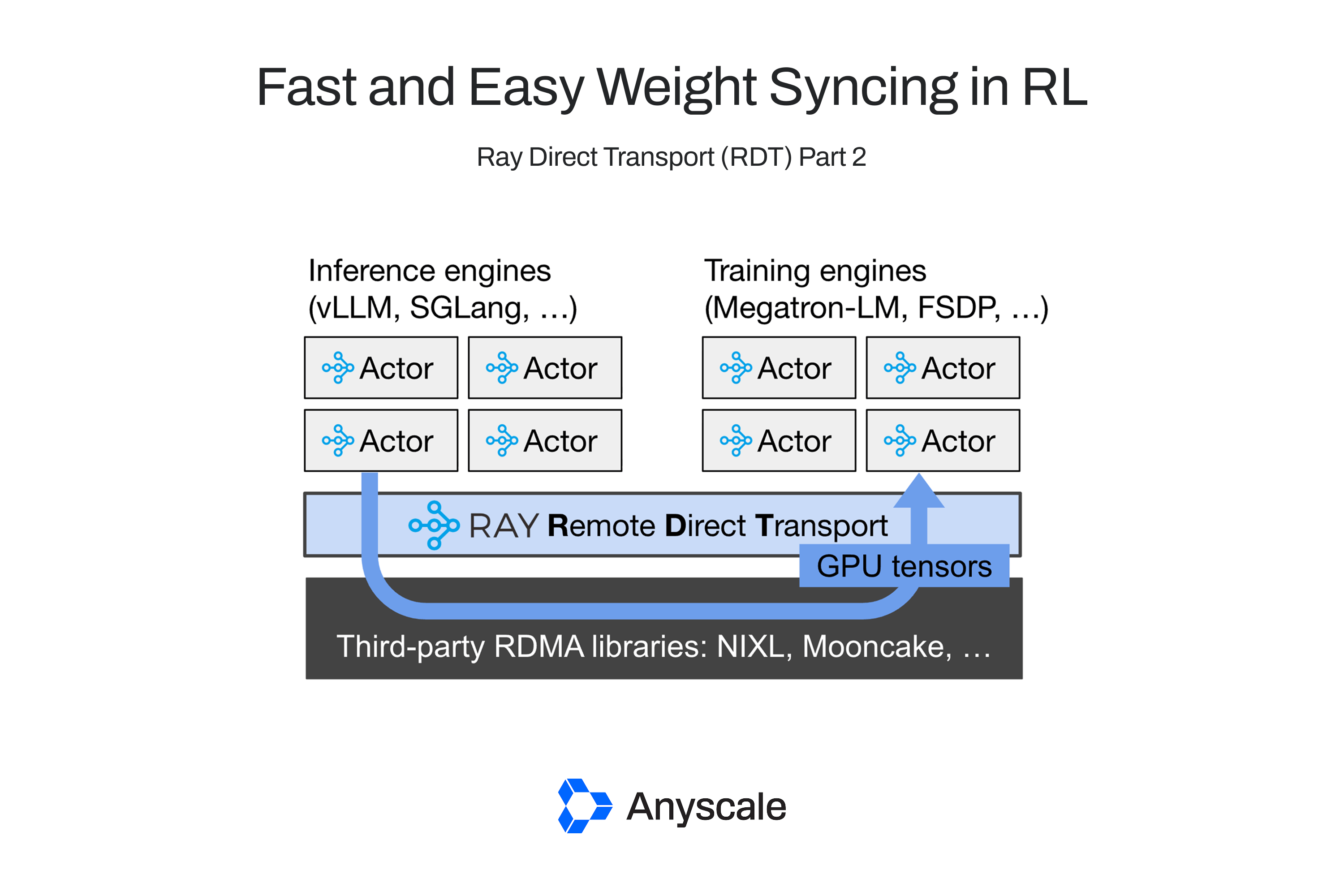
Tl;dr: Ray Direct Transport (RDT) enables fast and easy RDMA-backed weight transfer in reinforcement learning (RL) for LLMs. We show how to use the RDT APIs to maximize data transfer performance, by up to 6x over a naive RDMA implementation.
Everyone knows that RDMA is fast. It’s critical for applications where lots of data needs to be sent between GPUs quickly, like weights synchronization in reinforcement learning (RL) for LLMs. But RDMA also requires the developer to manage extra system operations before and after the data transfer like memory allocation, memory registration, metadata transfer, etc. Naive implementations for these steps can easily eliminate any speedups in the data transfer itself.
In Part 1, we introduced
Ray Direct Transportand third-party libraries such as
vLLMthat provide RDMA-based device-to-device transfers.
__NIXL__In this Part 2, we’ll cover the best practices for maximizing performance of your RDT application. We’ll walk through a working weight syncing application similar to the walkthrough in Part 1, then introduce RDMA-specific RDT APIs that you can use to eliminate performance overheads.
Using RDT best practices, we’ll show how to improve upon a naive RDMA implementation by up to 7.5x on GB200 nodes using Multi-Node NVLink (MNNVL).
These speedups will be generally available through ongoing open-source integrations with RL frameworks like
SkyRLand
Miles.
We’ll cover:
Part 0: The basics of RDMA and where unwanted performance overheads can come from, whether or not you’re using RDT.
Part 1: A working code example of weight syncing in Ray with RDT and RDMA.
Part 2: How to maximize performance of the weight syncing example, especially when transferring many small tensors.
LinkA quick primer on RDMA #
Remote Direct Memory Access (RDMA) is a networking technology that allows one machine to directly read or write the memory of another machine without involving the remote CPU, OS, or application software in the data path. Unlike traditional TCP/IP networking, where data must traverse multiple layers of the kernel networking stack, RDMA-capable network interface cards (NICs) perform data transfers directly between application memory buffers. This "kernel bypass" and "zero-copy" design dramatically reduces latency, CPU overhead, and memory bandwidth consumption, making RDMA attractive for distributed AI systems.
Because RDMA transfers operate directly on application memory buffers, the application needs to ensure that the right resources are available on both endpoints before the transfer starts. This makes setting up an efficient RDMA transfer a bit more involved than using something like TCP. Here are the main steps to be aware of:
The application
allocates memory buffers on both hosts andregisters them as “memory regions” with the RDMA NIC. This requires at least one syscall per registration to pin the corresponding page(s) in physical memory. It also creates metadata that the NIC can use for direct access: local and remote access keys that authorize future RDMA operations on the registered buffers.The application
exchanges connection information including the memory region’s metadata with the remote peer through an out-of-band channel, often using something like gRPC or Ray.For one-sided operations, the sender or receiver
posts the operation (either Write or Read, respectively), which triggers the initiating NIC to directly access the remote registered memory, without interrupting the remote CPU. The NIC transfers the data across the network and generates completion notifications when the operation finishes.
The result is a highly efficient data path in which data moves directly between application buffers on the two machines, with CPUs involved primarily during connection setup and completion handling rather than during the transfer itself.
However, these extra steps can also be a bit of a gotcha. Depending on when and how you choose to perform each step, actual data transfer bandwidth could be far below the hardware bandwidth. For example, one memory registration call can take 10s of us – it may not sound like much, but when your network is fast enough to complete a 1GB data transfer in milliseconds and each transfer contains many memory regions, the overhead can quickly add up.
LinkRDMA with Ray Direct Transport (RDT) #
Libraries like Mooncake or NVIDIA’s
__NIXL__How do we resolve this tension in Ray? One advantage of Ray is that as a distributed orchestrator, it already has a lot of visibility into when and where application data transfers need to happen. If we can piggy-back only the necessary RDMA metadata onto the existing Ray data transfer protocol, we can preserve Ray’s developer-friendly APIs but also benefit from RDMA-backed data transfer. That is why we built RDT.
Still, there is no free lunch. Achieving maximum performance with Ray RDT still requires some developer effort, but we think not as much as directly using an RDMA library. Let’s dive into the details. We’ll walk through the most basic way you could implement weight syncing with RDT first, then show the advanced design patterns for maximizing performance.
LinkWeight syncing with RDT: The Basics #
We’re going to work with a simple PyTorch example that mimics weight transfer in RL for LLMs, with one “sender” representing the trainer and one “receiver” representing an inference engine. The goal is to achieve a zero-copy implementation that triggers data transfer directly between the sender and receiver’s copies of the model weights.
Let’s introduce the code. If you’d prefer to see the full working example instead, check out the code here.
First, let’s define a model. We’ll use a 2GiB model with one linear layer:
class Model(torch.nn.Module):
    def __init__(self):
        super().__init__()
        TOTAL_SIZE_BYTES = 2 * 1024**3
        NUM_ROWS = 1_000
        self.layer = torch.nn.Linear(
            TOTAL_SIZE_BYTES // NUM_ROWS // 2, NUM_ROWS, dtype=torch.float16
        )
        self.layer.weight.zero_()

    def forward(self, x):
        with torch.no_grad():
            return self.layer(x)

    def get_views(self, num_views):
        return list(self.layer.weight[:num_views])
Notice that the get_views
method returns the layer as a list of views, each view comprising one row of the weight matrix. This isn’t necessary; you could just return the whole self.layer.weight
instead. But we’re going to use this method to test the system’s ability to handle many small tensor views, similar to what you might see in a tensor-parallel setting where matrices might be sharded across columns.
Next, let’s define a Ray actor class to run the training engine.
@ray.remote(num_gpus=1, enable_tensor_transport=True)
class Trainer:
    def __init__(self, num_views: int):
        self._model = Model().to("cuda")
        self._num_views = num_views
        self._model_version = 0
        self._generators = []

    async def reset_generators(self, generators: List[ActorHandle[Generator]]):
        """Reset the generators, possibly while the training loop is already running."""
        self._generators = generators

    async def loop(self, num_iters: int):
        """Training loop"""
        for _ in range(num_iters):
            self._model.layer.weight += 1
            self._model_version += 1

            views = self._model.get_views(self._num_views)
            weights_ref = ray.put(views, _tensor_transport="nixl")

            sync_tasks = [
                gen.sync_weights.remote(self._model_version, weights_ref)
                for gen in self._generators
            ]

            del weights_ref

            ray.get(sync_tasks)

            await asyncio.sleep(0)
The trainer does the following in a loop:
Update weights. In this case, we simply increment all values by 1. In an actual example, this would run a training step, possibly synchronizing gradients with other trainer replicas.
Store weights in Ray’s RDT-based object store, using ray.put. Note the
_tensor_transport="nixl"
argument that specifies to use RDT instead of Ray’s shared-memory object store.Push weights to each generator engine, by passing the list of ObjectRefs created in step 2.
Delete all ObjectRefs created during this iteration, to ensure that Ray will be able to garbage-collect any metadata.
Wait for the inference engines to complete the weights transfer. This step can optionally be deferred until right before the trainer is ready to update its weights again.
Yield the event loop. This ensures that the cluster’s controller can update the trainer’s list of generators, if a failure or autoscaling event and the generator membership changes.
Note that the Trainer
class specifies enable_tensor_transport=True
in ray.remote
to indicate to Ray that this actor can use RDT to put or get objects. Without this flag, the call to ray.put
with the additional _tensor_transport
flag would error.
Now we’ll walk through the generator logic. The generator executes rollouts in a loop but yields between each round to check for incoming weights synchronization requests from the trainer. During a weights synchronization request, the generator:
s generation.
Pulls a copy of the trainer’s weights via RDT. Under the hood, this posts an RDMA read to the trainer.
Copies weights from the pulled buffer to the local copy of weights.
Resumes generation.
Below we show a simplified version that only shows step 3. Generator.sync_weights
is the task definition corresponding to the trainer’s call to gen.sync_weights.remote(self._model_version, weights_ref); on the generator side, the weights_ref
is automatically replaced with the tensors transferred via RDT and NIXL.
@ray.remote(num_gpus=1, enable_tensor_transport=True)
class Generator:
    def __init__(self, num_views: int):
        self._model = Model().to("cuda")
        self._num_views = num_views
        self._model_version = 0
        self._generation_event = asyncio.Event()

    async def sync_weights(self, model_version, weights: List[torch.Tensor]):
        """Synchronize weights with the trainer's copy."""
        views = self._model.get_views(self._num_views)
        for view, weight in zip(views, weights):
            view.copy_(weight)
        self._model_version = model_version
Finally we have the driver loop to put this all together.
NUM_VIEWS, NUM_ITERS = 1_000, 100

generator = Generator.options(num_gpus=1).remote(NUM_VIEWS)
trainer = Trainer.options(num_gpus=1).remote(NUM_VIEWS)

trainer.reset_generators.remote([generator])

ray.get([
    trainer.loop.remote(NUM_ITERS),
    generator.loop.remote(NUM_ITERS)
])
The driver creates one trainer actor and one generator actor, each assigned 1 GPU. The driver exchanges actor handles, then simply waits for the two actors to finish their long-running loops. From there, the driver could save results, execute more loops, start new trainers or generators, etc.
**Summary: **Using RDT for weight syncing lets you focus on the application logic. All of the typical RDMA operations, like memory registration, metadata exchange, and garbage collection, are handled under the hood for you. But achieving good performance requires more effort. We’ll take a look at how RDMA’s hidden overheads can manifest and be mitigated next.
LinkPerformance #
During testing of weights syncing with RDT, we found and fixed a number of performance bottlenecks that greatly reduce the actual transfer bandwidth from the hardware optimal, in some cases by 10x or more! The resulting performance fixes that we introduced fall into a few different categories:
Reducing memory registrations. Memory registrations take time. This is especially important when the training and inference engines use different tensor-parallel sharding strategies, which can result in having to register and send many small tensors.Reducing peak memory overhead. Weight transfer implementations often use an additional intermediate memory copy as a staging buffer between the RDMA transfer and the source or destination model weights. This is convenient but adds peak memory pressure, which can be significant in training and inference engines where memory is already limited.Optimizing data transfer. The data transfer speed is affected by the size and number of tensors sent. Transferring many small tensors is slower than sending one big tensor, even if the total bytes transferred is the same. Next we’ll walk through the APIs available in RDT to address these issues. The below benchmarks were all done on inter-node transfers with 2 GB200 nodes, using MNNVL (multi-node NVLINK, 900 GB/s unidirectional point-to-point bandwidth).
LinkReducing memory registrations #
In weight syncing for RL, the location of the final source and destination buffers are known ahead of time and usually don’t change over time. Each step reads and writes the same locations as before. We can take advantage of this to avoid having to re-register the memory with each transfer.
In Ray RDT, we do this by exposing an API ray.experimental.register_nixl_memory
that allows users to register memory ahead of time. Use this API on both the sending and receiving actors when the same tensor(s) will be sent multiple times. For the receiving side, you’ll also have to use ray.experimental.set_target_for_ref
which we’ll discuss later. Memory that has already been registered with this API won’t be registered again at transfer time. Here is a snippet showing how the API works:
import ray

@ray.remote(num_gpus=1, enable_tensor_transport=True)
class Trainer:
    def __init__(self, num_views: int):
        for param in self._model.parameters():
            ray.experimental.register_nixl_memory(param)
Using this API pays the cost of memory registration time upfront during actor creation rather than on the fly during data transfers. Here’s a plot showing the total data transfer time before and after:
Another case where memory registration can become expensive is when you are transferring many small tensors that are actually views into a larger tensor, which is common when your training and inference models are sharded differently.
When using raw NIXL, the common practice is to register each subtensor separately, which can add a lot of overhead. RDT’s NIXL backend implements an optimization where it only registers the base tensor once, then sends each subtensor as an offset into that base tensor. This greatly improves the memory registration and therefore total transfer time as the number of subtensors grows:
LinkReducing peak memory overhead #
So far in our example code, the receiver uses RDMA to copy directly from the sender’s weights into a staging buffer. The receiver then uses another copy to move the data to the inference engine’s copy of the weights. This is convenient, especially if you need to do any postprocessing on the inference worker’s copy of the weights. However, we can also save some memory by copying directly from the trainer’s weights to the inference worker’s weights.
To do this, we introduced a new API ray.experimental.set_target_for_ref
that directs RDT on where the incoming data should be received. This API takes in an RDT-enabled ObjectRef and a list of local torch.Tensor
s that the caller wants to receive into.
Here’s how to use it in our example script:
@ray.remote(num_gpus=1, enable_tensor_transport=True)
class Generator:
    def __init__(self, num_views: int):
        for param in self._model.parameters():
            ray.experimental.register_nixl_memory(param)

    async def sync_weights(self, model_version, refs: List[ray.ObjectRef]):
        ref, = refs
        views = self._model.get_views(self._num_views)
        ray.experimental.set_target_for_ref(ref, views)
	 weights = ray.get(ref)
The peak memory usage was inspected using torch.cuda.memory.max_memory_allocated
. Prior, we consistently saw an extra copy in the torch caching allocator, so with 20GB of weights you would see the peak be 40GB. Now, the peak remains at 20GB.
LinkOptimizing data transfer #
Transferring many small tensors is inefficient for maximizing network bandwidth. It can often be better to “bucket” together many small tensors by making them contiguous first. Since the GPU has high HBM bandwidth, the overhead of the extra copy can be negligible compared to the overall transfer time. Note that while this method can improve transfer time, it does add to the trainer’s peak memory usage due to the extra copy.
While you could implement this yourself, RDT also implements a memory pool that performs such copies under the hood. All memory in the pool is preregistered, to avoid having to perform a new memory registration on each transfer.
Here’s how to enable it for our example:
@ray.remote(num_gpus=1, enable_tensor_transport=True)
class Trainer:
    def __init__(self):
        register_nixl_memory_pool(1024**3, torch.device("cuda"))
With this line in the constructor, each ray.put
call in Trainer.loop
will now copy its tensors into a contiguous memory buffer allocated from the RDT-managed memory pool. You can adjust the size of the bucket by deciding how many tensors to pass to a single ray.put
call. Note that for the receiver side, we still kept register_nixl_memory
set_target_for_ref
to remove the memory registration from the data transfer path. The below graph also includes a couple improvements to the memory pool that will be generally available in Ray 2.59, but as a preview:
LinkPutting it together #
Now that we’ve seen all of the performance improvements individually, we can test them out in the full script. Here’s a breakdown showing how each step contributes to the end-to-end time:
What are the remaining overheads? Let’s break it down:
Python object transfer: RDT supports sending PyTorch tensors embedded inside arbitrary Python objects. The tensor data is sent over RDMA via NIXL while the rest of the Python object is serialized and sent via Ray’s native CPU-based dataplane. For smaller Python objects, this requires just one message from the source to destination actor. For larger Python objects where the serialized data exceeds 100KB, like the list of 10k tensors in this example, Ray Core incurs an additional serialization/deserialization from transferring via Ray’s shared memory store.Data transfer: The actual transfer of tensor data over RDMA. In this case, the max hardware transfer bandwidth is 900GB/s and we achieved 859 GB/s for the data transfer itself.Tensor metadata management: Managing N tensors adds many O(N) system operations throughout the transfer, such as tracking each tensor’s shape, verifying that the shape matches the destination buffer, etc. For the 10k views transferred here, this currently adds a few milliseconds to the total transfer time.
LinkWhat’s next for RDT #
We are working together with the open source community to integrate RDT with RL frameworks for high-performance weight syncing.
With the RDT integration, SkyRL can sync weights for
__Qwen/Qwen3-235B-A22B__An integration with Miles is also in progress. With RDT, Miles is able to sync GLM-4.5-Air across four 8xH100 nodes in only 2.3s, 2.2x faster than using
NCCLand 1.14x faster than using the Mooncake Transfer Engine.
In the meantime, we’re also actively working on the remaining performance issues in RDT, including optimizing O(N) overheads for many small tensors, reducing the time needed to
, and extending the memory pool to
transfer Python object data. Check RDT out starting from
receiver-side tensorsand let us know what you think!
the docs