An external reconstruction of how Memory, Proactivity, Scheduling, Browser Use, Plugins, Skills and Tools work in the new ChatGPT Work.
Editor’s note: I’m excited to welcome Shlok to our guest post roster! You may know Shlok from his excellent explorations (as an outsider — for an insider perspective see our podcast with OpenAI’s Akshay Nathan. Already one of our most popular episodes of the year!) of leading AI Lab memory systems, which he gave an excellent AIE talk on. We’ve been covering OpenAI’s research and deployment of agents to all of humanity since Plugins 2023 and Devday 2024 and Codex 2025, and now ChatGPT Work in 2026 seems the penultimate stage of the long journey. Let’s dive in!
On July 9th, OpenAI released ChatGPT Work, their agent product for knowledge work. It was, by any measure, a busy launch: three new models across fourteen configurations, a consolidation of the ChatGPT and Codex desktop apps, and cloud agents brought to the mainstream in their most accessible form yet.
Three weeks in, Work (along with Codex) has reportedly [crossed 10 million users](https://x.com/thsottiaux/status/2079609157934886975).

Editor’s note: ChatGPT estimated to cross[1B MAU in June]and[1B WAU this month].
Chat and Work currently sit side by side as separate modes inside ChatGPT, but Greg Brockman has confirmed that they will merge by the end of the year. Work, then, is not just a niche product for power users, but a preview of how ChatGPT’s billion weekly users will soon use the app. That’s why people inside and outside OpenAI are so excited about it, and why it deserves a closer look.
Work in its current form takes some decoding. It’s an amalgamation of ChatGPT (in chat form), Codex the app, Codex the harness, Codex the original cloud agent, ChatGPT agent, Atlas, OpenClaw, and more. The product lineup around it is confusing. And the web and mobile versions diverge from the desktop one (unless you run it in cloud mode?!).
So I spent the past few days trying to unpack it: what Work is, where it fits in OpenAI’s lineup, the many interesting choices in its design, the tensions underneath, and where I think it’s headed. Most of what follows comes from Codex and me poking around inside Work, and I’ve linked those conversations throughout so you can see where each claim comes from.
What is Work?
At its core:
An agent for knowledge work. You connect it to the places you already work—Slack, email, Drive, calendars, CRMs, project trackers, and hundreds of other plugins—and it gathers context across all of them to produce finished work.Runs on the Codex harness. So it inherits the same models, sub-agents, browser use, and the ability to grind on a task for hours. Its UI is stripped of the evidence (git controls, diff-traces) that would give away you’re talking to a coding agent.Lives in a cloud computer. Specifically,a beefy, isolated microVM: Pro accounts get 8 CPUs, 20GB of RAM, and a 64GB disk; Plus gets 14GB of RAM. Alongside the VM, Work gets amanaged Chrome servicethat the agent operates through tool calls.Produces artifacts. Sheets, docs, and slides rendered in interactive viewers, plusSites: hosted web apps and dashboards it can build, share via URL, and keep updated.
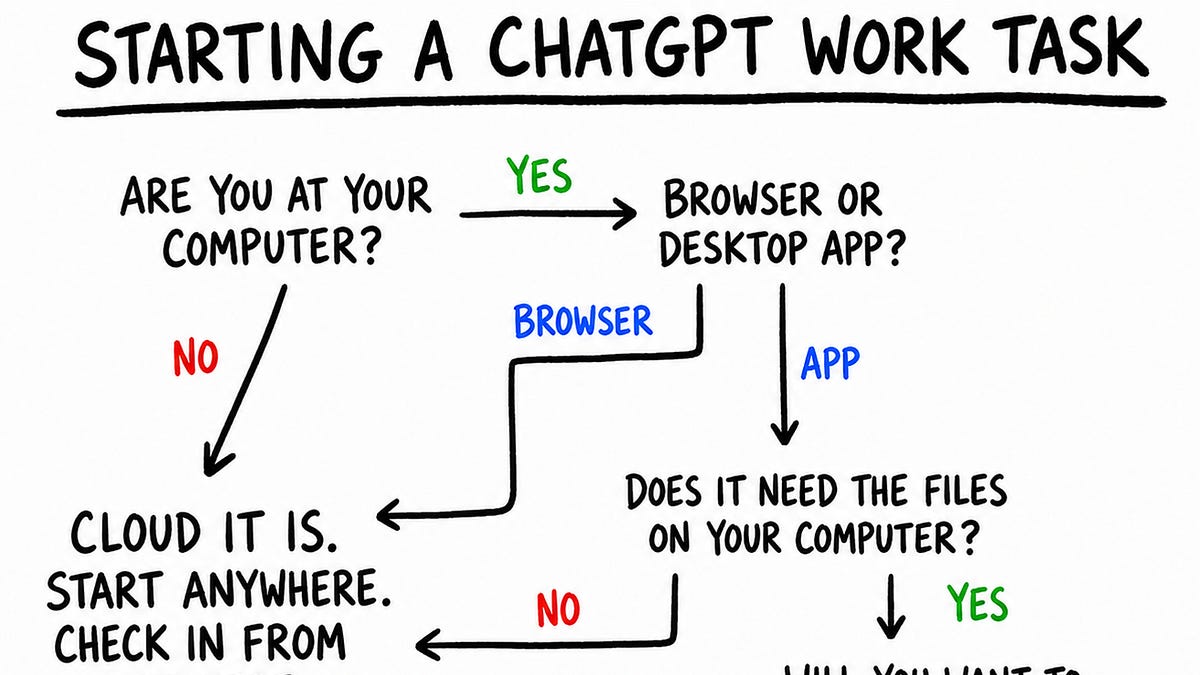
Every new conversation in Work is called a task. On web and mobile, Work runs in the cloud. You can kick off a task on web, track progress and give directions in the ChatGPT app on your phone, then view the result (maybe a report or a spreadsheet) back on your laptop.
Work on the desktop app is slightly different and comes in two modes: cloud and local. In cloud mode, tasks run on the same cloud computer as web and mobile and sync across all three.
In local mode, the agent works directly on your machine, across your files and apps, with full computer use. These tasks don’t appear on web or mobile, and there’s no way yet to move a local task to the cloud. This makes local mode essentially Codex, minus the code-related UI traces that would scare off a non-developer.
On desktop, each new Work task can run locally on your computer or in the cloud.
But then things get a little confusing. OpenAI did release a way to hand off a Codex task to a remote environment. Although this doesn’t work for me at the time of writing, I assume it eventually will, and that they will then bring the same functionality to Work.
For the rest of this piece, Work = Work in cloud mode. Persistence & Memory
One big reason OpenClaw felt different from a chatbot was that the agent had a computer of its own. You could run it on an always-on laptop or a VPS, let it create directories, install software, and maintain databases, and reuse all of this across conversations and subagents. Its state lived not just in chat history, Markdown files, or a dedicated memory system, but across the whole computer.
Work’s cloud computer is persistent too. But rather than running in one VM that stays on forever, its workspace is synchronised to persistent storage and restored onto isolated microVMs as needed. So the underlying machine can change, but the working state carries over. Compared to OpenClaw, though, the agent has far less sovereignty over this computer.
Every Work task (thread) gets a working directory under /workspace/scratch, where the agent has the freedom of a normal computer: it can make folders, install dependencies, write scripts, keep databases, and search everything with ordinary Linux commands.
When I ask it to make a presentation for Acme, it can create clients/acme, copy in the source material, perform some analysis through code, and create charts and slides, all as files in the directory. When I follow up in the same thread, it returns to that working state and can continue editing it.
But when a task needs context from other threads, it does not treat their working directories as a shared workspace that it can navigate freely. It relies instead on the ChatGPT product layer.
By default, each new thread receives a compressed summary of recent tasks and files worked on . A summary might look like this:
20260731T15:55 Prepare Acme pilot plan:||||
Turn the attached notes into a one-page plan for the Acme pilot, with an objective, deadline, and next steps.
<<File name=”acme_notes.txt”>> Raw conversation transcripts are not stored on the computer for the agent to browse. When a task needs context from previous threads, the agent calls ** Personal Context**, a dedicated tool that queries Chat and Work history through a separately managed service and returns the relevant excerpts.
Files follow the same pattern. ChatGPT’s ** Library** is the central user-facing repository for all files and artifacts.
User uploads land there automatically; agent-created files are saved when the user asks, or when the agent judges them worth retaining. The agent can also
create directories in the Libraryto keep it organised. Like conversations, the Library doesn’t live on the computer, and can only be reached through dedicated tools.
An uploaded file thus exists in two places: a working copy inside the thread and a canonical item in the Library. Interestingly, the two do not synchronise. If Thread A uploads a file and Thread B later changes the Library version, Thread A continues to read its now-stale local copy when resumed.
When instructed explicitly, an agent in one task can navigate the scratch directories of other tasks, find files, and modify them. But it won’t do this on its own, and the directories have opaque names, no legible map to their conversations, and no stated retention contract.
Memory is managed externally too. As I’ve written before, ChatGPT’s core memory primitive is a running, synthesised profile of the user. The product maintains that asynchronously and supplies it to Work when a task begins. The agent can reason from it, but can’t modify it or create OpenClaw-style Markdown files that other tasks load by default.
ChatGPT’s Projects carry over into Work. Projects group related conversations, standing instructions, and Sources (user-uploaded files). A new task within a Project receives its instructions, summaries of relevant conversations, and local copies of Sources in its directory. But the Project itself does not exist on the computer as a directory, as it does in Codex. It too is an abstraction the product maintains.
In short, the agent has broad freedom within a task, but continuity across tasks runs through an opinionated ChatGPT product layer rather than the computer itself. Why the split? My guess is several reasons:
Work builds on existing ChatGPT primitives (Conversations, Library, Personal Context, Memory). Ripping all of that out and rebuilding it inside the computer would mean refactoring a stack that already serves a billion users.
The separation is a guardrail. OpenClaw-style unrestricted access to a single environment holding every file, conversation, and memory is
unsafe for users.It lets OpenAI keep control of the product: what users see in the UI, how context is managed, and how sharing, cross-device sync, and file versioning work. All of that is harder to build if the agent could alter the environment at will.
What Work lacks today is a meta-layer agent, one that operates a level above individual tasks and projects and coordinates between them. (Some already use Codex this way.) Perhaps that is coming, along with much else. Work is still young, and the architecture could look very different a few weeks from now.
Hints of useful proactivity
Today’s AI products are still reactive. Before the model can help, you have to notice that something needs doing, gather the relevant context, and translate it all into a prompt. The agent can do a stellar job from there, but the initial act of agency is still yours. Proactivity, where agents figure out how to be useful on their own, is one of the holy grails of personal AI.
Work offers an early glimpse of that. When you open a new Work conversation, alongside the composer, you get personalized tasks generated from your own context.
One suggestion offered to prepare me for an upcoming call. When I selected it, Work injected a pre-authored prompt. It had reasoned asynchronously across my context: noticed the calendar event, inferred that preparation would help, pulled data from Calendar and Gmail, and framed a task around the interests and preferences in my memory. When I sent the prompt, it got to work, and the result was a great meeting brief — one I didn’t know I needed!
Today, Work takes a credible first step: it suggests tasks. But nothing happens until I execute them. For true proactivity, it would have to complete the tasks it predicts I’d want done, without me in the loop. That future doesn’t seem far off.
Scheduled Tasks
Automations let Work run tasks at a future time or on a recurring schedule, without the user manually prompting it. They are ChatGPT’s abstraction for reminders and cron jobs.
OpenAI introduced them as Scheduled Tasks in January 2025. Work builds on the same scheduler but makes it agentic: each run can use the agent’s context and tools to complete the task.
They come in two types.
A standalone scheduled task begins each run from a saved prompt and opens a fresh task for the result. It suits self-contained work: a one-off reminder, a daily briefing, a weekly job search, a routine email scan.
A scheduled task inside an existing conversation, triggered by a “heartbeat”, reawakens that task with its context intact. It suits use cases like monitoring a long-running operation, polling a connected service, or resuming a review loop at short intervals. At the time of writing, heartbeats work in the desktop app but are not exposed in Work on the web.
Either automation can be set up as one-time or recurring. Its trigger can be an exact time, a loose window such as “in the morning”, or a condition the agent monitors.
You can manage automations in two places. Inside a conversation, you can ask Work to create one, inspect existing automations, change their instructions or cadence, or and resume them. The Scheduled page puts all of this in a UI: every task with its next run and recent results, plus controls to create, edit, , or delete them.
The Scheduled page adds another element of proactivity: ChatGPT suggests custom automations for you. Some, like a Daily Brief, are generic; others, like a weekly recap for the football club I support, are personalized from my memory.
Browser Use
For years, ChatGPT had limited access to the web. It could search, retrieve pages, and use commands like curl to download files or call APIs. But it couldn’t click through an interface, stay logged into a service, or complete workflows like filling a form. ChatGPT first gained this ability with Operator and ChatGPT agent. It then became a core part of Codex and now finds its most integrated expression in Work. Unlike Codex running locally, the Work browser doesn’t live on the same computer as the agent. Instead, the agent controls a separately hosted Chrome service through tool calls. It can inspect the page, click, type, scroll, take screenshots, manage tabs and dialogs, and move files between the browser and its computer.
On web and desktop, Work shows a replayable timeline of the browser’s past states, so you can retrace what the agent did. You can also take over the live browser to navigate or enter a password, then hand it back to the agent. You can’t do this on mobile yet.
The browser service also keeps its own persistent profile. New browser instances inherit preferences and logged-in sessions: I switched Wikipedia to dark mode and signed into Google in one task, and a fresh task inherited both. The Work agent never sees this profile or its credentials. Instead, a small permission ledger is synchronised into its computer alongside the workspace, recording, globally and per conversation, which sites it may act on and whether it may move files to or from them.
But because the cloud browser runs in a datacenter, and not on your laptop, it faces constraints a local browser does not. Amazon US rejected it as an unsupported “session or client”, and Google Photos repeatedly timed out when I asked it to copy a shared album. Both tasks worked in local mode. Work can attempt a CAPTCHA, but only with your permission, and it is instructed not to loop, rotate its fingerprint, or otherwise evade a site’s safeguards.
Still, the cloud browser makes Work far more capable. It can finish whole classes of tasks that ChatGPT with web search alone never could.
Plugins, skills, and tools
OpenAI has spent years searching for the right primitive to connect ChatGPT to outside apps and services: Plugins (March 2023), GPTs and Actions (November 2023), connectors (June 2025), and apps, the Apps SDK, and the App Directory (late 2025). In March 2026, plugins returned to Codex as packages of apps and skills.
With the July 9 launch, the App Directory became the Plugin Directory, existing apps were packaged into plugins, and the directory expanded across Work and Codex. For now, OpenAI seems to have settled on plugins as the way for Chat and Work to interact with the external world.
A plugin today can contain: Apps, which connect the agent to services such as Gmail, Slack, or Salesforce. Most use an MCP server to expose** tools**: discrete operations the agent can invoke, such as searching messages or sending an email.** Skills**, which combine instructions with supporting material—references, templates, and sometimes scripts—to teach the agent a workflow.App templates, which let an organisation configure the private or organisation-specific app a workflow depends on.
Plugins come in three broad types:
Operational plugins give the agent Codex-native enhancements. Computer Use lets it operate interfaces; Sites lets it deploy websites; Documents, Presentations, and Spreadsheets let it create interactive artifacts.Role-specific plugins equip the agent for a particular kind of work. TheSales plugin, for example, teaches it to apply 20 skills (Analyze Account Signals, Build Business Case) across 29 apps, including Salesforce and Slack.Service plugins connect the agent to external products such as Gmail, Slack, Notion, Figma, Salesforce, and PitchBook.
Users can also create personal plugins by connecting a custom MCP server and, if needed, adding skills or custom UI. Developers who want to distribute a plugin more widely can submit it to OpenAI; once approved, it is published to the Plugin Directory.
The Plugin Directory already holds more than 1,000 plugins covering most major apps and services, but discovery is a weak link. Work routes tasks to installed plugins seamlessly, yet never suggests a relevant plugin when one is missing. When I asked it to search for flights and hotels, it ignored several available but uninstalled travel plugins in favour of web search, even though a plugin might have used fewer tokens, returned better results, and let me complete a booking directly. Even naming Expedia outright didn’t prompt it to offer the plugin.
I can imagine the product challenges: how does ChatGPT know when to handle a task itself, when to recommend a plugin, and which path serves the user better? And if several can do the job, which should it suggest? Without a solid discovery layer, though, OpenAI is leaving value on the table—for users, for developers, and for itself in its quest to become a platform.
What’s Next
When Work folds into Chat later this year, its design choices will become the default for a billion people. Before then, OpenAI has to resolve a few tensions that kept surfacing as I used it:
Does the cloud computer become the user’s primary AI computer? And how can syncing between it and the local machine feel seamless?
Do Work agents get more OpenClaw-like sovereignty over that computer? Does ChatGPT keep the opinionated role it plays in continuity, or is there a middle ground?
How does Work come to feel as familiar to users as Chat? And in the meantime, how does OpenAI teach Chat users, from within the product and outside it, what Work is for and how to get the most out of it?
None of this should detract from the fact that Work is an impressive, ambitious, yet underrated launch. It consolidates years of scattered products and experiments into one increasingly cohesive whole. And it’s close to the ChatGPT OpenAI would build if it were starting from scratch with today’s agents.
I’m excited to see where it heads next.
I spend most of my time thinking about personal AI: going down rabbit holes like this one, figuring out what the best products are getting right, and imagining what our AI sidekicks will look like a year and five years from now. If you made it this far, we probably think about the same things, and I’d love to hear from you. Find me on X or through my website.