Streaming, training, and iterating on versioned robot data with PyTorch and Foxglove
Project Context #
We recently purchased a Trossen Mobile AI to simulate a true end-to-end roboticist workflow with Foxglove. The rig includes two leader arms that we teleoperate to control two follower arms. Each follower arm has a wrist camera, and one camera on the base of the unit oversees everything.
Picking up a piece of fruit is something a toddler does without thinking. With modern ML, a robot with two arms and three cameras can learn it from demonstrations, so success comes down to the data, and to how well our pipeline helps us curate it. While we collected data, Foxlet automatically uploaded each recording to Foxglove, and we built our first dataset from those recordings.
Foxglove Datasets 101 #
A dataset in Foxglove is a versioned collection of episodes. An episode is a time range over one device’s recordings, like a single grasp attempt. Episodes point at the data you already have in Foxglove, so building a dataset copies nothing. You can create episodes from search results, events, recordings, or the visualizer, then review them in a gallery or table and trim each one until it captures exactly the moment you want.
Edits land in a shared draft. When the set looks right, you commit a dataset version, and that pins exactly which episode versions the dataset version contains. You can compare any two dataset versions, discard a draft, or restore an earlier version, and every change is attributed to the person or API key that made it. Each episode also records what it was created from, like the search or event behind it, so you can trace every episode back to where it came from. When you’re ready to train, read_dataset streams a committed version straight into your training loop as a PyTorch IterableDataset or Ray Dataset, so there’s no export or conversion step. That’s what we used for the rest of this post. To learn more about how we built datasets, check out this blog post.
Step 1: Assigning Episodes and Creating a Dataset #
Before we could train, we had to decide what counts as one example. For us, an episode is a single attempt: the arms reach, grasp a piece of fruit, and place it in the bowl. For version 1, we marked each attempt with an event and turned the events into episodes. After that, we let the robot tell us when an attempt was happening instead. We added a small episode tracker that publishes /episode/active, which is true whenever the arms are away from their home position. Each pick then shows up as a clean block of time, from the moment the arms leave home until they return. In Foxglove, we searched for /episode/active.data == true and turned the matching ranges into episodes, which is how we added episodes to every later version.
Step 2: Setting Up Training #
With the dataset committed, the next step was getting it into PyTorch.
Use for Training
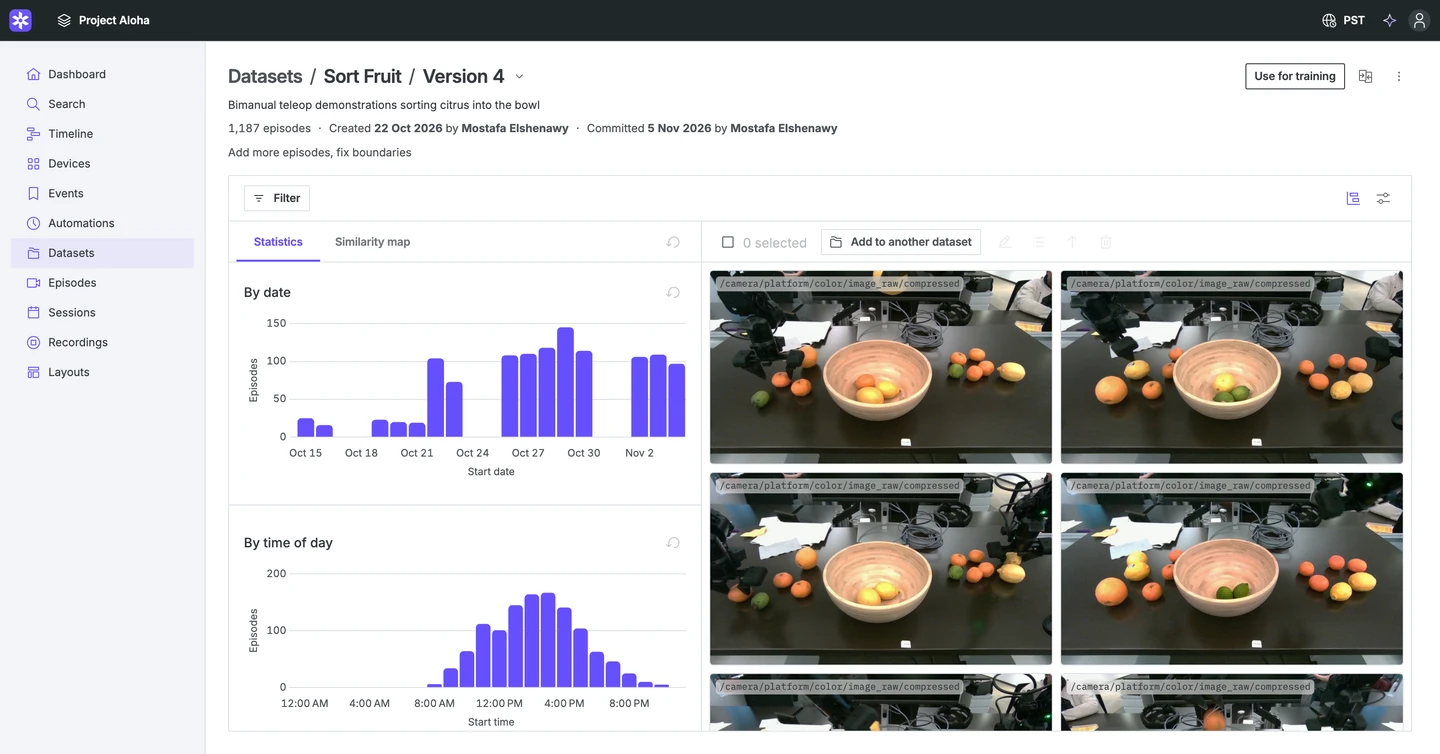
On the dataset page, we clicked Use for training and selected the topics we wanted to train on. Foxglove then walked us through the setup, with commands to install the Foxglove SDK, set an API key, and load the dataset in the training framework we chose.
Choosing Topics
The script comes ready to run, with our dataset and topics already filled in. We grouped the topics by what the model uses them for:
DATASET_ID = "dset_..."
VERSION = 1
STATE_TOPICS = ["/follower_left/joint_states", "/follower_right/joint_states"]
ACTION_TOPICS = ["/leader_left/joint_states", "/leader_right/joint_states"]
CAMERA_TOPICS = [
    "/camera/platform/color/image_raw/compressed",
    "/camera/wrist_left/color/image_raw/compressed",
    "/camera/wrist_right/color/image_raw/compressed",
]
TOPICS = STATE_TOPICS + ACTION_TOPICS + CAMERA_TOPICS
We mapped the follower arms’ joint states to the model’s state input, the three camera images to its image input, and the leader arms’ joint states to the action target, since the leader arms are what the operator moves. From here, the training script is ready to stream in only the needed information from our dataset.
Step 3: Building Training Samples #
Out of the box, read_episode yields topic names and log times, so the remaining work was splitting episodes into samples. Each sample needed an image from each of the three cameras and two sets of joint positions for the leader and follower arms.
Aligning Topics
We used the base camera as the clock for aligning our data. Each time it published a new frame, we took the latest message on every other topic and kept that frame as a training sample, unless any of those messages was more than 100 ms old. A frame is dropped only when a topic stalls, so a sample never pairs a fresh image with stale joint states.
REFERENCE_TOPIC = "/camera/platform/color/image_raw/compressed"
MAX_STALENESS_NS = 100_000_000

def read_episode(episode):
    latest = {}
    for _schema, channel, message, decoded in episode.iter_messages():
        latest[channel.topic] = (message.log_time, decoded)
        if channel.topic != REFERENCE_TOPIC or len(latest) < len(TOPICS):
            continue
        if any(message.log_time - t > MAX_STALENESS_NS for t, _ in latest.values()):
            continue
        yield {
            "images": torch.stack([decode_image(latest[t][1]) for t in CAMERA_TOPICS]),
            "state": joint_positions(latest, STATE_TOPICS),
            "action": joint_positions(latest, ACTION_TOPICS),
        }
Messages arrive decoded, so we read joint positions directly. As a preprocessing step, the image helper decodes each camera’s JPEG bytes into a 128×96 RGB tensor, which keeps the three images in a sample to about 110 KB.
Step 4: Training the Policy #
Now that everything is in place, we can begin training with PyTorch. read_dataset returns a regular IterableDataset. It fetches the episode list up front and streams each episode only while iterating, splitting episodes across Data workers and DDP ranks, with no need to export or convert the data.
Shuffling and Validation
Consecutive frames are highly correlated, which is bad for training, so we needed a way to shuffle the data. Data shuffling doesn’t work on a stream, so read_dataset reorders episodes every epoch with shuffle=True, and a 1,000-sample buffer in each worker mixes frames across the episodes that worker reads. For validation, DatasetSplit held out about 20% of the demonstrations, with every episode from a recording on the same side, and a fixed seed keeps the split the same across runs. In the code below, model, optimizer, and EPOCHS are our policy network, its optimizer, and the epoch count.
split = DatasetSplit(train=0.8, validation=0.2, test=0.0, seed=1)
dataset = read_dataset(
    DATASET_ID,
    version=VERSION,
    topics=TOPICS,
    read_episode=read_episode,
    split_config=split,
    split="train",
    shuffle=True,
    seed=0,
)
 = Data(ShuffleBuffer(dataset, 1000), batch_size=32, num_workers=4)

for epoch in range(EPOCHS):
    dataset.set_epoch(epoch)
    for batch in :
        loss = F.l1_loss(model(batch["images"], batch["state"]), batch["action"])
        optimizer.zero_grad()
        loss.backward()
        optimizer.step()
Step 5: Iterating on the Data #
Tracking the Version
Every checkpoint records the exact data that produced it:
torch.save(
    {"model": model.state_dict(), "dataset_id": DATASET_ID, "dataset_version": VERSION},
    "policy.pt",
)
Finding What to Fix
Our first policy couldn’t complete the task consistently, which meant we hadn’t collected enough of the right data. Visualizing the episodes in Foxglove showed us why: all of our demonstrations were recorded on a table at a different height than the one we tested on. On the new table, the arms reached the fruit but couldn’t find the right height to grasp it.
To find problems like this, we visualized the episodes in Foxglove and scrubbed through the camera frames and joint plots on a single timeline. This makes bumped attempts, idle arms, and unusual start poses easy to identify and remove.
Committing New Versions
Once we’d identified the bad episodes and collected new data, we staged the changes and committed a new version of the dataset. Each version is immutable, so version 1 stays exactly as it was. A few rounds of new episodes and fixes later, we were on version 4.
Compare versions in the UI shows what changed, and so does the API:
client.update_dataset_episodes(dataset_id=DATASET_ID, add=new_ids, remove=bad_ids)
client.commit_dataset(dataset_id=DATASET_ID)

diff = client.compare_dataset_versions(dataset_id=DATASET_ID, version_number=4, base_version=1)
print(f"+{diff['added_count']} -{diff['removed_count']}")
Retraining
Retraining is a one-line change in our script: VERSION = 4. Since version 1 never changes, we can rerun the old configuration at any time and compare both models on known data. If the new policy turns out worse, restore_dataset_version stages a previous version’s episodes back into the draft.
Results #
Ultimately, a final policy takes shape, which can be seen in the video below:
Wait, is the left arm failing to consistently pick up fruit? That sounds like a job for Automations. We can set them up to flag failures like these automatically and triage them as new recordings come in. And with that, the data flywheel starts over: we search for those failures and successes, curate and label them into a new dataset version, and train again to keep improving the policy.
Learn More #
- Try the adapter. Thedataset training example in the Foxglove SDK streams a dataset version into PyTorch or Ray.
- Read the docs. TheDatasets docs cover episodes, drafts, versions, andUse for training . TheFoxlet docs explain how recordings upload automatically from the robot.
- Read the launch post.Introducing Foxglove Datasets explains why we built Datasets and how versioning works under the hood.
- Find episodes worth training on.Semantic search finds moments nobody tagged, andAutomations can mark candidate failures as events when a recording lands.
- See the hardware. We used theTrossen Mobile AI with two leader and two follower arms and three cameras.
- Join the community. Questions about training on your own robot data? Come tell us in ourDiscord .