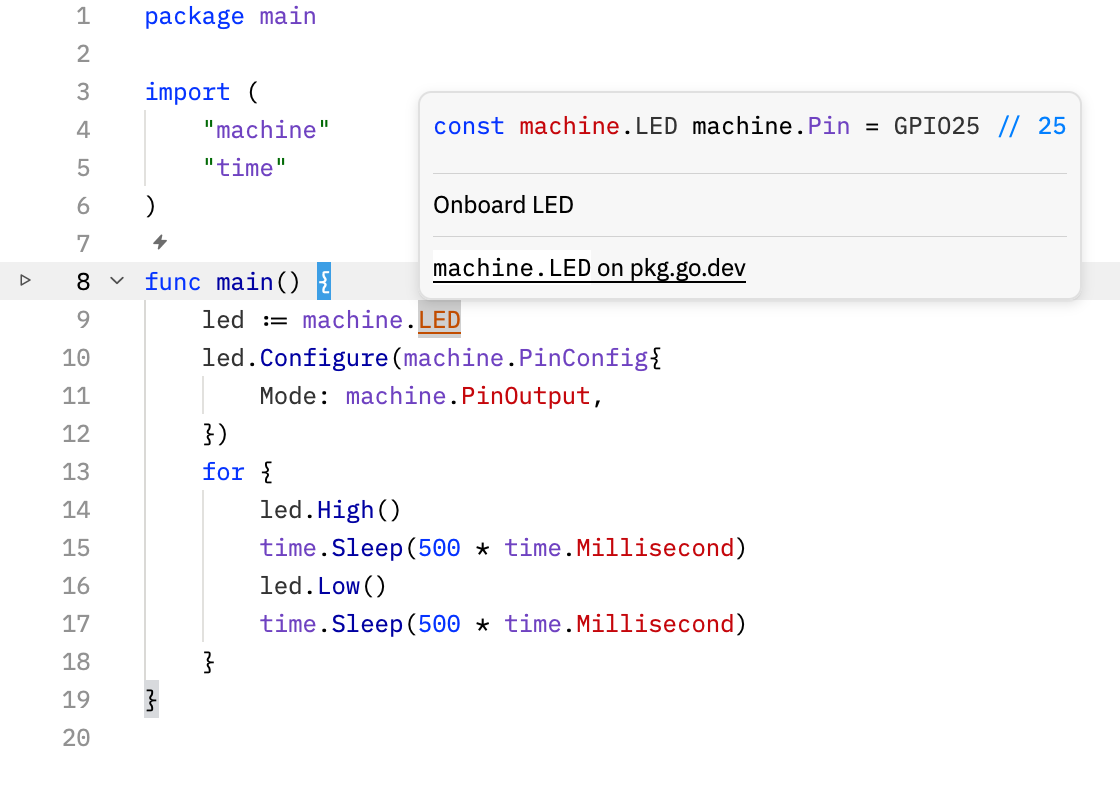
I’ve moved my embedded Go work to Zed. It is super fast, pleasant and increasingly secure by default. For me it beats the shit out of messy VS Code: fewer layers, less interface debris and no feeling that my text editor is a browser wearing a tool belt.
Zed is a native Rust application with a purpose-built, GPU-accelerated UI designed to render at 120 frames per second. Unfamiliar worktrees also open in Restricted Mode, so project settings cannot start language or MCP servers until I explicitly trust the worktree. Speed without careless defaults. Rather nice.
The TinyGo-shaped hole #
Zed’s native Go support uses gopls
, but TinyGo targets have their
own GOROOT
, architecture and build tags. Without those values,
gopls
cannot properly understand packages such as
machine
or names such as machine.LED
.
So I wrote tinygo-zed to turn that procedure into one command. Install it alongside TinyGo, then run it from the project directory:
go install github.com/oxplot/tinygo-zed@latest
tinygo-zed init
Choose a target when prompted. The utility reads its actual metadata from
TinyGo, writes the corresponding gopls
settings and adds custom Zed tasks for building, testing, size and allocation reports, and flashing. Open the directory in Zed, click Restricted Mode in the title bar and trust the worktree. Hover, completion, navigation and diagnostics should now understand the selected board, as in the screenshot above.
If the board changes, use tinygo-zed target
. After upgrading
TinyGo, run tinygo-zed sync
. That’s the whole trick: keep Zed’s native Go tooling and point it at the right reality.