Sooner or later your app has to do something with a model's answer. Show it in a UI, save it to a database, pass it to another service. For that, you need data, not prose.
The old way was to write "respond only with JSON" in the prompt and hope. It works until it doesn't: a stray sentence before the opening brace, a missing field, a string where you wanted a number, or a response cut off mid-object.
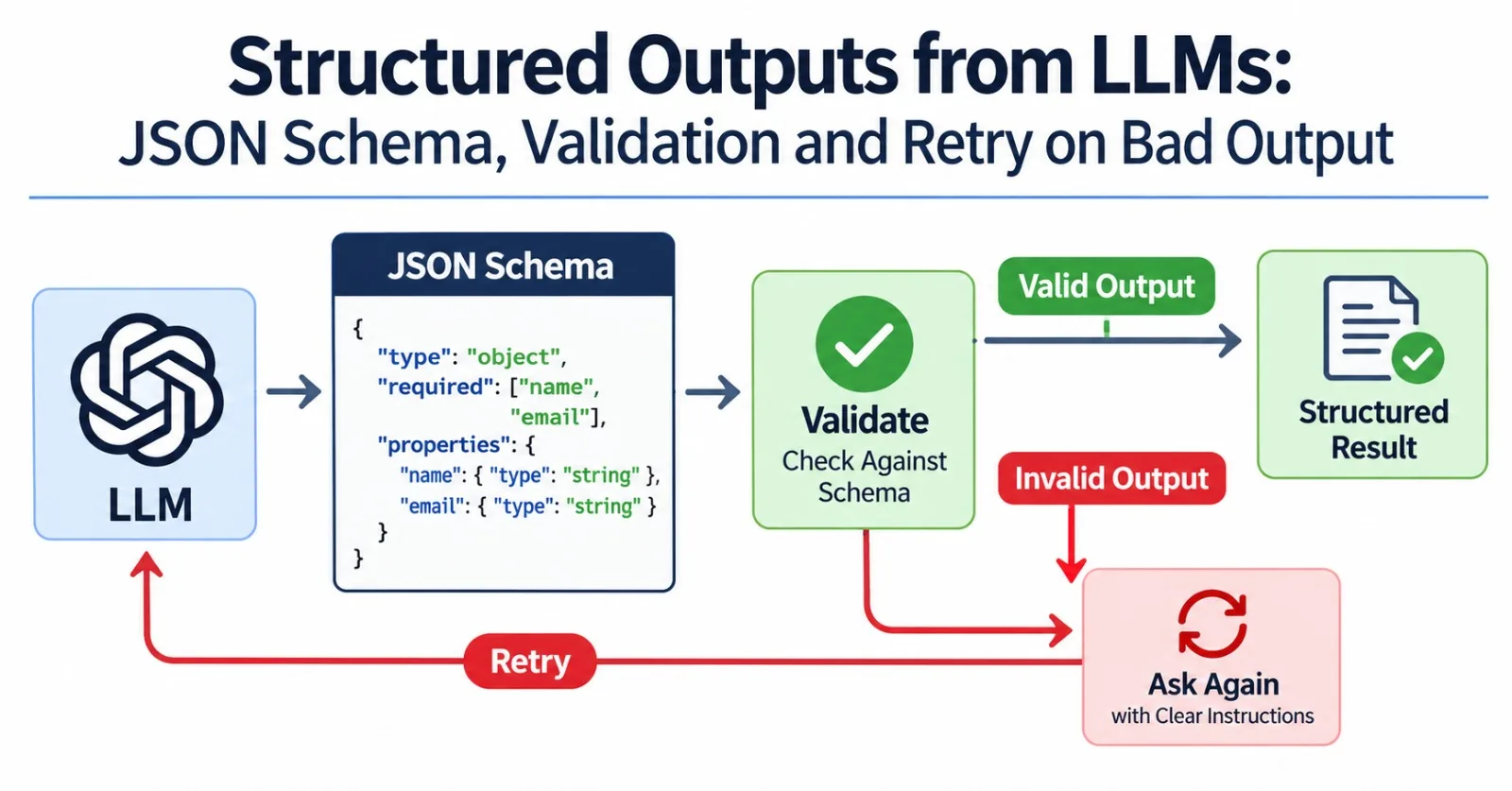
The fix is three layers that work together: a schema that defines the shape, enforcement by the provider, and validation plus retry in your code.
Sources: the API details come from the official Anthropic, OpenAI, Gemini and Pydantic documentation. These APIs change quickly, so check the current docs before you ship.
flowchart TD
    A["Prompt + JSON Schema"] --> B["LLM call"]
    B --> C{"Refused or truncated?"}
    C -- Yes --> D["Stop and handle it"]
    C -- No --> E["Parse and validate"]
    E --> F{"Valid?"}
    F -- Yes --> G["Use the result"]
    F -- No --> H{"Attempts left?"}
    H -- Yes --> I["Send the errors back to the model"]
    I --> B
    H -- No --> J["Fail loudly"]
Step 1: Define the shape once #
Write the structure as a Pydantic model. It gives you a JSON Schema for the provider and a validator for your code, from one definition:
from pydantic import BaseModel, ConfigDict, model_validator

class Strict(BaseModel):
    model_config = ConfigDict(extra="forbid")  # adds "additionalProperties": false

class LineItem(Strict):
    description: str
    quantity: float
    unit_price: float

class Invoice(Strict):
    invoice_number: str
    customer_name: str
    line_items: list[LineItem]
    total_amount: float

    @model_validator(mode="after")
    def total_matches_line_items(self):
        expected = sum(item.quantity * item.unit_price for item in self.line_items)
        if abs(expected - self.total_amount) > 0.01:
            raise ValueError(
                f"total_amount is {self.total_amount}, "
                f"but the line items add up to {expected:.2f}"
            )
        return self

schema = Invoice.model_json_schema()
Two details matter here. extra="forbid" makes Pydantic emit additionalProperties: false, which the strict modes of both Anthropic and OpenAI expect. And because no field has a default, every field is listed as required.
Use clear field names. A descriptive name like unit_price guides the model better than p, and you can add Field(description=...) for anything ambiguous.
Step 2: Let the provider enforce the schema #
All three major providers can now constrain the model's output to a schema. Anthropic describes its version as constrained decoding: generation is steered so the output can't break the schema, which means syntax errors and missing fields disappear.
| Provider | Where the schema goes | Python helper |
|---|---|---|
| Anthropic | output_config.format withtype: "json_schema" |
client.messages.parse(output_format=Model) , result inparsed_output |
| OpenAI (Responses API) | text.format withstrict: true |
client.responses.parse(text_format=Model) , result inoutput_parsed |
| OpenAI (Chat Completions) | response_format withstrict: true |
client.chat.completions.parse(response_format=Model) , result inmessage.parsed |
| Gemini | response_format with a MIME type andschema |
Pass Model.model_json_schema() , then callModel.model_validate_json(response.text) |
Older Gemini examples use response_mime_type and response_json_schema instead, so check which one your SDK version expects.
With Claude, the shortest path is the SDK helper:
from anthropic import Anthropic

client = Anthropic()

response = client.messages.parse(
    model="claude-sonnet-5-5",
    max_tokens=2048,
    messages=[{"role": "user", "content": "Extract the invoice data: ..."}],
    output_format=Invoice,
)
invoice = response.parsed_output
The helper converts your model into a schema the API accepts, sends it, and validates the response against your original model, including constraints the API can't enforce itself.
Don't confuse this with plain "JSON mode". OpenAI's docs are clear that JSON mode guarantees valid JSON but not that it matches your schema. Always prefer the schema version.
Know the schema limits
Providers support a subset of JSON Schema. For Anthropic, that means:
- No recursive schemas,
oneOfornot. UseanyOfinstead. - No numeric limits (
minimum,maximum) or string length limits (minLength,maxLength). additionalPropertiesmust befalseon every object.- A cap on complexity, including 24 optional parameters and 16 union-typed parameters per request.
Using an unsupported keyword in a raw schema returns a 400 error. The SDK helpers sidestep this by moving those constraints into the field description and checking them after the response arrives.
Heads up: don't use dict fields in a Pydantic model for Claude. The SDK sends them as an object with no properties, so the model can only return {}. Use a nested model, or a list of {key, value} items.
Step 3: Validate anyway #
It's tempting to stop after step 2. Don't. OpenAI's docs say outright that your app still has to handle refusals, incomplete responses and any business rules the schema doesn't express. Anthropic's docs list the same kinds of exceptions. A valid shape is not the same as a correct answer.
| Layer | What it catches | What it misses |
|---|---|---|
| Constrained decoding | Invalid JSON, missing fields, wrong types | Refusals, truncation, wrong values |
| Pydantic validation | Out-of-range values, business rules, bad enum values | Plausible but wrong answers |
| Retry with feedback | One-off mistakes | A model that systematically misreads the input |
These are the cases the schema can't save you from:
- Refusals. If Claude declines for safety reasons, the response has
stop_reason: "refusal"with a 200 status, and the output may not match your schema. OpenAI exposes arefusalfield on the message. - Truncation. When the model hits
max_tokens(OpenAI calls itfinish_reason: "length"), you get incomplete JSON even with strict mode on. - Constraints the API can't express. Number ranges, string lengths, and anything involving more than one field.
- Enum case drift. Anthropic notes that capitalization of enum values isn't guaranteed. Compare case-insensitively.
- Business rules. In the model above, nothing in the schema says the total must equal the sum of the line items. The validator does.
Treat model output like any other untrusted input. If it contains an ID, check that the ID exists before you use it.
Step 4: Retry with the error, not just "try again" #
When validation fails, the best retry tells the model exactly what was wrong. Show it its own output and the specific errors:
from pydantic import ValidationError

class StructuredOutputError(Exception):
    pass

def describe(error: ValidationError) -> str:
    lines = []
    for item in error.errors(include_url=False, include_input=False):
        where = ".".join(str(part) for part in item["loc"]) or "(whole output)"
        lines.append(f"- {where}: {item['msg']}")
    return "\n".join(lines)

def extract(call_llm, prompt, model_cls, max_attempts=3):
    messages = [{"role": "user", "content": prompt}]

    for _ in range(max_attempts):
        text, status = call_llm(messages)

        if status == "refused":
            raise StructuredOutputError("The model refused the request.")
        if status == "truncated":
            raise StructuredOutputError("Output hit the token limit. Raise max_tokens.")

        try:
            return model_cls.model_validate_json(text)
        except ValidationError as error:
            messages += [
                {"role": "assistant", "content": text},
                {
                    "role": "user",
                    "content": "Your JSON was invalid:\n"
                    + describe(error)
                    + "\nReturn the corrected JSON only.",
                },
            ]

    raise StructuredOutputError(f"Still invalid after {max_attempts} attempts.")
model_validate_json handles both problems in one call: bad JSON and a bad shape both raise ValidationError. Broken JSON shows up as an error of type json_invalid.
Here is the adapter that plugs Claude into it. It uses the raw schema from step 1 and maps the stop reasons to the statuses the loop understands:
def call_claude(messages):
    response = client.messages.create(
        model="claude-sonnet-5-5",
        max_tokens=2048,
        messages=messages,
        output_config={"format": {"type": "json_schema", "schema": schema}},
    )
    status = {"refusal": "refused", "max_tokens": "truncated"}.get(response.stop_reason, "ok")
    text = next((block.text for block in response.content if block.type == "text"), "")
    return text, status

invoice = extract(call_claude, "Extract the invoice data: ...", Invoice)
Heads up: this raw-schema version sends exactly what model_json_schema() produces. If your model has Field(ge=1, le=5) style limits, those become minimum and maximum in the schema, and Claude's API rejects them. Either keep such checks in validators, as in step 1, or use client.messages.parse, which handles the conversion.
A few rules make this loop behave well:
- Retry only validation failures. A refusal or a truncated response won't be fixed by sending the same request again. Raise the token limit for truncation, and surface refusals to the caller.
- Be specific. A field path and a message gives the model something to act on. "Try again" doesn't.
- Cap the attempts at two or three, then fail loudly, fall back to a default, or queue the item for a human.
- Keep API errors separate. Timeouts and rate limits need backoff and a plain retry of the same request, not an error message to the model.
- Know when the input is the problem. If the source document is itself inconsistent, say an invoice whose printed total is wrong, no number of retries will fix it. Let those failures reach a person.
Production tips #
- Keep schemas small and flat. Simpler schemas compile faster and leave less room for error. Make fields required where you can, since each optional field adds complexity.
- Expect a slower first request. Anthropic compiles each new schema into a grammar on first use, then caches it for 24 hours.
- Give the model an exit. If a field can legitimately be missing from the source, make it nullable. Otherwise the model has to invent a value.
- Don't ask for reasoning inside the JSON. Anthropic warns that fields requesting step-by-step thinking can trigger refusals. Ask for a short explanation instead.
- Accumulate before parsing. When you stream, collect the full response first. Partial JSON isn't valid JSON.
- Track your retry rate. A rising rate means your prompt, schema or model needs attention. Log the raw failing output so you can see why.
Checklist #
- One Pydantic model defines both the schema and the validation.
- Native structured outputs are on, with
additionalProperties: false. - Refusals and truncation are handled before parsing.
- Business rules live in validators, not in the prompt.
- Retries send back specific errors and stop after a few attempts.
- Failures are logged with the raw output.
Start with the schema and native enforcement, since that removes most of the pain. Then add validation and one retry for everything it can't promise.