The Local AI
Agent Runtime.
Run any AI model, fully local, on Apple Silicon. Squish loads models in under a second—54× faster than the standard path—and serves them faster than Ollama. No cloud, no API keys, fully offline.
The local AI agent runtime
Install once
brew install konjoai/squish/squish
✓ squish 9.34.8 installed
One command does everything
squish run qwen2.5:7b
↓ Pulling qwen2.5:7b 4.0 GB
✓ Model ready 0.43s
✓ Chat open at http://localhost:11435 🌐
Up and running in two steps #
Install once. Then squish run
handles pull, compress, serve, and opens your chat UI automatically.
One Homebrew command. No Docker, no CUDA, no virtual environment setup.
brew install konjoai/squish/squish
Downloads the pre-optimised model if needed, loads in milliseconds, opens your chat UI in the browser.
squish run qwen2.5:7b
squish serve
is an alias for squish run
— use whichever feels right.
Your data never #
leaves your Mac
Every inference runs on your hardware, in your memory. No telemetry on conversations, no API quotas, no usage bills. Fast, private AI you own outright.
Everything runs on-device — no API rate limits, no per-token billing, no data leaving your Mac.
INT4 compression turns a 16 GB BF16 8B model into 4.4 GB. Run two models where you used to fit one.
Calibrated quantisation holds benchmark accuracy to ≤1.5 pp across ARC-Easy, HellaSwag, WinoGrande, and PIQA at the tested sample size.
Squish ships 100+ composable optimisation modules. Each release improves TTFT and decode throughput, applied automatically.
Built for speed at every layer #
From storage format to HTTP serving, every decision is optimised for Apple Silicon unified memory. Memory-mapped INT4 tensors load directly into Metal unified memory with zero dtype conversion. A 1.5B model is ready in 0.33–0.53 s — versus 28.8 s for the standard , on 160 MB of RAM.
Zero code changes. LangChain, LlamaIndex, OpenAI SDK, Cursor, and any tool that speaks /v1/chat/completions
works out of the box.
Agents resend the same long system prompt every turn. Squish's two-cache architecture reuses the prefill instead of re-running it—so a repeated prompt skips straight to decode.
Small models hallucinate syntax. Squish uses engine-level Finite State Machine (FSM) masking to constrain every token to valid JSON matching your schema. Agents never crash a parser again.
A 32k context window normally pushes a 16 GB Mac into swap. Squish's Asymmetric INT4 KV Cache shrinks the KV footprint by 75%, keeping all context hot in unified memory.
Process multiple prompts in a single request. Essential for evals, data pipelines, and bulk generation—a capability Ollama and LM Studio don't offer.
Why Squish beats the rest #
Real measurements, same hardware. Apple M3 MacBook Pro, 16 GB — thermally controlled.
| Metric | Ollama | LM Studio | Squish ✶ |
|---|---|---|---|
| Cold start — load + first token | 20–30 s | ~18–28 s | 0.5 s ✶ |
| Decode throughput — 7B | 20.3 tok/s | — | 24.0 tok/s ✶ |
| Inter-token tail latency (p95) | 52 ms | — | 43 ms ✶ |
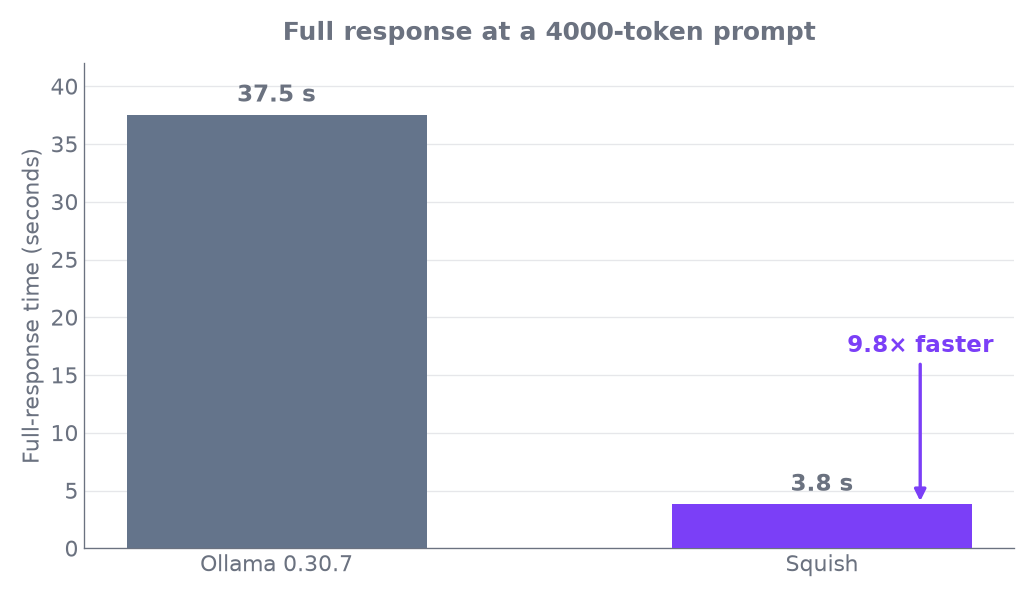
| Full response — 4000-token prompt | 37.5 s | — | 3.8 s 9.8× ✶ |
| Peak RAM — serving | 5.1 GB | — | 3.5 GB ✶ |
| Disk size — 7B INT4 | 4.4 GB (GGUF Q4) | 4.7 GB (GGUF Q4) | 4.0 GB INT4 ✶ |
| OpenAI API | ✓ | ✓ | ✓ |
| Batch requests | ✗ | ✗ | ✓ |
| Pre-optimised weights (HuggingFace) | ✗ | ✗ | ✓ 9 prebuilt |
| Auto-open chat UI | ✗ | ✓ | ✓ |
| Zero-copy mmap Metal load | ✗ | ✗ | ✓ |
| Repeat-prompt TTFT (KV cache hit) | ~160 ms | — | 4–11 ms ✶ |
| Guaranteed JSON Syntax (FSM) | ✗ | ✗ | ✓ 100% Reliable |
| Context Window Compression | FP16 Only (High VRAM) | FP16 Only | INT4 (75% Less VRAM) |
✶ M3 16 GB, thermally controlled. Cold start: Qwen2.5-1.5B. Serving (decode, tail, E2E, RAM): Qwen2.5-7B INT3 vs Ollama 0.30.7. Squish v9.34.8. On a loaded model, single-token TTFT is comparable (Ollama 167 ms / Squish 192 ms) — Squish’s edge is everywhere else.
Everything you need, right here #
macOS via Homebrew (recommended) brew install konjoai/squish/squish
✓ squish 9.34.8 installed
Or via pip (Python 3.11–3.14) pip install squish-ai
Verify installation
squish --version squish 9.34.8
One command: pull, optimise, serve, open browser
squish run qwen2.5:7b
↓ Pulling qwen2.5:7b 4.0 GB ██████████ 100%
✓ Model ready 0.43s
✓ Server http://localhost:11435 ✓ Chat UI opening in browser... 🌐
No model? Interactive picker appears
squish run
? Choose a model:
qwen2.5:7b 4.0 GB · INT4 (recommended) qwen3:4b 2.3 GB · INT4
llama3.2:3b 1.5 GB · INT4
Browser UI opens automatically after squish run
┌─────────────────────────────────────┐
│ 🟣 squish localhost:11435 │
├─────────────────────────────────────┤
│ Model: qwen2.5:7b ▾ │ ├─────────────────────────────────────┤
│ │
│ 🟢 Hi! Running on your Mac. │
│ No cloud. No cost. Fully private. │
│ │
│ You: [ ] → │ └─────────────────────────────────────┘
Terminal chat (no browser) squish chat qwen2.5:7b
... 0.4s
You: Hello!
AI: Hi! How can I help? <streams instantly>
squish run already starts a server; or start it manually
squish serve qwen2.5:7b
→ http://localhost:11435 (OpenAI-compatible) Zero code changes from OpenAI SDK
python3
import openai

client = openai.OpenAI(

base_url="http://localhost:11435/v1",
api_key="local"
)

r = client.chat.completions.create(

model="qwen2.5:7b",

messages=[{"role":"user","content":"Hello!"}]

)

print(r.choices[0].message.content)
Ollama-compatible too
export OLLAMA_HOST=http://localhost:11435 Compress any HuggingFace model to INT4 locally
squish pull meta-llama/Llama-3.3-70B-Instruct --int4 Down weights...
Quantising INT4 ████████████ 100%
✓ 18.2 GB → 4.9 GB (73% smaller)

INT8 for near-lossless quality (~50% smaller)

squish pull meta-llama/Llama-3.3-70B-Instruct --int8
✓ 18.2 GB → 9.2 GB (within measurement noise)
Rust quantizer: 4-6x faster compression (optional)

cargo build --release -p squish_quant_rs
Join the Squish community #
Chat, contribute, and share pre-squished models with others running local AI on Apple Silicon.
Reclaim your VRAM. #
Unleash your Agents.
Turn your MacBook into a fast, private local AI runtime in under 60 seconds. No cloud, no API bills.