TL;DR — Key Takeaways
- Solo.io’s open-source agentdesktop project is designed to help enterprises govern AI-agent tools such as Claude Code and Codex running on employee workstations.
- The platform adds AI-specific inventory, policy management, identity controls, credential handling, and observability on top of traditional MDM tools.
- Agentdesktop can translate centralized security policies into the native configuration formats used by different AI-agent harnesses.
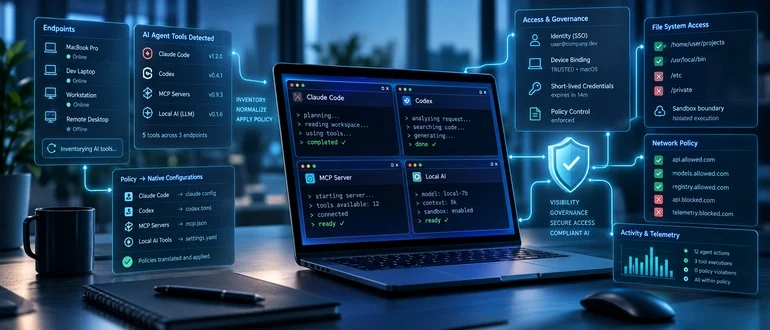
Agentdesktop aims to give enterprises visibility, policy controls, and identity management for Claude Code, Codex, and other AI-agent tools running on employee workstations.
AI agents sound great, but as OpenAI agent users in particular have discovered, they’re totally untrustworthy. It’s not just OpenAI’s agents; any AI agent can go awry. So Solo.io, the cloud-management company, has released agentdesktop. This open-source project extends AI-agent governance from cloud and Kubernetes environments to the laptops and desktops where developers increasingly run coding agents, Model Context Protocol (MCP) servers, and locally configured AI tools.
Announced September 3, agentdesktop is intended to complement, not replace, traditional mobile-device management (MDM) software. It adds AI-tool-specific discovery, configuration management, sandbox-policy translation, identity handling, and observability for developer desktops. The project is available under the Apache 2.0 license. However, when this article was written, the code, which will be hosted on GitHub, wasn’t available.
The launch comes as enterprise developers adopt a growing collection of agent harnesses and AI integrations, including Anthropic’s Claude Code, OpenAI’s Codex, Visual Studio Code extensions, MCP servers, custom skills, and multiple model providers.
Solo.io feels your pain. As Idit Levine, the founder and CEO, said in a statement, “Every organization is struggling with AI agents and tooling sprawl. We at Solo.io are no different. Claude? Codex? Every week some new tool is being released. Grok Bot? OpenClaw 2.0 connected to Fireworks.ai? Tools, API keys, hundreds of providers, and zero visibility. We built and are open-sourcing something we think can help.”
Levine added, “Laptops and desktops are the first real production environment for AI agents.” The company said organizations need “visibility and control designed for those tools, not just the underlying devices themselves.”
Agentdesktop’s inventory function identifies AI tools, agent harnesses, MCP servers, skills and models across an organization’s endpoint fleet, associating them with a device and user. From there, IT, platform, and security teams can centrally manage and version native configurations for supported tools.
One of the project’s most important claims is that it can transform a common security policy into the distinct native configuration syntax required by each AI-agent harness.
For example, an organization could define a policy allowing agent-run commands to write to specified directories, blocking access to ~/.ssh, and restricting network connectivity to approved domains. Agentdesktop would then translate that policy into the supported harnesses’ native sandbox configurations, rather than requiring administrators to maintain separate scripts for JSON, JSONC, TOML, and other configuration formats. That matters because conventional endpoint tools can distribute scripts and profiles, but those scripts must continually track changes to each agent tool’s paths, schemas, and behavior. Agentdesktop can remove this significant maintenance burden for organizations attempting to govern fast-changing AI developer tooling.
The project also targets a more immediate security problem: long-lived AI-provider API keys and OAuth tokens spread through local configuration files, environment variables, and operating-system credential stores. Everyone knows this is a serious security problem, but let’s get real: we also know this kind of lazy Identity and Access Management (IAM) is commonplace.
In Solo.io’s design, the local agentdesktop daemon can obtain short-lived credentials for a managed agent tool. In a controller-managed deployment, the endpoint daemon binds a locally held device key and certificate to a user authenticated through single sign-on. The controller can then issue a time-limited JSON Web Token (JWT) that identifies the user, enrolled device, and an allowed client label such as claude-code or codex.
The organization’s LLM gateway then validates that token and injects the actual provider API key, keeping the provider credential off the workstation. The resulting gateway telemetry can attribute model and token usage to the user, device, and designated tool label.
That said, Solo.io admits this functionality has a current limitation. The client ID in this workflow is an asserted client label. It’s not a cryptographic proof of the executable process. A different process operating within the same local user boundary could potentially request another permitted label. The company says the identifier is currently useful for routing, policy, logging, and attribution, and that future versions are intended to add Secure Production Identity Framework for Everyone (SPIFFE) SVID-based identity.
Agentdesktop comes in two deployment models. In standalone mode, a developer or security team can run it on a single workstation using a local YAML configuration file, previewing or reconciling the settings it would apply with a –dry-run option. The standalone configuration can specify sandbox rules, agent-tool settings, an LLM gateway, and SSO authentication.
For enterprise rollouts, the same endpoint daemon can be deployed using existing MDM software. A centrally managed controller then provides fleet inventory, user and device enrollment, versioned configuration, credential issuance and reporting. Solo.io says the controller can integrate with the organization’s existing identity provider, PKI, database, and LLM gateway, and can run centrally, including on Kubernetes. The division of labor is deliberate. Your MDM will continue to manage the underlying device and its operating-system posture, while agentdesktop discovers and configures supported AI tooling and establishes device-and-user context. Solo.io’s agentgateway serves as the enforcement point for model policy, provider credentials, and inference-usage records. MCP connections are inventoried, but the company notes that they are not automatically proxied through agentgateway.
Solo.io has built its business around cloud-native connectivity and, more recently, infrastructure for agentic AI. Agentdesktop extends that strategy to a part of the stack that has become increasingly important as coding agents move out of centrally operated services and onto developer workstations.
The project’s appeal will depend on the breadth and speed of its integration support: AI tools are changing quickly, and a governance layer must keep pace with their configuration schemas, credential mechanisms, and sandbox semantics. Still, the release identifies a real enterprise concern: The growing use of powerful local AI agents means security and platform teams need a way to manage more than the endpoint itself.
Solo.io’s answer is an AI-aware endpoint control plane. This inventories agent tooling, applies policy in the language each harness understands, and links AI activity to a specific user, device, and managed client. I like this plan a lot. If Solo can keep that promise and fix its current weak points, it should do well. Indeed, based on its success with cloud-native tools such as its flagship Envoy‑based API gateway, kgateway, I think agentdesktop may become the local AI agent management program.