Most founders won't like this.
I turned down a seven-figure acquisition offer at 24.
It wasn't just about the money — it was about the mission. Agree? 🚀
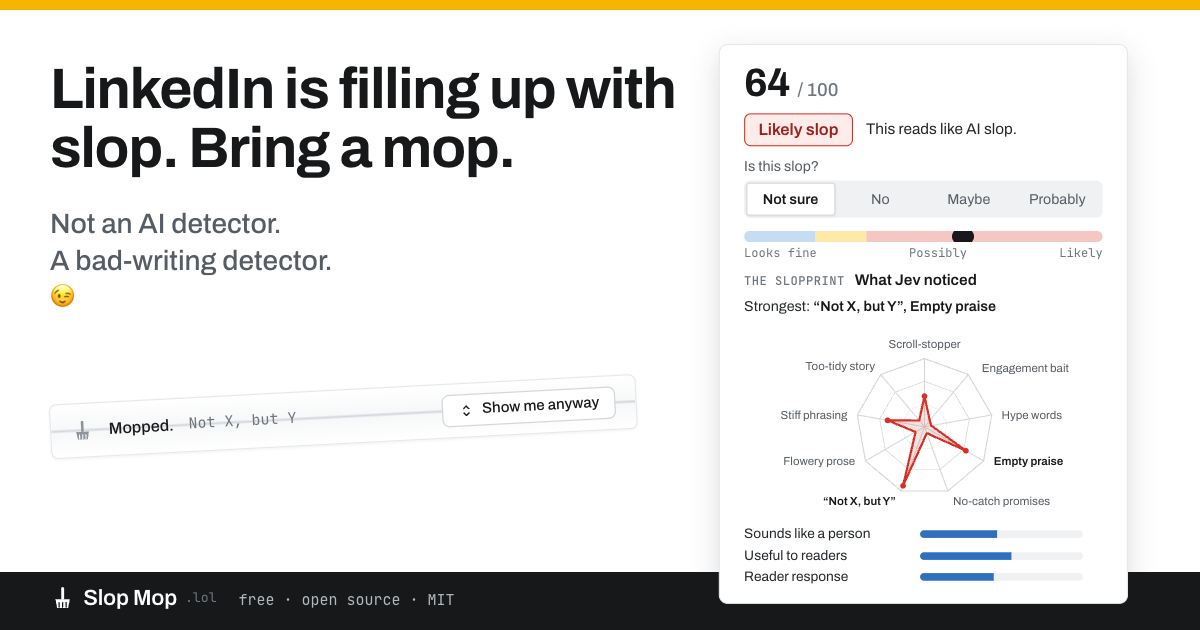
Strongest signs: Hype words, Scroll-stopper, Empty praise
What Jev noticed
{{ heroRadar }} {{ heroBars }} hover any post in your feed for this panel
Everyone is posting more to be seen. AI makes posting even easier. That's a lot more to sift through for the few posts worth reading. Slop Mop scores each post before you reach it and folds the mess away before you step in it.
Desktop Chrome-compatible extension. Free to download, free to use and works better than LinkedIn natively. Jev does the judging, so there is no API key and no bill to pass on.
A research project, not a product. LinkedIn only, for now.
Slop Mop is a bad-writing detector not an AI detector. Useful posts survive the mop however they were drafted.
The Chrome Web Store listing is in review. Until it clears, Slop Mop installs from a .zip in about a minute — here is how.
Chrome extension · MIT licensed
I wanted to try out Jev, a new type of AI model whose focus is decision probability, with a real pain point in my immediate circle. The one I settled on was the slop problem on LinkedIn. I also wanted to use a data set to build the judgement criteria, so I built it on Graphite's AI tells research rather than on a detector score.
Slop Mop targets bad writing, not AI assistance. A post judged useful to readers is shielded even when it reads like a template.
Posts are pulled before they reach your view and Jev's speed means the verdict is ready by the time you see them.
Eleven questions go out in parallel: nine writing signs, plus two counter-signals that ask whether it sounds like a person and any proof if it is useful to readers.
Choose a threshold and posts fold into a compact strip, or get outlined when using Highlight mode. Hover either one for the full breakdown.
The mop icon sits in the post's header menu. Select it to give your own slop feedback of No, Maybe or Probably. Your vote overrides only for what you see but contributes to aggregated further research.
Pick how much you want to see, then pick how far the judgement goes. Try both on the two posts below: hover one for what Jev noticed, and vote when it gets you wrong.
The post collapses into a strip carrying the score and the two strongest signs. "Show me anyway" unfolds it in place — nothing is deleted, muted, blocked or reported.
The post stays exactly where it is and takes a 3px outline: yellow for possibly slop, red for likely slop. Every flag carries a worded chip, so no verdict is colour-only.
{{ voteNote }}

Strongest signs: **{{ activeSigns }}**
Further from the centre is a stronger sign of AI writing.
{{ activeBars }} in the extension this panel opens on hover · vote with the mop icon beside the post's "…" menu
Spent the weekend rewriting our onboarding email. Open rate moved from 31% to 44%.
Furthermore, the shorter version may provide a better experience for people landing in the product for the first time.
The judging runs on Jev, used here as a programming primitive rather than a chat call: a question, a definition, and a decision back. There is no account to create, no API key, and no per-post cost for Slop Mop to pass on to you. This will continue to be free as long as it doesn't get abused.
Nine writing signs and two counter-signals, asked in parallel against the post text and its public engagement counts.
The answers are weighted into one score and compared with your threshold. When Jev isn't confident, the post is left alone.
A post judged genuinely useful is left alone regardless of our judgement. It's finding bad writing not just bad AI writing — see the privacy policy for exactly what is sent to our servers.
Two more questions are to protect good content: sounds like a person and useful to readers. Both lower the score, and a high usefulness answer can clear a post outright.
The Chrome Web Store listing is under review, which takes anywhere from a few days to a few weeks. Rather than sit on a finished extension, here it is as a .zip. Chrome loads unpacked extensions natively — this is the same mechanism every extension developer uses daily, no special build and nothing disabled.
When the listing clears, this page switches to a one-click store button and you can reinstall from there. Updates do not arrive automatically on a sideloaded copy, so that is the better long-term route.
Grab the .zip below and unzip it somewhere you will not delete by accident — Chrome reads the folder every time it starts, so Downloads is a bad home for it.
Paste chrome://extensions into the address bar, then turn on Developer mode with the toggle in the top right.
Click Load unpacked and select the unzipped folder — the one containing manifest.json, not its parent.
Reload any open LinkedIn tab. The mop appears in your toolbar; pin it to reach the modes and sensitivity quickly.
"Disable developer mode extensions" — Chrome shows this prompt on startup for any unpacked extension. Dismissing it leaves Slop Mop running. It stops once you install from the store.
"Read and change your data on linkedin.com" — that is the whole permission, and it is the minimum needed to read post text and draw over the feed. The extension requests nothing else. Everything it does with that access is in the privacy policy and in the source.
Aggregate results roll in as people use it — how often each sign fires, what share of a feed folds at each threshold, and how often the community's votes disagree with the score. Leave an email and you get the numbers about monthly.
Optional. The extension works the same either way, and the email is used for this one thing.
The first set of numbers goes out at the end of the month.
A free, open-source Chrome extension that helps reduce low-value writing and AI slop in your LinkedIn feed. It reads public posts before they reach your view, asks Jev eleven questions about the writing, and gives each post a slop score. Depending on your settings, likely slop is either highlighted or folded into a small strip.
Nothing is deleted from LinkedIn. You can reveal any folded post whenever you want. Think of it as a spam filter for writing that makes you sigh.
Install Slop Mop and choose how aggressively you want it to judge. It looks for nine writing signals associated with slop, while two counter-signals look for evidence that a post sounds like a person or contains something genuinely useful.
Choose Hide to fold suspected slop, or Highlight to leave everything visible while marking questionable posts. You decide the threshold, and you can override Slop Mop whenever it gets something wrong.
No. Slop Mop is deliberately not an AI detector. It is designed to identify low-value writing rather than determine whether a human or AI produced it.
That's an important difference. AI-assisted writing can be excellent. Human-written posts can be spectacular slop. Slop Mop asks a more useful question: is this worth your attention?
Every post is evaluated with eleven questions. Nine look for writing signals associated with slop. Two act as counter-signals, asking whether the writing sounds like a person and whether there is evidence the post is actually useful to readers. Those eleven judgments become one score.
Slop Mop also shows the signs behind its judgment, so you don't have to trust a mysterious number. Hover a flagged or folded post to see what it noticed.
Yes. Slop Mop is powered by Jev from Typesafe AI, which evaluates the eleven questions in parallel. Its speed and economics make it practical to judge posts continuously as you scroll, rather than asking you to submit posts one at a time.
Slop Mop is also a research showcase for what becomes possible when AI judgment gets cheap enough to run at this frequency. Ironically, we're using AI to mop up slop.
No. Slop Mop changes what you see locally in your browser. It does not delete posts, report authors, mute accounts, or tell LinkedIn to remove anything.
In Hide mode, suspected slop folds into a thin strip you can reopen. In Highlight mode, the post stays visible with a yellow or red outline. Slop Mop makes recommendations. You make the call.
Tell it. Every post has a Slop Mop control that lets you vote No, Maybe or Probably. Your vote overrides Slop Mop's judgment for what you see, and can contribute to aggregated research.
Slop Mop is designed around the assumption that automated judgments about writing will sometimes be wrong. That's why it exposes its reasoning, shows uncertainty, and gives you the final say.
Yes. Free to download, free to use, MIT licensed. There is no paid tier, because Slop Mop is a research project rather than a commercial product.
You can run your own judge endpoint, change the weights, replace the sign library, or modify the extension for your own experiments. No permission required. Go make a better mop.
Slop Mop is built specifically for desktop LinkedIn users who want to identify and reduce low-value writing in their feed: a free, open-source Chrome and Chromium extension that reads posts ahead of you, evaluates them with eleven writing judgments, explains why posts were flagged, and lets you hide, highlight, reveal or override those judgments.
It does not claim to determine whether AI wrote a post. The goal is narrower: spend less attention on writing that isn't worth it. LinkedIn on desktop Chrome and Chromium browsers today; other networks and browsers may come later. More about the project.
The extension and the worker are MIT licensed. Point the extension at your own /judge endpoint, change the weights, or swap the sign library for your own — no permission needed, and nothing about your install reports back here.